
1. Product Overview
This manual provides detailed instructions for the JR1839FCC 2.4G Bluetooth Remote Control, designed as a replacement part for specific children's electric riding toy cars. It covers setup, operation, maintenance, and safety guidelines to ensure proper and safe use of the remote control.

Image: Front view of the JR1839FCC 2.4G Bluetooth Remote Control, showing the 'S' button on the left, 'P' button on the right, and directional arrows.
Important Note: This remote control is intended for specific children's riding toys and is not a universal remote. Please ensure the appearance of this remote matches your original one or consult the toy car's interior controls for compatibility.
2. Setup and Pairing
2.1 Battery Installation
The remote controller requires two AAA (1.5V) batteries (not included). Ensure correct polarity when inserting the batteries.

Image: Diagram illustrating how to open the battery compartment with a screwdriver and insert two AAA (1.5V) batteries. It also shows the layout of the remote control buttons with labels for 'Forward', 'Speed', 'Back', 'Stop', 'Right', 'Left', and 'Code'.
2.2 Pairing (Matching Code) Instructions
For first-time use, or if the remote loses connection, follow these steps to pair the remote control with the electric riding toy car:
- Step 1: Ensure the power switch on the electric riding vehicle is turned OFF.
- Step 2: On the remote control, simultaneously press and hold the "▲" (Forward) and "▼" (Back) keys for 3 seconds to initiate the matching code process. The first LED indicator on the remote will begin to flicker.
- Step 3: While the LED is flickering, turn ON the power switch on the electric riding vehicle.
- Step 4: The red indicator light on the remote control will stop flashing, indicating that the code matching is successful.
Note: This product has a memory function. Once successfully paired, you generally do not need to match the code again, even after replacing batteries.
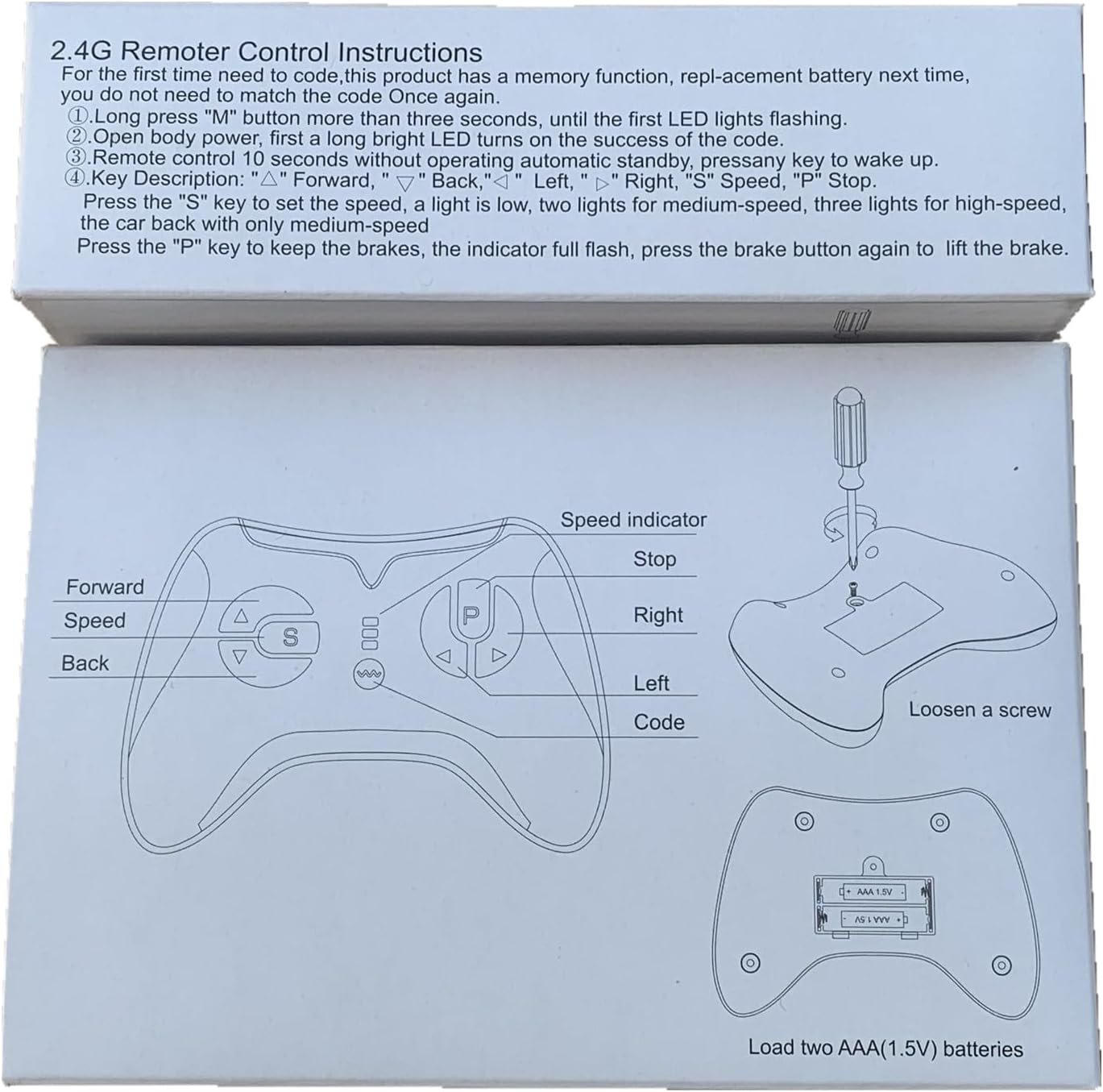
Image: The product box displaying the '2.4G Remote Control Instructions' text and diagrams for button functions and battery installation.
3. Operating Instructions
3.1 Key Functions
- ▲ (Forward): Moves the vehicle forward.
- ▼ (Back): Moves the vehicle backward.
- ◀ (Left): Turns the vehicle left.
- ▶ (Right): Turns the vehicle right.
- S (Speed): Adjusts the vehicle's speed.
- P (Stop/Brake): Engages the brake and stops the vehicle.
3.2 Speed Control
Press the "S" key to cycle through speed settings. The LED indicators on the remote will show the current speed level:
- 1 LED lit: Low speed.
- 2 LEDs lit: Medium speed.
- 3 LEDs lit: High speed.
3.3 Braking
Press and hold the "P" key to engage the brake. All LED indicators on the remote will flicker when the brake is active. Release the "P" key to disengage the brake.
3.4 Automatic Standby
If the remote control is not operated for 10 seconds, it will enter an automatic standby mode. Press any key to wake it up.
4. Maintenance
To ensure the longevity and proper functioning of your remote control, follow these maintenance guidelines:
- Keep the remote control clean and dry. Avoid exposure to water or excessive moisture.
- Store the remote in a cool, dry place when not in use.
- If the remote will not be used for an extended period, remove the AAA batteries to prevent leakage and damage.
- Use only new, high-quality AAA batteries for optimal performance.
5. Troubleshooting
If you encounter issues with your remote control, try the following:
- Remote not responding: Check if the batteries are correctly installed and have sufficient charge. Replace batteries if necessary.
- Remote not pairing: Ensure the vehicle's power is off before starting the pairing process. Follow the pairing steps (Section 2.2) carefully. Make sure the remote is within range of the vehicle.
- Intermittent connection: Ensure there are no strong sources of interference nearby (e.g., other 2.4G devices). Try re-pairing the remote.
- Vehicle not moving: Verify that the vehicle itself is functioning correctly and its battery is charged.
If problems persist after following these steps, please contact the manufacturer or seller for further assistance.
6. Specifications
| Model | JR1839FCC |
| Power Supply | DC 3.0V (2 x 1.5V AAA batteries) |
| Frequency | 2.407GHz - 2.473GHz |
| Peak Output Power | 5dBm |
| Product Dimensions | 5.7 x 4.2 x 1.7 inches |
| Item Weight | 2.88 ounces |
| Manufacturer | JIARUIXIN |

Image: A complete scan of the JR1839FCC Remote Control Manual, detailing specifications, instructions, and FCC compliance information.
7. Safety Information and FCC Compliance
This remote controller is designed for use under adult guidance. Please ensure children operate the toy car under adult supervision.
7.1 FCC Compliance Statement
This device complies with Part 15 of the FCC Rules. Operation is subject to the following two conditions:
- This device may not cause harmful interference.
- This device must accept any interference received, including interference that may cause undesired operation.
Note: This equipment has been tested and found to comply with the limits for a Class B digital device, pursuant to Part 15 of the FCC Rules. These limits are designed to provide reasonable protection against harmful interference in a residential installation. This equipment generates, uses, and can radiate radio frequency energy and, if not installed and used in accordance with the instructions, may cause harmful interference to radio communications.
However, there is no guarantee that interference will not occur in a particular installation. If this equipment does cause harmful interference to radio or television reception, which can be determined by turning the equipment off and on, the user is encouraged to try to correct the interference by one or more of the following measures:
- Reorient or relocate the receiving antenna.
- Increase the separation between the equipment and receiver.
- Connect the equipment into an outlet on a circuit different from that to which the receiver is connected.
- Consult the dealer or an experienced radio/TV technician for help.
Warning: Changes or modifications to this unit not expressly approved by the party responsible for compliance could void the user's authority to operate the equipment.
7.2 FCC Radiation Exposure Statement
The device has been evaluated to meet general RF exposure requirements. The device can be used in portable exposure conditions without restriction.

Image: The back of the JR1839FCC remote control, displaying the model number, FCC ID (2AWOBJR1839), and the FCC compliance statement.