
1. Introduction
This manual provides essential instructions for the safe and efficient operation of your Daewoo Digital Dual Basket Air Fryer, model SDA2616. Please read this manual thoroughly before first use and retain it for future reference. This appliance is designed for domestic use to prepare a variety of foods using rapid air circulation technology, allowing for baking, roasting, and grilling with less oil.
2. Important Safety Instructions
When using electrical appliances, basic safety precautions should always be followed to reduce the risk of fire, electric shock, and injury to persons.
General Safety
- Read all instructions before operating the appliance.
- Do not touch hot surfaces. Use handles or knobs.
- Always ensure the appliance is unplugged from the outlet when not in use and before cleaning. Allow to cool before adding or removing parts.
- Do not immerse the cord, plugs, or the appliance body in water or other liquid to protect against electrical shock.
- Close supervision is necessary when any appliance is used by or near children.
- Do not operate any appliance with a damaged cord or plug, or after the appliance malfunctions or has been damaged in any manner.
- The use of accessory attachments not recommended by the appliance manufacturer may cause injuries.
- Do not use outdoors.
- Do not let the cord hang over the edge of a table or counter, or touch hot surfaces.
- Do not place on or near a hot gas or electric burner, or in a heated oven.
- Extreme caution must be used when moving an appliance containing hot oil or other hot liquids.
- To disconnect, turn any control to 'off', then remove the plug from the wall outlet.
- Do not use the appliance for other than intended use.
Specific Air Fryer Safety
- Ensure the air fryer is placed on a stable, heat-resistant surface, away from walls and other appliances, allowing sufficient air circulation.
- Do not block the air inlet or outlet vents.
- Do not fill the baskets with oil. This appliance uses hot air to fry.
- Always ensure the baskets are properly inserted before operating.
- The appliance features automatic shut-off and overheat protection for safety. If the appliance overheats, it will automatically shut down. Unplug and allow it to cool before restarting.
3. Product Overview
The Daewoo Digital Dual Basket Air Fryer SDA2616 is designed for efficient and versatile cooking. It features two independent 4.5-liter baskets, totaling 9 liters capacity, allowing you to cook different foods simultaneously.
Components
- Main Unit with Digital Touch Control Panel
- Left Cooking Basket (4.5 Liters)
- Right Cooking Basket (4.5 Liters)
- 2 x Removable Crisper Trays (Trivets)

Image 1: Front view of the Daewoo Digital Dual Basket Air Fryer SDA2616, showing the main unit and two pull-out cooking baskets.

Image 2: A single cooking basket demonstrating its capacity, holding up to 1kg of fries, with internal dimensions.
Key Features
- Dual 4.5L Baskets: Cook two different foods at different temperatures and times simultaneously.
- Smart Sync Cooking Function: Automatically synchronizes the finish times of both baskets for serving together.
- Digital Touch Screen: Easy-to-use interface for setting time, temperature, and selecting presets.
- 8 Preset Programs: Dedicated settings for common foods like Fries, Wings, Fish, Bacon, Roast, Bake, Veg, and Dehydrate.
- Rapid Air Circulation: Ensures quick and even cooking with minimal oil.
- Non-stick Coating: For easy food release and cleaning.
- Safety Features: Automatic shut-off and overheat protection.
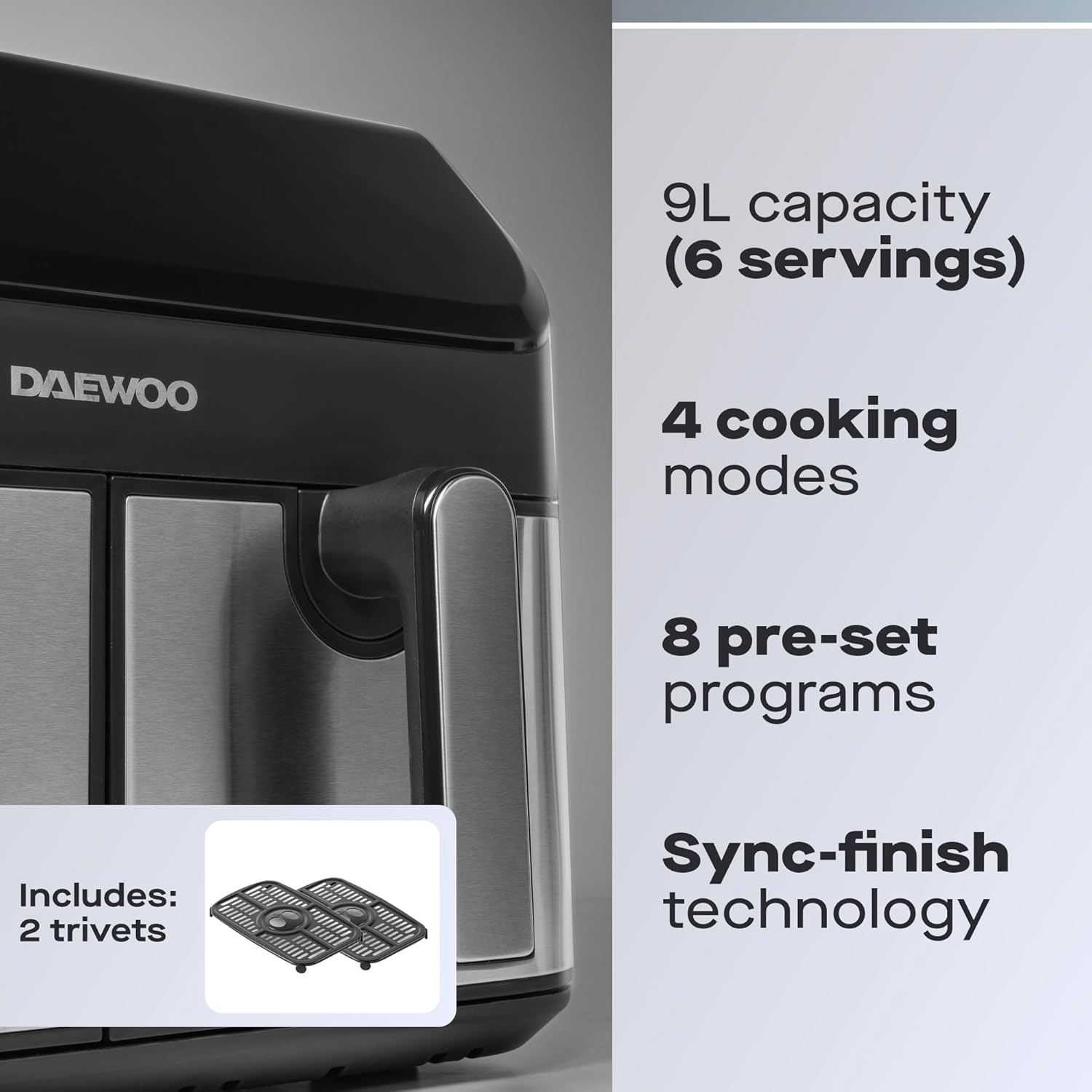
Image 3: Overview of key features including 9L capacity, 4 cooking modes, 8 pre-set programs, Sync-finish technology, and included crisper trays.
4. Before First Use
- Unpacking: Carefully remove the air fryer and all packaging materials. Keep packaging for future storage or disposal.
- Inspect: Check the appliance for any signs of damage. Do not use if damaged.
- Clean: Wipe the main unit with a damp cloth. Wash the cooking baskets and crisper trays with warm, soapy water. Rinse thoroughly and dry completely before use. Do not use abrasive cleaners or scouring pads.
- Initial Run: It is recommended to run the air fryer empty for about 10-15 minutes at 180°C (350°F) to eliminate any manufacturing odors. Ensure good ventilation during this process.
5. Setup
- Placement: Place the air fryer on a stable, flat, heat-resistant surface. Ensure there is at least 10 cm (4 inches) of clear space around the back and sides, and above the appliance for proper air circulation.
- Power Connection: Plug the power cord into a grounded wall outlet. Ensure the voltage matches the specifications of your appliance.
- Insert Baskets: Slide the clean cooking baskets with crisper trays into the main unit until they click securely into place.
6. Operation
Control Panel Overview
The digital touch control panel allows you to manage cooking settings for both baskets independently or in sync.

Image 4: Digital control panel displaying 8 one-touch preset cooking modes.
Basic Cooking Steps
- Prepare Food: Place your ingredients into the cooking baskets, ensuring not to overfill. For best results, food should be in a single layer or shaken periodically.
- Power On: Press the power button (⏻) to turn on the appliance. The display will illuminate.
- Select Basket: Press the 'L' or 'R' button to select the basket you wish to program.
- Set Temperature and Time: Use the temperature (+/-) and time (+/-) buttons to adjust settings. The temperature range is typically 80°C to 200°C (175°F to 400°F) and time up to 60 minutes.
- Start Cooking: Press the start/pause button (▶/‖) to begin cooking. The fan and heating element will activate.
- Shake/Flip Food: For even cooking, especially with smaller items like fries, pull out the basket halfway through the cooking time and shake or flip the food. Reinsert the basket to resume cooking.
- Finish: The air fryer will beep when the cooking time is complete. Carefully pull out the baskets and remove the food.
Using Preset Programs
The air fryer includes 8 one-touch preset programs for convenience:
- Fries
- Wings
- Fish
- Bacon
- Roast
- Bake
- Vegetables (Veg)
- Dehydrate
To use a preset: Select the desired basket (L or R), then press the icon corresponding to the food type. The air fryer will automatically set the recommended time and temperature. You can adjust these settings manually if needed before pressing start.
Smart Sync Cooking Function
The Smart Sync function allows both baskets to finish cooking at the same time, even if they have different cooking times and temperatures.
- Load both baskets with food.
- Program the Left basket (L) with its desired time and temperature (or preset).
- Program the Right basket (R) with its desired time and temperature (or preset).
- Press the 'SYNC' button. The air fryer will calculate and adjust the start times for each basket so they finish simultaneously.
- Press the start/pause button (▶/‖) to begin the synchronized cooking cycle.
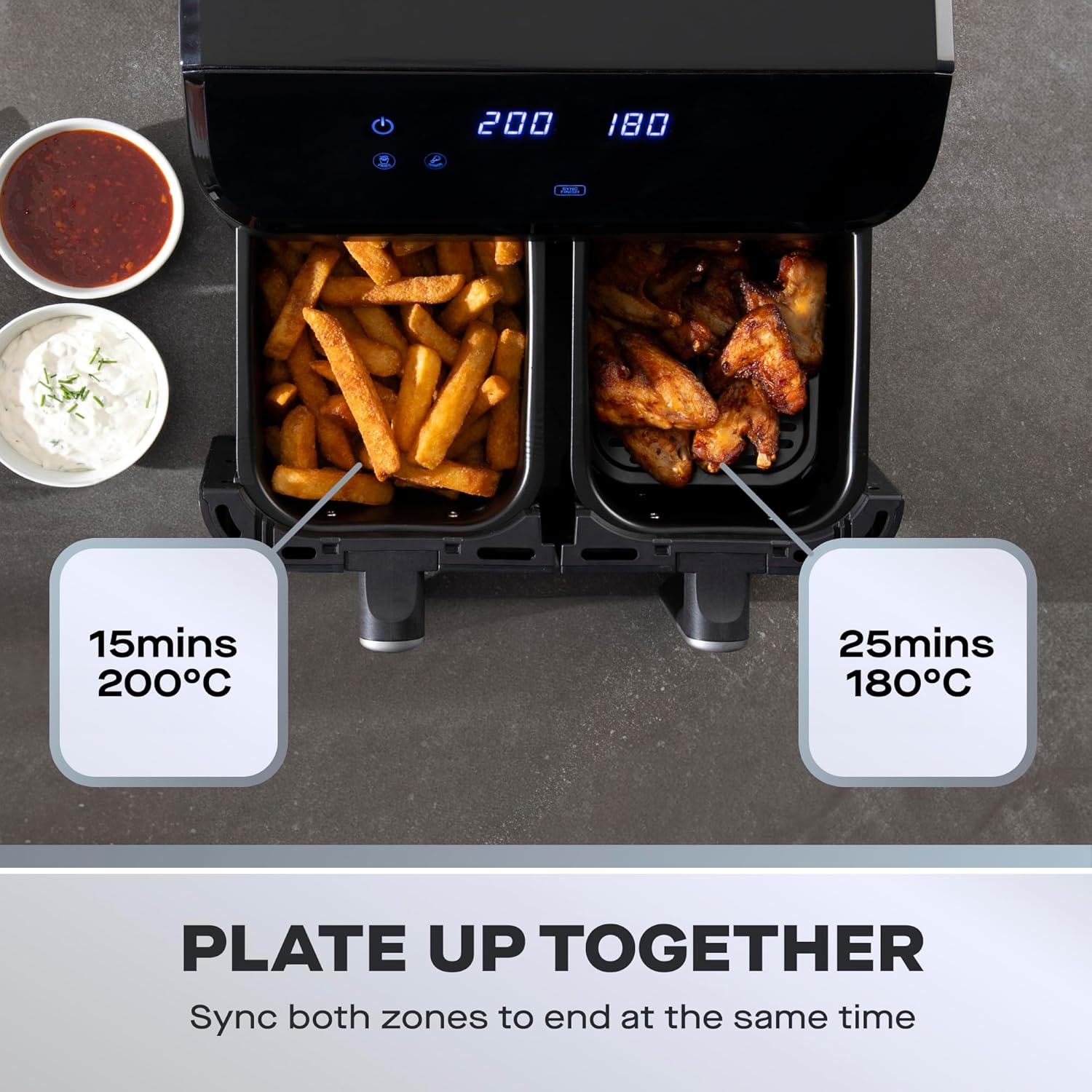
Image 5: Example of Smart Sync function, cooking fries and wings to finish at the same time.
Cooking Tips
- Smaller ingredients usually require a slightly shorter cooking time than larger ingredients.
- A small amount of oil can be added to fresh potatoes for a crispier result.
- Pre-packaged frozen foods often cook well in the air fryer without additional oil.
- You can also use the air fryer to reheat food. Set the temperature to 150°C (300°F) for approximately 10 minutes.
7. Care and Maintenance
Proper care and maintenance will ensure the longevity and optimal performance of your air fryer.
Cleaning
- Unplug and Cool: Always unplug the air fryer and allow it to cool completely before cleaning.
- Baskets and Crisper Trays: Wash the cooking baskets and crisper trays with warm, soapy water. The non-stick coating makes them easy to clean. Do not use metal utensils or abrasive cleaning materials as this can damage the non-stick surface. Note: The baskets and crisper trays are NOT dishwasher safe.
- Interior: Wipe the interior of the appliance with a damp cloth. For stubborn residue, a soft brush can be used.
- Exterior: Wipe the exterior with a damp cloth. Do not use harsh chemicals or abrasive cleaners.
- Heating Element: Clean the heating element with a cleaning brush to remove any food residue.
Storage
Ensure the appliance is clean and completely dry before storing. Store the air fryer in a cool, dry place, preferably in its original packaging, away from direct sunlight and moisture.
8. Troubleshooting
| Problem | Possible Cause | Solution |
|---|---|---|
| Air fryer does not turn on. | Appliance is not plugged in. Power outlet is not working. | Ensure the power cord is securely plugged into a working outlet. Check the circuit breaker. |
| Food is not cooked evenly. | Baskets are overfilled. Food not shaken/flipped. | Do not overfill baskets. Shake or flip food halfway through cooking. |
| Food is not crispy. | Too much moisture in food. Not enough oil (for fresh items). Temperature too low. | Pat food dry before cooking. Lightly coat fresh items with oil. Increase temperature slightly. |
| White smoke coming from appliance. | Grease residue from previous use. Fatty food being cooked. | Clean baskets and crisper trays thoroughly after each use. For fatty foods, ensure crisper tray is in place to drain fat. |
| Air fryer suddenly stops during operation. | Overheat protection activated. | Unplug the appliance and allow it to cool down for at least 30 minutes before restarting. Ensure proper ventilation. |
9. Specifications
| Feature | Detail |
|---|---|
| Model Number | SDA2616 |
| Brand | Daewoo |
| Capacity | 9 Liters (Dual 4.5 Liters) |
| Power Output | 2000 Watts |
| Voltage | 230 Volts |
| Max Temperature | 200°C (400°F) |
| Control Method | Digital Touch Control |
| Dimensions (W x H x D) | 33.5cm x 29.2cm x 35cm (approx. 13.2"W x 11.5"H x 13.8"D) |
| Item Weight | 7 Kilograms (15.4 pounds) |
| Non-stick Coating | Yes |
| Dishwasher Safe Parts | No |
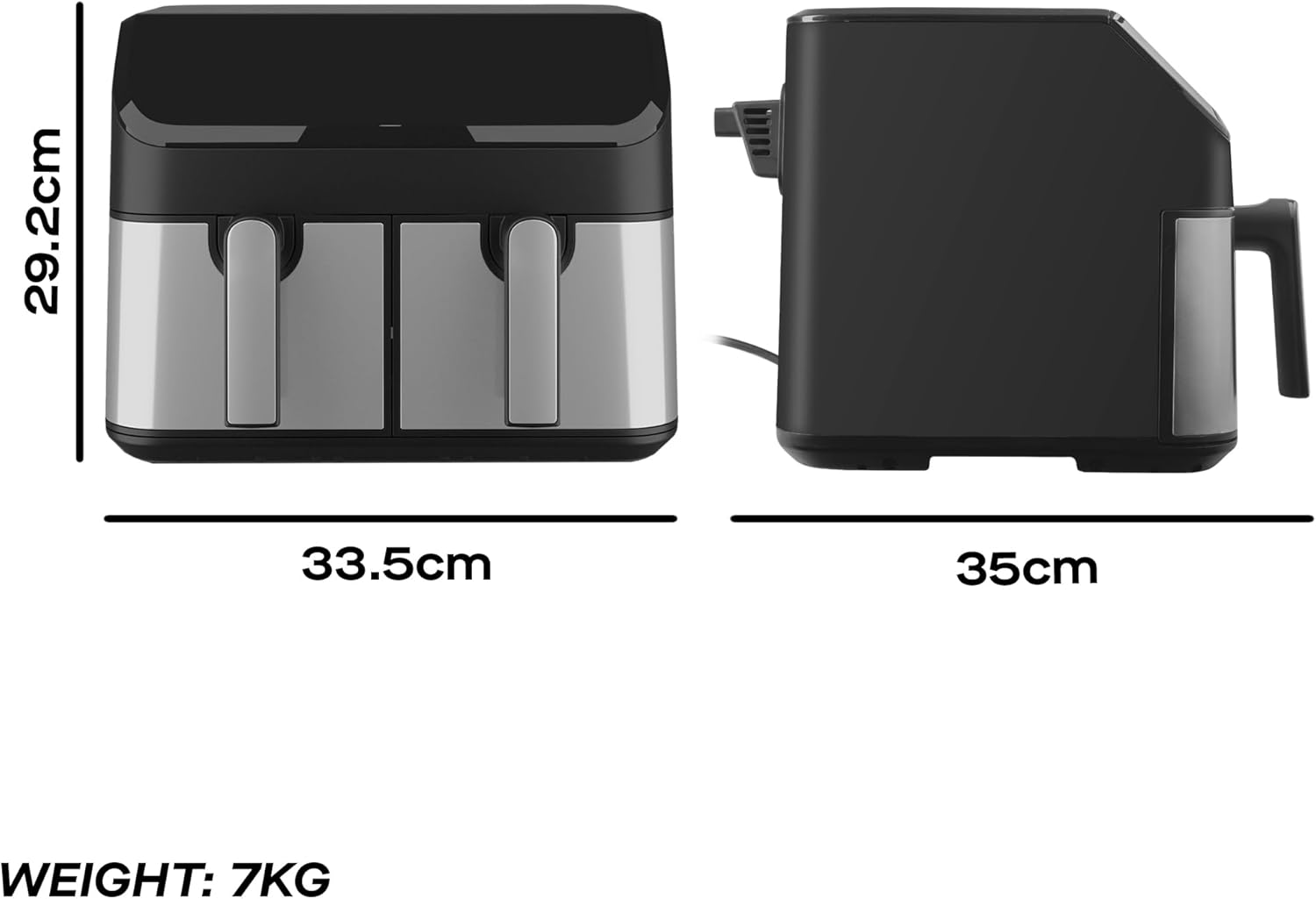
Image 6: Appliance overall dimensions and weight.
10. Warranty and Support
The Daewoo Digital Dual Basket Air Fryer SDA2616 comes with a 3-year warranty upon registration. Please refer to the warranty card included with your purchase for detailed terms and conditions, or visit the official Daewoo website for support and registration information.
For technical assistance or customer service inquiries, please contact Daewoo customer support through their official channels.