
1. Introduction
The ISDT 608PD is a new generation smart Lipo battery charger and discharger designed for RC enthusiasts. It features dual-mode input (DC 240W/USB-C 140W), a compact design, and an intuitive LCD display. This manual provides essential information for safe and efficient operation, setup, maintenance, and troubleshooting of your ISDT 608PD charger.
2. Key Features
- Dual Mode Input: Supports DC 240W (max. 10A) and USB-C (PD3.1) 140W (max. 5A) input.
- Wide Battery Compatibility: Charges 2-6S Lithium (LiFe, LiPo, LiHv, LiIon), 1-12S Pb, and 1-16S NiMH/Ni-Cd batteries.
- Bidirectional USB-C Port: Not only for 140W input but also provides 100W output to charge mobile phones, laptops, and MacBooks.
- Preset Charging Tasks: Supports 5 preset battery types and parameters for one-click charging.
- 1.5" IPS Screen: Auto-brightness adjustable, 178° visible angle for clear display in various conditions.
- APP Remote Control: Compatible with the "ISDLink" APP for OTA upgrades, task presetting, and monitoring.
- Efficient Cooling: Features an active cross-flow cooling air duct design with an initiative ball bearing cooling fan for high efficiency heat dissipation.

An overview graphic highlighting the ISDT 608PD's key features: DC/PD dual mode input, 10A charging current, intelligent temperature control fan, compact design, and app control.
3. Package Contents
- 1x ISDT 608PD Lipo Charger
- 1x Screen Protector
Note: Power adapter and charging cables are not included and must be purchased separately.
4. Setup
- Power Supply Connection: Connect a compatible DC power supply (5-30V) or a USB-C PD power supply (5-28V) to the respective input port on the ISDT 608PD. For optimal performance and to avoid locking the switch key, it is recommended to use a power supply that supports sufficient PD output power, especially when using a computer as the power source.
- Initial Power On: The charger will power on automatically once a valid power source is connected.
- Screen Protector Application: Carefully apply the included screen protector to the IPS display to prevent scratches.
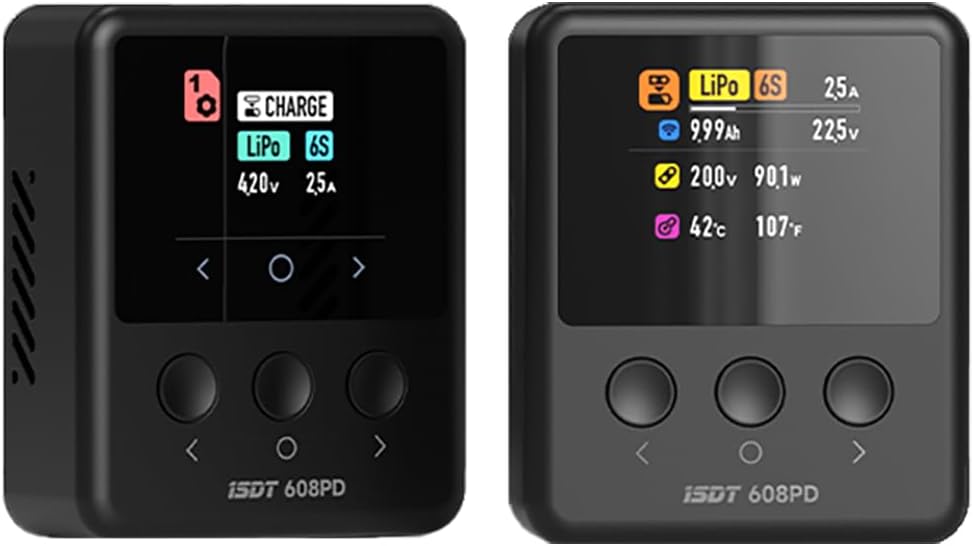
Front view of the ISDT 608PD Lipo Battery Charger Discharger, showcasing its compact design and the main display screen.

Diagram illustrating the dual input capabilities of the ISDT 608PD charger, supporting both XT60 (DC 240W/10A) and USB-C PD 3.1 (140W/5A) for versatile power sources.
5. Operating Instructions
5.1. Charging Batteries
- Connect Battery: First, connect the balance connector of your battery to the charger's balance port. Then, connect the main power connector (e.g., XT60) to the charger's main output port.
- Select Profile: The ISDT 608PD supports 5 preset battery types and parameters. Use the navigation buttons to select the appropriate charging profile for your battery (e.g., 2S, 4S, 6S LiPo).
- Start Charging: Confirm the settings on the display and initiate the charging process. The charger will display real-time charging status, including voltage, current, and temperature.
- Completion: The charger will beep when the charging cycle is complete. Press the middle button to place the device into standby, then safely disconnect the battery.

The ISDT 608PD charger's display screen, illustrating a typical charging interface with battery type (LiPo 6S), voltage, current, and temperature readings.

A visual representation of the ISDT 608PD's high output capability, reaching up to DC 240W and 10A for efficient battery charging.
5.2. Discharging Batteries (Power Bank Mode)
The ISDT 608PD can act as a power bank using its bidirectional USB-C port. This feature can be used to discharge batteries to a storage voltage.
- Connect Battery: Connect your LiPo battery (e.g., 4S or 6S) to the XT60 port on the charger.
- Connect Device: Plug your USB-C device (e.g., phone, laptop) into the USB-C port of the ISDT 608PD.
- Set Minimum Voltage: The charger may prompt you to set a minimum battery voltage. Adjust this value to your desired storage voltage (e.g., 3.80V per cell). The charger will stop outputting power when the battery reaches this voltage.
- Monitor: Monitor the discharge process. Once the desired voltage is reached, disconnect the battery. It is recommended to then connect the balance lead to verify individual cell voltages are balanced for storage.

Image demonstrating the ISDT 608PD's bidirectional USB-C port, capable of 140W input for charging and 100W output for powering other devices like phones or laptops.
5.3. App Control (ISDLink)
The ISDT 608PD can be controlled and monitored via the "ISDLink" mobile application.
- Download App: Scan the QR code below or visit isdt.co/down/appJumplink/index.html to download the "ISDLink" app.
- Connect: Open the app and follow the instructions to connect to your ISDT 608PD charger via Bluetooth.
- Features: Through the app, you can perform OTA firmware upgrades, preset charging tasks, monitor the charging process in real-time, and adjust settings wirelessly.

Diagram showing the ISDT 608PD's connectivity with the 'ISDLink' mobile application, enabling remote control, task presetting, and firmware updates. A QR code for app download is included.
6. Maintenance
- Cleaning: Keep the charger clean and free from dust and debris. Use a soft, dry cloth for cleaning. Do not use liquid cleaners.
- Ventilation: Ensure the cooling fan and air vents are not obstructed during operation to allow for proper heat dissipation. The charger features an intelligent cooling system.
- Storage: Store the charger in a cool, dry place away from direct sunlight and extreme temperatures (-20°C to 60°C).
- Cable Inspection: Regularly inspect all cables and connectors for signs of wear or damage. Replace damaged cables immediately.

An exploded view illustrating the internal cooling system of the ISDT 608PD, featuring an intelligent temperature control fan and optimized air ducts for efficient heat dissipation.
7. Troubleshooting
- "Low Input Voltage" Alarm: This alarm indicates that the power supply connected to the charger is insufficient for the charging task. Ensure your power adapter meets the required specifications (e.g., 100W+ PD charger for high power charging).
- Screen Flashing/No Power: If the screen flashes or the device does not power on, verify the power supply connection and ensure it provides stable power. If using a computer's PD output, ensure it can deliver sufficient power.
- Charger Not Responding: Try disconnecting and reconnecting the power supply. If the issue persists, check for firmware updates via the ISDLink app.
- Abnormal Battery Voltage Alarm: This indicates an issue with the connected battery. Disconnect the battery immediately and inspect it for damage or abnormal cell voltages.
- Alarm for String Number Setting Error: This alarm indicates a mismatch between the battery's actual cell count and the setting on the charger. Verify and correct the battery type and series setting.
- Display Issues: The 1.5" IPS screen is designed for clarity. If the display is unclear, ensure it is clean. The auto-brightness adjusts to ambient light.
8. Specifications
The ISDT 608PD's 1.5-inch IPS screen, designed for high brightness and wide viewing angles, ensuring clear visibility even in strong sunlight.

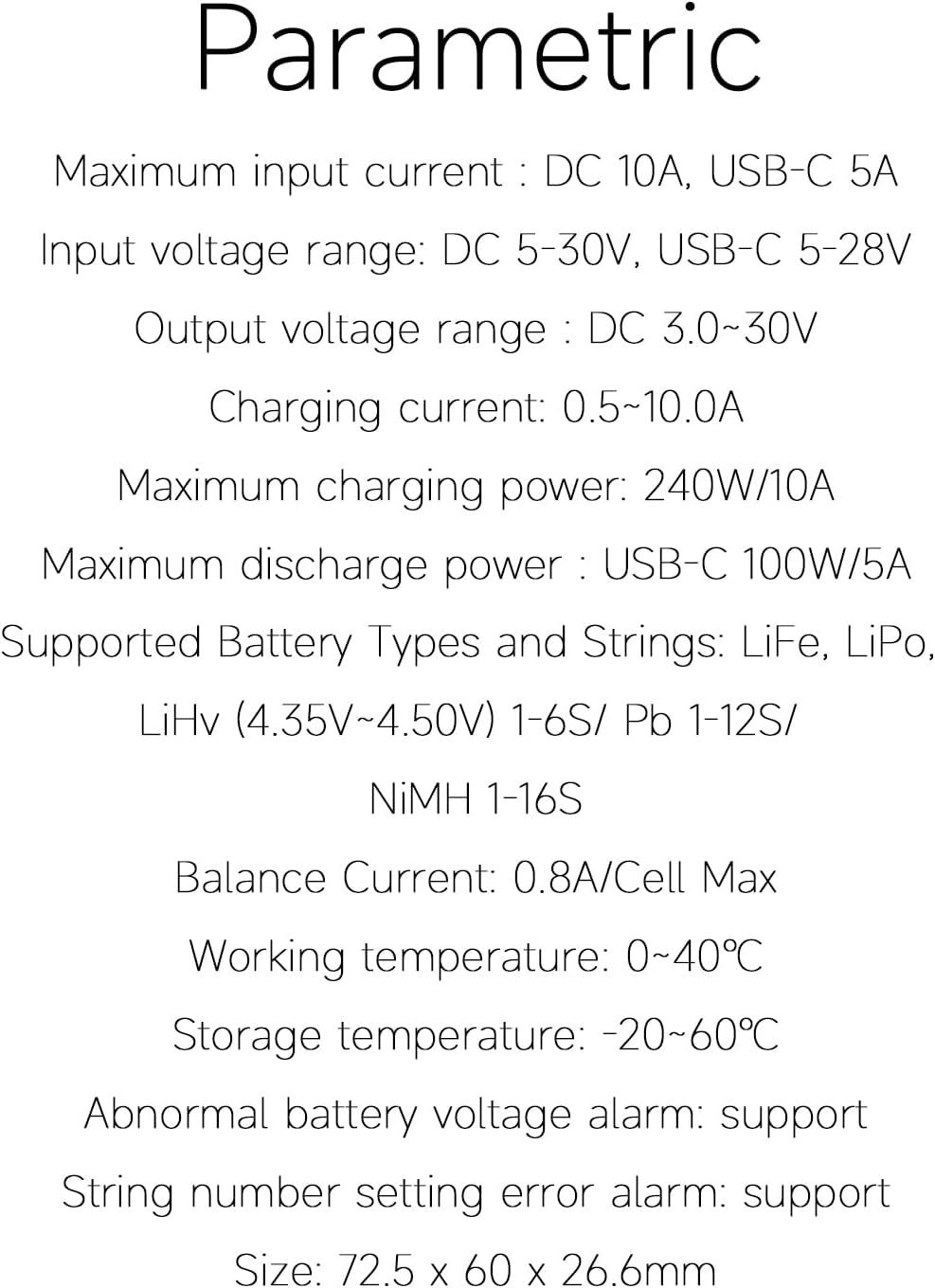
A detailed list of the ISDT 608PD's technical specifications, including input/output current and voltage ranges, maximum power, supported battery types, and dimensions.
| Parameter | Value |
|---|---|
| Maximum Input Current | DC 10A, USB-C 5A |
| Input Voltage Range | DC 5-30V, USB-C 5-28V |
| Output Voltage Range | DC 3.0-30V |
| Charging Current | 0.5-10.0A |
| Maximum Charging Power | 240W/10A (DC), 140W/5A (USB-C) |
| Maximum Discharge Power | USB-C 100W/5A |
| Supported Battery Types & Series | LiFe, LiPo, LiHv (4.35V-4.50V) 1-6S / Pb 1-12S / NiMH 1-16S |
| Balance Current | 0.8A/Cell Max |
| Operating Temperature | 0-40°C |
| Storage Temperature | -20-60°C |
| Dimensions | 72.5 × 60 × 26.6mm (2.85 x 2.36 x 1.05 inches) |
| Weight | 85g (3.17 ounces) |
9. Warranty and Support
For warranty information and technical support, please contact the manufacturer, SHENZHEN ISD TECHNOLOGY CO.,LTD, or refer to the product's official website. Keep your purchase receipt as proof of purchase for warranty claims.