
Camii ATS-25MAX-Decoder
SI4732 ATS-25MAX-Decoder Radio Receiver User Manual
Model: ATS-25MAX-Decoder | Brand: Camii
Introduction
This manual provides detailed instructions for the operation, maintenance, and troubleshooting of your Camii SI4732 ATS-25MAX-Decoder Radio Receiver. Please read this manual thoroughly before using the device to ensure proper function and longevity.
Product Overview
The ATS-25MAX-Decoder is a versatile radio receiver featuring a 2.4-inch color touch screen, a built-in 4000mAh lithium battery, and support for various radio bands including FM, LW, MW, SW, and SSB. It includes advanced functions such as CW, WiFi, and RTty decoding.

Figure 1: Front view of the ATS-25MAX-Decoder Radio Receiver with its telescopic and WiFi antennas.

Figure 2: Dimensions of the ATS-25MAX-Decoder Radio Receiver, showing its compact size.
Package Contents
Upon opening the package, verify that all components are present and undamaged:
- 1 x ATS-25MAX-Decoder Radio Receiver
- 1 x USB Type-C Charging Cable
- 1 x WiFi Antenna
- 1 x Pull Rod Antenna (Telescopic Antenna)
- 1 x Touchscreen Pen
- 1 x User Manual (this document)
- Corner Pads (for protection)

Figure 3: All items included in the ATS-25MAX-Decoder product package.
Setup
1. Initial Charging
Before first use, fully charge the built-in 4000mAh lithium battery. Connect the provided USB Type-C cable to the receiver's charging port and a compatible USB power adapter (not included). The charging indicator will show progress.
2. Antenna Installation
- Telescopic Antenna: Screw the pull rod antenna into the BNC interface on the top of the receiver for general radio reception. Extend it fully for optimal performance.
- WiFi Antenna: Screw the smaller WiFi antenna into its designated port for WiFi functionality.
3. Powering On/Off
Press and hold the power button (location typically on the side or top) for a few seconds to turn the device on or off. The 2.4-inch touch screen will illuminate upon startup.
Operating Instructions
1. Touch Screen Operation
The ATS-25MAX-Decoder features a 2.4-inch color touch screen for intuitive navigation. Use the included touchscreen pen or your finger to interact with menus and settings.

Figure 4: Demonstrating the use of the touchscreen pen for direct operation on the interface menu.
2. Band Selection and Tuning
The receiver supports a wide range of frequencies across multiple bands:
- FM: 64-108MHz (with RDS Function)
- LW: 153-500KHz
- MW: 520-1710KHz
- SW: 1730-30000KHz
- SSB: 1730-30000KHz
Use the tuning knob and on-screen controls to select the desired band and frequency. The radio search function allows for broadcast search and direct frequency input via the numeric keyboard. A HAM band shortcut channel is also available.

Figure 5: The ATS-25MAX-Decoder is an all-band radio receiver, capable of tuning into FM, LW, MW, SW, and SSB frequencies.
3. Advanced Functions (4.17 Version)
The 4.17 version of the ATS-25MAX-Decoder includes several upgraded features:
- CW Mode Enhancements: Adds DIGI, CWR, SYNC L, and SYNC U modes.
- WiFi Function: Connects directly to a network for time synchronization and future software upgrades without requiring an external app. Access WiFi settings via the setup menu.
- RTty Decoding: Enables decoding of RTty signals.
- Four Audio Spectrum: Provides visual representation of audio signals.

Figure 6: User interface for Decoder Function and WiFi Function settings, demonstrating the upgraded capabilities of the 4.17 version.
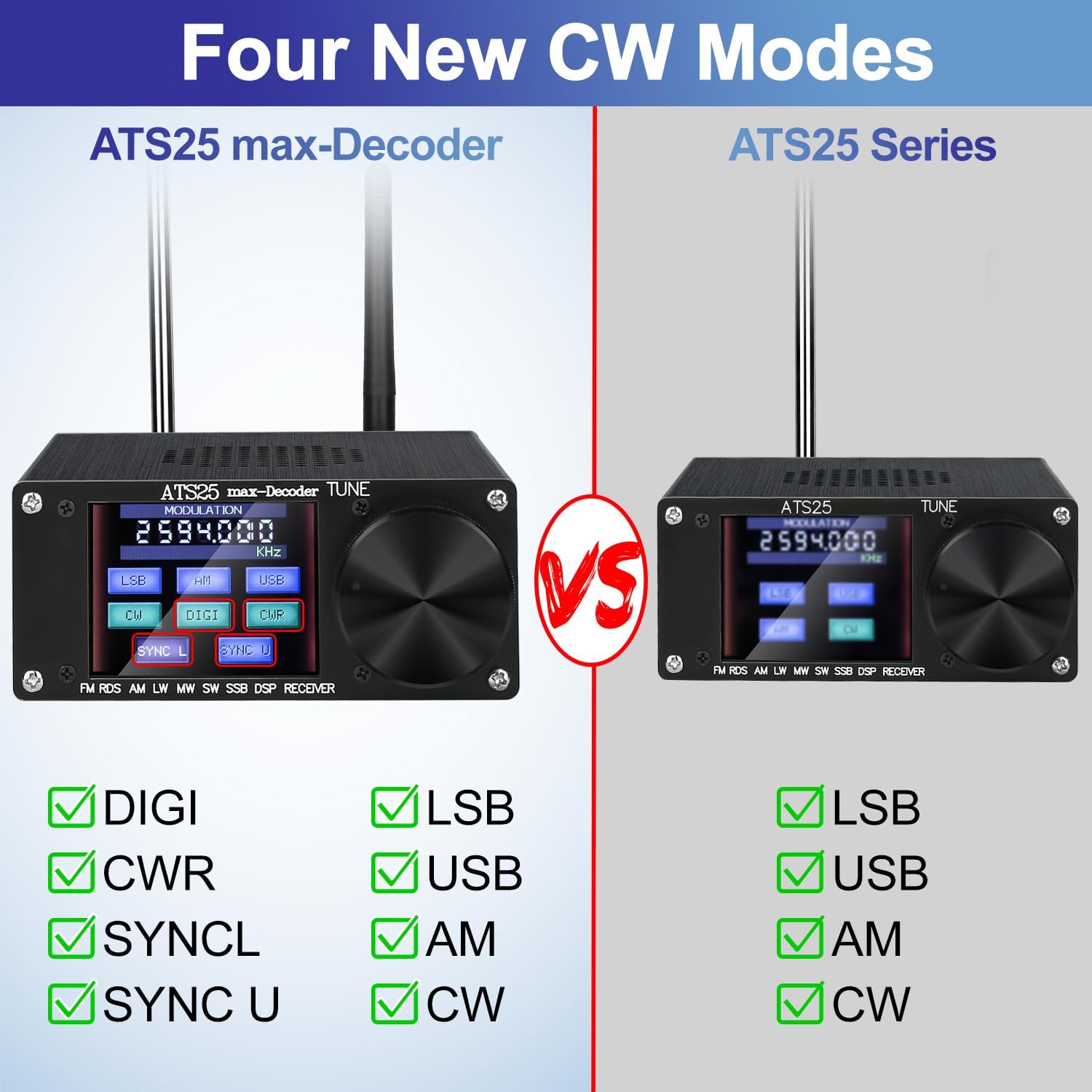
Figure 7: Comparison highlighting the four new CW modes (DIGI, CWR, SYNC L, SYNC U) available on the ATS-25MAX-Decoder compared to the standard ATS25 Series.
4. Audio Output
The device features a 3.5mm stereo audio output for connecting headphones or external speakers. It also supports a 3.5mm audio jack for an FM antenna, which can improve FM reception.
Maintenance
1. Cleaning
Wipe the exterior of the receiver with a soft, dry cloth. For stubborn marks, a slightly damp cloth can be used, but ensure no moisture enters the device. Do not use abrasive cleaners or solvents.
2. Battery Care
To prolong battery life, avoid fully discharging the battery frequently. Charge the device regularly, especially if it will be stored for an extended period.
3. Storage
Store the receiver in a cool, dry place away from direct sunlight, extreme temperatures, and high humidity. When not in use, retract the telescopic antenna to prevent damage.
Troubleshooting
| Problem | Possible Cause | Solution |
|---|---|---|
| No power | Battery is depleted. | Charge the device using the provided USB Type-C cable. |
| Poor reception | Antenna not extended or poor signal area. | Fully extend the telescopic antenna. Try moving to an open area or near a window. Consider an external antenna for better reception. |
| Touch screen unresponsive | Temporary software glitch or screen protector interference. | Restart the device. Ensure the screen is clean and free of debris. Use the touchscreen pen for precise input. |
| WiFi connection issues | Incorrect WiFi settings or weak signal. | Verify WiFi password and network selection. Ensure the WiFi antenna is properly installed. Move closer to the WiFi router. |
Specifications
| Feature | Detail |
|---|---|
| Model | ATS-25MAX-Decoder |
| Shell Material | Aluminum Alloy |
| Screen | 2.4-inch Color Touch Screen |
| Output Audio Power | 1.5W |
| Built-in Battery | 3.7V/4000mAh Lithium Battery |
| Antenna Interface | BNC |
| Audio Output | 3.5mm Stereo Audio Output |
| FM Antenna Support | 3.5mm Audio Jack |
| Charging Interface | TYPE-C (Max 1.5A Charging Current) |
| Product Dimensions | 7.28 x 7.28 x 2.36 inches (L x W x H) |
| Item Weight | 1 pound |
| Supported Bands | FM, LW, MW, SW, SSB |
| AM Bandwidth | 1-6K |
| SSB Bandwidth | 0.5-4.0K |
| Special Features | CW, WiFi, RTty Decoding, Four Audio Spectrum |
Warranty and Support
Camii provides customer support for this product. For any questions or issues, please contact Camii-Direct, the seller, through the Amazon platform or refer to the contact information provided with your purchase. Please retain your proof of purchase for warranty claims.
While specific warranty terms are not detailed in this manual, standard manufacturer warranties typically cover defects in materials and workmanship for a limited period from the date of purchase. Damage caused by misuse, accidents, unauthorized modifications, or improper maintenance is generally not covered.
For additional support and resources, you may visit the official Camii website or consult online communities dedicated to radio enthusiasts for tips and advanced usage.