
NEEWER PS099E
NEEWER PS099E Mini V Mount Battery Instruction Manual
Model: PS099E | Brand: NEEWER
Introduction
The NEEWER PS099E Mini V Mount Battery is a compact, high-capacity power solution designed for professional video and filmmaking equipment. Featuring multiple output ports and an intelligent battery management system, it provides reliable power for cameras, monitors, lights, and other accessories. This manual provides essential information for the safe and efficient use of your battery.
Package Contents
- 1 x PS099E V Mount Battery
- 1 x 3.3ft/1m USB Type C to USB Type C Cable
Key Features
- High Capacity: 6800mAh (99Wh/14.54V) lithium battery for extended operation.
- Fast Charging: Supports PD65W bidirectional fast charging via USB-C, fully charging in 3 hours with a compatible 65W PD charger (not included).
- Multiple Output Ports: Includes USB-A, USB-C, 5.5x2.1mm DC 8V, 5.5x2.5mm DC 12V, BP, and D-Tap interfaces for versatile device compatibility.
- Intelligent Battery Management System (BMS): Protects against short circuits, over-voltage, over-current, overcharging, over-discharge, over-power, and over-temperature.
- Compact & Portable: Measures 4.4" x 2.9" x 2.2" (111 x 73 x 56.7mm) and weighs 1.3lb (590g), making it airline-friendly.
- OLED Display: A 1.12" OLED screen provides real-time battery status at a glance.
Product Overview
The NEEWER PS099E Mini V Mount Battery features a robust design with clearly labeled ports and an intuitive OLED display for monitoring battery status.

Figure 1: Front view of the NEEWER PS099E Mini V Mount Battery, highlighting the OLED display and power button.
Ports and Connectors
The battery is equipped with a variety of input and output ports to ensure compatibility with a wide range of devices.
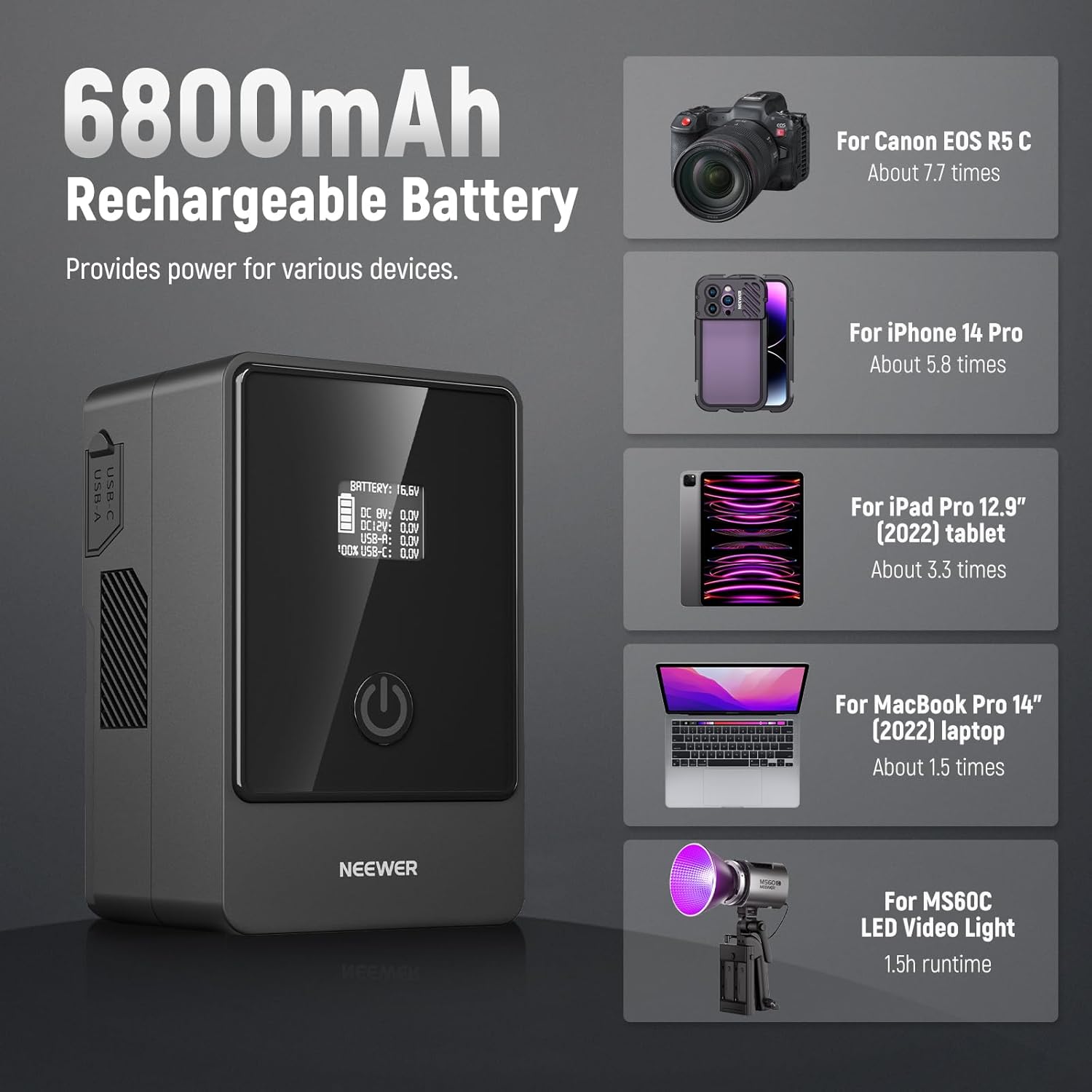
Figure 2: Detailed view of the multiple ports on the side of the battery, including USB-A, USB-C, DC 8V, DC 12V, and BP/D-Tap interfaces. Dust covers protect unused ports.
- USB-C (Input/Output): Supports PD65W bidirectional fast charging.
- USB-A (Output): Standard USB output for charging smaller devices.
- DC 8V (Output): 5.5x2.1mm port for 8V devices.
- DC 12V (Output): 5.5x2.5mm port for 12V devices.
- BP/D-Tap (Input/Output): 14.54V 14A (Max) for V-mount plates, monitors, and other accessories.
OLED Digital Display
The 1.12" OLED screen provides crucial information about the battery's operational status.

Figure 3: The OLED display showing real-time battery voltage and individual port output status.
Setup
Before initial use, ensure the battery is fully charged. Attach the battery to a compatible V-mount plate on your camera rig.

Figure 4: The PS099E battery mounted on a camera rig, providing power to the camera and accessories.
Operating Instructions
Powering On/Off
Press the power button located on the front of the battery to turn it on or off. The OLED display will activate upon powering on.
Using the OLED Display
The OLED display provides real-time information including battery voltage and the output status of each port (DC 8V, DC 12V, USB-A, USB-C). This allows for precise power management during operation.
Charging the Battery
The PS099E battery can be charged using two methods:
- USB-C: Connect the included USB Type C to Type C cable to the battery's USB-C port and a compatible PD fast charging GaN charger (65W or above, not included). A full charge takes approximately 3 hours.
- D-Tap Charger: Use a 16.8V D-Tap charger (not included) to charge the battery via its D-Tap port.

Figure 5: The battery connected to a USB-C wall charger for fast charging.
Powering External Devices
Connect your devices to the appropriate output ports. The battery can simultaneously power multiple devices.
- USB-C: Provides up to 65W output for laptops, tablets, and smartphones.
- USB-A: Provides standard USB output for various devices.
- DC 8V & 12V: Use for compatible field monitors, LED video lights, and other accessories.
- D-Tap/BP: Connect to V-mount battery plates, DSLR cameras (with appropriate dummy battery), and other professional equipment.

Figure 6: Examples of devices powered by the PS099E battery, illustrating its versatility.
Video 1: Overview of the NEEWER V Mount Battery PS099E, demonstrating its features and compact design.
Maintenance
- Store the battery in a cool, dry place away from direct sunlight and extreme temperatures.
- Keep the ports clean and free from dust. Use the provided dust covers when ports are not in use.
- Avoid dropping or subjecting the battery to strong impacts.
- For long-term storage, charge the battery to approximately 50-60% capacity.
Troubleshooting
- Battery Not Powering On: Ensure the battery is sufficiently charged. If the issue persists, contact customer support.
- Overheating During Charging: The intelligent BMS will automatically shut down charging to protect the battery if it overheats. Use a compatible charger and ensure adequate ventilation. If the battery indicator flashes during charging, it indicates overheating.
- Device Not Charging: Check that the device is compatible with the selected output port and that the cable is securely connected. Verify the battery has sufficient charge.
Safety Information
The NEEWER PS099E battery features an intelligent Battery Management System (BMS) and a fireproof PC V0 shell to enhance safety and durability. The BMS protects against:
- Short circuits
- Over-voltage
- Over-current
- Overcharging
- Over-discharge
- Over-power
- Over-temperature
- Under-power discharge
Always use the battery according to the instructions to prevent damage or injury.
Specifications
| Feature | Detail |
|---|---|
| Brand | NEEWER |
| Model | PS099E |
| Material | Fireproof PC V0 |
| Capacity | 14.54V 6800mAh 99Wh |
| Charging Time | 3 hours (with fast charging GaN charger and 65W cable or above) |
| Product Dimensions | 4.4" x 2.9" x 2.2" / 111 x 73 x 56.7mm |
| Weight | 1.3lb / 590g |
| Input (BP/D-Tap) | 16.8V 8A (Max) |
| Input (USB-C) | 20V 3.25A (Max) |
| Output (USB-A) | QC2.0/AFC/FCP: 5V 3A, 9V 2A, 12V 2A; QC3.0: 3.6-6.5V 3A, 6.5-9V 2A, 9-12V 2A; SCP: 4.5V 5A, 5V 4.5A; DCP-1.5A: 5V 0.5-1.5A; 5V 2.4A for Apple charging protocol |
| Output (USB-C) | PD3.0: 5V 3A, 9V 3A, 12V 3A, 15V 3A, 20V 3.25A; QC2.0/AFC/FCP: 5V 3A, 9V 2A, 12V 2A; QC3.0: 3.6-6.5V 3A, 6.5-9V 2A, 9-12V 2A; SCP: 4.5V 5A, 5V 4.5A; DCP-1.5A: 5V 0.5-1.5A; PPS: 3.3-21V 3A; 5V 2.4A for Apple charging protocol |
| Output (DC 8V) | 8V 3A (Max) |
| Output (DC 12V) | 12V 3A (Max) |
| Output (BP/D-Tap) | 14.54V 14A (Max) |
Warranty and Support
For warranty information and customer support, please refer to the official NEEWER website or contact your retailer.
Related Documents - PS099E
 |
Neewer F700 7-Inch On-Camera Monitor User Manual and Specifications Comprehensive guide to the Neewer F700 7-inch on-camera monitor, covering product overview, package contents, installation, power supply, functions, settings, firmware upgrades, troubleshooting, safety precautions, and detailed specifications. Ideal for filmmakers and photographers. |
 |
NEEWER F700 7-Inch Camera Field Monitor User Manual and Guide Comprehensive guide to the NEEWER F700 7-inch camera field monitor, covering product overview, package contents, installation, functions, power supply, troubleshooting, and specifications. |
 |
NEEWER RGB168 LED Video Light User Manual - Installation, Operation & Specs User manual for the NEEWER RGB168 LED video light. Learn about its features, installation, operation modes (CCT, HSI, Scene), app control, safety guidelines, and technical specifications. Ideal for photography and videography. |
 |
Neewer F700 7-Inch Camera Monitor User Manual and Specifications Comprehensive user manual and technical specifications for the Neewer F700 7-inch camera monitor, detailing setup, features, functions, troubleshooting, and safety precautions. |
 |
NEEWER LS-T22 Smart Electronic Eyepiece User Manual This manual provides instructions for the NEEWER LS-T22 smart electronic eyepiece, covering setup, functions, and safety precautions. Learn how to connect to the NEEWER View App, adjust camera settings, and manage your photos and videos. |
 |
Neewer BP300 LED Video Light Instruction Manual Official instruction manual for the Neewer BP300 LED Video Light. Covers package contents, setup, operation, brightness and color temperature adjustments, safety precautions, and specifications. |
Ask a question about this manual
Ask about setup, troubleshooting, compatibility, parts, safety, or missing instructions. Manuals+ will review the question and use this page’s manual context to help answer it.