
BLUELAND TAB-AZ2-20P-MP
BLUELAND Foaming Hand Soap Refill Tablets User Manual
Model: TAB-AZ2-20P-MP
Introduction
Thank you for choosing BLUELAND Foaming Hand Soap Refill Tablets. This product offers an eco-friendly and effective solution for hand hygiene. Our 20-pack variety includes multiple scents, providing a pleasant experience while reducing plastic waste. This manual provides essential information for the proper setup, operation, and maintenance of your foaming hand soap system.

Image: BLUELAND Foaming Hand Soap Refill Tablets in a 20-pack variety, showcasing the eco-friendly packaging and product.
Setup
Setting up your BLUELAND Foaming Hand Soap is a simple three-step process:
- Prepare Your Bottle: Ensure you have a clean, reusable foaming hand soap dispenser. Fill the bottle with warm water up to the designated fill line or half-round symbol (approximately 9 fl oz).
- Insert Tablet: Carefully drop one BLUELAND foaming hand soap tablet into the water-filled bottle.
- Dissolve: Allow the tablet to fully dissolve. This typically takes a few minutes. Once dissolved, attach the pump to the bottle.
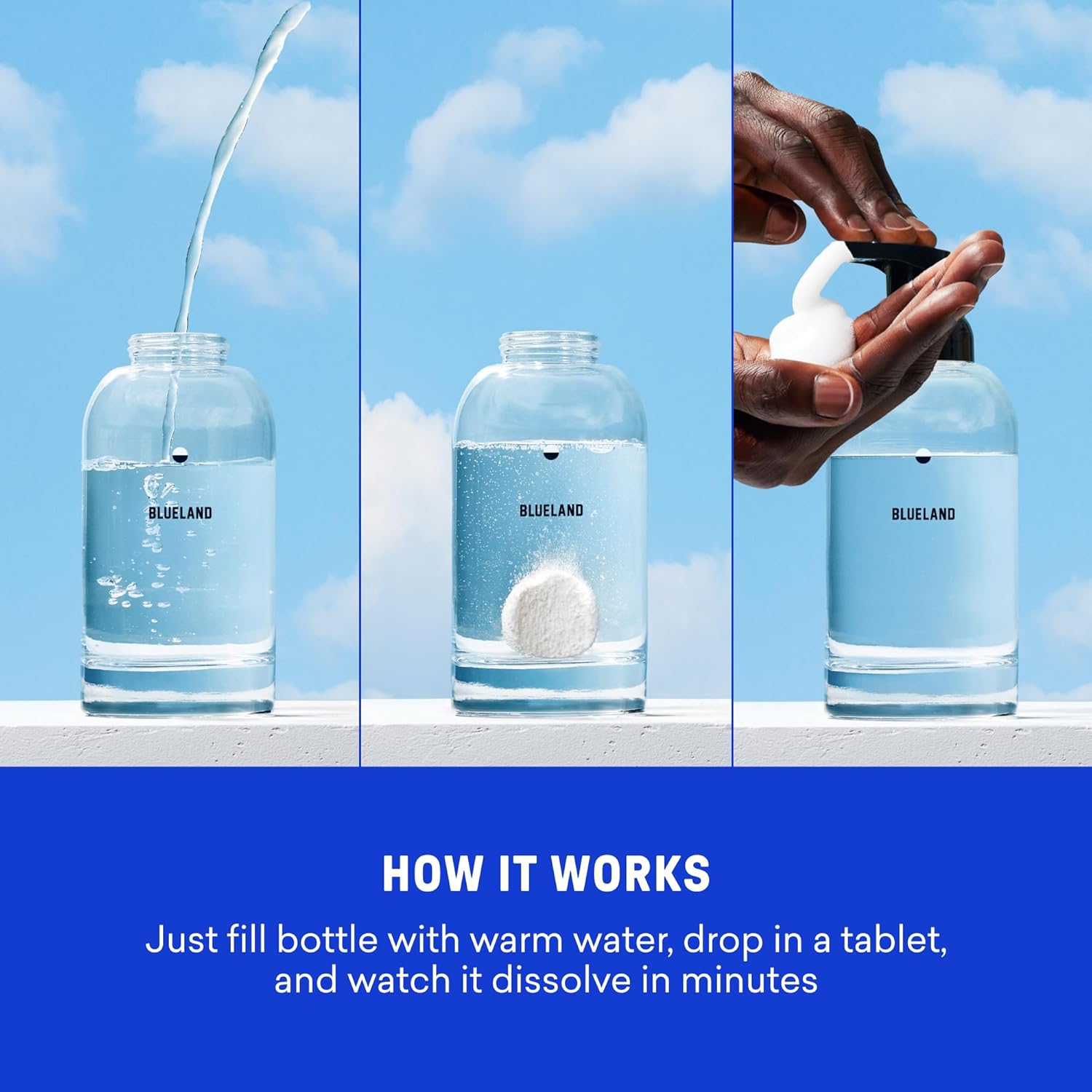
Image: A visual guide demonstrating the three steps: filling a bottle with water, dropping in a tablet, and dispensing the resulting foam.
For optimal dissolution, it is recommended to use warm water. Cold water may take longer for the tablet to fully dissolve.
Operating Instructions
Once your foaming hand soap is prepared, it's ready for use:
- Dispense: Press the pump to dispense a rich, foamy lather onto your hands.
- Wash: Lather thoroughly for at least 20 seconds, ensuring all areas of your hands are covered.
- Rinse: Rinse your hands completely with clean water.

Image: A close-up showing the rich, foamy lather of the hand soap being dispensed and used, emphasizing its gentle and effective cleaning properties.
Maintenance
The BLUELAND system is designed for reusability and minimal waste:
- Refilling: When your soap runs out, simply wash out the bottle, refill with warm water, and drop in a new tablet following the setup instructions.
- Bottle Care: The glass bottle is durable and designed for long-term use. Clean it periodically with warm water to maintain hygiene.

Image: An illustration of the BLUELAND system, featuring a reusable glass bottle, a plastic-free tablet, and industrially compostable wrappers, highlighting its sustainable design.
Troubleshooting
- Tablet Not Dissolving: Ensure you are using warm water. Cold water can significantly slow down the dissolution process. If the tablet is still not dissolving, gently swirl the bottle.
- Weak or Watery Foam: This can sometimes occur if the tablet has not fully dissolved or if the water-to-tablet ratio is incorrect. Ensure complete dissolution and proper water levels.
- Pump Issues: If the pump becomes stiff or jams, try cleaning it by pumping warm water through it. If issues persist, contact customer support for assistance.
Specifications
Product Details:
- Product Dimensions: 7.25 x 5.25 x 3.5 inches
- Item Weight: 0.58 Pounds (9.28 ounces)
- Unit Count: 20.0 Count
- Net Content Volume (per tablet): Makes 9 Fluid Ounces of soap
- Item Form: Capsule (tablet)
- Recommended Uses: Hand washing
- Skin Type: All
- Manufacturer Part Number: TAB-AZ2-20P-MP
- UPC/GTIN: 8100183396299
Key Features:
- Microplastic-free formula
- Made with plant and mineral-based cleaning power
- Hypoallergenic
- EPA Safer Choice Certified
- Leaping Bunny Certified (Cruelty-Free)
- Vegan
- B Corp Certified
- Climate Neutral Certified
- Free From: Microplastics (PVA), Parabens, Phthalates, Dyes, Phosphates

Image: A hand holding a BLUELAND tablet, with a list of harmful ingredients it is free from and various safety certifications.
Ingredients:
CITRIC ACID, SODIUM CARBONATE, SODIUM BENZOATE, SODIUM COCO-SULFATE, SODIUM CITRATE, ALGIN, DISODIUM COCOYL GLUTAMATE, POTASSIUM SORBATE, SODIUM COCOYL ISETHIONATE, FRAGRANCE, COCONUT ACID, GLUTAMIC ACID, MONOSODIUM CITRATE.
Caution: For external use only. Avoid eye contact. Keep out of reach of children and pets.
Scent Variety (Classic Variety Pack):
- Iris Agave
- Perrine Lemon
- Lavender Eucalyptus
- Peony Blossom
- Pacific Mist

Image: A display of five different BLUELAND foaming hand soap tablet packets, each representing a unique scent from the variety pack.
Support
For any questions or concerns regarding your BLUELAND Foaming Hand Soap Refill Tablets, please contact our dedicated Customer Experience Team. We are committed to ensuring your satisfaction and will assist you in resolving any issues.
Visit the official BLUELAND Store for more information and products: BLUELAND Store
Related Documents - TAB-AZ2-20P-MP
 |
Blackview Tab 20 WiFi Series User Manual and Guide Official user manual and guide for the Blackview Tab 20 WiFi Series tablet, detailing setup, safety precautions, maintenance, and regulatory compliance information. |
 |
Blackview Tab 20 WiFi Návod k použití | Uživatelská příručka Oficiální návod k použití pro tablet Blackview Tab 20 WiFi. Získejte informace o ovládacích prvcích, bezpečném používání, nabíjení a prohlášení o shodě. |
 |
Cubot TAB 20 Quick Start Guide Quick start guide and safety instructions for the Cubot TAB 20 tablet, including device layout, battery safety, and manufacturer compliance information. |
 |
Blackview Tab 20 WiFi Series User Manual User manual for the Blackview Tab 20 WiFi Series tablet, providing instructions on setup, safety, maintenance, and regulatory compliance. |
 |
DeepSkyCamera for Android: Astrophotography App Manual Comprehensive manual and reference guide for the DeepSkyCamera Android app, covering installation, features, settings, and astrophotography techniques. Includes links to resources and software. |
 |
Blackview Tab 20 WiFi Series User Manual and Safety Information Comprehensive guide for the Blackview Tab 20 WiFi Series, covering device features, setup, safety precautions, maintenance, and regulatory information. |
Ask a question about this manual
Ask about setup, troubleshooting, compatibility, parts, safety, or missing instructions. Manuals+ will review the question and use this page’s manual context to help answer it.