
1. Introduction
This manual provides detailed instructions for the installation, operation, and maintenance of your RUSFEIDA POE IP Camera (Model N388). This 5MP dome surveillance camera is designed for outdoor home security, featuring advanced capabilities such as 100ft color night vision, AI human/vehicle detection, and a built-in microphone for one-way audio. Please read this manual thoroughly before use to ensure proper functionality and safety.

Image: The RUSFEIDA 5MP PoE IP Outdoor Security Camera, a white dome camera with dual lights and a lens, designed for outdoor surveillance.
2. Package Contents
Upon opening the package, verify that all items listed below are included:
- RUSFEIDA POE IP Camera (Model N388)
- User Manual
- Mounting Screws and Wall Plugs
- Waterproof Lid for Ethernet Connector
- Drilling Template Sticker
- Warning Sticker
- Warranty Card
For a visual guide to the camera's components and unboxing, please refer to the video below:
Video: An unboxing video for a similar dome camera, showing the contents of the package including the camera, user manual, warning sticker, warranty card, drilling sticker, waterproof lid, and screws.
3. Product Overview
Key Features:
- 5MP HD Resolution: Captures clear video at 2592x1944 resolution with a CMOS 1/2.8” low illumination image sensor.
- 100ft Color Night Vision: Equipped with built-in Dual Light technology for enhanced low-light performance and full-color night vision up to 100 feet.
- AI Human/Vehicle Detection: Intelligent motion detection identifies people and vehicles, sending real-time alerts via the MYEYE software.
- PoE (Power over Ethernet): Uses a single Ethernet cable for both data transmission and power, simplifying installation.
- IP67 Weatherproof: Durable metal enclosure designed to withstand harsh outdoor conditions.
- Built-in Microphone: For one-way audio monitoring.
- ONVIF Protocol Support: Compatible with third-party ONVIF cameras and NVRs.
- 24/7 Continuous Recording: Supports continuous recording, especially when motion is detected.
Camera Components:
Familiarize yourself with the main components of your camera:

Image: A diagram illustrating the setup of the RUSFEIDA PoE IP Camera with a smartphone app, showing the camera, QR code for app download, and steps for adding the device and viewing live video.
- Lens: 2.8mm fixed lens for wide-angle viewing.
- IR LEDs / White Lights: Dual light system for night vision.
- Microphone: For audio capture.
- Network Cable Port (RJ45): For PoE connection and data.
- Power Adapter Port (DC 12V): Alternative power input if PoE is not used.
- Reset Button: Used for resetting the camera to factory defaults.
- MicroSD Card Slot: For local storage (card not included, supports up to 512GB).

Image: The RUSFEIDA PoE IP Camera partially submerged in water, highlighting its IP67 weatherproof rating.
4. Setup
4.1 Physical Installation
The camera can be mounted on a wall or ceiling using the provided mounting hardware. Ensure the camera is positioned to cover the desired surveillance area and is securely fastened.

Image: A white RUSFEIDA PoE IP Camera mounted under the eave of a house, providing a wide view of the outdoor area.
4.2 Power and Network Connection
The RUSFEIDA POE IP Camera offers flexible connection options:
- PoE (Power over Ethernet): Connect an Ethernet cable from a PoE-enabled NVR, PoE switch, or PoE injector directly to the camera's Network Cable Port. This single cable provides both power and data.
- DC 12V Power Supply: If PoE is not available, connect a DC 12V power adapter (not included) to the camera's Power Adapter Port, and then connect an Ethernet cable from your router to the camera's Network Cable Port.
For a visual demonstration of connection methods, please watch the video below:
Video: A tutorial demonstrating three ways to connect a PoE IP camera: via an NVR PoE port, using a DC12V power supply, and through a PoE injector or switch. This video is from Unilook Direct.

Image: A diagram illustrating the "Hassle-Free Plug & Play" PoE connection, showing the camera connected to a PoE NVR via a single Ethernet cable, eliminating the need for separate power cables or adapters for the camera.
4.3 App Installation and Initial Setup
To access and control your camera, download the MYEYE software. Ensure your camera and smartphone are connected to the same 2.4GHz Wi-Fi network during initial setup.
- Scan the QR code or search for "MYEYE" in your device's app store (App Store for iOS, Google Play Store for Android).
- Follow the in-app instructions to add your device. You may need to find the camera's serial number in the CMS or NVR.
- If needed, reset the camera by pressing and holding the reset button for 10 seconds until you hear a "beep" indicating "Reset Successfully". Wait for about 60 seconds for the camera to restart.
Download the MYEYE app here: http://d.xmeye.net/Xmeye
5. Operation
5.1 Live View and Recording
Once connected, you can view live footage from your camera via the MYEYE app or compatible software (WEB, CMS). The camera supports 24/7 continuous recording, with motion-triggered recording options available.
5.2 AI Human/Vehicle Detection
The camera's intelligent motion detection can differentiate between humans and vehicles, reducing false alarms. When a suspicious person or vehicle is detected, you will receive real-time notifications through the MYEYE software.
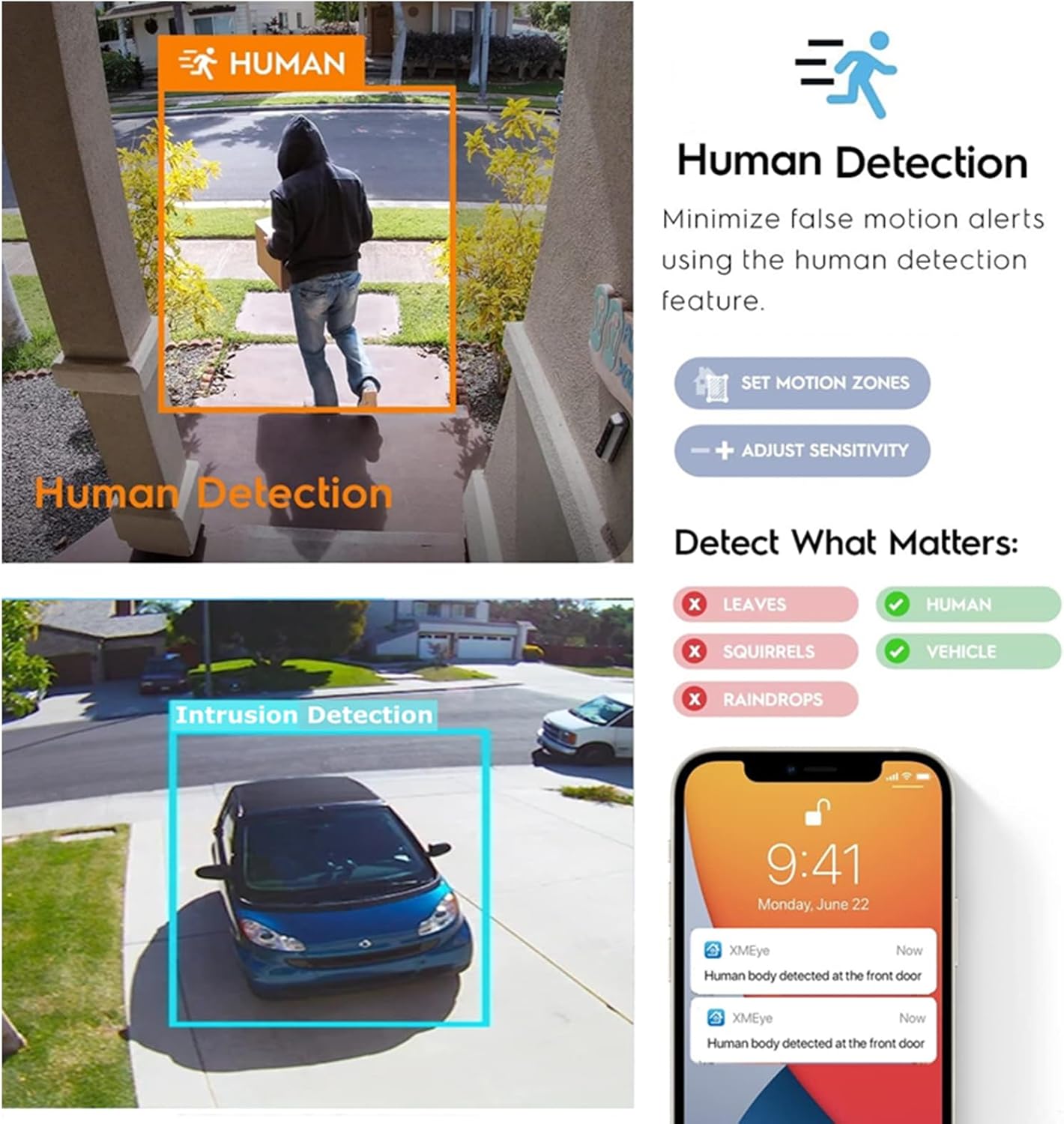
Image: A split image demonstrating AI Human Detection and Intrusion Detection for vehicles, showing how the camera identifies and alerts for relevant movements while minimizing false alarms from leaves, squirrels, or raindrops.
Video: A short preview video (12 seconds) demonstrating the smart human auto-tracking function of a security camera, showing a person walking and the camera following their movement. This video is from Smart Security US.
5.3 Night Vision Modes
The camera features advanced night vision capabilities:
- IR Night Vision: Provides clear black and white footage in complete darkness up to 100 feet using IR lights.
- Color Night Vision: Activates white lights upon motion detection to provide full-color video at night.

Image: A comparison of day vision, IR night vision (black and white with white light off), and color night vision (white light auto ON/OFF when movement is detected) for the RUSFEIDA PoE IP Camera.
5.4 Two-Way Audio and Alarm
The built-in microphone allows for one-way audio monitoring. In addition, the camera can activate an alarm light to deter intruders, and send instant push alerts to your phone.
6. Maintenance
- Cleaning: Regularly clean the camera lens with a soft, dry cloth to ensure clear image quality. Do not use harsh chemicals.
- Firmware Updates: Check the MYEYE app or manufacturer's website periodically for firmware updates to ensure optimal performance and security.
- Cable Inspection: Periodically inspect all cables for any signs of wear or damage, especially in outdoor installations.
7. Troubleshooting
| Problem | Possible Cause | Solution |
|---|---|---|
| Camera not powering on. | No power, faulty cable, or power adapter. | Check power source and connections. Ensure PoE is active or DC 12V adapter is working. |
| No video feed in app. | Network issue, incorrect app settings, camera offline. | Verify network connection (camera and phone). Ensure camera is added correctly in the MYEYE app. Try restarting the camera and router. |
| Frequent false motion alerts. | Sensitivity too high, environmental factors (e.g., moving branches). | Adjust motion detection sensitivity in the app. Utilize AI human/vehicle detection to filter irrelevant movements. |
| Poor night vision quality. | Dirty lens, insufficient ambient light, IR/white lights obstructed. | Clean the camera lens. Ensure IR/white lights are not blocked. Check night vision settings in the app. |
| Moisture inside lens. | Condensation due to temperature changes or improper sealing. | If persistent, contact customer support. Ensure proper installation to prevent moisture ingress. |
8. Specifications
| Feature | Detail |
|---|---|
| Model Number | N388 |
| Effective Still Resolution | 5 MP (2592x1944) |
| Image Sensor | CMOS 1/2.8” Low illumination |
| Night Vision Range | 100 Feet (Color Night Vision with Dual Light) |
| Connectivity Technology | Wired (PoE) |
| Wireless Communication Technology | Wi-Fi (for app setup, 2.4GHz) |
| Power Source | Corded Electric (PoE or DC 12V) |
| International Protection Rating | IP67 (Weatherproof) |
| Form Factor | Dome |
| Material | Acrylonitrile Butadiene Styrene (ABS) |
| Item Dimensions L x W x H | 3.74 x 3.74 x 3.74 inches |
| Item Weight | 1.04 pounds |
| Special Feature | HD Resolution, AI Human/Vehicle Detection, Built-in Mic |
9. Warranty and Support
For warranty information, technical support, or any questions regarding your RUSFEIDA POE IP Camera, please refer to the product packaging or contact RUSFEIDA customer service directly. Keep your purchase receipt for warranty claims.