
1. Introduction
This manual provides essential information for the proper installation, operation, and maintenance of the HOMISIA QC1002 Controller Panel. This panel is specifically designed for use with Atlas Copco Air Compressors. Please read this manual thoroughly before attempting to install or operate the device to ensure safe and efficient performance.
Safety Warning: Always disconnect power to the air compressor before performing any installation, maintenance, or troubleshooting procedures on the controller panel.
2. Product Overview
The HOMISIA QC1002 Controller Panel serves as the primary interface for controlling and monitoring Atlas Copco air compressors. It features a digital display for real-time data, along with intuitive buttons for navigation and control. Its robust design ensures reliable performance in industrial environments.
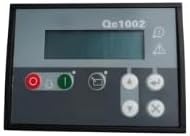
Figure 2.1: HOMISIA QC1002 Controller Panel. This image displays the HOMISIA QC1002 Controller Panel, featuring a digital display screen, control buttons, and indicator lights. The panel is black with a grey faceplate, showing the model number 'QC1002' at the top.
Key Features:
- Part Number: QC1002
- Designed for Atlas Copco Air Compressors
- Digital display for operational data
- Intuitive control buttons
3. Specifications
| Attribute | Detail |
|---|---|
| Brand | HOMISIA |
| Model Name | QC1002 |
| Part Number | QC1002 |
| Recommended Uses | Controlling and managing Atlas Copco air compressors |
| Color | Black |
| Style | Other |
| Manufacturer | HOMISIA |
| ASIN | B0CM5QFKV6 |
| Date First Available | October 31, 2023 |
4. Setup
Proper installation is crucial for the correct functioning of the QC1002 Controller Panel. It is highly recommended that installation be performed by a qualified technician familiar with industrial air compressor systems and electrical wiring.
Installation Steps (General Guidelines):
- Power Disconnection: Ensure the air compressor and all associated power sources are completely disconnected and locked out before beginning installation.
- Mounting: Securely mount the QC1002 panel in the designated location on the air compressor, ensuring proper ventilation and protection from environmental factors.
- Wiring: Connect the panel to the air compressor's control system according to the wiring diagram provided with your specific Atlas Copco compressor model. Pay close attention to power, sensor, and communication line connections.
- Verification: Double-check all connections for tightness and correctness. Ensure no wires are pinched or exposed.
- Power Restoration: Once installation is complete and verified, carefully restore power to the air compressor.
Note: Refer to your Atlas Copco Air Compressor's specific wiring diagrams and safety instructions for detailed installation procedures.
5. Operating Instructions
The QC1002 Controller Panel provides an intuitive interface for managing your air compressor. Familiarize yourself with the display and button functions before operation.
Basic Operation:
- Power On/Off: Use the designated power button (often marked with I for ON and O for OFF) to start or stop the compressor.
- Display Navigation: Use the arrow keys (up, down, left, right) to navigate through different menus and view various operational parameters such as pressure, temperature, running hours, and error codes.
- Parameter Adjustment: Access settings menus to adjust operational parameters like pressure setpoints, delay times, or alarm thresholds, if applicable. Follow on-screen prompts for saving changes.
- Alarm/Warning Indicators: Pay attention to any illuminated warning lights or messages on the display, which indicate abnormal operating conditions or system faults. Consult the troubleshooting section for guidance.
- Emergency Stop: In case of an emergency, immediately press the compressor's main emergency stop button.
6. Maintenance
Regular maintenance of the QC1002 Controller Panel ensures its longevity and reliable performance. Always disconnect power before performing any maintenance.
Recommended Maintenance:
- Cleaning: Periodically clean the panel's surface with a soft, dry, or slightly damp cloth. Avoid using abrasive cleaners, solvents, or excessive moisture, which can damage the display or buttons.
- Inspection: Regularly inspect the panel for any signs of physical damage, loose connections, or wear. Ensure all buttons are functioning correctly and the display is clear.
- Environmental Control: Ensure the operating environment remains within the specified temperature and humidity ranges to prevent damage to internal components.
- Firmware Updates: If applicable, consult HOMISIA or Atlas Copco for information on any available firmware updates for the controller panel.
7. Troubleshooting
This section provides general guidance for common issues you might encounter with the QC1002 Controller Panel. For complex problems, contact qualified service personnel.
| Problem | Possible Cause | Solution |
|---|---|---|
| Panel does not power on | No power supply; Loose wiring; Internal fuse blown | Check power source; Verify all wiring connections; Consult a technician for fuse replacement. |
| Display is blank or unreadable | Power issue; Display fault; Extreme temperature | Check power; Ensure operating environment is within limits; If problem persists, contact support. |
| Buttons are unresponsive | Physical damage; Internal fault | Inspect for damage; Try power cycling the compressor; If unresponsive, contact support. |
| Incorrect readings on display | Sensor malfunction; Calibration issue; Wiring error | Verify sensor connections; Consult compressor manual for calibration; Contact a technician. |
| Error code displayed | Specific system fault | Note the error code and consult your Atlas Copco compressor's manual or contact HOMISIA/Atlas Copco support for specific interpretation and resolution. |
8. Warranty and Support
For warranty information regarding your HOMISIA QC1002 Controller Panel, please refer to the documentation provided at the time of purchase or contact HOMISIA directly. Standard protection plans may be available for purchase separately.
Customer Support:
If you encounter issues that cannot be resolved using the troubleshooting guide, or require technical assistance, please contact HOMISIA customer support. When contacting support, please have your product model (QC1002) and any relevant purchase information ready.
For specific operational or system-level issues related to your Atlas Copco Air Compressor, please refer to your compressor's manual or contact Atlas Copco support.