
ADBEN GM-215
ADBEN GM-215 Electric Guitar Amplifier User Manual
Model: GM-215
1. Introduction
Thank you for purchasing the ADBEN GM-215 Electric Guitar Amplifier. This 15W amplifier is designed to provide a versatile sound experience for electric guitarists, featuring a 3-band EQ and distortion capabilities. Please read this manual thoroughly to understand the amplifier's functions and ensure safe and optimal performance.
2. Important Safety Instructions
- Read these instructions.
- Keep these instructions.
- Heed all warnings.
- Follow all instructions.
- Do not use this apparatus near water.
- Clean only with dry cloth.
- Do not block any ventilation openings. Install in accordance with the manufacturer’s instructions.
- Do not install near any heat sources such as radiators, heat registers, stoves, or other apparatus (including amplifiers) that produce heat.
- Do not defeat the safety purpose of the polarized or grounding-type plug. A polarized plug has two blades with one wider than the other. A grounding type plug has two blades and a third grounding prong. The wide blade or the third prong are provided for your safety. If the provided plug does not fit into your outlet, consult an electrician for replacement of the obsolete outlet.
- Protect the power cord from being walked on or pinched particularly at plugs, convenience receptacles, and the point where they exit from the apparatus.
- Only use attachments/accessories specified by the manufacturer.
- Unplug this apparatus during lightning storms or when unused for long periods of time.
- Refer all servicing to qualified service personnel. Servicing is required when the apparatus has been damaged in any way, such as power-supply cord or plug is damaged, liquid has been spilled or objects have fallen into the apparatus, the apparatus has been exposed to rain or moisture, does not operate normally, or has been dropped.
3. Product Features
- 3-Band EQ: Control Treble, Middle, and Bass frequencies for precise tone shaping.
- Treble Control: Adjusts high frequency equalization as required.
- Middle Control: Provides active mid equalization with boost & cut capabilities.
- Bass Control: Delivers the desired amount of bass response.
- Gain Control: Sets the amount of distortion when the drive switch is engaged. Higher settings provide additional distortion.
- One Channel Operation: Simple and direct sound.
- 1/4 inch Headphone Jack: Allows for silent practice, automatically turning off the amplifier speaker when connected.
- 5" Speaker: Delivers clear and powerful sound.
4. Controls and Functions
Familiarize yourself with the front panel controls of your GM-215 amplifier:
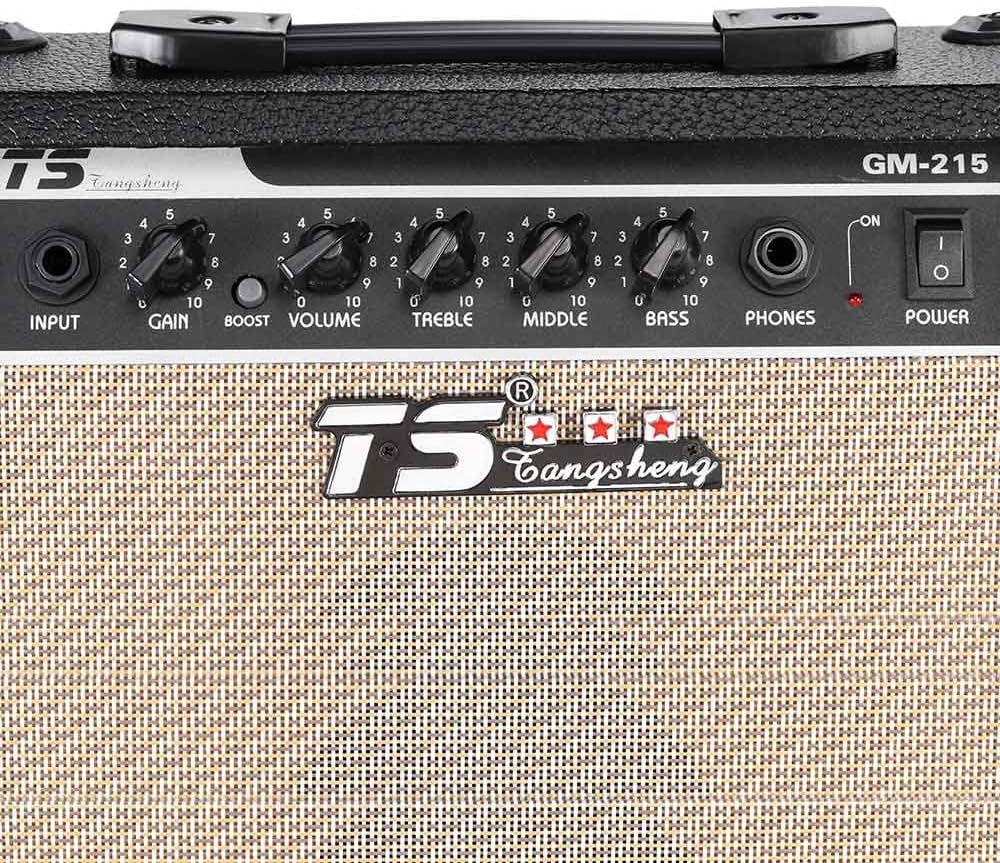
Figure 4.1: Front Panel Controls
This image displays a detailed view of the amplifier's control panel, highlighting each knob and input for easy identification and understanding of their functions.
- INPUT: Connect your electric guitar or other instrument here using a standard 6.35mm (1/4 inch) instrument cable.
- GAIN: Controls the amount of pre-amplification and distortion. Turn clockwise for more gain and a more distorted sound.
- BOOST VOLUME: Adjusts the overall output volume of the amplifier.
- TREBLE: Controls the high-frequency response. Turn clockwise to increase treble, counter-clockwise to decrease.
- MIDDLE: Controls the mid-range frequency response. Turn clockwise to increase mids, counter-clockwise to decrease.
- BASS: Controls the low-frequency response. Turn clockwise to increase bass, counter-clockwise to decrease.
- PHONES: A 1/4 inch stereo headphone jack. Plugging in headphones automatically mutes the amplifier's internal speaker, allowing for silent practice.
- POWER: The main power switch for turning the amplifier ON or OFF.
5. Setup
Follow these steps to set up your GM-215 amplifier:

Figure 5.1: Power Cord Connection
This image illustrates the side of the amplifier with its attached power cord, ready for connection to a power outlet.
- Placement: Place the amplifier on a stable, flat surface away from direct sunlight, heat sources, and excessive moisture. Ensure adequate ventilation around the unit.
- Power Connection: Ensure the amplifier's POWER switch is in the OFF position. Connect the amplifier's power cord to a standard US 110V AC power outlet.
- Instrument Connection: Connect your electric guitar to the INPUT jack on the front panel using a high-quality 6.35mm (1/4 inch) instrument cable.
- Initial Settings: Before turning on the amplifier, set the GAIN and BOOST VOLUME knobs to their minimum (fully counter-clockwise) positions. Set the TREBLE, MIDDLE, and BASS knobs to their center (12 o'clock) positions.
6. Operating Instructions
Once set up, you can begin using your amplifier:

Figure 6.1: ADBEN GM-215 Amplifier Overview
This image provides a comprehensive view of the amplifier, showcasing its compact design and front panel layout, which is essential for understanding its operation.
- Power On: Flip the POWER switch to the ON position. The power indicator light will illuminate.
- Adjust Volume: Slowly turn the BOOST VOLUME knob clockwise to achieve your desired listening level.
- Adjust Gain/Distortion:
- For a clean sound, keep the GAIN knob at a lower setting.
- For distorted tones, turn the GAIN knob clockwise. Higher settings will produce more saturation and sustain.
- Tone Shaping (EQ):
- TREBLE: Adjust for brightness or warmth.
- MIDDLE: Adjust for presence and cut through the mix.
- BASS: Adjust for low-end fullness and punch.
- Headphone Use: To practice silently, plug a 1/4 inch stereo headphone into the PHONES jack. The internal speaker will automatically mute. Adjust the BOOST VOLUME for headphone listening.
- Power Off: Before turning off the amplifier, turn the BOOST VOLUME knob down to its minimum position. Then, flip the POWER switch to the OFF position.
7. Maintenance
Proper care will ensure the longevity of your amplifier:
- Cleaning: Use a soft, dry cloth to clean the exterior of the amplifier. Do not use liquid cleaners, abrasive cleaners, or waxes.
- Ventilation: Ensure that the ventilation openings are not blocked. Good airflow prevents overheating.
- Storage: When not in use for extended periods, store the amplifier in a cool, dry place, away from extreme temperatures and humidity.
- Transportation: When moving the amplifier, use the integrated handle and ensure it is protected from impacts.
- Servicing: Do not attempt to service the amplifier yourself. Refer all servicing to qualified service personnel.
8. Troubleshooting
If you encounter issues with your amplifier, refer to the following common problems and solutions:
| Problem | Possible Cause | Solution |
|---|---|---|
| No sound from speaker |
|
|
| Sound is distorted or noisy (when not desired) |
|
|
| No power indicator light |
|
|
If the problem persists after trying these solutions, please contact customer support.
9. Specifications
| Model: | GM-215 |
| Plug Type: | US 110V |
| Output Power: | 15W (RMS) |
| Speaker: | 5" 4 Ohm or 8 Ohm |
| Input Jack: | 6.35mm (1/4 inch) |
| Item Size (L x W x H): | 29 x 28 x 11 cm / 11.4 x 11 x 4.3 inches |
| Item Weight: | 2545g / 5.6 Lb |
| Manufacturer: | ADBEN |
| Compatible Devices: | Guitar |
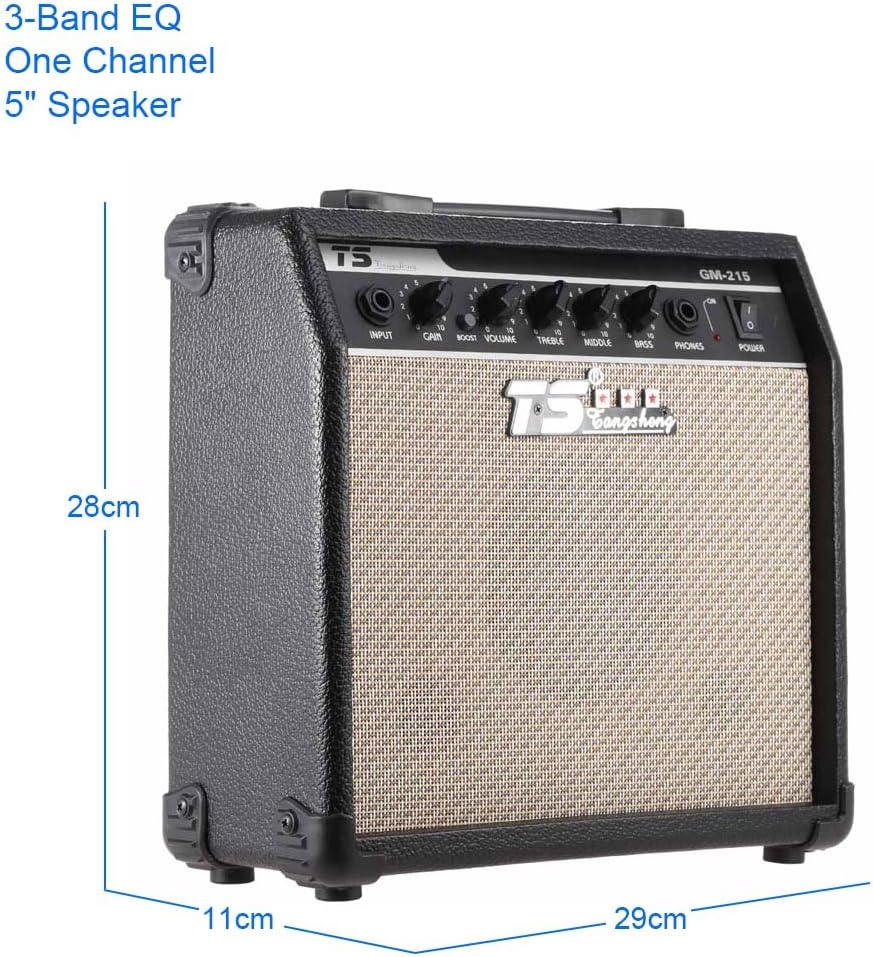
Figure 9.1: Amplifier Dimensions
This image visually represents the physical dimensions of the amplifier, providing a clear understanding of its size.
10. Warranty and Support
For warranty information and customer support, please refer to the documentation provided at the time of purchase or contact ADBEN customer service through the retailer where the product was acquired. Please have your model number (GM-215) and purchase details ready when contacting support.
Related Documents - GM-215
 |
ZOOM GM-200 Guitar Amp Modeler Operation Manual This manual provides detailed information on the ZOOM GM-200 Guitar Amp Modeler, covering its features, controls, connections, operation, sample settings, and troubleshooting. It explains how to use the VAMS technology for a wide range of guitar amp sounds, effects, and output configurations. |
 |
Pioneer GM-D8701/DX871/D9701/DX971 Class D Mono Amplifier Owner's Manual This owner's manual provides detailed information on the installation, connection, settings, and specifications for the Pioneer GM-D8701, GM-DX871, GM-D9701, and GM-DX971 Class D mono amplifiers. It includes safety precautions, operational guidance, and technical details for optimal performance. |
 |
Pioneer GM-D8704 & GM-DX874 Bridgeable Four-Channel Power Amplifier Owner's Manual Detailed owner's manual for the Pioneer GM-D8704 and GM-DX874 bridgeable four-channel power amplifiers, covering installation, setup, specifications, and safety guidelines. |
 |
Defender Wireless Gaming Mouse Operation Manual This document provides the operation manual for the Defender Wireless Gaming Mouse, including setup instructions, safety precautions, and warranty information. It covers various models and is available in multiple languages. |
 |
Neptronic 3-Way NPT Female Globe Valves (AT&AM) - Specifications & Installation Guide Detailed specifications and installation instructions for Neptronic 3-Way NPT Female Globe Valves (AT&AM) series, including model numbers, technical data, and dimensions for industrial and HVAC applications. |
 |
A2D-GM1 Bluetooth Music Streaming Installation Guide for GM Vehicles Detailed installation guide for the A2D-GM1 Bluetooth music streaming receiver, designed for 1995-05 GM vehicles with separate slave units. Learn how to connect, pair, and operate the device for wireless audio streaming. |