
E-YIIVIIL EB-BA546ABY
E-YIIVIIL EB-BA546ABY Replacement Battery User Manual
For Samsung Galaxy A54 5G (A546) and A34 5G (A346)
Introduction
This manual provides essential instructions for the safe and effective installation and use of your E-YIIVIIL EB-BA546ABY replacement battery. This battery is designed for compatibility with Samsung Galaxy A54 5G (model A546) and Samsung Galaxy A34 5G (model A346) mobile phones. Please read this manual thoroughly before proceeding with installation or use.
Safety Information
- Do not disassemble, crush, puncture, heat, or burn the battery.
- Keep the battery away from water and fire.
- Avoid using the battery if it shows signs of damage, swelling, or leakage.
- Dispose of used batteries according to local regulations. Do not discard with household waste.
- Use only compatible and high-quality chargers. Low-quality chargers can shorten battery life or cause damage.
Package Contents
Your package should contain the following items:
- 1 x E-YIIVIIL EB-BA546ABY Replacement Battery
- Installation Tools (as pictured below)

Image: The replacement battery shown alongside a set of small screwdrivers, prying tools, and a suction cup, which are typically included for battery replacement.
Compatibility
This replacement battery is specifically compatible with the following Samsung Galaxy models:
- Samsung Galaxy A54 5G (Model A546)
- Samsung Galaxy A34 5G (Model A346)
Please verify your phone's model number before attempting installation to ensure proper compatibility.

Image: The replacement battery positioned next to a smartphone, illustrating its intended use for compatible Samsung Galaxy models.
Installation Guidelines
Battery replacement in mobile phones requires careful handling and specific tools. It is recommended that this procedure be performed by individuals with professional installation technology or experience to avoid damage to your device.
- Power Off Device: Ensure your phone is completely powered off before beginning the replacement process.
- Disassembly: Carefully open your phone's casing using appropriate tools. This often involves heating the adhesive and using prying tools. Refer to specific device disassembly guides for your Samsung Galaxy A54 5G or A34 5G model.
- Disconnect Old Battery: Locate the old battery and its connector. Carefully and gently disconnect the old battery's cable from the mainboard. Avoid pulling on the wires.
- Remove Old Battery: Gently remove the old battery. It may be secured with adhesive.
- Install New Battery: Place the new E-YIIVIIL battery into position.
- Connect New Battery: Carefully connect the new battery's cable to the mainboard. Ensure the connection is secure and properly seated.
- Test Functionality: Before fully reassembling, attempt to power on your phone with the new battery. If the phone does not power on, power it off, disconnect, and reconnect the battery cable to ensure a proper connection.
- Reassembly: Once functionality is confirmed, carefully reassemble your phone, ensuring all components are correctly placed and secured.
The manufacturer is not responsible for any damage caused by improper operation or installation.
First Use and Charging
- Initial Performance: A new Li-ion battery will achieve its best performance after 2 or 3 complete cycles of charging and discharging.
- Charging: Use only the original charger or a high-quality, certified third-party adapter charger designed for your Samsung Galaxy phone. Using low-quality or incompatible chargers can shorten the battery's lifespan and potentially damage your device.
Maintenance
- Avoid exposing the phone with the new battery to extreme temperatures (very hot or very cold).
- Do not allow the battery to fully discharge frequently. Charge it before it drops to very low percentages.
- Store the device in a cool, dry place if not in use for extended periods.
Troubleshooting
If you encounter issues after battery replacement, consider the following:
- Phone Does Not Power On:
- Ensure the battery connector is securely and correctly attached to the mainboard. Re-seat the connector if necessary.
- Verify that the battery itself is not damaged.
- Battery Drains Quickly:
- Allow 2-3 full charge/discharge cycles for the battery to calibrate and reach optimal performance.
- Ensure you are using a compatible and quality charger.
- Check for background apps or settings on your phone that might be consuming excessive power.
- Charging Issues:
- Confirm the charging port on your phone is clean and undamaged.
- Try a different charging cable and adapter to rule out accessory issues.
Specifications
| Feature | Detail |
|---|---|
| Part Number | EB-BA546ABY |
| Capacity | 5000mAh / 19.4WH |
| Nominal Voltage | 3.88V |
| Rated Capacity | 4905mAh / 17.71Wh |
| Typical Capacity | 5000mAh / 18.23Wh |
| Charge Limit Voltage | 4.47V |
| Type | Lithium Polymer |
| Compatible Models | Samsung Galaxy A54 5G (A546), Samsung Galaxy A34 5G (A346) |
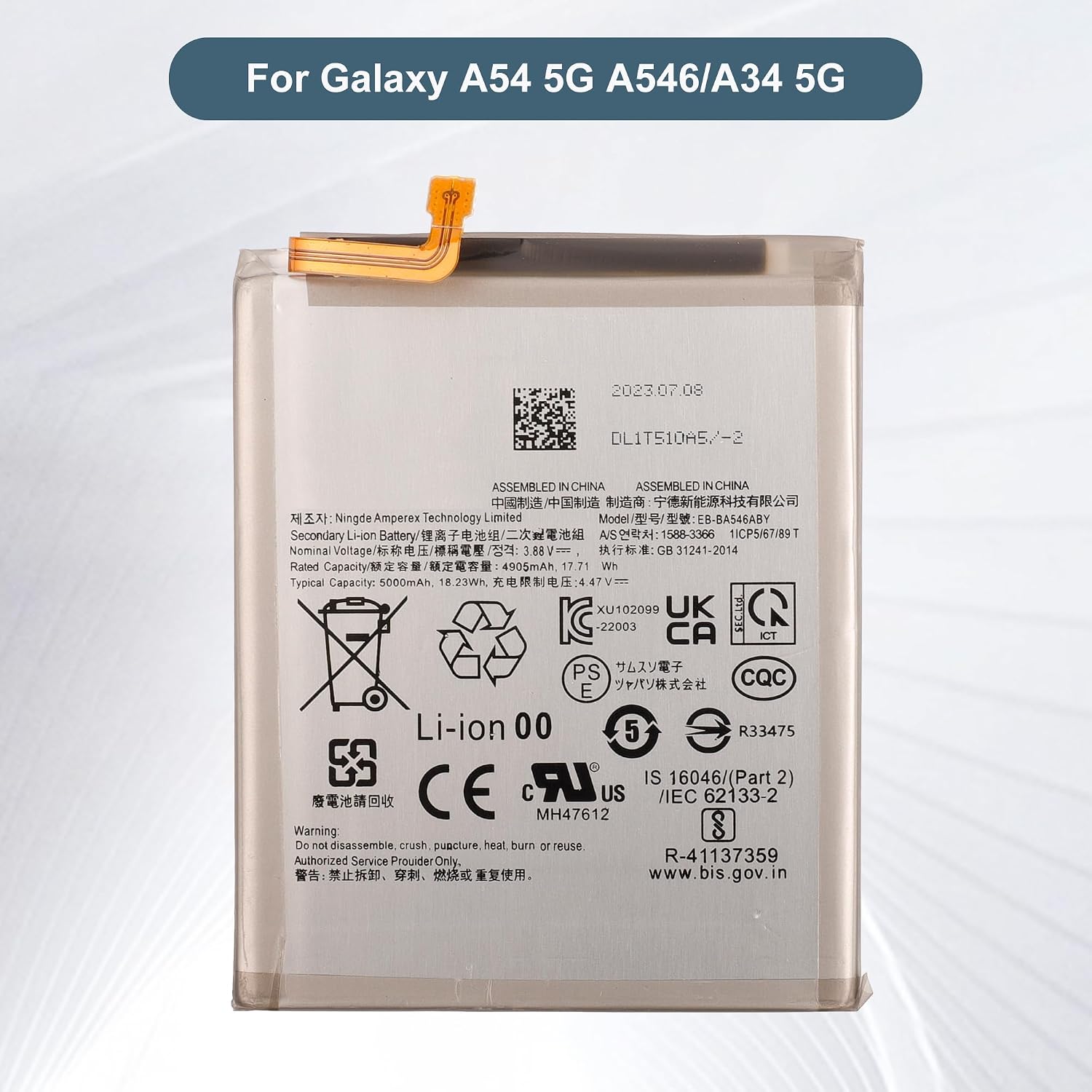
Image: A detailed view of the battery's label, displaying technical specifications such as model number, capacity, and voltage.
Customer Support
If you have any questions, concerns, or encounter any issues while using our product, please do not hesitate to contact us. Our customer support team is available to assist you.
We aim to respond to all inquiries within 24 hours. Your patience is greatly appreciated.
Contact information is typically available through your purchase platform or the seller's store page.
Warranty Information
Specific warranty details for this product may vary. Please refer to the product listing on the platform where you made your purchase or contact customer support for detailed warranty information.
Ask a question about this manual
Ask about setup, troubleshooting, compatibility, parts, safety, or missing instructions. Manuals+ will review the question and use this page’s manual context to help answer it.