
Introduction
Welcome to your new KUBEI Digital Milligram Scale. This precision instrument is designed for accurate measurements up to 100 grams with a readability of 0.001 grams. Please read this manual carefully before use to ensure proper operation and longevity of your device.
Product Overview

The KUBEI digital milligram scale, shown with its protective cover open, displaying the weighing pan and digital display. Included accessories are a USB charging cable, two AAA batteries, and a 100g calibration weight.

An image highlighting the scale's high precision and accuracy. It states a maximum weight capacity of 100g, a precision value of 0.001g, and includes a 100g calibration weight.
Key Features
- High Precision: 0.001g readability.
- Maximum Capacity: 100g.
- Multiple Units: Easily switch between 8 weighing units.
- Tare Function: For net weight measurement.
- Multiple Power Modes: USB rechargeable, AAA battery, or USB plug-in.
- Protective Wind Cover: Ensures stable and accurate measurements.
Package Contents
- KUBEI Digital Milligram Scale
- 100g Calibration Weight
- USB Charging Cable
- Tweezers
- Weighing Pan/Base
- 2 x AAA Batteries (included)
Setup
Powering the Scale
Your scale can be powered in three ways:
- AAA Batteries: Insert 2 AAA batteries into the battery compartment.
- USB Charging: Connect the scale to a USB power source using the provided cable. The integrated rechargeable battery will charge.
- USB Plug-in: Operate the scale directly by connecting it to a USB power source.

An illustration demonstrating the three power modes: using 2 AAA batteries, USB charging, and direct USB plug-in operation. The scale is shown connected via USB to a wall adapter.
Initial Placement
Place the scale on a flat, stable, and vibration-free surface to ensure accurate readings.
Operating Instructions
Turning On/Off
Press the ON/OFF button to turn the scale on or off.
Weighing an Item
- Place the item directly on the weighing pan.
- Read the weight displayed on the screen.
Tare Function (Net Weight Measurement)

A four-panel image illustrating the tare function. 1. Place an empty container on the weighing pan. 2. Press the 'TARE' button to zero the display. 3. Place the item to be weighed into the container. 4. The display shows the net weight of the item.
- Place an empty container or tray on the weighing pan.
- Press the TARE button (often labeled 'T') to reset the display to zero.
- Place the item to be weighed into the container.
- The display will show the net weight of the item.
Unit Conversion
Press the MODE button (often labeled 'M') to cycle through the available weighing units.

An image showing the scale's ability to switch between 8 units: grams (g), kilograms (kg), carats (ct), ounces (oz), troy ounces (ozt), grains (gn), pennyweights (dwt), and taels (tl). Examples of different unit readings are displayed.
The scale supports the following units: grams (g), kilograms (kg), carats (ct), ounces (oz), troy ounces (ozt), grains (gn), pennyweights (dwt), and taels (tl).
Calibration
Regular calibration ensures the accuracy of your scale. Use the provided 100g calibration weight.
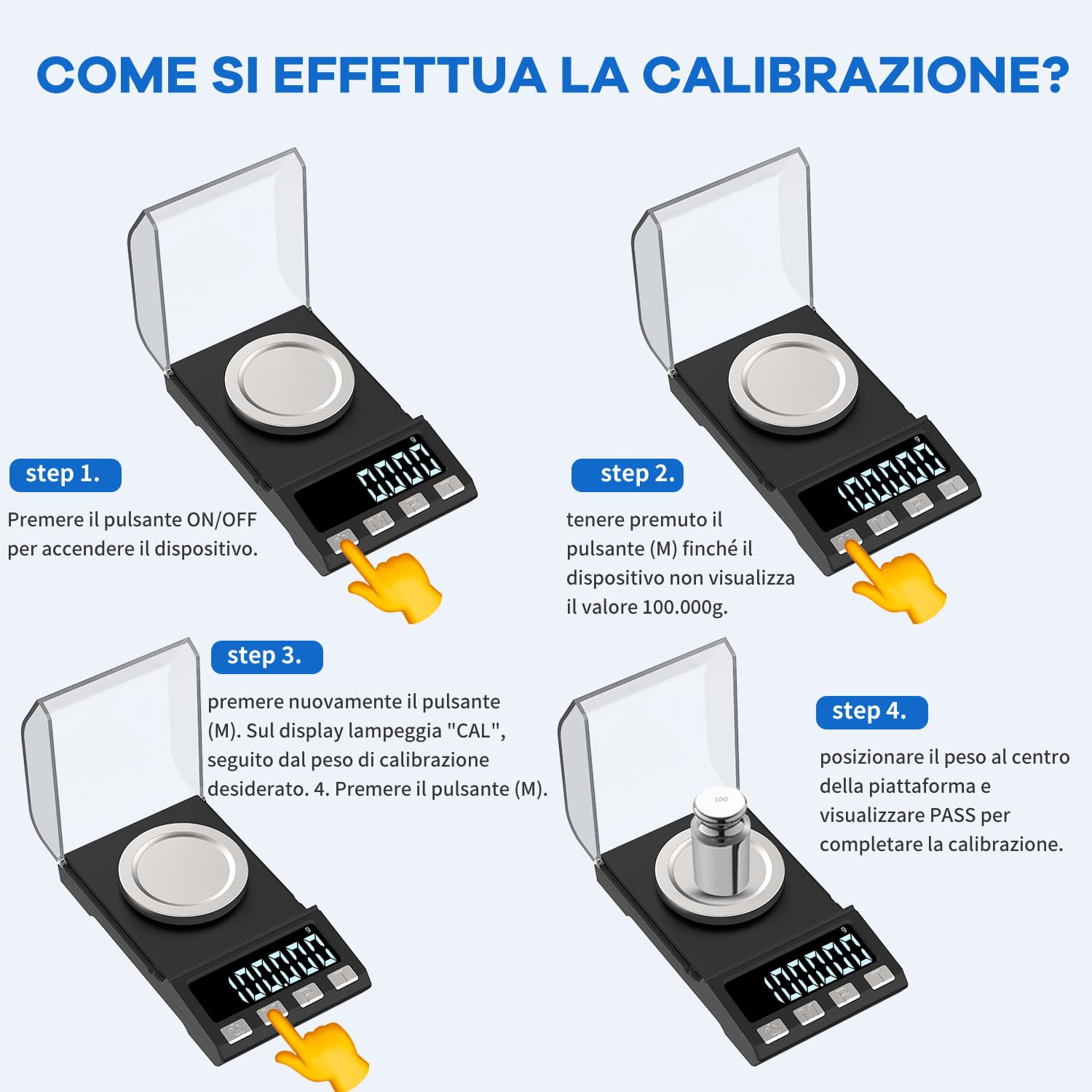
A four-step visual guide for calibrating the scale. Step 1: Turn on the device. Step 2: Press and hold the 'M' button until '100.000g' is displayed. Step 3: Press 'M' again; 'CAL' will flash, followed by the desired calibration weight. Step 4: Place the 100g calibration weight in the center of the platform, and 'PASS' will be displayed to confirm successful calibration.
- Step 1: Turn on the scale by pressing the ON/OFF button.
- Step 2: Press and hold the MODE button (M) until the display shows "100.000g".
- Step 3: Press the MODE button (M) again. The display will flash "CAL", followed by the calibration weight value (e.g., "100.000g").
- Step 4: Carefully place the 100g calibration weight in the center of the weighing platform. The display will show "PASS" to indicate successful calibration. Remove the weight.
Maintenance
- Keep the scale clean by wiping it with a soft, damp cloth. Do not use abrasive cleaners.
- Avoid exposing the scale to extreme temperatures, humidity, or direct sunlight.
- Store the scale in a dry, stable environment.
- Ensure the protective wind cover is used during operation to prevent external interference.

An image showing the dimensions of the scale and its protective wind cover. The cover helps ensure weighing accuracy and prevents external environmental interference.
Troubleshooting
- Display shows "Lo"
- Low battery. Recharge the scale or replace the AAA batteries.
- Display shows "OUE2" or "EEEE"
- Overload error. Remove the item immediately to prevent damage.
- Inaccurate readings
- Ensure the scale is on a flat, stable surface. Recalibrate the scale. Check for drafts or vibrations.
- Scale does not turn on
- Check battery installation or charge the scale via USB.
Specifications
| Feature | Detail |
|---|---|
| Brand | KUBEI |
| Model Number | 8068 |
| Capacity | 100g |
| Readability | 0.001g |
| Units | g, kg, ct, oz, ozt, gn, dwt, tl |
| Power Source | 2 x AAA Batteries (included), USB Rechargeable, USB Plug-in |
| Package Dimensions | 18.8 x 10.6 x 4.4 cm |
| Item Weight | 300 grams |
| UPC | 741311086733 |
Applications
This precision scale is suitable for various applications requiring accurate small weight measurements, including:

A collage of images showing various uses for the precision scale: powdered medicine, jewelry, laboratory experiments, coins, spices, and herbs.
- Powdered Medicine
- Jewelry
- Laboratory Experiments
- Coins
- Spices
- Herbs


