
Grotera MX62
Grotera MX62 Portable Antenna Duplexer User Manual
Model: MX62
1. Introduction
The Grotera MX62 Portable Antenna Duplexer is a high-quality, multi-frequency device designed to combine or separate radio signals from different frequency bands, allowing a single antenna to be used for multiple transceivers or a single transceiver to operate on multiple bands with appropriate antennas. It is an essential accessory for radio communication enthusiasts and professionals, ensuring smooth and reliable signal management.
2. Product Overview
The MX62 Duplexer is constructed from durable metal, providing excellent isolation between frequency bands and ensuring clear, uninterrupted signal transmission. Its compact design makes it portable and suitable for various communication setups, including those involving FT857D, FT911, and ATAS-120A systems.
Key Features:
- Ensures smooth communication across various frequencies.
- High-quality metal construction for excellent isolation and clear signals.
- Enhances communication strength and expands capabilities for radio communication.
- Reliable and efficient communication for outdoor activities and professional use.
- Improves communication setups with extended coverage and effortless frequency switching.

Figure 2.1: The Grotera MX62 Duplexer shown with two short coaxial cables, highlighting its compact size and connection ports.
3. Setup and Installation
The MX62 Duplexer is designed for straightforward integration into your existing radio communication system. Follow these steps for proper setup:
- Identify Ports: The duplexer has three ports. One common port (typically labeled "MIX" or central) and two frequency-specific ports (labeled "MX72" for 1.6-55 MHz and "MX62" for 144-148 MHz / 400-470 MHz).
- Connect Antennas:
- Connect your low-frequency antenna (e.g., HF antenna) to the port designated for 1.6-55 MHz.
- Connect your high-frequency antenna (e.g., VHF/UHF antenna) to the port designated for 144-148 MHz and 400-470 MHz.
- Connect Transceiver: Connect your radio transceiver to the common "MIX" port of the duplexer. Ensure all connections are secure and use appropriate coaxial cables with compatible connectors.
- Cable Management: Arrange cables to prevent strain on connectors and to avoid interference with other equipment.
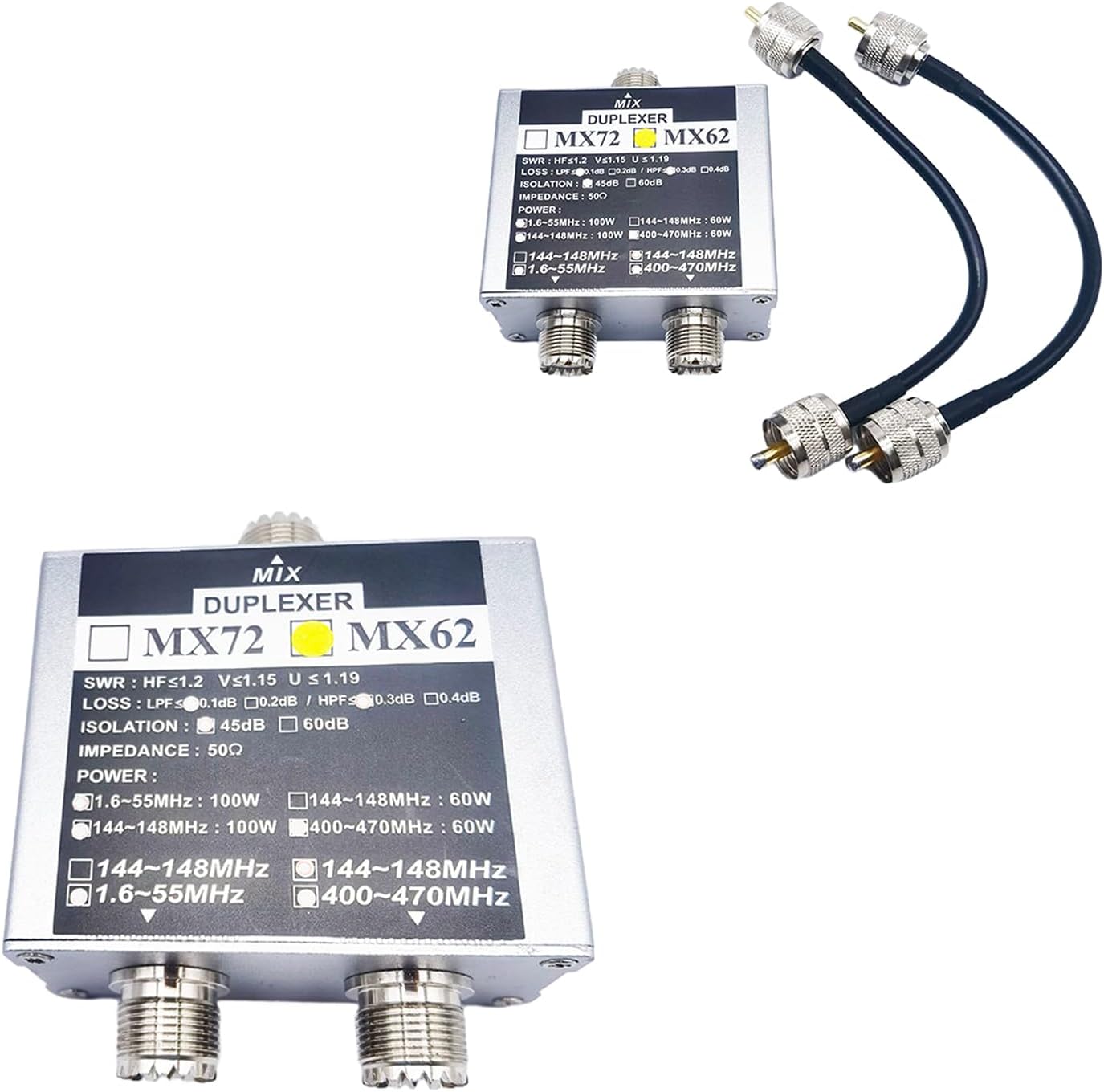
Figure 3.1: The MX62 Duplexer connected with coaxial cables, illustrating the typical setup for combining signals from two antennas to a single radio.
4. Operating Instructions
The Grotera MX62 Duplexer is a passive device and does not require external power or active configuration. Once properly connected, it automatically routes signals based on their frequency.
- Ensure your radio transceiver is set to the correct frequency band for transmission and reception.
- The duplexer will automatically direct signals from the common port to the appropriate frequency-specific port, and vice-versa.
- Always operate within the specified power limits for each frequency band to prevent damage to the duplexer or connected equipment.
5. Maintenance
The MX62 Duplexer requires minimal maintenance to ensure long-term performance.
- Cleaning: Keep the unit clean and free from dust and debris. Use a soft, dry cloth for cleaning. Do not use harsh chemicals or abrasive materials.
- Connections: Periodically check all coaxial cable connections to ensure they are tight and secure. Loose connections can lead to signal loss or interference.
- Environment: Store and operate the duplexer in a dry environment, away from extreme temperatures, direct sunlight, and moisture.
- Inspection: Visually inspect the unit for any signs of physical damage or corrosion on the connectors.
6. Troubleshooting
If you experience issues with your MX62 Duplexer, consider the following troubleshooting steps:
- Poor Signal or No Signal:
- Verify all coaxial cable connections are secure and properly seated.
- Ensure the correct antenna is connected to the corresponding frequency port on the duplexer.
- Check the integrity of your coaxial cables for any damage or shorts.
- Confirm your radio transceiver is operating within the frequency range supported by the connected antenna and duplexer port.
- Interference:
- Ensure proper grounding of your radio equipment.
- Check for external sources of interference in your operating environment.
- Verify that the duplexer's isolation specifications are sufficient for your application.
- Physical Damage:
- If the unit has sustained physical damage, it may affect performance. Contact customer support for assistance.
7. Specifications
Detailed technical specifications for the Grotera MX62 Portable Antenna Duplexer:
| Feature | Specification |
|---|---|
| Material | Metal |
| Dimensions (L x W x H) | Approx. 7.4 x 6.3 x 3.3 cm (2.91 x 2.48 x 1.30 inches) |
| Frequency Range | 1.6 ~ 55 MHz / 144 ~ 148 MHz / 400 ~ 470 MHz |
| Input Resistance (Power Handling) | 1.6 ~ 55 MHz & 144 ~ 148 MHz: 100 W 400 ~ 470 MHz: 60 W |
| Isolation Degree | 45dB (typical) |
| Insertion Loss | 1.6-55 MHz: below 0.1 dB 144-148 MHz & 400-470 MHz: below 0.3 dB |
| SWR (Standing Wave Ratio) | HF ≤1.2, V ≤1.19 |
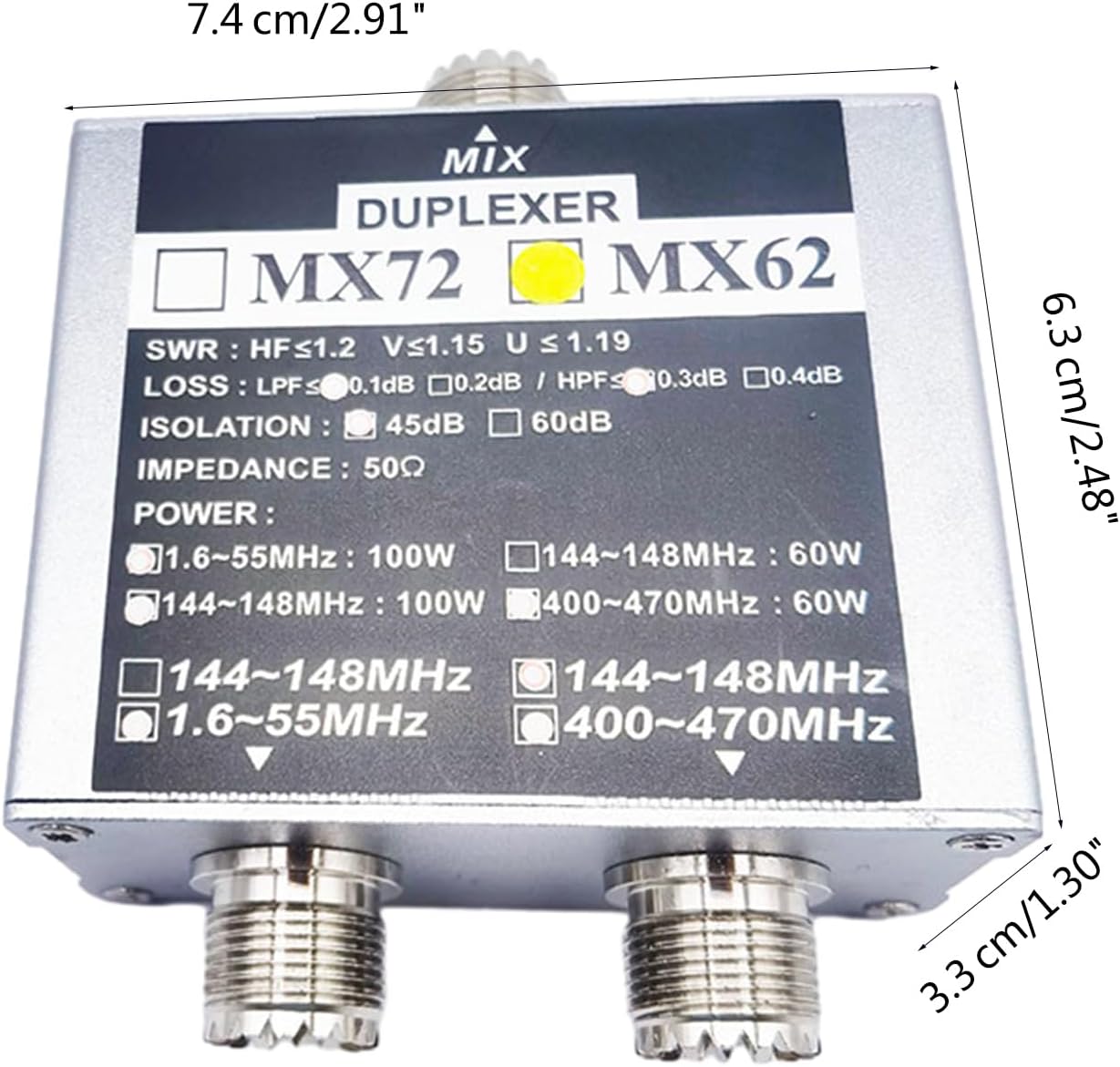
Figure 7.1: Dimensions of the MX62 Duplexer, showing its length, width, and height.
8. Warranty and Support
Grotera products are manufactured to high-quality standards. For specific warranty information, please refer to the documentation included with your purchase or contact your retailer. For technical support or inquiries, please reach out to Grotera customer service through their official channels.
Always ensure you purchase from authorized sellers to guarantee product authenticity and eligibility for support.
Ask a question about this manual
Ask about setup, troubleshooting, compatibility, parts, safety, or missing instructions. Manuals+ will review the question and use this page’s manual context to help answer it.