
1. Introduction
This manual provides essential information for the safe and efficient operation, installation, and maintenance of your Rinnai CXP199iN High Efficiency Plus Natural Gas Interior Tankless Water Heater. This unit is designed to provide on-demand hot water for commercial and multi-family residential applications. Please read this manual thoroughly before installation or use.

Figure 1: Front view of the Rinnai CXP199iN tankless water heater. This image shows the compact design of the unit, with the Rinnai logo prominently displayed and a digital display at the bottom.
2. Safety Information
Always adhere to the following safety guidelines to prevent property damage, personal injury, or death.
- Professional Installation Required: Installation, service, and maintenance must be performed by a qualified professional.
- Gas and Water Connections: Ensure all gas and water connections are properly sealed and tested for leaks.
- Ventilation: Proper venting is crucial. Do not obstruct the air inlet or exhaust.
- Flammable Materials: Do not store or use flammable materials, gasoline, or other combustible vapors and liquids in the vicinity of this appliance.
- Electrical Safety: Ensure the unit is properly grounded and connected to a 120-volt power supply.
- Hot Water Safety: Water temperatures above 120°F (49°C) can cause severe burns instantly or death from scalds. Exercise caution when setting water temperature.
3. Setup and Installation
The Rinnai CXP199iN is designed for versatile installation, either indoors or outdoors with the optional Versa-Vent outdoor vent cap (sold separately). Professional installation is strongly recommended.
3.1 Component Overview

Figure 2: Internal components of the Rinnai CXP199iN. This diagram illustrates key internal parts such as the flue gas exhaust, air inlet filter, fan, gas valve, primary and secondary heat exchangers, burner assembly, ignition unit, combustion analysis port, condensate trap, pump PC board (for CXP models), and main PC board.
Familiarize yourself with the main components of the unit as shown in Figure 2. This includes the air inlet, exhaust, burner assembly, heat exchangers, and control boards.
3.2 Connection Points
The unit features clearly marked connection points for water and gas lines, as well as vent connections.

Figure 3: Bottom view of the Rinnai CXP199iN. This image highlights the hot water outlet, cold water inlet, condensate drain, and gas connection points.
- Cold Water Inlet: Connect the incoming cold water supply.
- Hot Water Outlet: Connect to the hot water distribution system.
- Gas Connection: Connect the natural gas supply. The Smart Sense Gas Valve Technology allows for seamless adjustment between natural gas and propane without conversion kits.
- Condensate Drain: Connect to an appropriate drainage system.
- Vent Connection: The unit supports 2-inch (51mm) nominal PVC/CPVC/Polypropylene or 3-inch/5-inch Concentric venting.
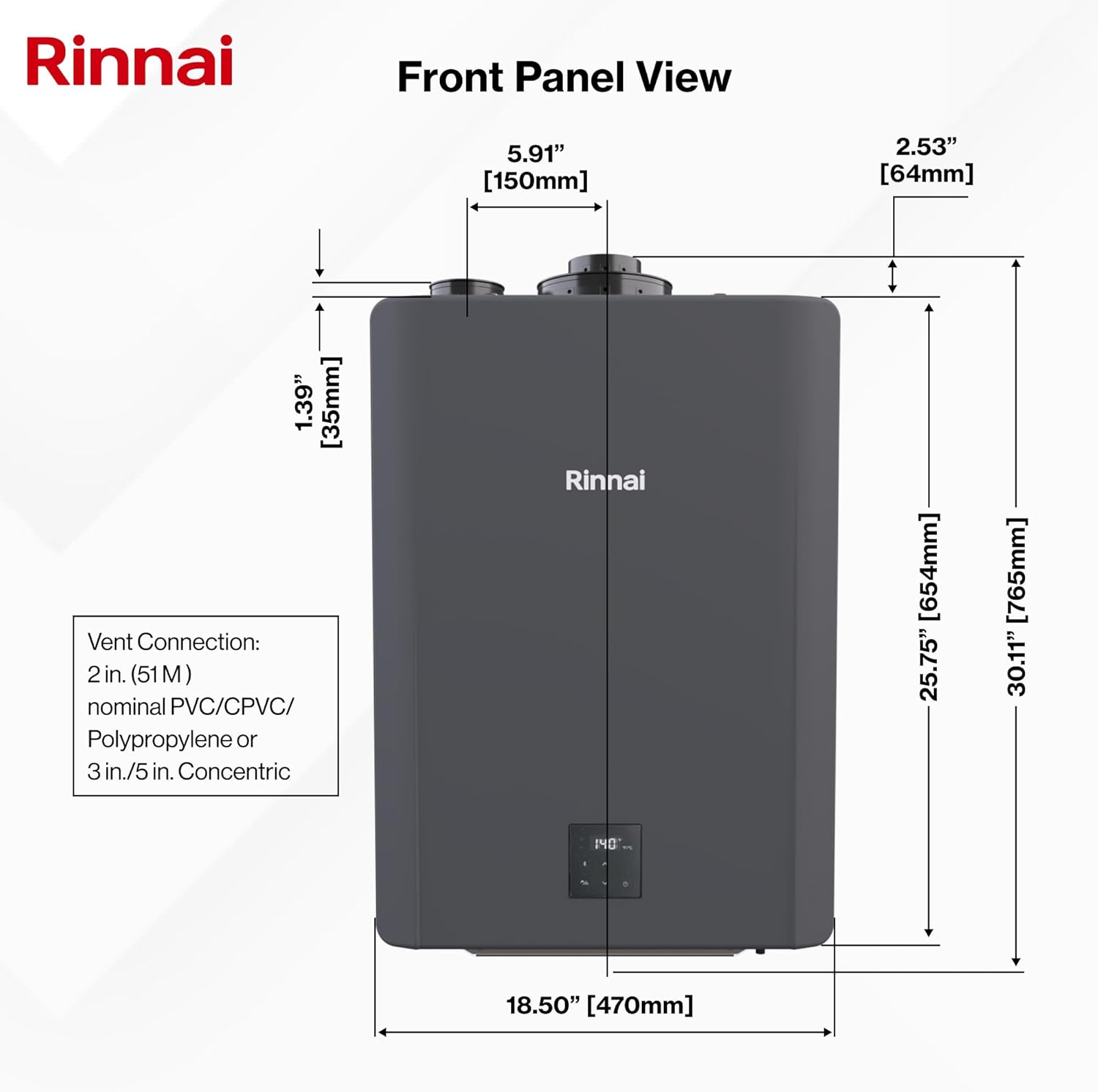
Figure 4: Front panel view with dimensions. This image provides the overall dimensions of the unit and specifies the compatible vent connection types and sizes.
4. Operating Instructions
The Rinnai CXP199iN is designed for user-friendly operation, providing on-demand hot water and intelligent features.
4.1 Powering On and Initial Start-up
- Ensure all gas and water connections are secure and leak-free.
- Open the main water supply valve to the unit.
- Open the gas supply valve to the unit.
- Connect the unit to a 120-volt electrical outlet. The unit will perform a self-diagnostic check.
- The digital display on the front panel will show the current status and temperature.
4.2 Setting Water Temperature
The desired hot water temperature can be adjusted via the control panel on the unit or through the Rinnai Central App. The maximum temperature is 140°F (60°C). For safety, especially in residential settings, a lower temperature (e.g., 120°F or 49°C) is often recommended to prevent scalding.

Figure 5: Overview of the Rinnai CXP199iN highlighting the controller, vent connections, and supply connections. The controller allows for temperature adjustments and displays operational status.
4.3 Smart-Circ Intelligent Recirculation
The built-in Smart-Circ Intelligent Recirculation system learns hot water usage patterns over approximately one week. It then schedules pump and tankless recirculation to ensure hot water is available when needed, optimizing energy usage. No external controllers are required for this feature.
4.4 Smart Connect with Rinnai Central App
For enhanced monitoring and management, download the Rinnai Central App on your smartphone. This app allows you to:
- Set up and manage your tankless water heater remotely.
- Monitor performance and energy usage.
- Receive alerts and troubleshoot issues.
5. Maintenance
Regular maintenance ensures the longevity and optimal performance of your Rinnai tankless water heater. Professional maintenance is recommended annually.
5.1 Quick Flush System
The CXP199iN features a simplified quick flush system for easy maintenance, particularly for descaling. This process helps remove mineral buildup that can affect efficiency and performance.
- Turn off the power and gas supply to the unit.
- Close the main water supply valve.
- Connect a descaling pump and hoses to the designated flush ports (typically service valves on the cold water inlet and hot water outlet).
- Circulate a descaling solution through the unit according to the descaling solution manufacturer's instructions.
- Flush the unit with fresh water to remove all descaling solution.
- Reconnect water and gas lines, restore power, and check for leaks.
Refer to the detailed descaling instructions in the full installation manual or consult a qualified service technician.
5.2 General Cleaning
Keep the exterior of the unit clean and free from dust and debris. Ensure the air inlet and exhaust vents are unobstructed.
6. Troubleshooting
If you encounter issues with your Rinnai CXP199iN, refer to the following basic troubleshooting steps. For complex problems, contact a qualified service professional.
| Problem | Possible Cause | Solution |
|---|---|---|
| No hot water | No power, gas supply off, water supply off, error code displayed. | Check power connection, gas valve, water valves. Note any error codes and consult the full manual or Rinnai support. |
| Inconsistent hot water temperature | Mineral buildup, improper gas pressure, flow rate issues. | Perform a quick flush descaling. Verify gas pressure. Ensure adequate water flow. |
| Unit not igniting | Gas supply issue, ignition component failure, blocked vent. | Check gas supply. Inspect vent for obstructions. Contact a professional for ignition system diagnosis. |
| Error code displayed | System malfunction. | Refer to the Rinnai Central App or the comprehensive manual for specific error code meanings and recommended actions. |
7. Specifications
Key technical specifications for the Rinnai CXP199iN Tankless Water Heater.
- Brand: Rinnai
- Model Number: CXP199iN
- Product Dimensions (W x H): 18.5" x 30.11"
- Item Weight: 71.8 pounds
- Color: Silver
- Voltage: 120 Volts
- Maximum Flow Rate: 11 Gallons Per Minute (GPM)
- Maximum Temperature: 140 Degrees Fahrenheit
- Thermal Efficiency: 97%
- Mounting Type: Wall
- Fuel Type: Natural Gas (convertible to Propane with Smart Sense Gas Valve Technology)
- UPC: 766156017322

Figure 6: Diagram detailing features of the Rinnai SENSEI RX series, which includes the CXP199iN. This image highlights improved turbo fan, enhanced primary and secondary heat exchangers, lighter weight, 4-speed DC pump, and Energy Star compliance.
8. Warranty Information
Rinnai products are backed by a manufacturer's warranty. Specific warranty terms and conditions, including coverage periods for parts and labor, can vary. Please refer to the warranty card included with your product or visit the official Rinnai website for the most current and detailed warranty information.
Note: Improper installation, unauthorized service, or failure to perform recommended maintenance may void your warranty.
9. Customer Support
For technical assistance, service inquiries, or to locate a qualified Rinnai professional in your area, please contact Rinnai Customer Support.
- Rinnai Official Website: www.rinnai.us
- Rinnai Central App: Available for download on smartphone app stores for remote monitoring and management.
- Rebate Information: For information on potential rebates, visit the Rinnai Rebate Website: Rinnai Rebate Website