
SUZLAZYR SA-060
SUZLAZYR Portable CD Player User Manual
Model: SA-060
Introduction
Thank you for purchasing the SUZLAZYR Portable CD Player. This device is designed to provide high-fidelity audio playback from CDs, MP3s, and USB drives, while also functioning as a versatile Bluetooth speaker. Its compact design, long-lasting battery, and multiple connectivity options make it ideal for home and car use. Please read this manual carefully before operating the device to ensure proper use and maintenance.

Image: The SUZLAZYR Portable CD Player, showcasing its wooden base, clear lid, and a CD playing. A remote control is positioned to the right of the player. This image illustrates the product's design and primary function.
Product Features
- 2-in-1 CD Player & Bluetooth Speaker: Functions as both a portable CD player and a portable Bluetooth speaker with 2.0 stereo surround sound and full-range internal magnetic speakers for pure sound quality.
- Two-Way Bluetooth Connectivity: Features a built-in Bluetooth receiver to connect to Bluetooth-enabled devices (e.g., smartphones) and a Bluetooth transmitter to pair with Bluetooth headphones or speakers.
- Crystal Clear Stereo Surround Sound: Utilizes Hi-Fi technology for high-quality, crystal clear stereo sound with minimal distortion, suitable for various environments.
- Wide Compatibility: Supports CD, MP3, CD-R, and USB formats. Includes integrated 3.5mm AUX input/output and a headphone jack. Can connect to car audio systems via AUX cable.
- Rechargeable Battery: Built-in 2600mAh lithium battery provides over 10 hours of continuous playback on a single charge. Charges via the included USB Type-C cable.
- Professional CD Laser Module: Employs a pure professional CD laser module for stable and high-quality disc reading.
- High-Fidelity Optical Output: Offers optical fiber high-fidelity sound output for lossless pure sound quality.
- Japanese JRC Op-Amp: Incorporates a Japanese JRC op-amp for audio amplification, ensuring strong stability and improved sound quality.
- Infrared Remote Control: Convenient remote control operation for ease of use.
Package Contents
Please check the package contents upon unboxing:
- SUZLAZYR Portable CD Player (Model: SA-060)
- Type-C Charging Cable (80 cm) x 1
- Audio Cable x 1
- Remote Control x 1
- User Manual x 1
Setup
1. Charging the Device
Before first use, fully charge the CD player. Connect the included Type-C charging cable to the charging port on the device and the other end to a 5V/2A USB power adapter (not included). The LED display will indicate charging status. A full charge takes approximately 3 hours and provides 8-10 hours of playback.

Image: The portable CD player placed on a nightstand next to a bed, emphasizing its compact size and long battery life. Text overlays indicate 2600mAh battery capacity, 3 hours charging time, and 8-10 hours battery life.
2. Powering On/Off
Press and hold the Power button on the control panel or remote control to turn the device on or off.
Operating Instructions
Control Panel Overview

Image: A detailed view of the CD player's control panel, showing the LED display and buttons. Labels indicate functions such as display, volume up/down, previous/next track, stop, play/pause, mode selection, and power switch.
- LED White Light Display: Shows track number, time, and mode.
- - / + Buttons: Short press for previous/next song; Long press to decrease/increase volume.
- Stop Button: Stops playback.
- Play / Pause Button: Toggles play and pause.
- M (Mode) Button: Selects playback mode (CD, Bluetooth, AUX, USB).
- Power Button: Turns the device on/off.
1. CD Playback
- Open the CD compartment lid.
- Carefully place a CD (CD-DA, MP3, CD-R) onto the spindle, label side up.
- Close the lid. The player will automatically detect the disc and begin playback.
- Use the Play/Pause, Stop, Previous/Next, and Volume buttons on the control panel or remote control to manage playback.
2. Bluetooth Connectivity (Two-Way)
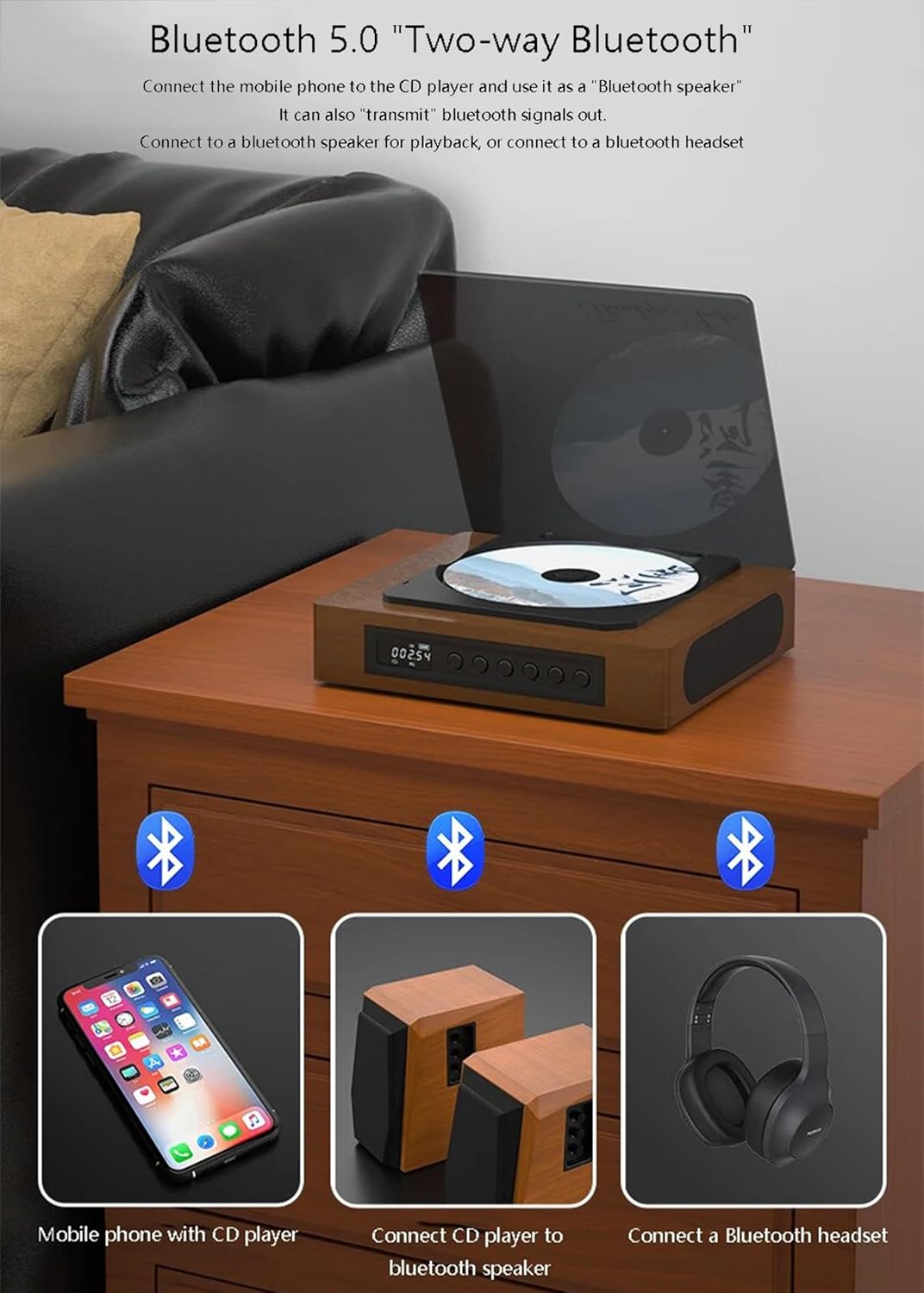
Image: An illustration demonstrating the two-way Bluetooth functionality. It shows the CD player connecting to a mobile phone (acting as a Bluetooth speaker) and also transmitting audio to external Bluetooth speakers or headphones.
2.1. Connecting to the CD Player (Receiver Mode)
To use the CD player as a Bluetooth speaker for your smartphone or other Bluetooth-enabled device:
- Turn on the CD player.
- Press the M (Mode) button until "Bluetooth" mode is selected (indicated on the display). The device will enter pairing mode.
- On your smartphone or Bluetooth device, search for "SUZLAZYR" in the Bluetooth settings.
- Select "SUZLAZYR" to pair. Once connected, you can play audio from your device through the CD player's speakers.
2.2. Connecting the CD Player to Bluetooth Headphones/Speakers (Transmitter Mode)
To listen to CDs or USB audio through external Bluetooth headphones or speakers:
- Ensure your Bluetooth headphones or speakers are in pairing mode.
- Turn on the CD player and select CD or USB mode.
- The CD player will automatically search for nearby Bluetooth audio devices. Once found, it will connect.
- If it doesn't connect automatically, you may need to briefly press the Bluetooth button on the remote (if available) or cycle through modes to re-initiate pairing.
3. AUX Input
To play audio from an external device (e.g., MP3 player, car audio system) through the CD player's speakers:
- Connect one end of the 3.5mm audio cable to the AUX input port on the CD player.
- Connect the other end to the audio output jack of your external device.
- Press the M (Mode) button until "AUX" mode is selected.
- Play audio from your external device.
4. USB Playback
To play MP3 files from a USB flash drive:
- Insert a USB flash drive (max 32GB) containing MP3 files into the USB port.
- Press the M (Mode) button until "USB" mode is selected.
- The player will automatically detect and begin playing MP3 files from the USB drive.
5. Using the Remote Control

Image: A couple relaxing on a sofa, using the remote control for the SUZLAZYR Portable CD Player. This highlights the convenience of the infrared remote control, allowing users to operate the device from a distance.
The included infrared remote control allows for convenient operation from a distance. Functions include power on/off, volume control, track navigation, play/pause, stop, and mode selection. Ensure there are no obstructions between the remote and the player's infrared receiver.
6. Optical Output (SPDIF)

Image: A close-up view of the rear of the CD player, highlighting the SPDIF optical output port. This feature allows for high-fidelity, lossless sound transmission to compatible audio systems.
For the highest quality audio output, connect the SPDIF optical output port to a compatible amplifier or sound system using an optical audio cable (not included). This provides lossless pure sound quality.
7. Various Interfaces

Image: A diagram illustrating the different input and output interfaces on the CD player, including SPDIF optical output, AUX input, headphone output, USB interface, and charger socket. This shows the device's versatility in connecting to various audio equipment.
The player features multiple interfaces for broad compatibility:
- SPDIF Optical Output: For high-fidelity digital audio output.
- AUX Input: 3.5mm audio input for external devices.
- Headphone Output: 3.5mm stereo headphone jack.
- USB Interface: For playing MP3 files from USB drives.
- Charger Socket: Type-C port for power and charging.
Maintenance
- Cleaning: Use a soft, dry cloth to clean the exterior of the player. Do not use liquid cleaners or aerosols.
- Disc Care: Handle CDs by the edges. Keep them clean and free of scratches. Store them in their cases when not in use.
- Storage: Store the device in a cool, dry place away from direct sunlight and extreme temperatures.
- Laser Lens: Do not touch the laser lens. If cleaning is necessary, use a specialized CD lens cleaner disc.
Troubleshooting
| Problem | Possible Cause | Solution |
|---|---|---|
| Device does not power on. | Low battery or no power connection. | Charge the device using the Type-C cable. Ensure the power adapter is working. |
| No sound from speakers. | Volume too low; incorrect mode selected; headphones connected. | Increase volume. Ensure correct mode (CD, Bluetooth, AUX, USB) is selected. Disconnect headphones if using speakers. |
| CD skipping or not playing. | CD is dirty, scratched, or inserted incorrectly. | Clean the CD with a soft cloth. Check for deep scratches. Reinsert the CD correctly. |
| Bluetooth connection issues. | Device too far; pairing mode not active; interference. | Ensure devices are within 10 meters. Put both devices in pairing mode. Restart both devices. |
| USB drive not recognized. | USB format not supported; drive capacity too large; corrupted files. | Ensure USB is FAT32 format and max 32GB. Check if files are MP3. Try another USB drive. |
Specifications
| Parameter | Value |
|---|---|
| Model Number | SA-060 |
| Brand | SUZLAZYR |
| Voltage | DC 5V/2A |
| Bluetooth Version | 5.0 |
| Bluetooth Protocol Support | ADP/AVRCP |
| Bluetooth Reception Distance | 10M |
| Battery Capacity | 2600 mAh/3.7 V |
| Speaker Output Power | 2*2 W THD <0.1% |
| USB Interface Support | Max 32GB USB drive |
| Readable Formats | CD-DA/MP3 (CD-RW/USB) |
| Audio Input | 3.5mm audio input |
| Audio Output | 3.5mm stereo headphone output |
| Digital Interface | Optical signal output (SPDIF) |
| Type-C Charging Cable Length | 80 cm |
| Product Size | 158*158*46.6mm |
| Product Weight | 580g |
Warranty and Support
For warranty information and customer support, please refer to the warranty card included in your package or contact SUZLAZYR customer service through the retailer where you purchased the product. Please retain your proof of purchase for warranty claims.
Customer Service Contact: Please refer to the contact information provided on the product packaging or the official SUZLAZYR website for support.