
Urbuti FC23922
Urbuti Facial Cleansing Brush User Manual
Model: FC23922
Introduction
Thank you for choosing the Urbuti Facial Cleansing Brush. This device is designed to provide deep cleansing and gentle exfoliation for your face and neck, promoting healthier, more radiant skin. With its advanced sonic vibration technology, zoned silicone brush head, and multi-functional hot compress feature, it offers a comprehensive skincare solution for both men and women. Please read this manual thoroughly before use to ensure proper operation and maintenance.
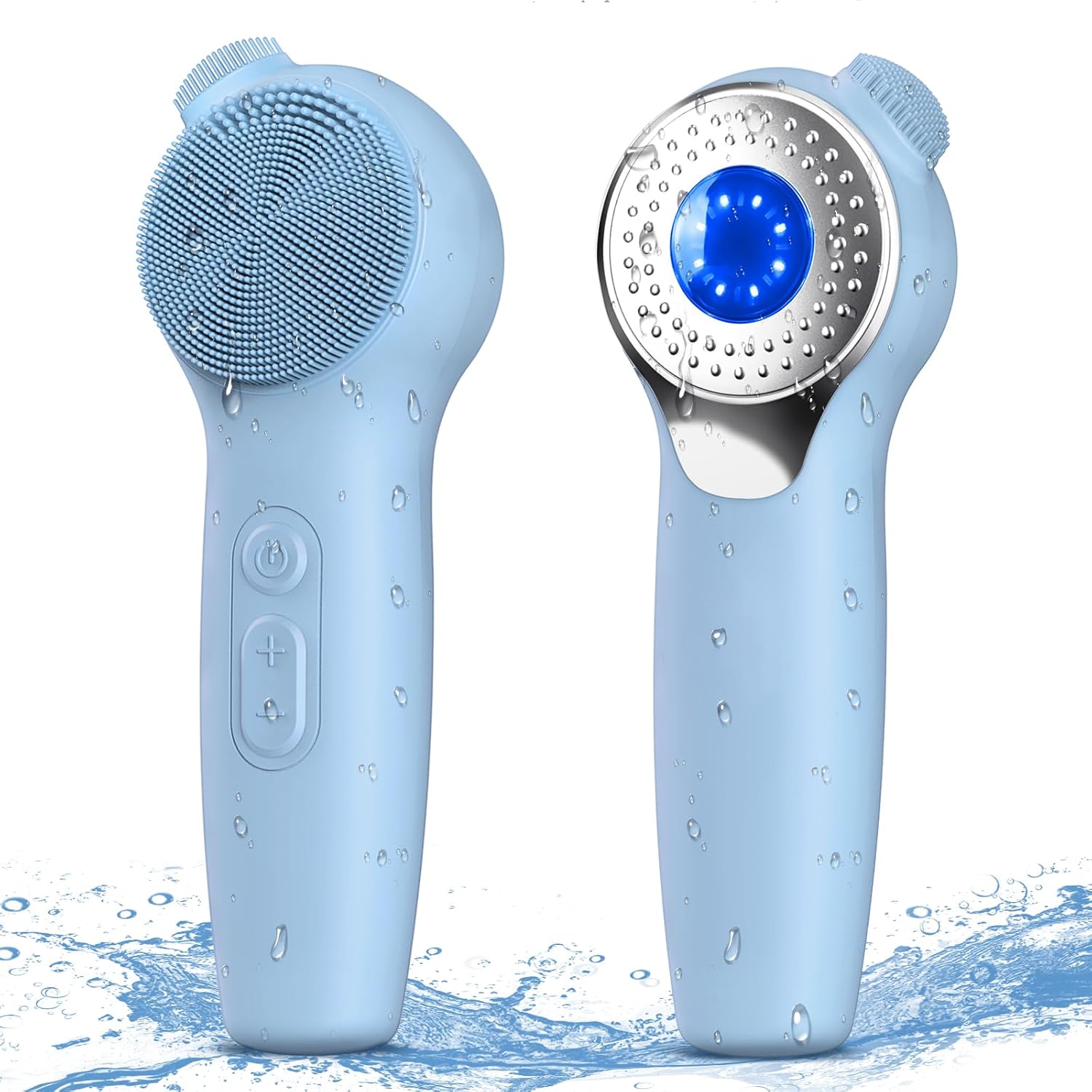
Figure 1: Urbuti Facial Cleansing Brush (Blue model)
Safety Information
- Ensure the device is properly charged and unplugged before use.
- Do not submerge the charging interface underwater.
- Always keep the device away from water sources while charging.
- Statements regarding dietary supplements have not been evaluated by the FDA and are not intended to diagnose, treat, cure, or prevent any disease or health condition.
Product Features
The Urbuti Facial Cleansing Brush is equipped with several features designed to enhance your skincare routine:
- Deep Cleansing & Gentle Exfoliation: High-quality silicone bristles and efficient sonic vibrations work with your facial cleanser to create rich foam, deeply cleaning and caring for skin cuticles, promoting cellular metabolism, and firming the skin.
- Zoned Silicone Brush Head & Five Vibration Intensity: Designed with three brush head areas for detailed cleansing: shag brush for oil-prone areas (forehead, around lips, chin), fine brush for cheeks, and small nose brush head for the nose and sides. Five different vibration amplitudes cater to all daily cleaning needs.
- Multi-functional Hot Compress: This intelligent facial cleanser includes a hot compress feature that mimics skin pore expansion, warming pores to open them and effectively remove deep dirt. Red/blue light therapy areas promote absorption of skincare products for stretched and plumped skin.
- IPX7 Waterproof: Features an IPX7 waterproof design and ergonomic handle, with a safer DC puncture charging interface to prevent water and dust entry. Safe for use during washing and showering.
- Long Battery Life: A 1-2 hour full charge can last up to a month.
Detailed Features Overview
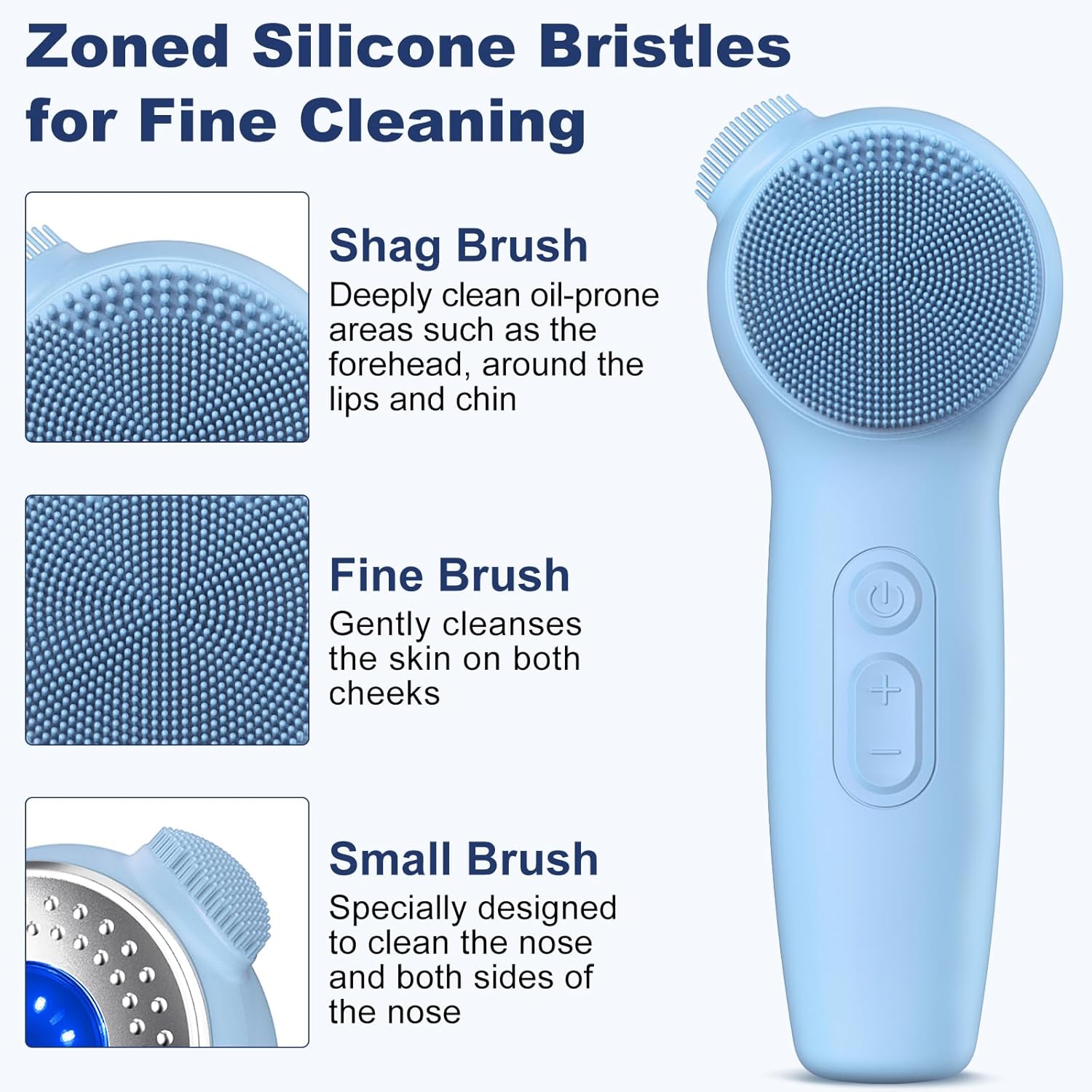
Figure 2: Zoned Silicone Bristles for targeted cleaning of different facial areas.

Figure 3: Patented Advanced Sonic Technology effectively removes dirt and oil for deep cleansing.

Figure 4: Five adjustable vibration intensities (Light, Soft, Moderate, Slightly Strong, Strong) to suit different skin needs.

Figure 5: Hot compress function opens pores, while red/blue light therapy aids in skincare product absorption and skin improvement.

Figure 6: The IPX7 waterproof rating ensures safe use under faucet, in the shower, or even submerged.

Figure 7: Secure DC Puncture Charging Interface allows for full charge in approximately two hours.
Setup
Before first use, ensure your Urbuti Facial Cleansing Brush is fully charged. Connect the DC puncture charging cable to the device and a compatible USB power source (e.g., computer, power bank, or adapter). The charging indicator will show progress, and the device will be ready for use once fully charged.
Operating Instructions
- Wet your face and apply your preferred facial cleanser.
- Wet the silicone brush head of the device.
- Press the power button to turn on the device.
- Select your desired vibration intensity using the '+' and '-' buttons. There are five levels of intensity.
- Gently move the brush in circular motions across your face and neck. Utilize the zoned bristles for specific areas: shag brush for oil-prone areas, fine brush for cheeks, and small nose brush for the nose.
- To activate the hot compress or light therapy, press the power button again after turning on the device. Press once for blue light, twice for red light, and three times for hot compress.
- After cleansing, rinse your face thoroughly with water and pat dry.
- Clean the brush head after each use by rinsing it under running water.
- Charge the brush when the battery indicator is low.

Figure 8: Visual guide for using the Urbuti Facial Cleansing Brush.
Official Product Video
Video 1: Official demonstration of the Urbuti Facial Cleansing Brush features and usage.
Maintenance
To ensure the longevity and hygiene of your Urbuti Facial Cleansing Brush, follow these maintenance guidelines:
- After each use, rinse the silicone brush head thoroughly with warm water and a mild soap to remove any cleanser residue or impurities.
- Gently pat the device dry with a clean, soft towel.
- Store the brush in a dry, well-ventilated area, away from direct sunlight or extreme temperatures.
- Avoid using abrasive cleaners or harsh chemicals on the device, as this may damage the silicone or electronic components.
- Regularly inspect the charging port for any debris and clean if necessary with a dry, soft brush.
Troubleshooting
If you encounter any issues with your Urbuti Facial Cleansing Brush, please refer to the following common problems and solutions:
| Problem | Possible Cause | Solution |
|---|---|---|
| Device does not turn on. | Low battery; device not charged. | Ensure the device is fully charged. Check the charging cable and power source connection. |
| Vibration is weak or inconsistent. | Low battery; brush head clogged. | Recharge the device. Clean the silicone bristles thoroughly to remove any residue. |
| Hot compress/light therapy not working. | Incorrect mode selection; device malfunction. | Ensure you are pressing the power button correctly to cycle through the modes. If the issue persists, contact customer support. |
| Charging issues (e.g., not charging, solid blue light but not turning on). | Faulty charging cable/port; internal battery issue. | Verify the charging cable is not damaged and is securely connected. Try a different USB power source. If the problem continues, it may indicate an internal issue requiring professional assistance or warranty claim. |
If the problem persists after attempting these solutions, please contact Urbuti customer support for further assistance.
Specifications
| Feature | Detail |
|---|---|
| Product Dimensions | 0.39 x 0.39 x 0.39 inches |
| Item Model Number | FC23922 |
| Weight | 9.88 ounces |
| Batteries | 1 CR5 battery required (included) |
| Material | Silicone |
| Brand | Urbuti |
| Color | Blue |
| Power Source | Battery Powered |
| Waterproof Rating | IPX7 |
Warranty and Support
For warranty information or technical support, please refer to the product packaging or contact Urbuti customer service directly. Keep your purchase receipt as proof of purchase for any warranty claims.
You can visit the official Urbuti Store for more information: Urbuti Store on Amazon.
Ask a question about this manual
Ask about setup, troubleshooting, compatibility, parts, safety, or missing instructions. Manuals+ will review the question and use this page’s manual context to help answer it.