
ninetom GPBM2022H-NBT
Android 13 Car Radio User Manual
Brand: ninetom | Model: GPBM2022H-NBT
1. Introduction
This manual provides comprehensive instructions for the installation, operation, and maintenance of your ninetom Android 13 Car Radio. This 12.3-inch touchscreen unit is designed to enhance your in-car entertainment and navigation experience while retaining your vehicle's original functionalities.
Compatibility: This unit is compatible with Mercedes Benz E Class S212 W212 models from 2009 to 2014, specifically those equipped with NTG4.0, NTG4.5, and NTG4.7 systems. This includes models such as E200, E250, E300, E350, E400, E500, E550, and E63 AMG.

Image: Compatible Model List. This image displays a table detailing the compatible Mercedes Benz E Class models (S212 W212) from 2009-2014 with NTG 4.0/4.5/4.7 systems.

Image: Fitment Check. This image illustrates how to verify compatibility by checking the original car dashboard picture and the original car system (NTG 4.0, 4.5, 4.7). It explicitly states that the unit is not compatible with E Coupe cars or NTG 5.0/5.1/5.2 systems.
2. Product Overview
The ninetom Android 13 Car Radio features a 12.3-inch touchscreen display, powered by Android 13 with 8GB RAM and 256GB storage. It is designed to integrate seamlessly with your Mercedes Benz, preserving original vehicle functions.
Key Features:
- Android 13 System: Equipped with the latest Android 13 operating system, offering enhanced performance and access to a wide range of applications.
- High Performance: Features 8GB RAM and 256GB internal storage for smooth operation and ample space for apps and media.
- Wireless CarPlay & Android Auto: Supports both wireless and wired connections for Apple CarPlay and Android Auto, allowing integration with Siri, Maps, Music, and phone calls.
- Mirror Link Function: Enables screen mirroring from your smartphone (AirPlay for iPhone, AutoLink for Android).
- Retains Original Functions: Fully compatible with original car radio, amplifier, joystick control, reversing camera, parking radar, and other factory features.
- Connectivity: Built-in WiFi, USB ports, and SIM card slot for versatile connectivity options.
- High Resolution Display: 12.3-inch touchscreen with 1920x1080 resolution for clear and vibrant visuals.

Image: ninetom Android 13 Car Radio. This image shows the 12.3-inch touchscreen unit with its Android 13 interface, featuring navigation, music, phone, weather, and car info icons. A smartphone displaying "Android 13 CarPlay" is shown connected to the unit, which is installed in a Mercedes Benz dashboard.

Image: Before and After Upgrade. This image provides a side-by-side comparison of a Mercedes Benz dashboard before and after the installation of the ninetom Android 13 touchscreen, highlighting the visual upgrade.
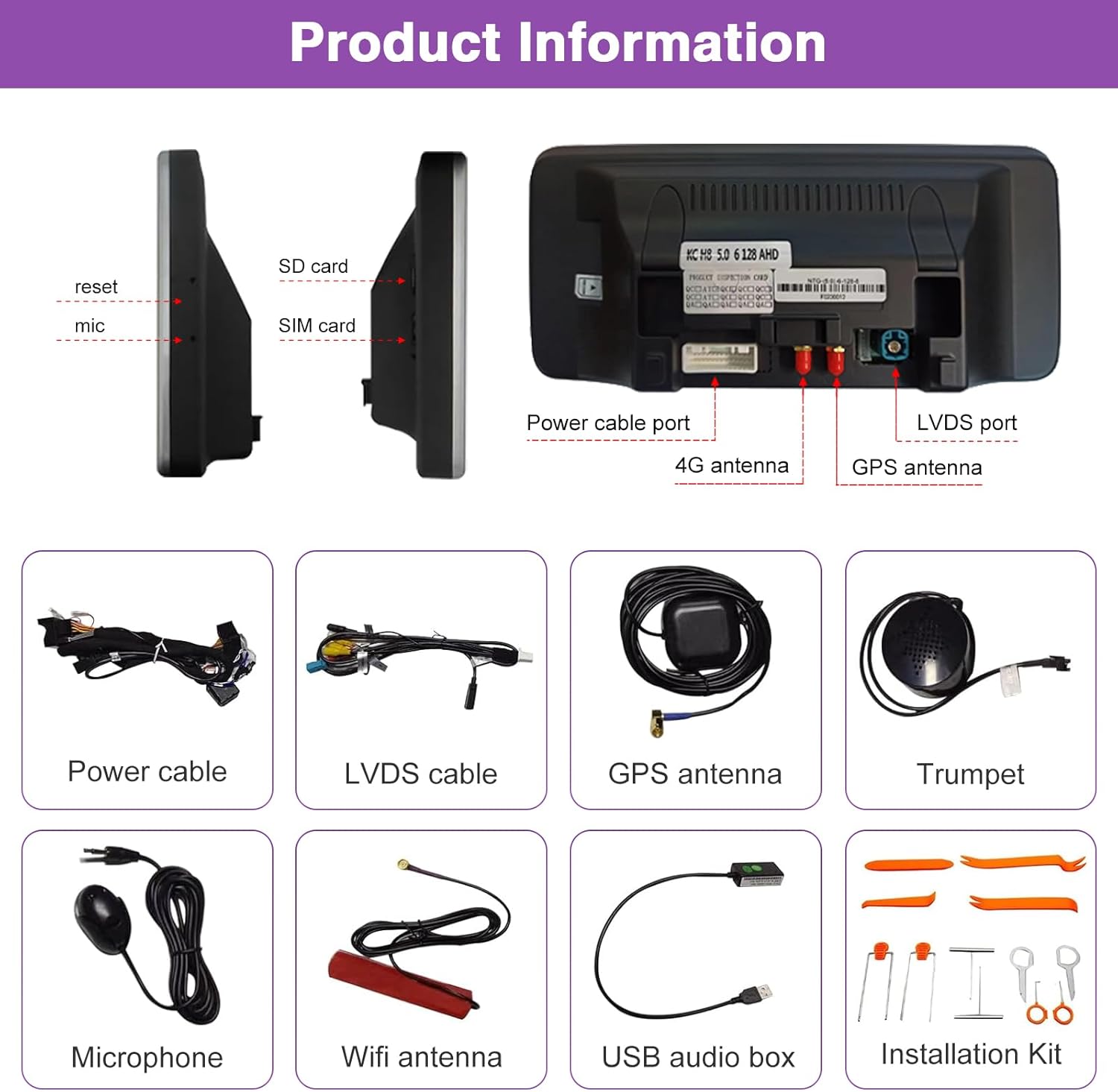
Image: Product Information. This image details the ports on the unit (reset, mic, SD card, SIM card, power cable port, 4G antenna, GPS antenna, LVDS port) and displays all included components: Power cable, LVDS cable, GPS antenna, Trumpet, Microphone, Wifi antenna, USB audio box, and Installation Kit.
3. Setup and Installation
Installation of the ninetom Android 13 Car Radio requires careful attention. It is recommended to seek professional assistance if you are not confident in performing the installation yourself. Ensure all functions are tested before finalizing the installation.
General Installation Guidelines:
- Preparation: Before beginning, ensure your vehicle's ignition is off and the battery is disconnected to prevent electrical damage.
- Remove Original Unit: Carefully remove the existing car radio unit and display from your dashboard. Refer to your vehicle's service manual for specific instructions on panel removal.
- Connect Cables: Connect the provided power cable, LVDS cable, GPS antenna, 4G antenna, microphone, and USB audio box to the new Android unit as indicated in the product information image. Ensure all connections are secure.
- Integrate with Vehicle System: Connect the new unit to your vehicle's wiring harness. The design ensures retention of original car functions.
- Test Functions: Before fully reassembling the dashboard, reconnect the vehicle battery and power on the unit. Test all functionalities, including audio, navigation, CarPlay/Android Auto, Bluetooth, and camera inputs (if applicable).
- Final Assembly: Once all functions are verified, carefully reassemble the dashboard and secure the new unit in place.
Important: Do not finalize the installation until you have tested every function on your vehicle and ensured they work correctly.
4. Operating Instructions
Basic Operation:
- Power On/Off: The unit powers on automatically with the vehicle ignition. To turn off, turn off the vehicle ignition.
- Touchscreen Navigation: Navigate through the Android interface by tapping icons and swiping.
- Volume Control: Use the vehicle's original steering wheel controls or the unit's touchscreen volume controls.
Switching Between Systems:
You can easily switch between the factory car system and the Android 13 system by tapping the 'Car Info' button on the Android home screen menu.

Image: System Switching. This image demonstrates how to switch between the Android 13 System Interface and the Factory NTG4.5/4.7 System Interface by tapping the 'Car Info' button. It also shows 8 color options for the user interface.
Wireless CarPlay & Android Auto:
The unit supports both wireless and wired connections for Apple CarPlay and Android Auto. The connection method depends on your phone type.
- Enable Bluetooth & Wi-Fi: Ensure Bluetooth and Wi-Fi are enabled on your smartphone.
- Pair Device: On the car radio, go to the Bluetooth settings and pair your phone.
- Launch CarPlay/Android Auto: Once paired, the CarPlay or Android Auto interface should automatically launch or be accessible from the main menu.
With CarPlay/Android Auto, you can use Siri/Google Assistant, access Maps (Waze, Sygic, etc.), play music from iTunes or other apps, and manage phone calls and messages.

Image: CarPlay, Android Auto, Mirror Link. This image shows the unit displaying Apple CarPlay and Android Auto interfaces, along with a demonstration of the MirrorLink function (AirPlay for iPhone and AutoLink for Android).
Multimedia and Connectivity:
- Bluetooth Music: Connect your phone via Bluetooth to stream music.
- USB Ports: Use the USB ports for media playback or connecting other devices.
- SIM Card Slot: Insert a SIM card for mobile data connectivity.
- GPS Navigation: The unit supports GPS navigation. You can download different navigation apps and link them to your homescreen.
- Camera Support: Supports factory original reverse camera, parking radar, aftermarket reverse camera, and 360 camera. Also supports front view camera DVR (CVBS input).

Image: Connectivity and Camera Support. This image highlights features such as WiFi/USB/Bluetooth support, global weather display, GPS navigation, and compatibility with factory, aftermarket, and 360 cameras.

Image: Original Car Settings Support. This image shows that the unit supports original car audio, CD radio, steering wheel control, original command knob, original touch mouse, and original joystick.

Image: Applications. This image displays a grid of various applications available on the Android system, including navigation, music, communication, and entertainment apps.
Video: 12.3 Inch Touchscreen for Mercedes Benz. This video demonstrates the user interface of the ninetom Android 13 car radio, showcasing various features, app navigation, and system information.
5. Maintenance
To ensure the longevity and optimal performance of your ninetom Android 13 Car Radio, follow these maintenance guidelines:
- Screen Cleaning: Use a soft, lint-free cloth to gently wipe the touchscreen. For stubborn smudges, slightly dampen the cloth with a screen-safe cleaner. Avoid abrasive materials or harsh chemicals.
- Software Updates: Periodically check for software updates to ensure you have the latest features and security patches. Updates can typically be found in the system settings or through the manufacturer's website.
- Avoid Extreme Temperatures: Do not expose the unit to extreme temperatures, as this can affect its performance and lifespan.
- Protect from Liquids: Keep liquids away from the unit to prevent damage to internal components.
6. Troubleshooting
If you encounter issues with your ninetom Android 13 Car Radio, refer to the following common troubleshooting steps:
| Problem | Possible Solution |
|---|---|
| Unit does not power on. | Check power connections and vehicle fuse. Ensure the vehicle ignition is on. |
| No sound from speakers. | Verify speaker connections. Check volume levels on both the unit and the vehicle's original audio system. Ensure the amplifier is functioning. |
| CarPlay/Android Auto not connecting. | Ensure Bluetooth and Wi-Fi are enabled on your phone. Try forgetting the device on both the phone and the unit, then re-pair. Check for software updates on both devices. |
| Touchscreen unresponsive. | Restart the unit (turn vehicle ignition off and on). If issue persists, perform a factory reset (refer to system settings). |
| GPS signal weak or inaccurate. | Ensure the GPS antenna is properly installed and has a clear view of the sky. Try updating navigation app maps. |
| Original car functions not working. | Verify all LVDS and CANBUS connections are secure. Ensure the unit is correctly configured to retain original functions. |
If these steps do not resolve the issue, please contact ninetom customer support for further assistance.
7. Specifications
| Feature | Detail |
|---|---|
| Brand | ninetom |
| Model Number | GPBM2022H-NBT |
| Operating System | Android 13 |
| RAM | 8GB |
| Storage | 256GB |
| Display Size | 12.3 Inches |
| Resolution | 1920 x 1080 |
| Control Method | Touchscreen, Voice Command |
| Connectivity | Bluetooth, Wi-Fi, USB, SIM Card |
| CarPlay/Android Auto | Wireless & Wired Support |
| Item Weight | 5.83 pounds |
| Package Dimensions | 15.43 x 7.28 x 7.24 inches |

Image: Resolution Comparison. This image compares the unit's 1920x720 resolution (approximately 1,368,000 pixels) with a lower 1280x480 resolution (approximately 628,800 pixels), highlighting the superior clarity and brightness of the ninetom unit.

Image: Screen Size Comparison. This image visually compares a 10.25-inch screen with the 12.3-inch screen, showing the larger dimensions of the product.
8. Warranty and Support
Your ninetom Android 13 Car Radio comes with a 1-Year Warranty. This warranty covers manufacturing defects and ensures the quality of your product.
Installation Assistance: The installation process does not damage your original car wiring and will not affect your factory car warranty. If you require assistance with installation, it is recommended to seek help from a professional.
Customer Support: For any issues, questions, or technical support, please feel free to reach out to ninetom customer service. Our team is available to provide knowledgeable assistance.