
Xiaomi OB03729
Xiaomi Karaoke Microphone Black - User Manual
Model: OB03729
Introduction
This user manual provides comprehensive instructions for the safe and effective use of your Xiaomi Karaoke Microphone Black. Please read this manual thoroughly before operating the device and retain it for future reference.
The Xiaomi Karaoke Microphone is designed to deliver an immersive audio experience with its dual high-power speakers and advanced sound processing. Its portable design and long-lasting battery make it ideal for various entertainment settings.
Product Overview
Familiarize yourself with the components and controls of your Xiaomi Karaoke Microphone.
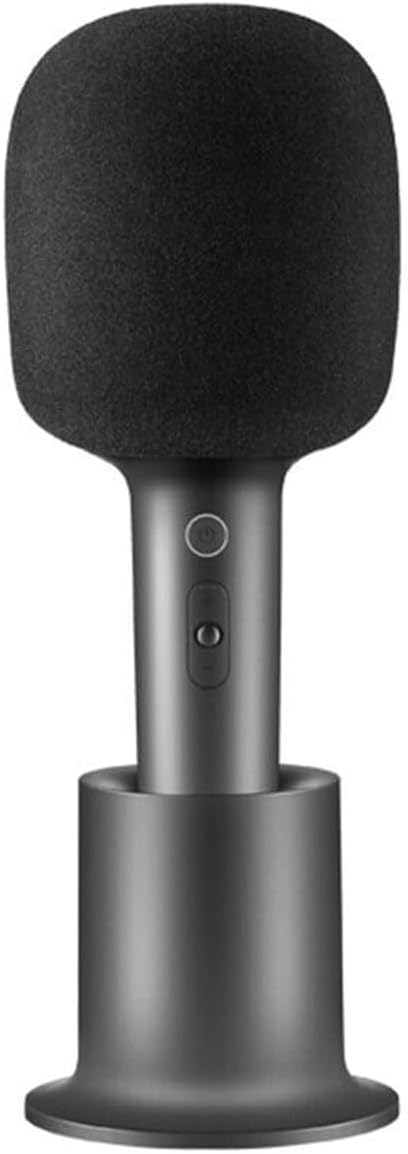
Figure 1: Xiaomi Karaoke Microphone with its charging base.

Figure 2: Front view of the microphone, showing the power button and volume/effect controls.
Key Features:
- Dual 5W High-Power Speakers: Provides immersive audio with rich bass and clear vocals for a karaoke-like experience.
- 2500mAh High-Capacity Battery: Offers up to 7 hours of continuous singing on a single charge.
- One-Key Smart Elimination of Original Sound: Easily removes vocal tracks from songs, allowing you to sing along.
- Multi-Function Buttons: Control volume, change sound effects, and pause/play music directly on the microphone.
- Stylish and Portable Design: Lightweight and compact for easy transport.
Setup
Charging the Microphone:
- Connect the provided USB Type-C charging cable to the charging port on the microphone or the charging base.
- Connect the other end of the cable to a compatible USB power adapter (5V) or a computer USB port.
- The indicator light will show charging status. A full charge typically takes approximately 3-4 hours.

Figure 3: The microphone can be connected to a smartphone for use.
Pairing via Bluetooth:
- Press and hold the power button on the microphone to turn it on. The indicator light will flash, indicating it is in pairing mode.
- On your smartphone or other Bluetooth-enabled device, navigate to the Bluetooth settings.
- Select "Xiaomi Karaoke Mic" (or similar name) from the list of available devices.
- Once paired, the indicator light on the microphone will turn solid.
Operating Instructions
Basic Functions:
- Power On/Off: Press and hold the power button.
- Volume Control: Use the volume up (+) and down (-) buttons to adjust the microphone's output volume.
- Music Playback: When connected to a device, use the play/pause button to control music playback.
Advanced Functions:
- Original Sound Elimination: Press the dedicated "one-key smart elimination" button to remove vocals from a song, allowing you to sing along to the instrumental track.
- Sound Effects: Cycle through various sound effects by pressing the sound effect button. The microphone features 9 interesting sound effects, including monster and cartoon effects.

Figure 4: The microphone offers various sound effects for an enhanced experience.

Figure 5: Experience KTV-level stereo sound with the dual 5W high-power opposed speakers.
Maintenance and Care
- Clean the microphone's exterior with a soft, dry cloth. Do not use abrasive cleaners or solvents.
- Avoid exposing the microphone to extreme temperatures, humidity, or direct sunlight.
- Store the microphone in a cool, dry place when not in use.
- Do not attempt to disassemble or repair the microphone yourself. Contact authorized service personnel for assistance.
Troubleshooting
| Problem | Possible Cause | Solution |
|---|---|---|
| Microphone does not turn on. | Battery is depleted. | Charge the microphone using the provided USB Type-C cable. |
| Cannot pair with Bluetooth device. | Microphone is not in pairing mode or device's Bluetooth is off. | Ensure microphone is on and indicator light is flashing. Turn on Bluetooth on your device and search for "Xiaomi Karaoke Mic". |
| No sound output. | Volume is too low or microphone is not properly connected. | Increase microphone volume. Ensure Bluetooth connection is stable. Check volume on connected device. |
| Sound quality is poor. | Interference or microphone too far from source. | Move closer to the connected device. Avoid sources of strong electromagnetic interference. |
Specifications
| Feature | Detail |
|---|---|
| Model Number | OB03729 |
| Color | Black |
| Material | Aluminum |
| Dimensions (L x W x H) | 10 x 5 x 1.3 cm |
| Weight | 100 g |
| Power Source | Battery Powered |
| Battery Type | 1 Lithium Ion battery (2500mAh) |
| Battery Life | Up to 7 hours continuous use |
| Connectivity | Bluetooth |
| Connector Type | USB Type-C |
| Speaker Output | Dual 5W speakers |
| Impedance | 4 Ohm |
| Frequency Range | 100 Hz - 10 KHz |
| Compatible Devices | Voice Recorder, Smartphone, Karaoke Machine |
| Included Components | Charge base |
Warranty Information
Xiaomi products are manufactured to the highest quality standards. This product is covered by a limited warranty from the date of purchase. Please refer to the warranty card included with your product or visit the official Xiaomi website for detailed warranty terms and conditions specific to your region.
Keep your purchase receipt as proof of purchase for warranty claims.
Customer Support
For technical support, troubleshooting assistance, or service inquiries, please contact Xiaomi customer support through their official website or the contact information provided in your product packaging.
You can also visit the Xiaomi Store on Amazon for additional product information and resources.
Ask a question about this manual
Ask about setup, troubleshooting, compatibility, parts, safety, or missing instructions. Manuals+ will review the question and use this page’s manual context to help answer it.