
Depusheng US MX8
Depusheng MX8 8-Channel Sound Mixer Audio Mixing Console User Manual
Professional Audio Mixing Console
Product Overview
The Depusheng MX8 is an 8-channel sound mixer and audio mixing console designed for professional use in various audio environments, including podcasting, live broadcasting, recording studios, and stage performances. It features 48V phantom power, 256 DSP effects, and USB connectivity for PC play and recording.

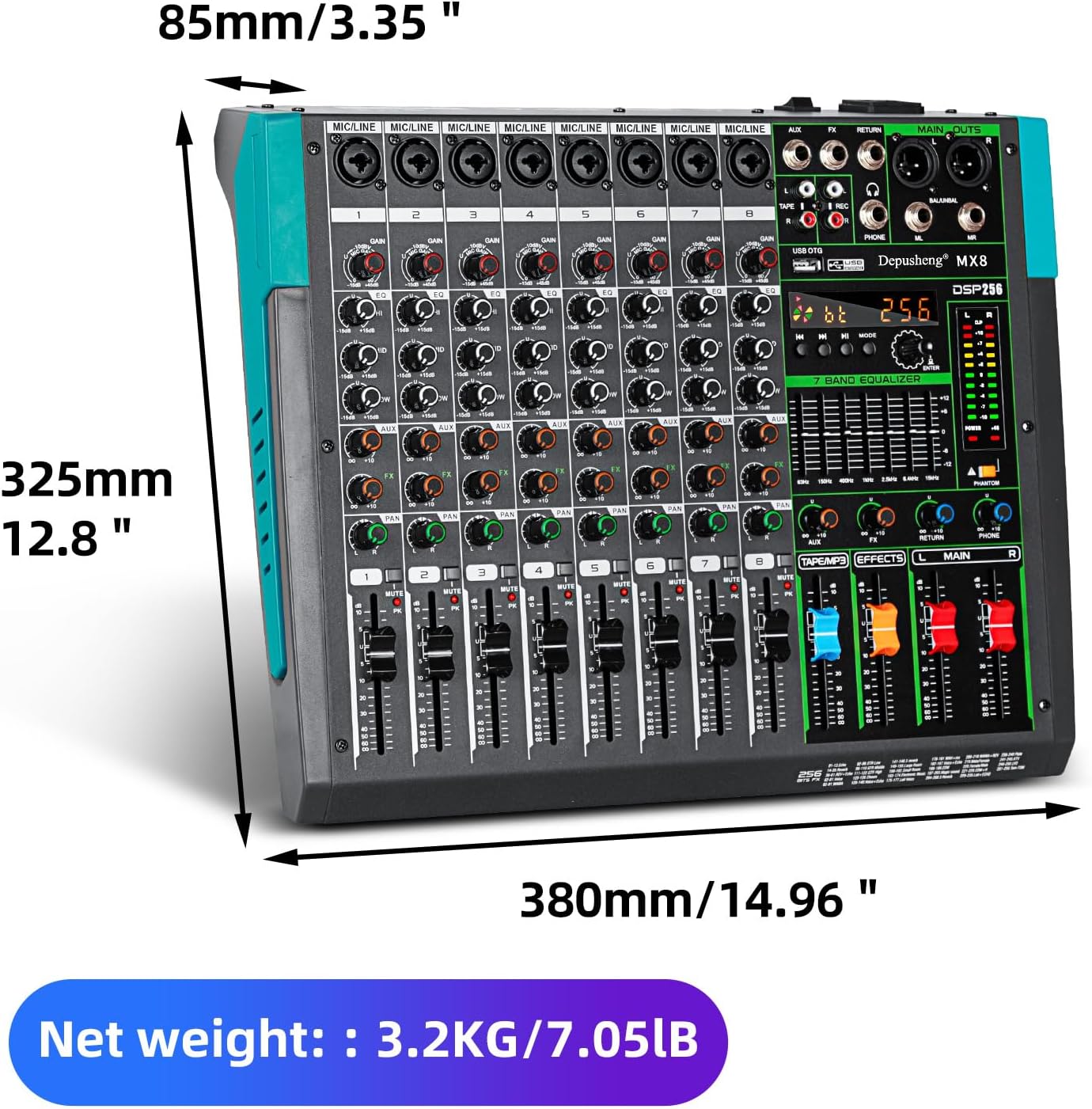
Front view of the Depusheng MX8 8-Channel Sound Mixer, showcasing its comprehensive control layout.
Setup and Connections
This section details the initial setup and various connection options for your Depusheng MX8 mixer.
Input and Output Interfaces
The MX8 mixer is equipped with a variety of input and output options to accommodate diverse audio setups.

Detailed diagram illustrating all controls and connection ports on the Depusheng MX8 mixer.
- 8-Channel Inputs: Each channel features a dual-purpose input supporting both XLR microphones and 6.35mm (1/4'') line inputs.
- XLR Outputs: For main stereo output to professional audio equipment.
- 1/4'' (L/R) Outputs: Additional stereo outputs.
- RCA (L/R) Inputs and Outputs: For connecting consumer audio devices.
- USB Port: For direct connection to a PC for recording and playback.
- Bluetooth Connectivity: For wireless audio streaming from compatible devices.
Connecting Microphones and Instruments
The mixer's dual-purpose input connectors allow for flexible microphone and instrument connections.
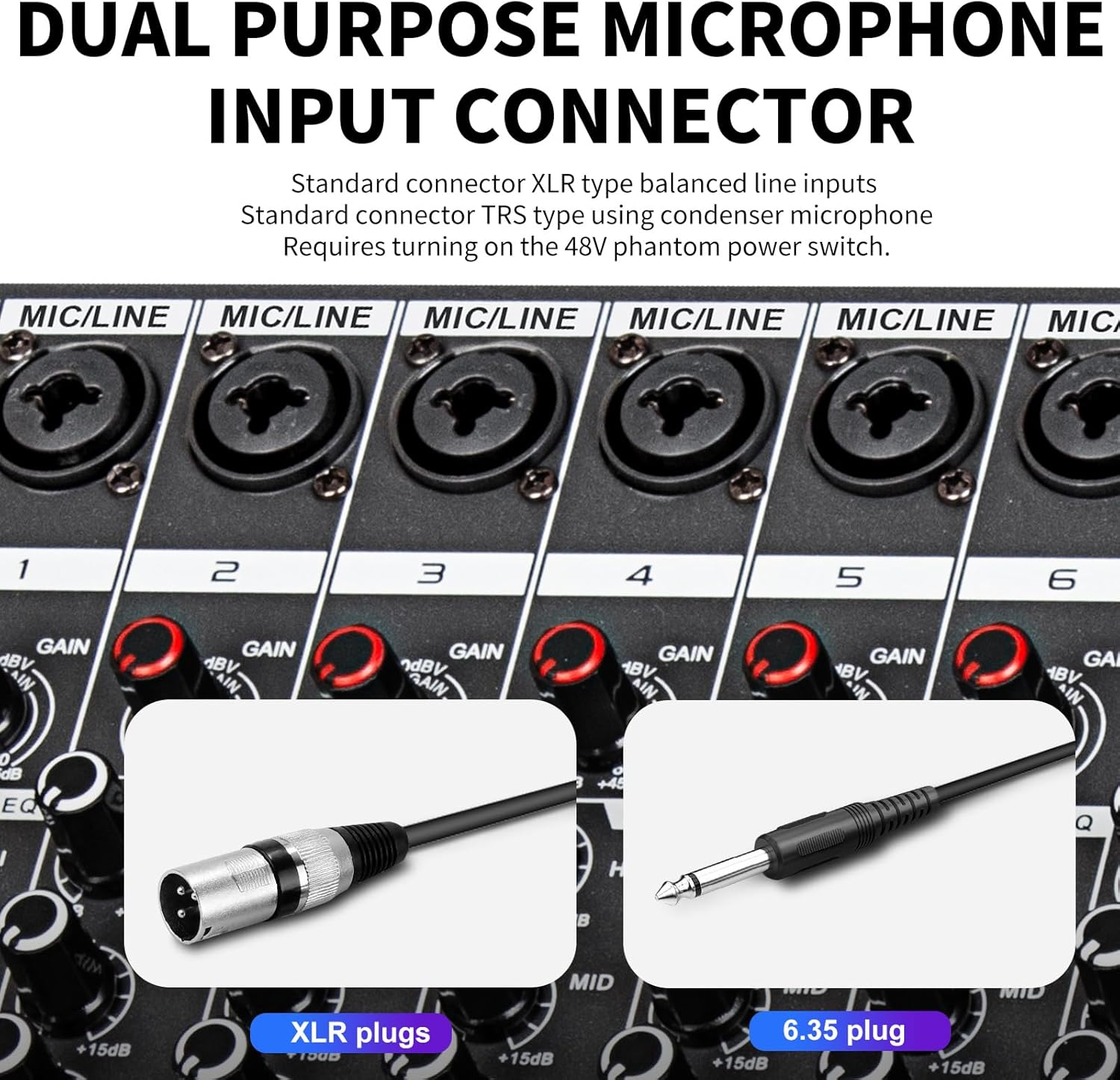
A close-up view of the dual-purpose input connectors, showing compatibility with both XLR and 6.35mm plugs. Condenser microphones require the 48V phantom power to be turned on.
- XLR Inputs: Use for balanced microphones (dynamic or condenser). Ensure 48V phantom power is enabled for condenser microphones.
- 6.35mm (1/4'') Inputs: Use for line-level instruments or dynamic microphones.
Power Connection
Connect the mixer to a power source using the provided power cable. The power switch is located at the rear of the unit.
Rear view of the Depusheng MX8, highlighting the power switch and external power input socket.
Operating Instructions
Learn how to effectively use the various features of your Depusheng MX8 mixer.
Channel Controls
Each of the 8 channels on the mixer features dedicated controls for optimal sound shaping.
Detailed diagram illustrating all controls and connection ports on the Depusheng MX8 mixer, including individual channel controls.
- GAIN Controller: Adjusts the input sensitivity for each channel.
- 3-Band Equalization (EQ): Fine-tune the high, mid, and low frequencies of each audio source independently.
- AUX Controller: Controls the auxiliary send level for external effects or monitor mixes.
- FX Controller: Adjusts the send level to the internal DSP effects processor.
- PAN Controller: Positions the sound of the channel within the stereo field (left to right).
- MUTE Button: Silences the individual channel.
- VOLUME Fader: Controls the output level of the individual channel.

Close-up of the 3-band equalization knobs (HI, MID, LOW) for precise tone control on each channel.
Video demonstrating the 3-band equalization controls and their effect on audio. This video also shows the dual-purpose interface, master output jacks, extended fader slide, and DSP reverb effects.
DSP Effects
The MX8 features 256 built-in Digital Signal Processing (DSP) effects, primarily reverberation, to enhance your audio.

The display indicating the 256 available reverberation effects, which can be adjusted using the dedicated reverb knob.
- Rotate the REVERB knob to select from 256 different reverberation effects.
- Adjust the FX Controller on each channel to send the desired amount of signal to the effects processor.
USB Playback and Recording
The integrated USB interface allows for direct audio playback from USB storage devices and recording to a connected computer.

The USB port on the mixer, demonstrating its use for connecting USB storage devices for playback, with a clear LCD color screen display.
- Insert a USB storage device into the USB OTG port for direct audio playback.
- Connect the mixer to a computer using the provided USB cable for professional computer recording.
Bluetooth Connection
Wirelessly connect your smartphone or other Bluetooth-enabled devices to the mixer for audio streaming.

A smartphone connected wirelessly via Bluetooth to the Depusheng MX8 mixer, enabling music playback.
- Activate Bluetooth on your device and search for the mixer.
- Pair your device to stream audio directly to the mixer.
Maintenance
Proper maintenance ensures the longevity and optimal performance of your Depusheng MX8 mixer.
- Cleaning: Use a soft, dry cloth to clean the surface of the mixer. Avoid abrasive cleaners or solvents.
- Dust Protection: Keep the mixer covered when not in use to prevent dust accumulation, especially on faders and knobs.
- Storage: Store the mixer in a cool, dry place away from direct sunlight and extreme temperatures.
- Cable Management: Ensure all cables are properly coiled and stored to prevent damage.
Troubleshooting
This section provides solutions to common issues you might encounter with your mixer.
| Problem | Possible Cause | Solution |
|---|---|---|
| No sound output |
|
|
| Microphone not working |
|
|
| No USB playback |
|
|
Specifications
Key technical specifications for the Depusheng MX8 8-Channel Sound Mixer.
| Feature | Detail |
|---|---|
| Model Number | US MX8 |
| Number of Channels | 8 |
| Item Weight | 9.13 pounds (4.15 Kilograms) |
| Package Dimensions | 17.5 x 15.2 x 5.9 inches |
| Connector Types | XLR jack, 6.35MM jack, RCA jack, USB, Bluetooth |
| Power Source | Corded Electric |
| DSP Effects | 256 kinds of reverberation effects |
| Equalization | 3-band EQ per channel, 7-band graphic equalizer |
Warranty and Support
For warranty information and technical support, please refer to the official Depusheng website or contact their customer service directly. Keep your purchase receipt as proof of purchase.
Depusheng is a high-tech enterprise specializing in professional audio equipment, mixers, wireless microphones, power amplifiers, speakers, microphone stand accessories, peripheral equipment, etc.
Visit the Depusheng Store on Amazon for more products and information.
Ask a question about this manual
Ask about setup, troubleshooting, compatibility, parts, safety, or missing instructions. Manuals+ will review the question and use this page’s manual context to help answer it.