Introduction
This manual provides detailed instructions for the installation, operation, and maintenance of your SIMBAILAI WiFi 1080P Wireless Video Doorbell Intercom. Please read this manual thoroughly before using the product to ensure proper functionality and safety.
The SIMBAILAI video intercom system offers a convenient and secure way to monitor your entrance and communicate with visitors. It features a 1080P HD camera, a 7-inch touch screen monitor, and remote access via the Tuya Smart mobile application.
Product Overview Video
Video: A brief overview demonstrating the key features and functionality of the SIMBAILAI Wireless Video Doorbell Intercom system.
Package Contents
Please verify that all items listed below are included in your package:
- Indoor Display Unit (7-inch Touch Screen)
- Outdoor Doorbell Unit with Camera
- Rechargeable Battery (for outdoor unit)
- Power Adapter (for indoor unit)
- 32GB TF Card (pre-installed or included)
- Mounting Hardware (screws, 3M adhesive)
- User Manual
Setup and Installation
The SIMBAILAI video intercom system is designed for easy, wireless installation. No complicated wiring is required between the outdoor doorbell unit and the indoor monitor.
1. Outdoor Doorbell Unit Installation
Choose a suitable location for the outdoor doorbell unit, typically near your main entrance. Ensure the area provides a clear view and is within effective wireless range of the indoor monitor.

Image: Two installation methods for the outdoor doorbell unit. Method 1 shows expansion screw installation, and Method 2 shows 3M super glue installation. Choose the method appropriate for your surface.
- Method 1: Screw Installation
Secure the mounting bracket to the wall using the provided screws. Then, attach the doorbell unit to the bracket. - Method 2: 3M Adhesive Installation
Clean the mounting surface thoroughly. Apply the 3M adhesive to the back of the doorbell unit and firmly press it onto the desired location.
Important Note: Aluminum doors and certain Wi-Fi interference sources may reduce the effective operating distance between the two devices. Test the signal strength before final installation.
2. Indoor Monitor Setup
Place the indoor monitor in a convenient location within your home. The indoor unit requires connection to a power adapter for continuous operation.

Image: The indoor monitor and outdoor doorbell unit are shown, highlighting their wireless connectivity and the absence of complex wiring.
The indoor unit has an antenna that can be activated to improve signal reception. Ensure it is extended for optimal performance.
3. Initial Power-Up and Pairing
Once both units are installed, power on the indoor monitor. The system should automatically attempt to pair the outdoor doorbell unit with the indoor monitor. Follow any on-screen prompts for initial setup.
Operating Instructions
1. Answering a Call
When a visitor presses the doorbell, both the indoor monitor and your mobile phone (via the Tuya Smart APP) will receive a notification. You can answer the call from either device.
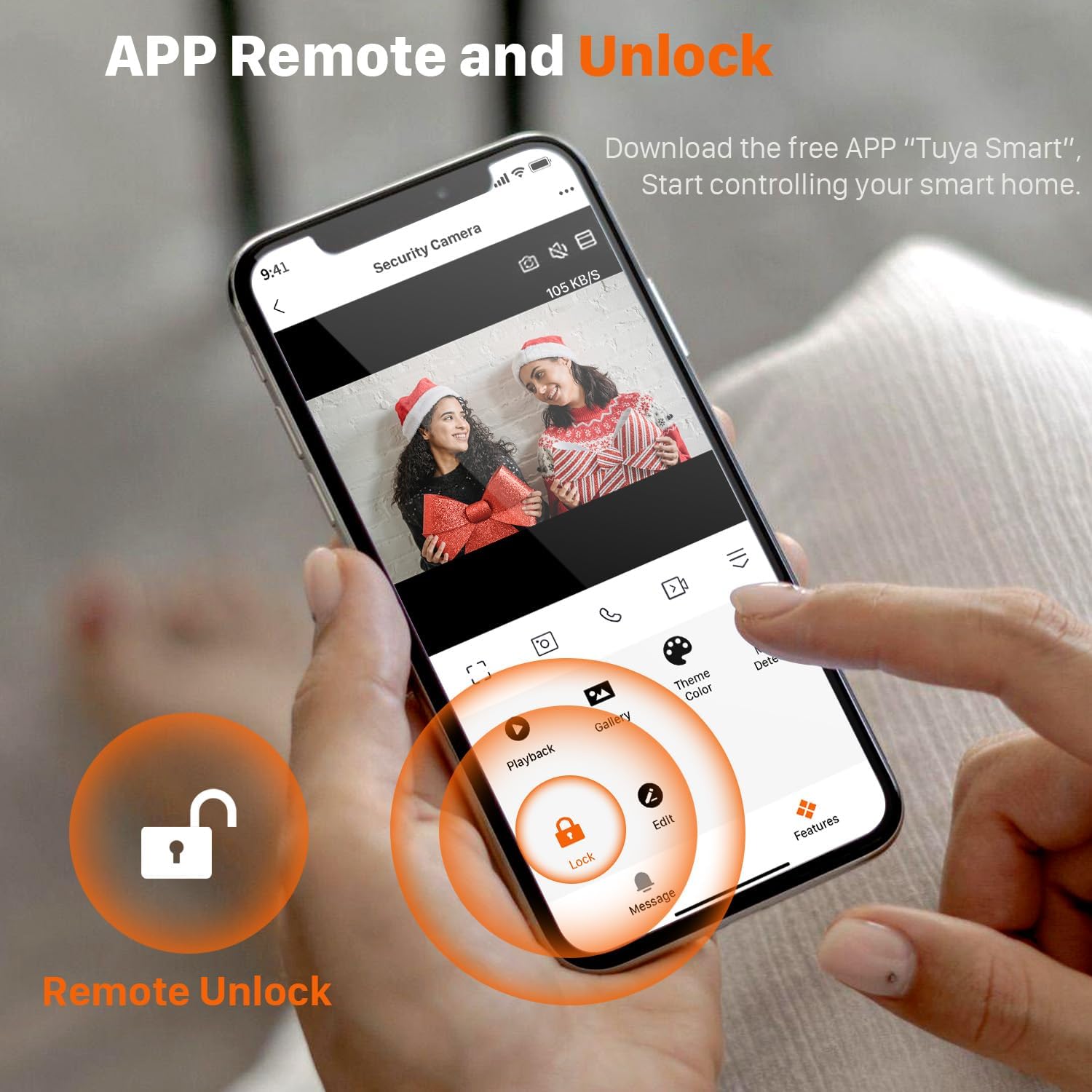
Image: The Tuya Smart app on a smartphone allows remote viewing and unlocking when a visitor rings the doorbell.

Image: The sensitive smart touch screen of the indoor monitor provides easy operation, similar to a smartphone.
- From the Indoor Monitor: Tap the "Answer" button on the 7-inch touch screen to initiate a real-time video dialogue with the visitor.
- From the Tuya Smart APP: Open the app on your smartphone. You will receive a video notification. Tap to answer and engage in a remote video dialogue.
2. Remote Unlocking
If your system is connected to a compatible electronic lock, you can remotely unlock your door through the Tuya Smart APP during a video call.

Image: The Tuya Smart app allows remote unlocking of the door directly from your smartphone.
3. Motion Detection (PIR)
The outdoor doorbell unit features a 160° wide-angle camera with PIR motion detection. When motion is detected, the system can automatically capture images or record video.

Image: The 160° wide-angle camera with PIR motion detection alerts you to activity outside your door.
- Adjusting Sensitivity: You can adjust the sensitivity of the motion detection in the indoor monitor's settings or via the Tuya Smart APP.
- Night Vision: The camera provides enhanced night vision for clear images even in low-light conditions.
4. Video Recording and Playback
All video recordings are stored on the memory card within the indoor unit. The product includes a 32GB TF card, and supports up to 128GB.

Image: The indoor monitor allows you to view previous video recordings stored on the TF card.
- Viewing Recordings: Access the playback function on the indoor monitor's touch screen to review past events.
- Storage: The system supports a maximum 128GB TF card for extended recording capacity.
5. Multi-User and Family Sharing
You can share access to the Tuya Smart APP with family members, allowing multiple users to receive notifications and interact with visitors simultaneously.

Image: The system supports multiple intercom conversations, allowing family members in different rooms or locations to communicate with visitors.
Maintenance
1. Battery Management
The outdoor doorbell unit is equipped with a 5000mAh battery, providing a standby time of up to 6 months. The indoor unit requires continuous power via its adapter.
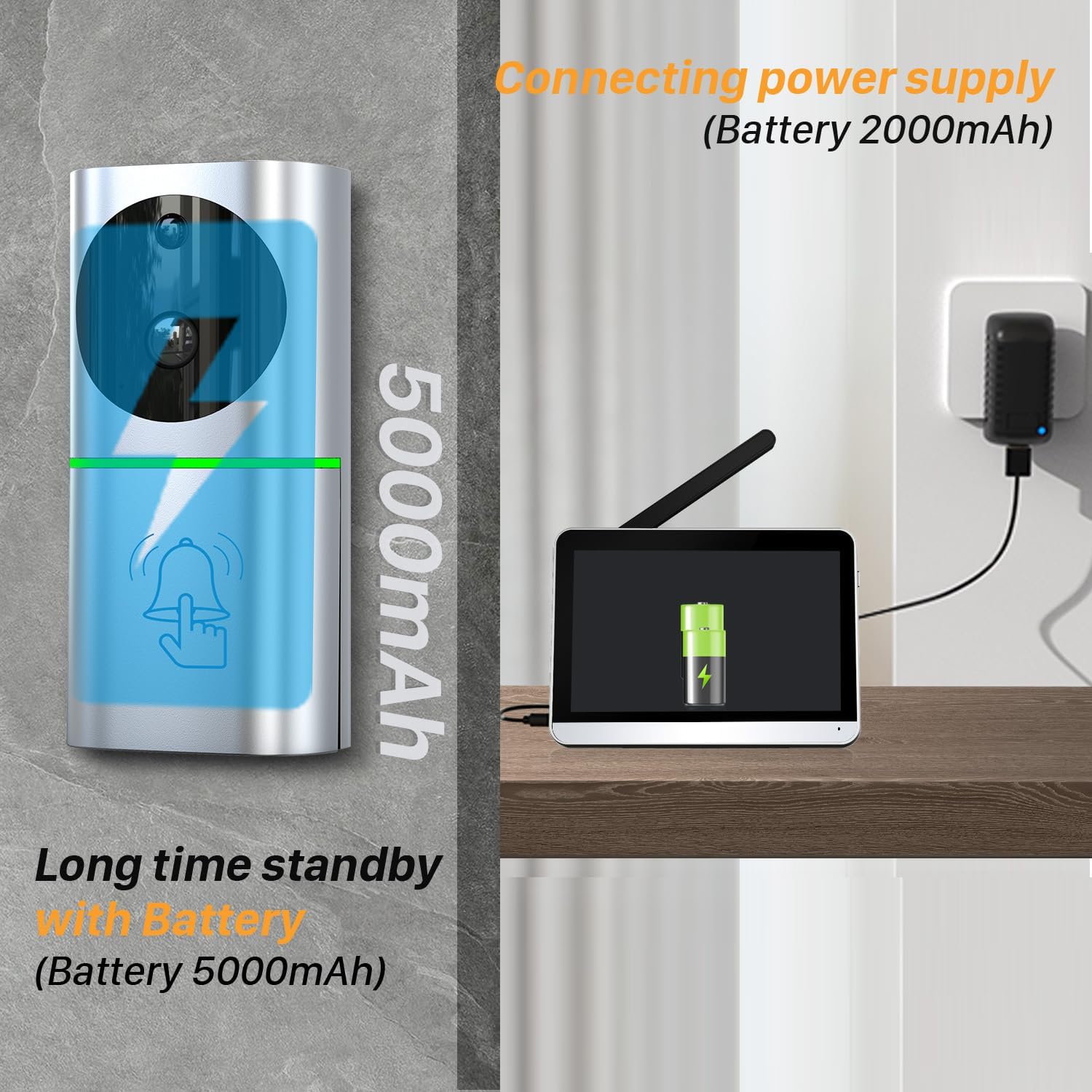
Image: The outdoor unit features a 5000mAh battery for long standby time, while the indoor unit is powered by an adapter.

Image: The outdoor unit can be recharged via its Android port (USB).
Recharge the outdoor unit's battery when indicated by the low battery warning. Use a standard USB charger (not always included, but implied by "Android port").
2. Cleaning
Wipe the outdoor and indoor units with a soft, damp cloth. Avoid using abrasive cleaners or solvents that could damage the surfaces.
3. Weather Resistance
The outdoor unit has an IP65 water resistance rating, protecting it from dust and water splashes. However, avoid submerging the unit in water.

Image: The outdoor unit is IP65 rated, offering protection against dust and water.
Troubleshooting
| Problem | Possible Cause | Solution |
|---|---|---|
| No connection between outdoor and indoor units. | Out of wireless range, signal interference (e.g., aluminum doors, strong Wi-Fi signals), or pairing issue. | Ensure units are within effective range. Extend the indoor unit's antenna. Try re-pairing the units according to the initial setup instructions. Reduce potential interference sources. |
| Outdoor unit battery not charging or charge indicator is inaccurate. | Faulty charging cable/adapter, dirty charging port, or battery issue. | Try a different USB charging cable and adapter. Clean the charging port on the outdoor unit. If the issue persists, contact customer support. |
| No video or poor video quality. | Poor wireless signal, camera lens obstructed, or low light conditions. | Check wireless signal strength. Clean the camera lens. Ensure night vision is active in low light. |
| Motion detection not working or too sensitive. | Incorrect sensitivity settings, obstruction, or environmental factors. | Adjust PIR sensitivity in the settings. Ensure the camera's field of view is clear. |
Specifications
| Feature | Detail |
|---|---|
| Model Number | TL-AH701A |
| Brand | SIMBAILAI |
| Connectivity Technology | Wireless (Wi-Fi 2.4G/5G) |
| Indoor Monitor Screen | 7-inch Full Touch Screen |
| Screen Resolution | 1280x800 |
| Camera Resolution | 1080P HD |
| Viewing Angle | 160 Degrees |
| Special Features | PIR Motion Detection, Local Recording, Night Vision, Remote Access via Tuya APP |
| Outdoor Unit Battery | 5000mAh Lithium-ion (up to 6 months standby) |
| Indoor Unit Power Source | Adapter Powered (5 Volts DC) |
| Water Resistance Level | IP65 (Outdoor Unit) |
| Storage | Supports up to 128GB TF card (32GB included) |
| Material | Metal |
| Product Dimensions (L x W x H) | 18.1 x 2 x 13.2 cm |
| Product Weight | 1.2 Kilograms |
| Recommended Use | Surveillance |
Warranty and Support
This product comes with a 12-month manufacturer's warranty from the date of purchase. Please retain your proof of purchase for warranty claims.
For technical support, troubleshooting assistance, or warranty inquiries, please contact SIMBAILAI customer service through your retailer or the official brand channels.
Information regarding the availability of spare parts is currently unavailable.