
Introduction
This manual provides detailed instructions for the installation, operation, and maintenance of your ZMJH Elongated Smart Bidet Toilet Seat, Model 210S. Please read this manual thoroughly before installation and use to ensure proper function and safety.
Important Safety Information
Please observe the following safety precautions to prevent injury or damage to the product:
- Ensure the power outlet is properly grounded and matches the product's voltage requirements.
- Do not immerse the product in water or spray water directly onto electrical components.
- Unplug the unit before cleaning or performing any maintenance.
- Keep out of reach of children and supervise use by individuals with reduced physical, sensory, or mental capabilities.
- Do not attempt to repair or modify the product yourself. Contact qualified service personnel for assistance.
Package Contents
Verify that all components are present before beginning installation:
- ZMJH Elongated Smart Bidet Toilet Seat (Model 210S)
- Wireless Remote Control
- Mounting Plate and Hardware
- T-Valve for Water Connection
- Water Supply Hose
- User Manual
Installation Guide
Follow these steps to install your ZMJH Smart Bidet Toilet Seat:
Step 1: Prepare the Toilet
Turn off the water supply to your toilet and flush to empty the tank. Remove your existing toilet seat and lid by unscrewing the mounting bolts.

Figure 1: Removing the existing toilet seat and lid.
Step 2: Install the Mounting Plate
Place the mounting plate over the toilet bowl holes. Insert the rubber cones and bolts into the holes, then tighten them from underneath the toilet bowl to secure the plate.

Figure 2: Securing the mounting plate to the toilet bowl.
Step 3: Attach the Bidet Seat
Slide the bidet toilet seat onto the installed mounting plate until it clicks into place. Ensure it is firmly seated.

Figure 3: Sliding the bidet seat onto the mounting plate.
Step 4: Connect the Water Supply
Install the T-valve between the toilet's fill valve and the water supply line. Connect one end of the provided water supply hose to the T-valve and the other end to the bidet seat's water inlet. Turn the water supply back on and check for leaks.

Figure 4: Connecting the water supply to the bidet seat.
Step 5: Power Connection
Plug the bidet seat's power cord into a grounded electrical outlet. Ensure the outlet is compatible with the bidet's power requirements.
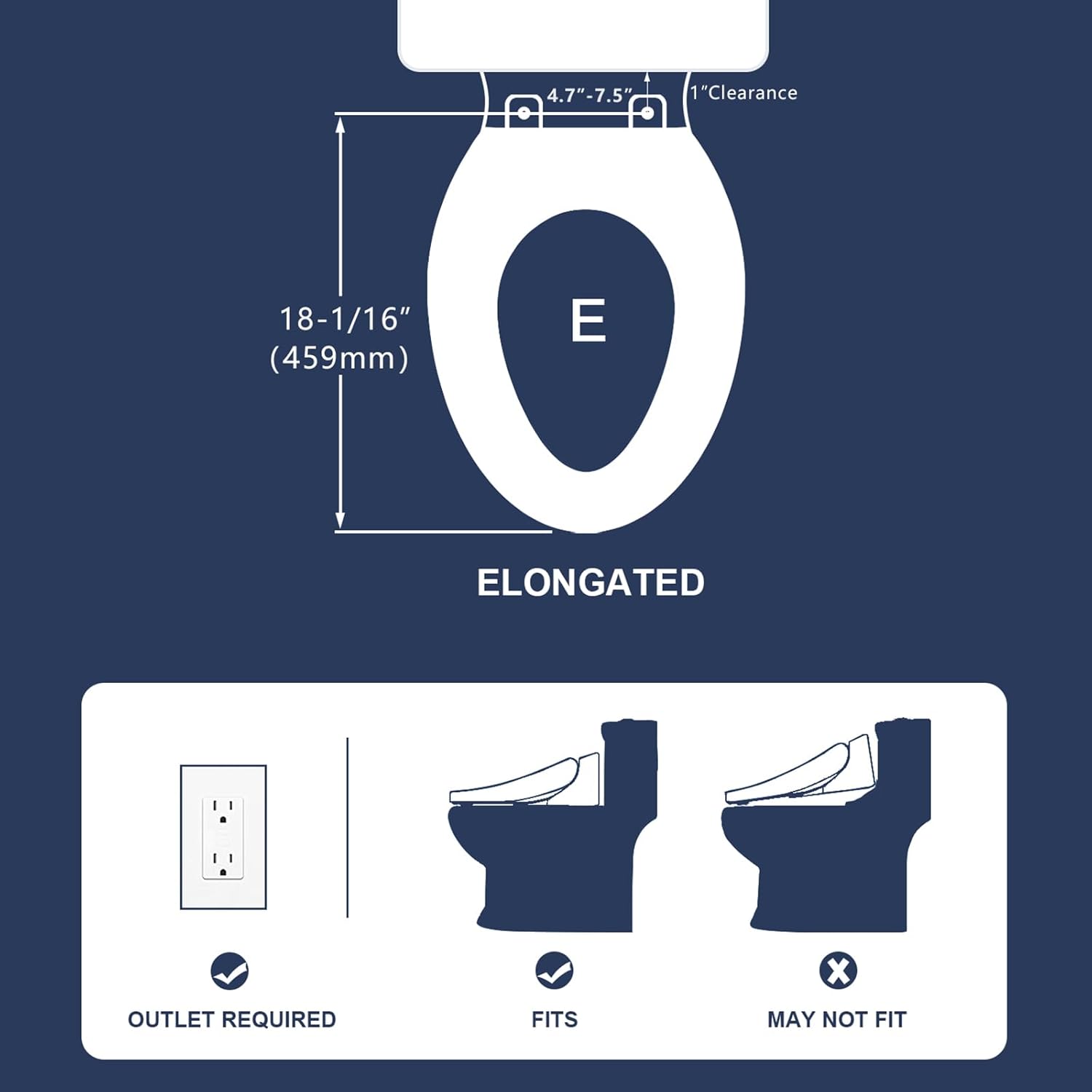
Figure 5: The bidet seat requires a grounded electrical outlet.
Note: This bidet seat is designed for elongated toilets. Please verify your toilet type before installation.

Figure 6: Ensure your toilet is elongated for proper fitment.
Operating Instructions
Your ZMJH Smart Bidet Toilet Seat offers various functions for personalized hygiene. Control options include a wireless remote and a side control knob.
Wireless Remote Control
The wireless remote provides full control over all bidet functions. Familiarize yourself with the button layout:

Figure 7: Wireless Remote Control functions.
- Rear Wash: Activates the posterior wash.
- Bidet Wash: Activates the feminine wash.
- Adjustable Nozzle Position: Adjusts the nozzle forward or backward.
- Adjustable Water Pressure: Increases or decreases water spray intensity.
- Adjustable Water Temperature: Sets the water temperature to your preference.
- Adjustable Heated Seat: Controls the seat temperature.
- Warm Air Drying: Activates the warm air dryer.
- Night Light: Turns the bowl night light on or off.
- ECO Mode: Energy-saving mode.
- Stop/Power: Stops current operation or turns the unit on/off.
- Kids Mode: Provides a gentle wash suitable for children.
- Auto Mode: Initiates a preset wash and dry cycle.
- Turbo Wash: Provides a stronger, more focused wash.
Side Control Knob
A convenient side control knob offers quick access to essential functions:

Figure 8: Side Control Knob for basic operations.
The knob typically allows selection between rear wash, feminine wash, and drying functions, along with basic adjustments.
Key Features in Operation
- Adjustable Washes: The 3-in-1 stainless steel nozzle provides Rear Wash, Bidet Wash, and a Self-Cleaning function. Water temperature is adjustable.
- Smart Display: The integrated smart display shows current settings at a glance, such as water temperature or seat temperature.
- Heated Seat & Warm Air Dryer: Enjoy comfort with an adjustable heated seat and a warm air dryer for a complete experience.
- Night Light: A gentle night light illuminates the bowl for convenience in low-light conditions.

Figure 9: Various adjustable wash modes and nozzle self-cleaning.

Figure 10: Smart display indicating current settings.

Figure 11: Features including slow closing seat, heated seat, warm air dryer, and night light.

Figure 12: The integrated night light for visibility.
Maintenance and Cleaning
Regular cleaning ensures optimal performance and hygiene of your bidet seat.
General Cleaning
- Unplug the bidet seat from the power outlet before cleaning.
- Wipe the exterior surfaces with a soft, damp cloth and a mild, non-abrasive cleaner.
- Do not use harsh chemicals, abrasive pads, or solvents, as these can damage the finish.
- Ensure all surfaces are dry before plugging the unit back in.
Nozzle Cleaning
The bidet features a self-cleaning nozzle. For manual cleaning:
- Activate the nozzle extension (refer to remote control functions).
- Gently wipe the nozzle with a soft cloth or brush and a mild cleaner.
- Do not force the nozzle or use excessive pressure.
- Retract the nozzle after cleaning.

Figure 13: The stainless steel bidet nozzle.
Troubleshooting Guide
If you encounter issues with your bidet seat, refer to the following common problems and solutions:
| Problem | Possible Cause | Solution |
|---|---|---|
| No power / Unit not turning on | Power cord unplugged, circuit breaker tripped, power outlet malfunction. | Ensure power cord is securely plugged in. Check circuit breaker. Test outlet with another device. |
| No water spray / Weak spray | Water supply valve closed, water filter clogged, low water pressure. | Open the toilet's water supply valve fully. Clean or replace the water filter. Check household water pressure. |
| Water temperature not adjusting | Temperature setting incorrect, water heater malfunction. | Adjust water temperature settings using the remote. Allow time for water to heat up. |
| Heated seat not working | Heated seat function off, temperature setting too low. | Ensure heated seat function is activated and temperature is set appropriately. |
| Beeping sound during operation | Normal operational feedback, or specific alert. | Some operations may produce a beep. If persistent or unusual, consult the full manual or contact support. |
If the problem persists after attempting these solutions, please contact customer support.
Product Specifications
| Feature | Detail |
|---|---|
| Model | 210S |
| Type | Elongated Bidet Toilet Seat |
| Color | White |
| Material | Plastic, Stainless Steel |
| Item Weight | 11 Pounds |
| Product Dimensions | 20 x 15 x 0.99 inches |
| Power Source | Electric (requires grounded outlet) |
| Control | Wireless Remote, Side Control Knob |
| Wash Functions | Rear Wash, Bidet Wash, Turbo Wash, Self-Cleaning Nozzle |
| Comfort Features | Heated Seat, Warm Water, Warm Air Dryer, Slow-Close Lid, Night Light |
Warranty and Customer Support
For warranty information and customer support, please refer to the warranty card included with your product or visit the official ZMJH website. Keep your purchase receipt for warranty claims.
For technical assistance or inquiries, please contact ZMJH customer service through the contact information provided on their website or product packaging.


