1. Product Overview
The Krups Genio S Plus KP340B is a compact, high-pressure capsule coffee machine designed for professional-quality beverages. It features an integrated Thermoblock system for rapid heating and an automatic shut-off function for energy efficiency. This versatile machine supports over 30 coffee and beverage preparations, including both hot and cold drinks, using Nescafé Dolce Gusto capsules. Its XL function allows for customizable drink lengths up to 300ml, and temperature control offers four distinct options for personalized brewing.

Figure 1.1: Front view of the Krups Genio S Plus coffee machine. This image shows the compact design and the control dial at the top.
2. Setup and First Use
Before using your Krups Genio S Plus coffee machine for the first time, please follow these steps carefully to ensure proper operation and the best beverage quality.
2.1 Unpacking
- Remove all packaging materials and stickers from the machine.
- Ensure all components are present: coffee machine, water tank, drip tray, and capsule holder.
2.2 Cleaning Before First Use
- Wash the water tank and drip tray with warm water and mild detergent. Rinse thoroughly.
- Wipe the exterior of the machine with a damp cloth.
2.3 Filling the Water Tank
- Remove the water tank from the back of the machine.
- Fill the tank with fresh, cold drinking water up to the MAX level indicator.
- Place the water tank back onto the machine, ensuring it is securely seated.
2.4 Initial Rinse Cycle
It is recommended to perform an initial rinse cycle to prime the system and clean internal components.
- Place an empty cup or container on the drip tray.
- Do not insert a capsule.
- Turn on the machine. Wait for the indicator light to turn green (ready).
- Select the maximum water volume (XL function) using the control dial.
- Press the hot water button to start the rinse cycle.
- Allow the machine to dispense water until the tank is empty or the cycle completes.
- Repeat this process once or twice.
3. Operating Instructions
Your Krups Genio S Plus machine is designed for easy and intuitive operation. Follow these steps to prepare your favorite beverages.
3.1 Preparing a Beverage
- Ensure the water tank is filled with fresh water.
- Turn on the machine. Wait for the indicator light to turn green.
- Open the locking handle and pull out the capsule holder.
- Insert a Nescafé Dolce Gusto capsule into the holder. Ensure it is correctly seated.
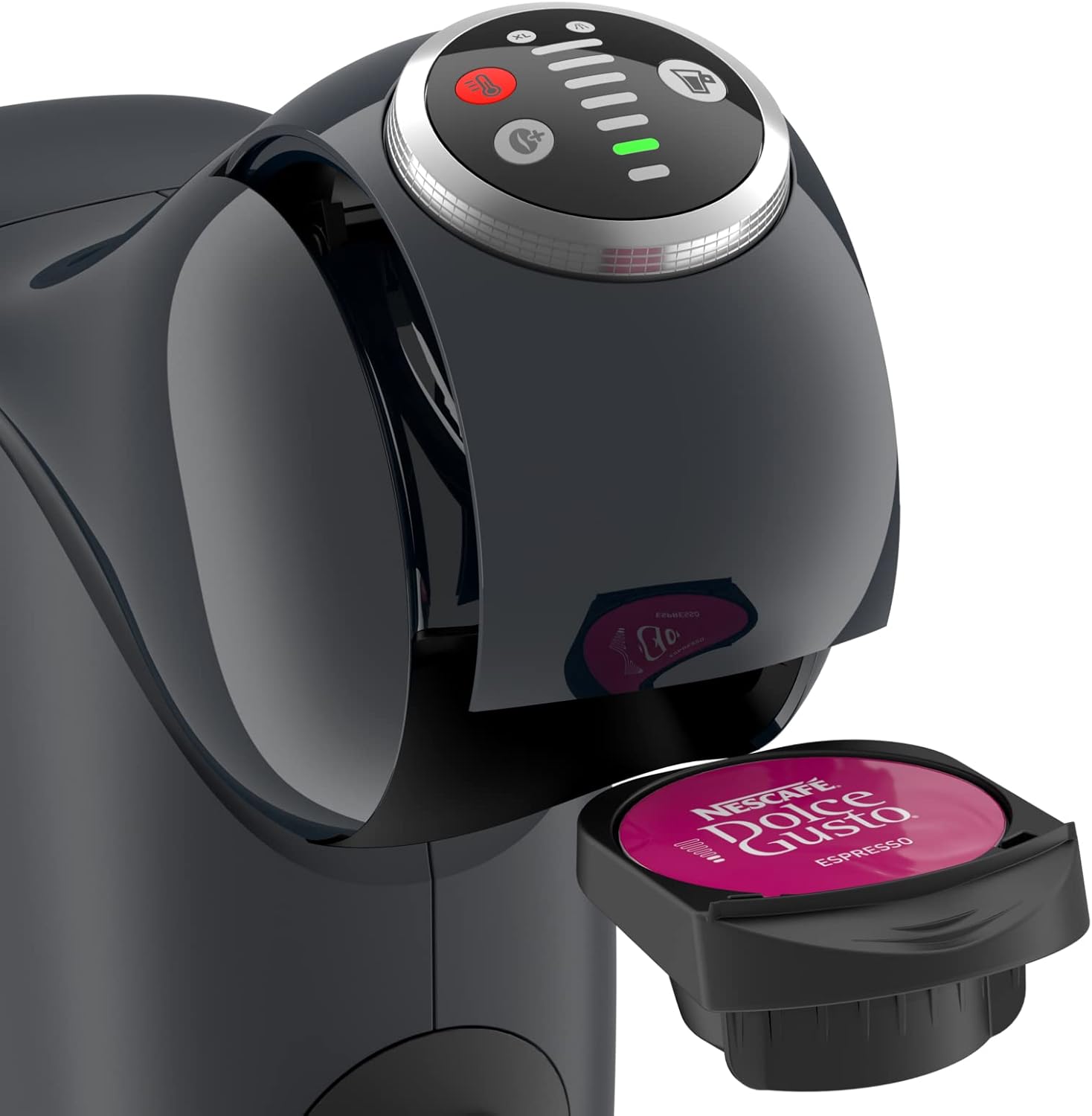
Figure 3.1: Proper insertion of a Nescafé Dolce Gusto capsule into the capsule holder.
- Slide the capsule holder back into the machine and close the locking handle firmly.
- Place an appropriate cup on the drip tray. Adjust the drip tray height if necessary for taller cups.

Figure 3.2: The coffee machine dispensing a layered latte into a glass cup, demonstrating its versatility.
- Selecting Water Volume: Use the LED control dial to select the desired water volume. The recommended volume is usually indicated on the capsule packaging. The XL function allows for larger drinks up to 300ml.
- Selecting Temperature: Use the temperature control button to choose one of the four temperature options.
- Press the hot water button (red) for hot beverages or the cold water button (blue) for cold beverages.
- The machine will automatically stop dispensing when the selected volume is reached.
- Once dispensing is complete, wait a few seconds for the pressure to release, then open the locking handle and remove the used capsule. Dispose of the capsule.
3.2 Customization Features
- XL Function: For larger drinks, rotate the control dial to the maximum setting. This is ideal for iced coffees or larger servings.
- Temperature Control: The machine offers four temperature settings. Adjust this based on your preference for hotter or cooler drinks.
- Espresso Boost Function: For a more intense espresso, activate the Espresso Boost function (refer to specific machine instructions for button location, usually indicated by a small 'boost' icon). This pre-wets the coffee for a richer aroma and crema.

Figure 3.3: The machine utilizes 15 bar maximum pressure to ensure perfect taste and a rich crema for your beverages.

Figure 3.4: The Nescafé Dolce Gusto system offers a wide variety of over 30 coffee and beverage options.
4. Maintenance and Cleaning
Regular cleaning and maintenance will prolong the life of your coffee machine and ensure optimal beverage quality.
4.1 Daily Cleaning
- Drip Tray: Empty and rinse the drip tray and grid daily.
- Water Tank: Rinse the water tank daily and refill with fresh water.
- Exterior: Wipe the exterior of the machine with a soft, damp cloth. Do not use abrasive cleaners or solvents.
4.2 Capsule Holder Cleaning
Clean the capsule holder regularly to prevent coffee residue buildup.
- Remove the capsule holder from the machine.
- Rinse it under running water. Use a small brush if necessary to remove any stubborn residue.
- Ensure the piercing needle area is clear.
- Allow it to air dry before reinserting.
4.3 Descaling
Descaling is crucial to remove mineral buildup and maintain machine performance. The frequency depends on your water hardness and usage. The machine may have a descaling indicator light.
- Use a Nescafé Dolce Gusto approved descaling solution or a suitable descaler for coffee machines. Follow the descaler manufacturer's instructions carefully.
- Empty the water tank and fill it with the descaling solution mixed with water as per instructions.
- Place a large container (at least 1 liter) under the coffee outlet.
- Start the descaling cycle (refer to your machine's specific descaling procedure, often involves holding down a button or a specific sequence).
- Allow the machine to run the descaling solution through until the tank is empty.
- Rinse the water tank thoroughly and fill it with fresh water.
- Perform at least two rinse cycles with fresh water to remove any descaler residue.
5. Troubleshooting
Here are some common issues and their solutions. If the problem persists, please contact customer support.
| Problem | Possible Cause | Solution |
|---|---|---|
| Machine does not turn on. | Not plugged in; power outlet issue. | Check power cord connection; try a different outlet. |
| No water flow or very little water. | Empty water tank; air bubble in system; machine needs descaling; piercing needle blocked. | Refill water tank; perform a rinse cycle to remove air; descale the machine; clean the piercing needle. |
| Coffee is not hot enough. | Temperature setting too low; machine needs descaling. | Adjust temperature setting to a higher level; descale the machine. |
| Leaking from machine. | Water tank not properly seated; drip tray full; damaged seal. | Ensure water tank is correctly inserted; empty drip tray; contact support if seal is damaged. |
| Used capsule stuck. | Capsule not properly inserted or removed too quickly. | Gently try to remove the capsule holder. Do not force it. If stuck, contact support. |
6. Technical Specifications
Key technical details for the Krups Genio S Plus KP340B coffee machine.
| Feature | Detail |
|---|---|
| Brand | NESCAFÉ DOLCE GUSTO |
| Model Number | KP340BKA |
| Color | Black |
| Product Dimensions | 28.6 x 27.3 x 11.2 cm (11.26 x 10.75 x 4.41 inches) |
| Product Weight | 2 kg (4.4 lbs) |
| Special Features | Espresso Boost XL Function, Temperature Control |
| Coffee Maker Type | Espresso Machine (Capsule) |
| Operation Mode | Semi-automatic |
| Pressure | Up to 15 bar |
| Automatic Shut-off | Yes, after 1 minute of inactivity |

Figure 6.1: Dimensional diagram of the Krups Genio S Plus coffee machine, showing its compact size.
7. Warranty and Support
7.1 Warranty Information
For detailed warranty information, please refer to the warranty card included with your product or visit the official Nescafé Dolce Gusto website. Warranty terms and conditions may vary by region.
7.2 Customer Support
If you encounter any issues not covered in this manual or require further assistance, please contact Nescafé Dolce Gusto customer support. You can find contact details on their official website or through the retailer where you purchased the product.
You can also visit the official brand store for more information and resources: Nescafé Dolce Gusto Brand Store


