1. Introduction
Thank you for purchasing the Generic Charge Mini 3+ Portable Wireless Bluetooth Speaker. This speaker is designed to provide a high-quality audio experience with the convenience of wireless connectivity and portability. Its robust design makes it suitable for outdoor use, and its built-in power bank functionality allows you to charge your mobile devices on the go. Please read this manual carefully to ensure proper use and maintenance of your speaker.
2. Product Overview
Key Features:
- Wireless Bluetooth Streaming: Connect wirelessly to smartphones, tablets, laptops, and other Bluetooth-enabled devices.
- Impressive Stereo Sound: Delivers clear and powerful audio.
- Bass Boost Feature: Enhances low-frequency sounds for a richer audio experience.
- Noise and Echo-Cancelling Speakerphone: Enables crystal-clear calls with the touch of a button.
- High-Capacity 6,000mAh Battery: Provides up to 4 hours of playtime.
- USB Output for Charging: Can charge your smartphones and tablets.
- Outdoor Splash Proof Design: Offers durability for various environments.
Package Contents:
- Generic Charge Mini 3+ Portable Wireless Bluetooth Speaker
- USB Charging Cable (assumed)
- User Manual (this document)

Figure 2.1: The Charge Mini 3+ speaker in blue, illustrating its cylindrical shape and control panel.
3. Setup
3.1 Initial Charging
- Before first use, fully charge the speaker. Connect the provided USB charging cable to the speaker's charging port and the other end to a USB power adapter (not included) or a computer's USB port.
- The charging indicator light will illuminate during charging and turn off or change color when fully charged.
3.2 Powering On/Off
- To power on, press and hold the Power button (â’¸) for a few seconds until you hear an audible prompt or see the indicator light.
- To power off, press and hold the Power button (â’¸) again for a few seconds until the speaker powers down.
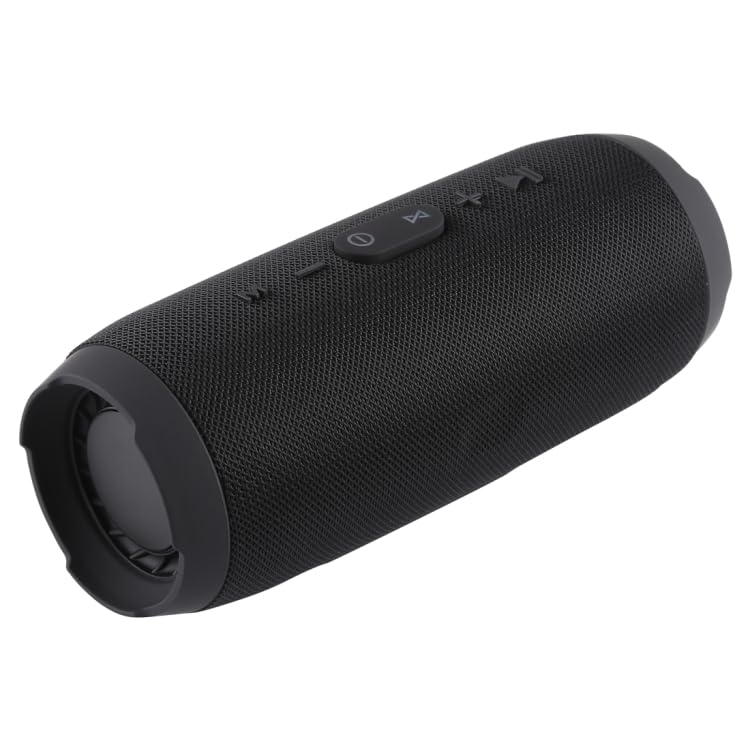
Figure 3.1: Top view of the speaker, highlighting the control buttons including the power button.
4. Operating Instructions
4.1 Bluetooth Pairing
- Ensure the speaker is powered on and in Bluetooth pairing mode. The Bluetooth indicator light will typically flash rapidly.
- On your device (smartphone, tablet, etc.), enable Bluetooth and search for available devices.
- Select "Charge Mini 3+" (or similar name) from the list of devices.
- Once paired, the speaker will emit an audible confirmation, and the Bluetooth indicator light will stop flashing and remain solid.
4.2 Playing Audio
- After successful pairing, you can stream audio from your device to the speaker.
- Use your device's media player to control playback (play, pause, skip tracks).
- The speaker may also have dedicated buttons for Play/Pause and Skip Track.
4.3 Speakerphone Function
- When a call comes in while connected via Bluetooth, the music will pause.
- Press the Call button (often represented by a phone icon) on the speaker to answer the call.
- To end a call, press the Call button again.
- To reject a call, press and hold the Call button.
4.4 Volume Control
- Adjust the volume using the Volume Up (+) and Volume Down (-) buttons on the speaker.
- You can also control the volume from your connected device.
4.5 Charging External Devices (Power Bank Function)
- Connect your smartphone or tablet to the speaker's USB output port using your device's charging cable.
- The speaker's internal battery will begin charging your connected device.
- Note that using this feature will reduce the speaker's playtime.

Figure 4.1: Side view of the speaker, showing the control panel for playback and calls.
5. Maintenance
- Cleaning: Wipe the speaker with a soft, damp cloth. Do not use harsh chemicals or abrasive cleaners.
- Storage: Store the speaker in a cool, dry place away from direct sunlight and extreme temperatures.
- Water Resistance: While splash-proof, do not submerge the speaker in water. Ensure all port covers are securely closed before exposure to moisture.
- Battery Care: To prolong battery life, avoid fully discharging the battery frequently. Charge it regularly, even if not in use for extended periods.
6. Troubleshooting
| Problem | Possible Cause | Solution |
|---|---|---|
| Speaker does not power on | Low battery | Charge the speaker fully. |
| Cannot pair with Bluetooth device | Bluetooth not enabled on device; Speaker not in pairing mode; Device too far | Ensure Bluetooth is on and speaker is in pairing mode. Move device closer to speaker. |
| No sound during playback | Volume too low; Device not connected; Incorrect audio source | Increase volume on both speaker and device. Re-pair Bluetooth. Check device's audio output settings. |
| Poor call quality | Weak signal; Obstructions; Speaker too far from user | Move to an area with better signal. Ensure no obstructions between speaker and device. Speak closer to the speaker. |
| External device not charging | Speaker battery low; Incorrect cable; Device not compatible | Charge the speaker. Use a functional charging cable. Ensure your device supports USB charging from external sources. |
7. Specifications
- Model: Charge Mini 3+
- Brand: Generic
- Product Dimensions: 25.4 x 10.16 x 25.4 cm
- Item Weight: 500 g
- Connectivity Technologies: USB, Wireless (Bluetooth)
- Special Features: Bass Boost, Noise and Echo-Cancelling Speakerphone, Power Bank Function
- Battery Capacity: 6,000mAh (approximate, inferred from playtime)
- Playtime: Up to 4 hours
- Color: Multi (available in various colors)
- Manufacturer: Generic
- Date First Available: 27 October 2023
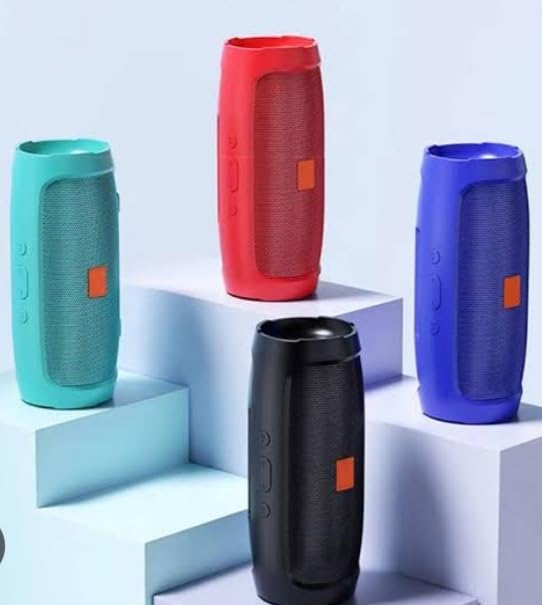
Figure 7.1: The Charge Mini 3+ speaker available in multiple colors.
8. Warranty and Support
This product is manufactured by Generic. For any warranty claims, technical support, or service inquiries, please refer to the retailer or platform where the product was purchased. Keep your proof of purchase for warranty validation. Specific warranty terms and conditions may vary by region and retailer.


