
Primy B0CLXVZGC9
Primy Ergonomic Office Chair User Manual
Model: B0CLXVZGC9
1. Introduction
Thank you for choosing the Primy Ergonomic Office Chair. This manual provides essential information for the safe assembly, operation, and maintenance of your new chair. Please read these instructions carefully before assembly and retain them for future reference.
Safety Guidelines
- Ensure all parts are present and undamaged before assembly. Do not use if any parts are missing or broken.
- Follow the assembly steps precisely. Incorrect assembly can lead to instability and potential injury.
- Do not stand on the chair.
- Do not use the chair for purposes other than its intended use as an office or drawing chair.
- Keep children away from the chair during assembly. Small parts may pose a choking hazard.
- Regularly check all bolts and screws to ensure they are tightened.
- Maximum weight capacity: 300 lbs (136 kg). Do not exceed this limit.
2. Package Contents
Please verify that all components listed below are included in your package:
- Backrest
- Seat Cushion
- Armrests (2)
- Gas Lift Cylinder
- Base (5-star)
- Casters (5)
- Footrest Ring
- Assembly Hardware (screws, washers, Allen wrench)
- Instruction Manual
3. Assembly Instructions
Assembly typically takes approximately 15 minutes. It is recommended to assemble the chair on a soft, clean surface to prevent damage.
- Attach Casters to Base: Insert each of the five casters into the holes at the end of each leg of the 5-star base. Push firmly until they click into place.
- Insert Gas Lift: Place the gas lift cylinder into the center hole of the assembled 5-star base.
- Attach Footrest Ring: Slide the footrest ring over the gas lift cylinder. Adjust its height to your preference and secure it with the knob or lever provided.
- Attach Armrests to Seat: Align the armrests with the pre-drilled holes on the underside of the seat cushion. Secure them using the provided screws and Allen wrench. Ensure the folding mechanism is facing the correct direction.
- Attach Backrest to Seat: Connect the backrest to the seat cushion using the designated screws. Ensure the lumbar support mechanism is correctly positioned.
- Connect Seat Assembly to Gas Lift: Carefully place the assembled seat and backrest onto the gas lift cylinder, ensuring the center mechanism aligns with the top of the gas lift. Press down firmly to secure.

The Primy Ergonomic Office Chair, featuring a grey mesh backrest and seat, white frame, and a footrest ring, positioned in a contemporary workspace.
4. Operating Your Chair
Your Primy Ergonomic Office Chair offers several adjustable features to enhance comfort and support.
4.1. Adjusting Seat Height
To adjust the seat height, locate the lever on the right side, beneath the seat. While seated, pull the lever up to lower the seat. To raise the seat, stand up slightly and pull the lever up. Release the lever at your desired height.

A visual guide to adjusting the chair's seat height using the lever and the mechanism for adjusting the height of the footrest ring.
4.2. Adjusting Lumbar Support
The chair features an adjustable lumbar support designed to protect your cervical spine and reduce back fatigue. The lumbar support can be adjusted vertically to align with the natural curve of your lower back.

An illustration highlighting the curved backrest designed to conform to the spine and the adjustable lumbar support for lower back protection.
4.3. Folding Armrests
The armrests can be folded up by 90 degrees. This feature allows you to push the chair closer to your desk, saving space when not in use, or to accommodate different seating preferences.

This image illustrates how the chair's armrests can be folded up by 90 degrees, allowing the chair to be pushed under a desk to save space.
4.4. Adjusting Footrest Ring
The 360° rotating footrest ring can be adjusted in height to provide comfortable support for your feet, reducing pressure on the back of your legs. Loosen the knob on the footrest ring, slide it to your desired height, and then tighten the knob to secure it.
4.5. Swivel Function
The chair is equipped with 360° swivel wheels, allowing for easy movement and rotation, facilitating communication and access within your workspace.
5. Maintenance and Care
Proper care will extend the life and appearance of your Primy Ergonomic Office Chair.
- Cleaning: For general cleaning, wipe surfaces with a soft, damp cloth. For spills or stains, spot clean immediately using a mild soap solution and a clean cloth. Avoid harsh chemicals or abrasive cleaners.
- Mesh Fabric: The breathable mesh fabric can be gently vacuumed to remove dust and debris.
- Inspection: Periodically check all screws and bolts to ensure they are tight. Re-tighten if necessary.
- Casters: Keep casters clean from hair and debris to ensure smooth rolling.
6. Troubleshooting
If you encounter any issues with your chair, please refer to the following common solutions:
- Chair Squeaks: Check all screws and bolts and tighten them. A small amount of silicone lubricant can be applied to moving parts if the squeaking persists.
- Chair is Unstable/Wobbly: Ensure all assembly screws are fully tightened. Verify that the gas lift is properly seated in the base and the seat mechanism.
- Gas Lift Not Adjusting: Ensure the height adjustment lever is fully engaged or disengaged. If the issue persists, the gas lift cylinder may need replacement.
- Casters Not Rolling Smoothly: Remove any hair or debris wrapped around the caster wheels. Clean the wheels with a damp cloth.
7. Specifications
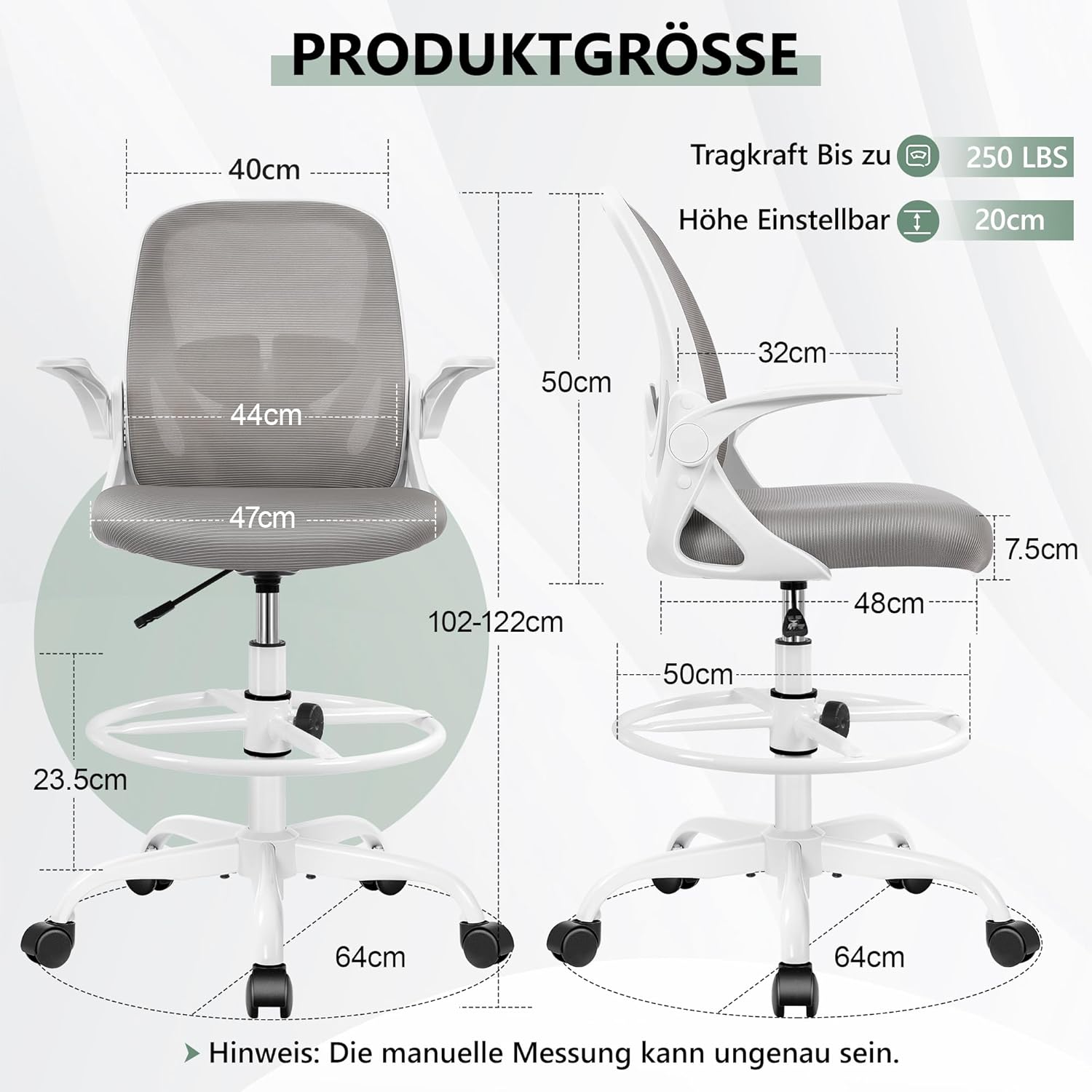
A detailed diagram illustrating the key dimensions of the chair, including seat width, backrest height, and overall adjustable height range.
| Feature | Detail |
|---|---|
| Brand | Primy |
| Model | B0CLXVZGC9 |
| Color | Grey |
| Product Dimensions | 25 x 54 x 53 cm (approx. 9.8 x 21.3 x 20.9 inches) |
| Item Weight | 14.7 Kilograms (approx. 32.4 lbs) |
| Material | Metal, Mesh Fabric, Foam |
| Special Features | Adjustable Height, Ergonomic Design, Folding Armrests, Adjustable Lumbar Support, Footrest Ring |
| Maximum Load Capacity | 300 lbs |
| Seat Height Adjustment | 8 cm (approx. 3.15 inches) |
8. Customer Support
For any questions, concerns, or assistance with your Primy Ergonomic Office Chair, please contact our professional after-sales service. Refer to your purchase documentation for specific contact details or visit the Primy official website.
Related documentsB0CLXVZGC9


Ask a question about this manual
Ask about setup, troubleshooting, compatibility, parts, safety, or missing instructions. Manuals+ will review the question and use this page’s manual context to help answer it.