
NN BEN NEVIS L6655
NN BEN NEVIS Digital Watch User Manual
Model: L6655
Introduction
Thank you for choosing the NN BEN NEVIS Digital Watch, Model L6655. This ultra-thin, multi-functional timepiece is designed for both men and women, offering a blend of minimalist fashion and practical features. This manual provides detailed instructions on how to set up, operate, and maintain your watch to ensure optimal performance and longevity.

Image: The NN BEN NEVIS Digital Watch, featuring a black case, black strap, and a clear digital display showing time and date.
Product Overview and Features
The NN BEN NEVIS Digital Watch is equipped with a range of features designed for daily convenience and active lifestyles:
- Ultra-thin Design: Features a 6.7 mm thickness for a sleek and comfortable fit.
- Multi-functional: Includes countdown, snooze mode, dual time zone, stopwatch, automatic calendar, 12/24 hour format, alarm clock, backlight, and hourly chime.
- Easy Readability: Large digital display with clear numbers and letters.
- Comfortable Wear: Equipped with a soft PU strap suitable for sports enthusiasts.
- Water Resistance: Water-resistant up to 3 ATM for daily use (hand washing, facial washing, rain).

Image: A collage illustrating key watch functions including Countdown, Alarm, Dual Area Time, and Hourly Time Signal.

Image: A close-up view highlighting the ultra-thin 6.6 mm case thickness of the watch.

Image: Icons representing the watch's various functions: Stopwatch, Countdown, 12/24 hour format, Dual-time, Calendar, Alarm, Hourly time signal, and EL Light.
Button Identification
Familiarize yourself with the watch buttons for easy operation:
- Button (A) - LIGHT: Activates the EL backlight.
- Button (B) - MODE: Cycles through different modes (Time, Alarm, Stopwatch, Countdown, Dual Time).
- Button (C) - START/STOP: Used to start/stop functions in Stopwatch and Countdown modes, and to adjust settings.
- Button (D) - RESET: Used to reset functions in Stopwatch and Countdown modes, and to adjust settings.

Image: Diagram showing the location of Button (A), Button (B), Button (C), and Button (D) on the watch.
Setup and Time Setting
Setting Time and Date:
- From the normal time display, press Button (B) MODE three times to enter Time Setting Mode. The seconds will flash.
- Press Button (D) RESET to reset the seconds to 00.
- Press Button (C) START/STOP to move the flashing selection to the hour digits.
- Press Button (D) RESET to adjust the hour. Note the AM/PM indicator for 12-hour format.
- Press Button (C) START/STOP to move the flashing selection to the minute digits.
- Press Button (D) RESET to adjust the minutes.
- Continue pressing Button (C) START/STOP to cycle through year, month, and day settings, adjusting each with Button (D) RESET.
- Press Button (B) MODE to exit Time Setting Mode and return to normal time display.
12/24 Hour Format:
In normal time display, press Button (C) START/STOP to toggle between 12-hour (with AM/PM indicator) and 24-hour formats.
Operating Instructions
Alarm Function:
- From normal time display, press Button (B) MODE once to enter Alarm Mode.
- Press Button (C) START/STOP to select the hour digits.
- Press Button (D) RESET to adjust the alarm hour.
- Press Button (C) START/STOP to select the minute digits.
- Press Button (D) RESET to adjust the alarm minutes.
- Press Button (B) MODE to exit Alarm Setting Mode.
- To turn the alarm ON/OFF, in Alarm Mode, press Button (D) RESET. The alarm icon will appear/disappear.
- To activate Snooze, when the alarm sounds, press Button (C) START/STOP. The alarm will sound again after 5 minutes (up to 7 times). Press any other button to stop the alarm completely.
Stopwatch Function:
- From normal time display, press Button (B) MODE twice to enter Stopwatch Mode.
- Press Button (C) START/STOP to start the stopwatch.
- Press Button (C) START/STOP again to pause the stopwatch.
- Press Button (D) RESET to reset the stopwatch to zero.
- Press Button (B) MODE to exit Stopwatch Mode.
Countdown Function:
- From normal time display, press Button (B) MODE four times to enter Countdown Mode.
- Press Button (C) START/STOP to select the hour digits.
- Press Button (D) RESET to adjust the countdown hour.
- Press Button (C) START/STOP to select the minute digits.
- Press Button (D) RESET to adjust the countdown minutes.
- Press Button (C) START/STOP to start the countdown.
- Press Button (C) START/STOP again to pause the countdown.
- Press Button (D) RESET to reset the countdown to the set time.
- Press Button (B) MODE to exit Countdown Mode.
Dual Time Zone:
- From normal time display, press Button (B) MODE five times to enter Dual Time Mode.
- Press Button (C) START/STOP to select the hour digits.
- Press Button (D) RESET to adjust the dual time hour.
- Press Button (C) START/STOP to select the minute digits.
- Press Button (D) RESET to adjust the dual time minutes.
- Press Button (B) MODE to exit Dual Time Mode.
EL Backlight:
Press Button (A) LIGHT at any time to illuminate the display for a few seconds, allowing for clear viewing in low-light conditions.
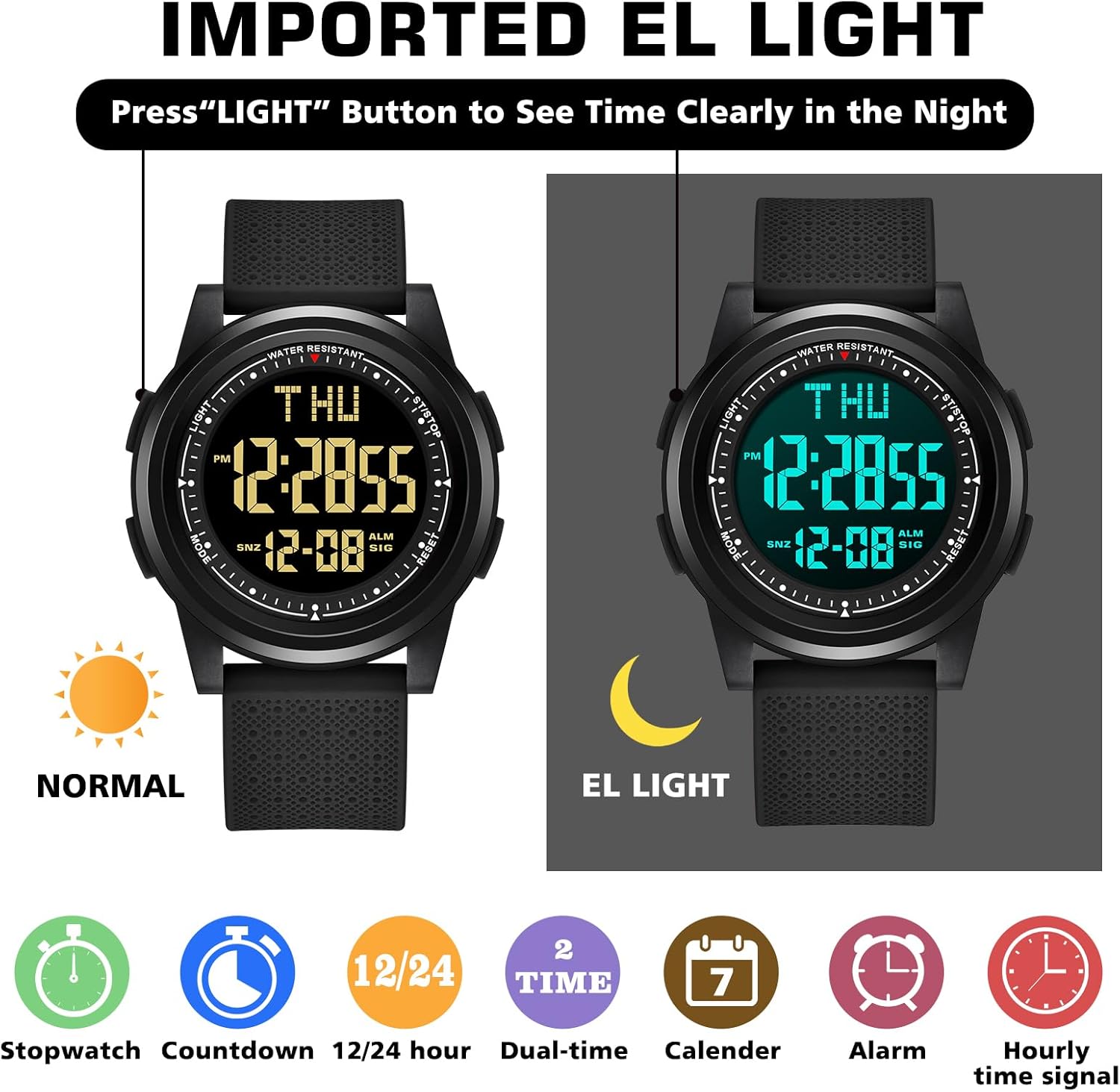
Image: Comparison showing the watch display in normal light and with the EL backlight activated for night visibility.
Hourly Chime:
To activate or deactivate the hourly chime, in normal time display, press Button (B) MODE twice to enter Stopwatch Mode, then press Button (D) RESET. The hourly chime icon will appear/disappear.
Maintenance
Water Resistance:
Your NN BEN NEVIS Digital Watch is water-resistant up to 3 ATM. This means it is suitable for:
- Washing hands
- Facial washing
- Use on rainy days
Important Precautions:
- DO NOT press any buttons while the watch is in water.
- DO NOT wear this watch for prolonged underwater activities such as swimming, diving, or showering.
- Avoid exposing the watch to hot water or steam, as this can compromise the water seals.

Image: Icons indicating suitable water exposure (hand washing, rain) and activities to avoid (swimming/submersion).
Cleaning:
Wipe the watch case and strap regularly with a soft, dry cloth. For stubborn dirt, a slightly damp cloth can be used, followed by immediate drying.
Troubleshooting
| Problem | Possible Cause / Solution |
|---|---|
| Display is dim or faded. | Battery may be low. Replace the battery. |
| Watch not keeping accurate time. | Ensure time is set correctly. If issue persists, battery may be low or watch may require service. |
| Buttons are unresponsive. | Ensure watch is not wet. If dry, try pressing firmly. If still unresponsive, contact customer support. |
| Alarm not sounding. | Check if the alarm function is activated (alarm icon visible). Ensure volume is not muted (if applicable, though this model doesn't have volume control). |
Specifications
| Feature | Detail |
|---|---|
| Model Number | L6655 |
| Brand | NN BEN NEVIS |
| Case Thickness | 6.7 mm (approx.) |
| Water Resistance | 3 ATM (30 meters / 98 feet) - Suitable for daily use, not for swimming/diving. |
| Functions | Stopwatch, Countdown, Alarm, Dual Time, Calendar, 12/24 Hour, Backlight, Hourly Chime. |
| Strap Material | PU (Polyurethane) |
| Package Dimensions | 5.83 x 2.68 x 0.94 inches |
| Item Weight | 2.4 ounces |

Image: Diagram illustrating the watch's dimensions, including case width (44mm), strap width (22mm), and total length (233mm).
Warranty and Support
NN BEN NEVIS offers a friendly service and support for your watch. If you encounter any non-human related issues with your product within 3 months of receiving it, please do not hesitate to contact us.
How to Contact Support:
Please reach out to us via the Amazon message system. We are committed to resolving any problems you may have in the shortest possible time.
For further assistance or inquiries, please visit the official NN BEN NEVIS store on Amazon: NN BEN NEVIS Store