
1. Product Overview
The EPLZON 12V Push Pull Headlight Switch is a universal ON/OFF switch designed for various 12-volt automotive applications, including golf carts, club cars, EZGO, and Yamaha vehicles. This switch provides reliable control for vehicle headlights with a simple push-pull mechanism.

Image 1.1: General view of the EPLZON 12V Push Pull Headlight Switch.
Key Features:
- Functionality: 2-pin ON/OFF operation. Push to switch OFF, Pull to switch ON.
- Rating: 15 Amp, 12 Volt DC.
- Construction: Rustproof nickel-plated copper components, burr-free smooth insulated housing, and a knob with a recognizable headlight icon.
- Terminals: 2 pins, designed for easy wiring with included spade terminals.
- Applications: Suitable for EZGO/Yamaha golf carts, club cars, RVs, UTVs, trucks, and other automotive vehicles.

Image 1.2: Detailed view highlighting key components: 1. Recognized headlamp icon knob, 2. Rust-proof nickel-plated copper pin, 3. Burr-free smooth insulated housing, 4. Dust-free protective cover.
2. Package Contents
Verify that all items are present in the package:
- 2 x EPLZON Push Pull Headlight Switches
- 4 x 6.3MM Female Spade Terminals
- 4 x 6.3MM Insulating Sleeves
3. Specifications
| Specification | Value |
|---|---|
| Rating | 15A 12V DC |
| Function | ON/OFF (Push OFF, Pull ON) |
| Terminals | 2 Pins, Spade Type |
| Mounting Hole Size | 1/2 inch (12mm panel cutout) |
| Materials | Metal and Plastic (Nickel-plated copper contacts) |
| Operating Voltage | 12 Volts |
| Actuator Type | Push Pull |
| Item Model Number | EP-GEFKG-2PCS |
| UPC | 791162197621 |

Image 3.1: Diagram illustrating the product dimensions and mounting hole size (1/2 inch or 12mm).
4. Setup and Installation
Proper installation is crucial for the safe and effective operation of the headlight switch. Always ensure the vehicle's power is disconnected before beginning installation.
4.1 Mounting the Switch
- Identify a suitable location on your vehicle's dashboard or panel for mounting the switch.
- Drill a 1/2 inch (approximately 12mm) diameter hole at the chosen location.
- Insert the threaded shaft of the switch through the drilled hole.
- Secure the switch by tightening the provided nuts on both sides of the panel. Ensure the switch is firmly seated and does not rotate.
Image 4.1: Illustration of how to install the switch into a panel, showing the 1/2 inch panel cutout size.
4.2 Wiring Instructions
The push-pull headlight switch requires proper wiring to function correctly. Refer to the diagram below and ensure all connections are secure.
- Connect one terminal of the switch to the positive (+) power source (12V DC).
- Connect the other terminal of the switch to the positive (+) input of your headlight circuit.
- Ensure the headlight circuit has a proper ground connection.
- Use the provided 6.3MM Female Spade Terminals and Insulating Sleeves for secure and insulated connections.
Caution: Incorrect wiring can damage the switch or the connected lights. If you are unsure about the wiring process, consult a qualified automotive technician.
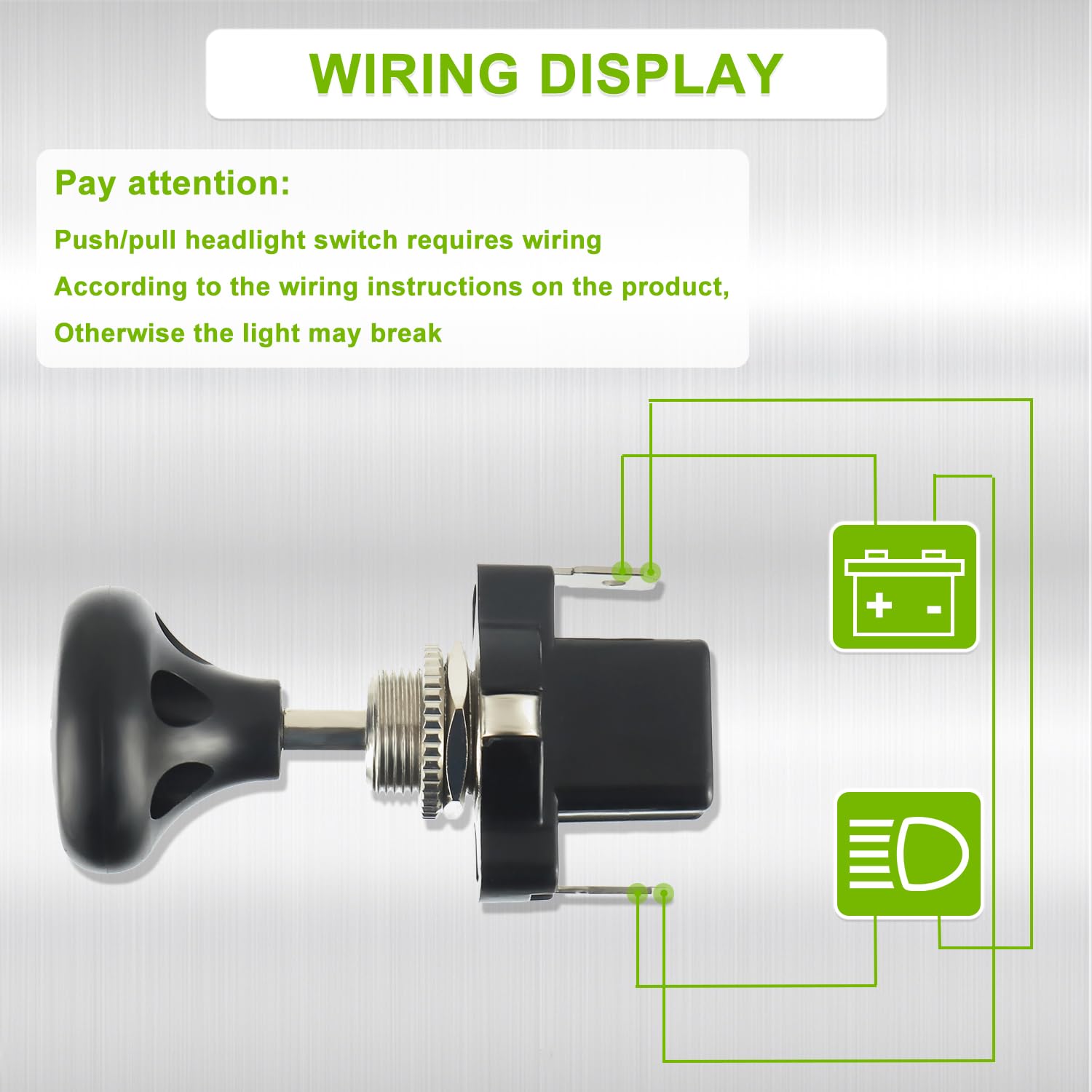
Image 4.2: Basic wiring diagram showing connections between the switch, 12V power source, and headlight.
5. Operating Instructions
The EPLZON Push Pull Headlight Switch operates with a simple mechanical action:
- To Turn ON the Headlights: Pull the knob outwards. The switch will click into the ON position, illuminating the connected headlights.
- To Turn OFF the Headlights: Push the knob inwards. The switch will click into the OFF position, turning off the connected headlights.

Image 5.1: Visual guide demonstrating the push (OFF) and pull (ON) operation of the switch.
6. Applications
This 12V push-pull headlight switch is designed for universal use in various vehicles requiring a simple ON/OFF lighting control. Common applications include:
- Golf Carts (e.g., EZGO, Yamaha)
- Club Cars
- Recreational Vehicles (RVs)
- Utility Task Vehicles (UTVs)
- Trucks
- Other 12V automotive vehicles

Image 6.1: Examples of vehicles where the switch can be used for lighting control.
7. Maintenance
The EPLZON Push Pull Headlight Switch is designed for durability and requires minimal maintenance. To ensure long-lasting performance:
- Keep the switch clean and free from dust and debris. Use a soft, dry cloth for cleaning.
- Periodically check wiring connections to ensure they remain secure and free from corrosion.
- Avoid exposing the switch to excessive moisture or harsh chemicals.
8. Troubleshooting
If you encounter issues with your headlight switch, consider the following common troubleshooting steps:
- Lights Not Turning On:
- Check all wiring connections for looseness or corrosion.
- Verify that the 12V power source is active.
- Inspect the headlight bulbs to ensure they are not burnt out.
- Check for any blown fuses in the vehicle's electrical system.
- Intermittent Operation:
- Ensure the switch is fully pushed or pulled into its respective ON/OFF position.
- Inspect wiring for any frayed or damaged sections that might cause intermittent contact.
If troubleshooting steps do not resolve the issue, contact customer support for further assistance.
9. Warranty and Support
For warranty information or technical support regarding your EPLZON 12V Push Pull Headlight Switch, please refer to the product packaging or contact EPLZON customer service directly. Contact details can typically be found on the manufacturer's official website or through your purchase platform.


