1. Introduction
Thank you for choosing the ERICAT Digital Angle Gauge Inclinometer. This precision tool is designed for highly accurate angle measurements in various applications, including woodworking, construction, machine manufacturing, and automotive repair. Its user-friendly interface, backlit display, and robust design ensure reliable performance.
Key features include:
- High precision and accuracy for critical measurements.
- User-friendly digital display for quick and accurate readings.
- Upgraded LCD display with high visibility reverse contrast for clear reading in various lighting conditions.
- Durable, thick plastic case for protection against drops and impacts.
- Wide range of applications across multiple industries.
2. Safety Information
Please read and understand all safety instructions before using this device. Failure to do so may result in injury or damage to the product.
- Battery Safety: Use only specified batteries (2 AA batteries, not included). Do not mix old and new batteries, or different types of batteries. Ensure correct polarity. Remove batteries if the device will not be used for an extended period.
- General Handling: Avoid dropping the device from excessive heights. Keep the device clean and dry. Do not expose to extreme temperatures or direct sunlight for prolonged periods.
- Laser Safety (if applicable): If your model includes a laser, do not stare directly into the laser beam. Avoid pointing the laser at people or animals.
3. Product Overview and Components
The ERICAT Digital Angle Gauge Inclinometer is a compact and versatile tool. The package typically includes:
- 1x Digital Inclinometer
- User Manual (this document)
Note: Batteries are not included and must be purchased separately.
Device Features:
- Digital Display: Backlit LCD for clear readings.
- Control Buttons: ON/OFF, ZERO, MODE, HOLD.
- Magnetic Base: For secure attachment to metal surfaces.
- Spirit Level Vial: For quick visual leveling.

Figure 1: Front view of the ERICAT Digital Angle Gauge Inclinometer.
4. Setup
4.1 Battery Installation
- Locate the battery compartment cover on the back of the device.
- Open the cover.
- Insert 2 AA batteries, ensuring correct polarity (+/-).
- Close the battery compartment cover securely.
4.2 Initial Power On
Press the ON/OFF button to power on the device. The backlit LCD display will illuminate, showing the current angle reading.
5. Operating Instructions
5.1 Power On/Off
- To Power On: Short press the ON/OFF button.
- To Power Off: Press and hold the ON/OFF button for approximately 3 seconds.
5.2 Measurement Modes (Absolute vs. Relative)
The inclinometer supports both absolute and relative measurement modes.
- Absolute Measurement Mode: Measures the angle relative to a true horizontal surface.
- Relative Measurement Mode: Allows you to set any surface as a temporary zero reference point for measuring subsequent angles.
To switch between modes, press the ZERO button. In relative mode, the display will show '0.00°' after pressing ZERO, indicating the new reference point.

Figure 2: Illustration of Absolute and Relative Measurement Modes.
5.3 Unit Switching
The device can display measurements in four different units: Degrees (°), Percentage (%), mm/m, and in/ft.
- To cycle through the measurement units, short press the MODE button.
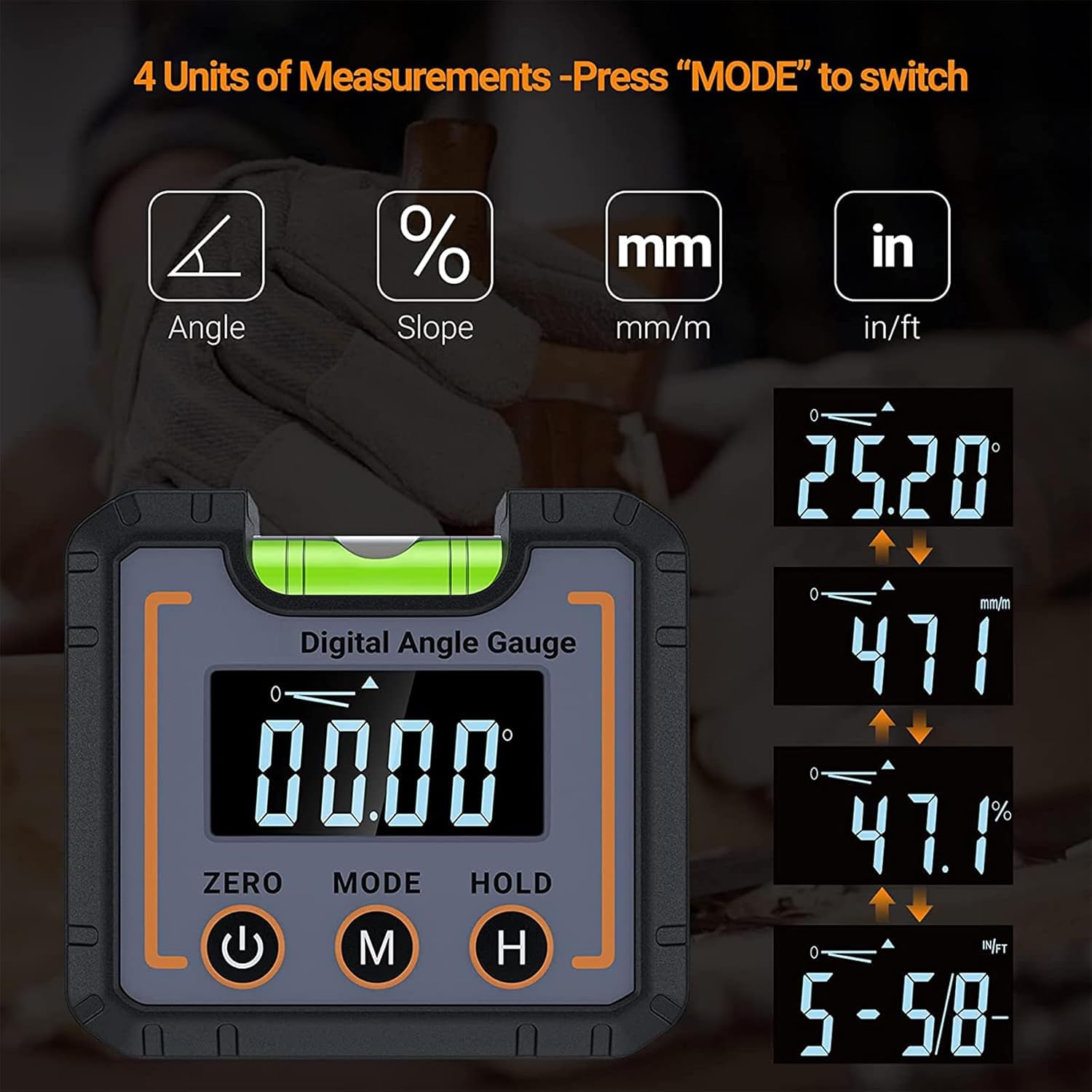
Figure 3: Switching between the four available measurement units.
5.4 Hold Function
The HOLD function allows you to freeze the current reading on the display for easier viewing, especially in hard-to-reach areas.
- To activate the HOLD function, short press the HOLD button. The reading will freeze, and a 'HOLD' indicator may appear on the screen.
- To release the HOLD function and resume live readings, short press the HOLD button again.
5.5 Automatic Screen Flip
The display automatically rotates 180° when the device is inverted, ensuring the numbers are always upright and easy to read from any orientation.

Figure 4: The large LCD display with backlight and automatic screen flip for enhanced readability.
5.6 Magnetic Base Usage
The strong magnetic base allows the inclinometer to be securely attached to metal surfaces, providing hands-free operation and stable measurements.

Figure 5: The inclinometer in use, demonstrating its versatility.
5.7 Example Applications
The ERICAT Digital Angle Gauge is suitable for a variety of tasks:
- Setting blade angles on table saws and miter saws.
- Measuring slopes for drainage or construction.
- Aligning machinery and equipment.
- Checking angles in automotive repair.
- General leveling and angle finding in home decoration and DIY projects.

Figure 6: Multi-scenario usage of the digital angle gauge, including timber processing, home decoration, and car repair.
5.8 Illustrative Videos
The following videos demonstrate common features and uses of digital angle gauges. Please note that the specific device shown in these videos may vary from your ERICAT model, but the principles of operation are similar.
Video 1: Demonstration of a digital angle finder with electronic laser, showing angle measurement and laser line projection.
Video 2: Overview of a digital angle gauge, highlighting its multi-functional aspects, angle range, measurement modes, and backlight display.
Video 3: Features and operation of a digital magnetic angle gauge, including its laser function, measurement modes, and magnetic base.
6. Maintenance
- Cleaning: Wipe the device with a soft, dry cloth. Do not use abrasive cleaners or solvents.
- Storage: Store the inclinometer in a cool, dry place away from direct sunlight and extreme temperatures. Remove batteries if storing for extended periods to prevent leakage.
- Battery Replacement: Replace batteries when the low battery indicator appears on the display to ensure accurate readings.
7. Troubleshooting
- Device does not power on: Check battery installation and ensure batteries are fresh.
- Inaccurate readings: Ensure the device is placed on a stable surface. Perform calibration if necessary.
- Display shows 'Err': This may indicate an out-of-range measurement or a calibration issue. Re-position the device or perform calibration.
8. Specifications
| Feature | Specification |
|---|---|
| Product Name | Digital Inclinometer |
| Display Range | 0~90° |
| Resolution | 0.05° |
| Accuracy | ±0.1° |
| Power Source | 2 AA Batteries (Not Included) |
| Working Temperature | 0°C~40°C |
| Storage Temperature | -10°C~50°C |
| Product Size | 68x32x62MM |
| Manufacturer | ERICAT |
9. Warranty and Support
For warranty information, technical support, or service inquiries, please refer to the contact information provided with your purchase or visit the official ERICAT website. Keep your purchase receipt as proof of purchase for warranty claims.


