
1. Product Overview
This manual provides essential information for the safe assembly, operation, and maintenance of your Captiva Designs 4-Burner Propane Gas BBQ Grill. Please read all instructions carefully before use.

Image 1.1: The Captiva Designs 4-Burner Propane Gas BBQ Grill, featuring a main cooking area, side burner, and storage cabinet.
The Captiva Designs 4-Burner Propane Gas BBQ Grill is designed for outdoor cooking, offering a total of 46,700 BTU output. It features porcelain-enameled cast iron grates for even heat distribution and durability, a side burner for additional cooking flexibility, and a built-in thermometer for temperature monitoring.
2. Safety Information
WARNING: For outdoor use only. Do not store or use gasoline or other flammable vapors and liquids in the vicinity of this or any other appliance.
- Always operate the grill on a level, stable surface.
- Keep the grill area clear and free from combustible materials, gasoline, and other flammable vapors and liquids.
- Maintain a minimum clearance of 10 inches from the back and sides of the grill to any combustible construction.
- Do not obstruct the flow of combustion and ventilation air.
- Never leave the grill unattended while in use.
- Keep children and pets away from the grill at all times.
- Always wear protective gloves when handling hot components.
- Ensure the propane tank is securely connected and checked for leaks before each use.
- Turn off all burner controls and the propane tank valve when the grill is not in use.
3. Package Contents
Before assembly, ensure all parts are present and undamaged. The package should include:
- Grill Lid
- Main Grill Body
- Side Burner Assembly
- Porcelain-Enameled Cast Iron Grates
- Warming Rack
- Flame Tamers
- Grease Tray and Grease Box
- Propane Hose and Regulator (Adapter Hose)
- Tool Holder
- Caster Wheels (2 locking, 2 non-locking)
- Hardware Pack (screws, bolts, washers)
- User Manual
4. Assembly Instructions
Assembly is required for this grill. It is recommended to have two people for assembly. Follow the detailed instructions provided in the included user manual. Ensure all connections are secure before proceeding to setup.

Image 4.1: Overall dimensions of the grill: 48.6"W x 19.1"D x 45.1"H, with a cooking height of 35.5 inches.
5. Setup
5.1 Propane Tank Connection
- Ensure all burner control knobs are in the 'OFF' position.
- Place the propane tank (not included) into the designated storage area within the grill cabinet.
- Connect the regulator hose to the propane tank valve. Hand-tighten firmly. Do not use tools.
- Open the propane tank valve slowly, turning counter-clockwise.
- Perform a leak test: Apply a soapy water solution to the hose and connections. If bubbles appear, there is a leak. Tighten connections or replace parts as necessary. Do not use the grill if a leak is detected.

Image 5.1: The internal cabinet provides secure storage for a standard propane tank.
5.2 Initial Burn-Off
Before cooking for the first time, perform an initial burn-off to remove any manufacturing residues:
- With the lid open, turn one main burner control knob to 'HIGH'.
- Once lit, turn on the remaining main burners to 'HIGH'.
- Close the lid and allow the grill to heat for 10-15 minutes.
- Turn all burners to 'OFF' and close the propane tank valve.
6. Operating Instructions
6.1 Lighting the Main Burners
- Ensure the propane tank valve is open.
- Open the grill lid.
- Push and turn one main burner control knob to the 'HIGH' position. You should hear an ignition click.
- Verify the burner is lit by looking through the cooking grates. If it does not light within 5 seconds, turn the knob to 'OFF', wait 5 minutes, and repeat the process.
- Once one burner is lit, you can light the adjacent burners by turning their control knobs to 'HIGH'.

Image 6.1: Control knobs for individual burners, allowing precise temperature adjustment.
6.2 Using the Side Burner
- Open the side burner lid.
- Push and turn the side burner control knob to the 'HIGH' position.
- Verify the burner is lit. If it does not light, turn the knob to 'OFF', wait 5 minutes, and repeat.
- Adjust the flame as needed.

Image 6.2: The integrated side burner provides additional cooking capacity for sauces or side dishes.
6.3 Temperature Control
The grill features a built-in thermometer on the lid to monitor the internal temperature. Adjust individual burner control knobs to achieve desired cooking temperatures. The porcelain-enameled cast iron grates ensure even heat distribution across the 360 sq. in. primary cooking area.

Image 6.3: The lid-mounted thermometer displays the internal temperature of the grill.
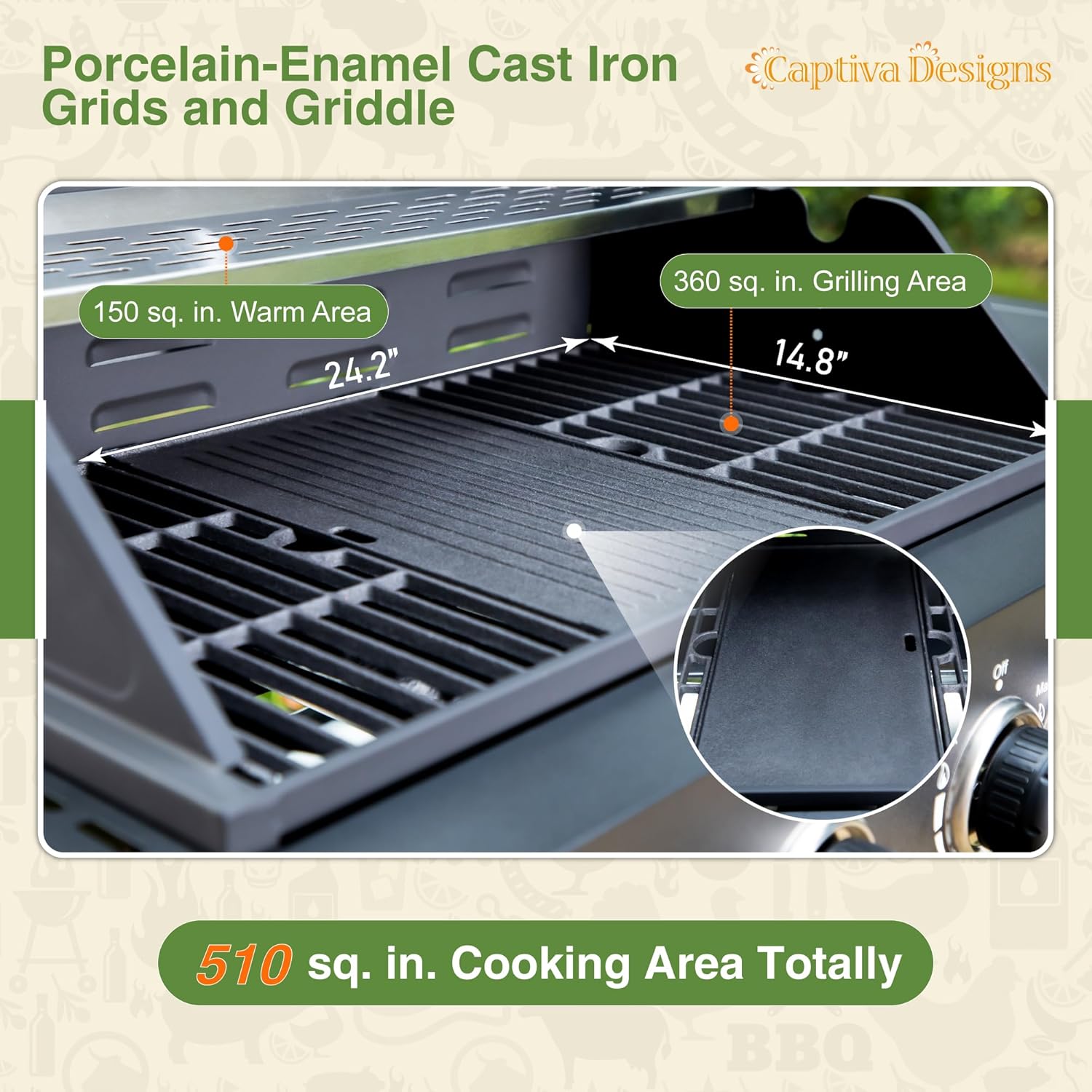
Image 6.4: The grill offers a 360 sq. in. primary grilling area and a 150 sq. in. warm rack, totaling 510 sq. in. of cooking space.
6.4 Rotisserie Cooking Area
This grill includes fixed slots on both sides of the cooking area to accommodate an optional rotisserie kit or rotisserie basket (not included). This feature allows for a wider variety of cooking methods, such as roasting large cuts of meat.

Image 6.5: Designated slots for installing an optional rotisserie kit or basket.
7. Maintenance and Cleaning
7.1 Cleaning the Cooking Grates
After each use, once the grill has cooled, clean the porcelain-enameled cast iron grates with a grill brush. For stubborn residue, use warm soapy water and a non-abrasive sponge.

Image 7.1: The grill features heavy-duty porcelain-enameled cast iron grates, designed for durability and even heating.
7.2 Grease Management
The grill is equipped with a full-sized slide-out grease tray and a hanging grease box. This design facilitates easy cleaning by allowing grease to flow directly into the removable box.

Image 7.2: The slide-out grease tray and removable grease box simplify post-cooking cleanup.
7.3 Exterior Cleaning
Clean exterior surfaces with mild soap and water. Avoid abrasive cleaners or pads that could damage the finish.
8. Troubleshooting
| Problem | Possible Cause | Solution |
|---|---|---|
| Burner fails to light | No gas flow; Clogged burner port; Faulty igniter | Check propane tank valve; Clean burner ports; Contact customer service |
| Uneven heating | Clogged burner ports; Improper flame tamers placement | Clean burner ports; Ensure flame tamers are correctly positioned |
| Gas smell | Gas leak | Immediately turn off gas supply. Perform leak test. Do not use if leak persists. |
9. Specifications
- Brand: Captiva Designs
- Model Number: GR022
- Product Dimensions: 48.6"W x 19.1"D x 45.1"H
- Fuel Type: Propane Gas (LPG)
- Total BTU Output: 46,700 BTU (14 KW)
- Main Burner Count: 4
- Side Burner Count: 1
- Primary Cooking Area: 360 sq. in.
- Warming Rack Area: 150 sq. in.
- Total Cooking Surface Area: 510 sq. in.
- Grates Material: Porcelain-Enameled Cast Iron
- Special Features: Built-In Thermometer, Removable Grease Tray, Warming Rack, Rotisserie Kit Ready
- Assembly Required: Yes
- Color: Black
- Material: Alloy Steel, Cast Iron, Iron, Metal, Porcelain, Stainless Steel
10. Warranty and Support
Captiva Designs provides professional customer service for your propane gas grill. If you encounter any problems or have questions, please contact us. We aim to respond within 24 hours to ensure your satisfaction and protect your investment.
For support, please refer to the contact information provided with your purchase documentation or visit the official Captiva Designs website.