
1. Introduction
Thank you for choosing the Generic Smart Door Lock. This manual provides detailed instructions for the installation, operation, and maintenance of your new smart lock. Please read this manual thoroughly before installation and use to ensure proper function and longevity of the product. Keep this manual for future reference.
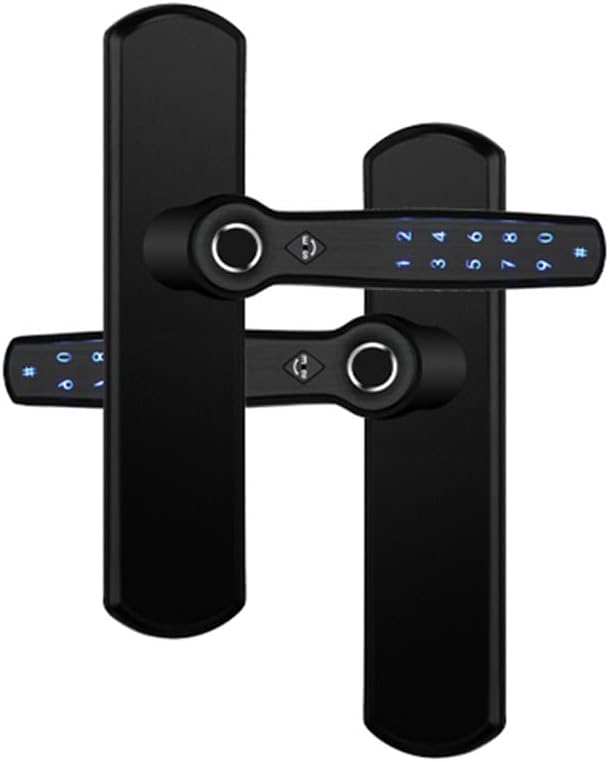
Figure 1: Front and back view of the Generic Smart Door Lock.
2. Product Overview
The Generic Smart Door Lock is a sophisticated security solution designed for modern homes and offices. It offers multiple unlocking methods, including fingerprint recognition, password entry, Bluetooth control via the TTlock APP, and traditional mechanical keys. Constructed from durable 304 stainless steel and zinc alloy, this lock is suitable for various door types, including wooden, aluminum, and metal doors.
3. Features
- Multiple Unlocking Methods: Fingerprint, Password, Bluetooth (TTlock APP), and Mechanical Key.
- Double-Sided Smart Lock: Enhanced security and convenience.
- TTlock APP Support: Manage access, generate temporary/timed passwords, and monitor lock activity remotely.
- High Capacity: Stores up to 110 fingerprints and unlimited passwords.
- Durable Construction: Made with 304 stainless steel panel and zinc alloy handle.
- Reversible Handle: Adaptable for both right and left-handed door installations.
- Low Power Reminder: Notifies users via the app when batteries are low.
4. Specifications
| Specification | Detail |
|---|---|
| Unlocking Methods | Fingerprint, Password, Bluetooth APP, Mechanical Key |
| Material | 304 Stainless Steel Panel, Zinc Alloy Handle |
| Color | Black |
| Applicable Door Types | Wooden doors, Aluminum doors, Metal doors |
| Fingerprint Capacity | 110 fingerprints |
| Password Capacity | Unlimited |
| Fingerprint Reader | FPC Fingerprint Reader |
| Item Dimensions (L*W*H) | 220mm * 50mm * 65mm (Handle length: 135mm) |
| Weight | 1.95 kg |
| Power Supply | 4 AAA 1.5V batteries (not included) |
| Applicable Door Thickness | 30-70mm |
| Applicable Door Frame Width | Above 50mm |
| Working Temperature | -20°C to 60°C |
| Certifications | CE/ROHS |
5. Setup and Installation
5.1 Door Compatibility Check
Before installation, ensure your door meets the following requirements:
- Door Thickness: 30mm - 70mm
- Door Frame Width: Above 50mm
5.2 Mortise Lock Selection
Select the appropriate mortise lock for your door. The lock supports universal right/left direction and can be adjusted freely.
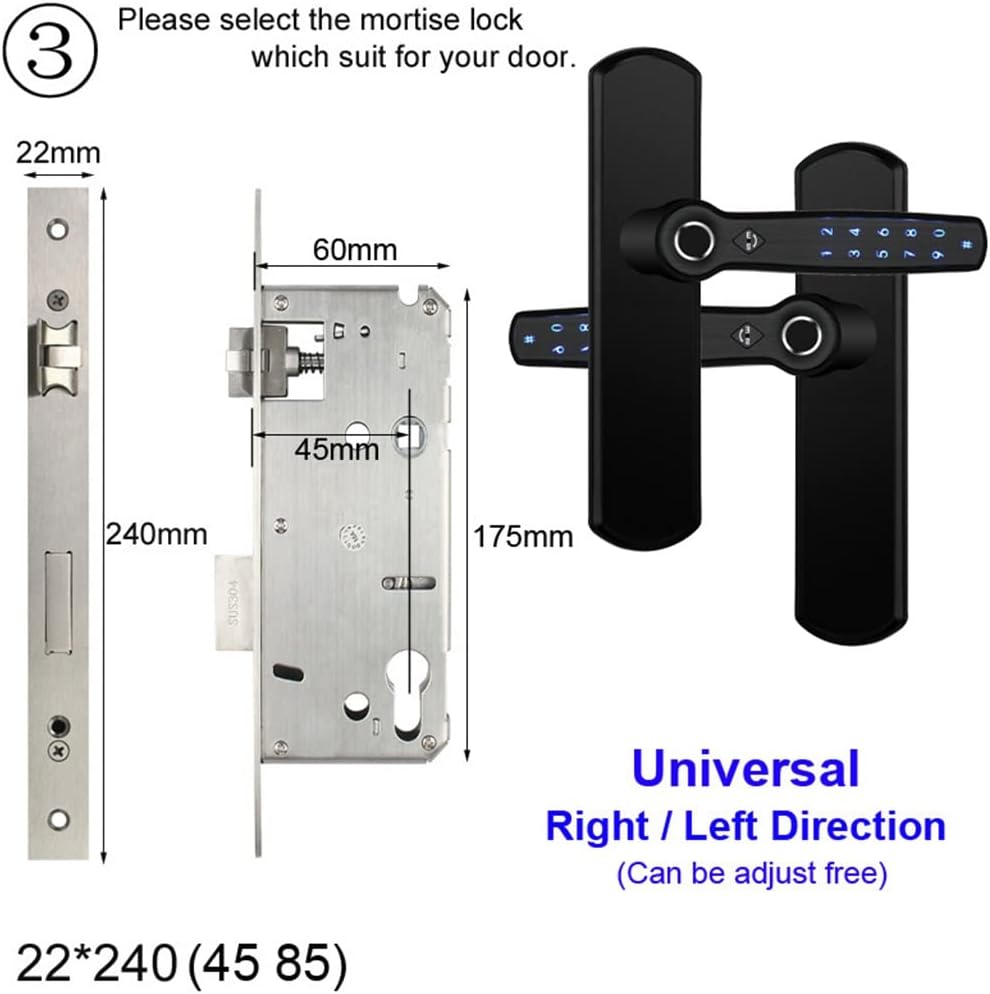
Figure 2: Mortise lock selection guide with dimensions (e.g., 22*240 (45 85)).
5.3 Product Dimensions
Refer to the diagram below for detailed dimensions of the lock components to assist with drilling and fitting.
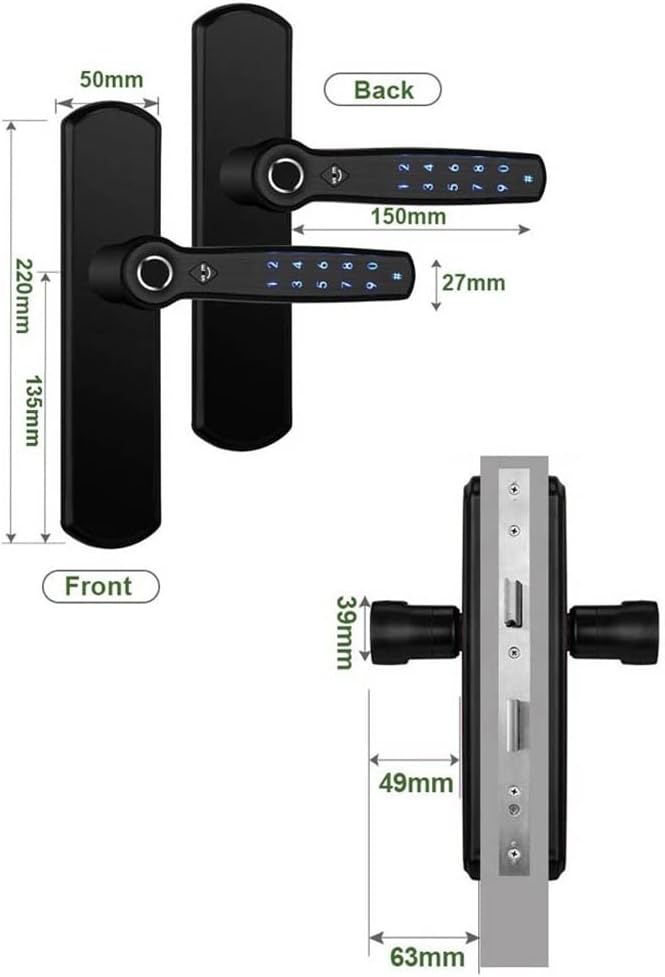
Figure 3: Detailed dimensions of the front panel, back panel, and mortise lock.
5.4 Screw Pitch-Row Adjustment
The screw pitch-row can be adjusted up and down to accommodate various sized lock bodies. This ensures a secure and flush fit.
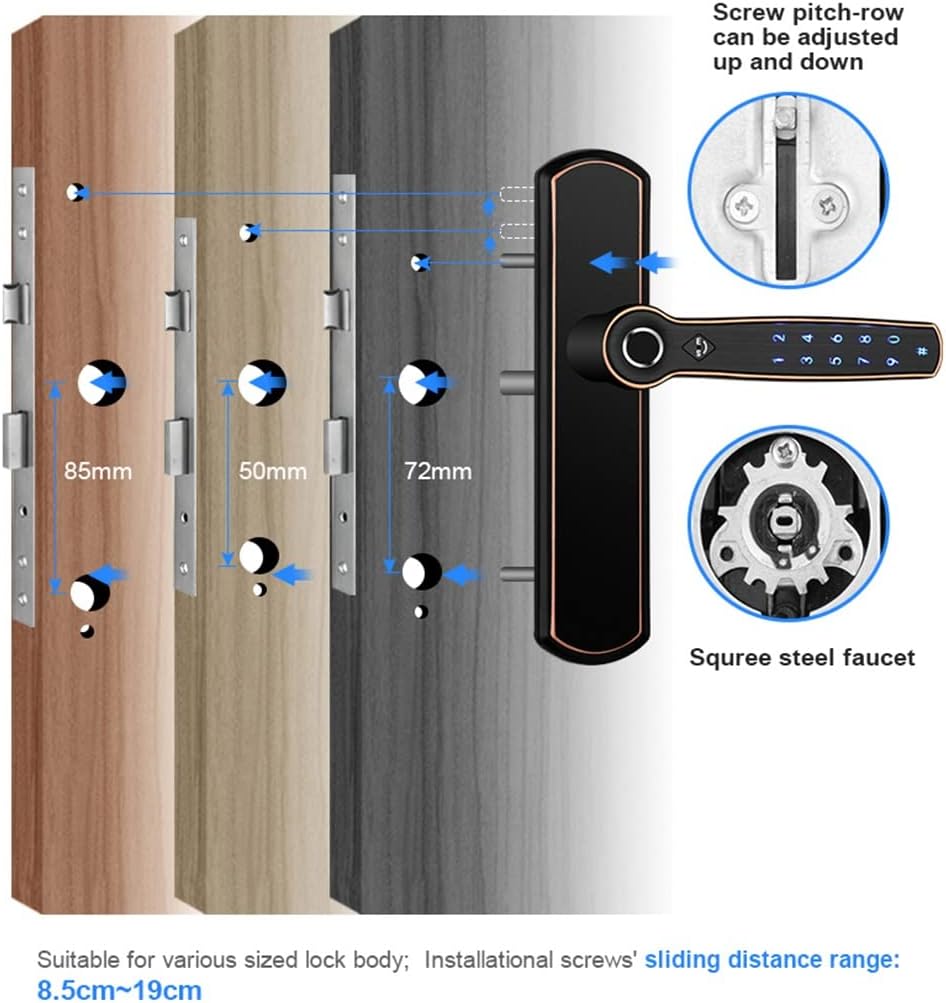
Figure 4: Illustration of screw pitch-row adjustment for various lock body sizes.
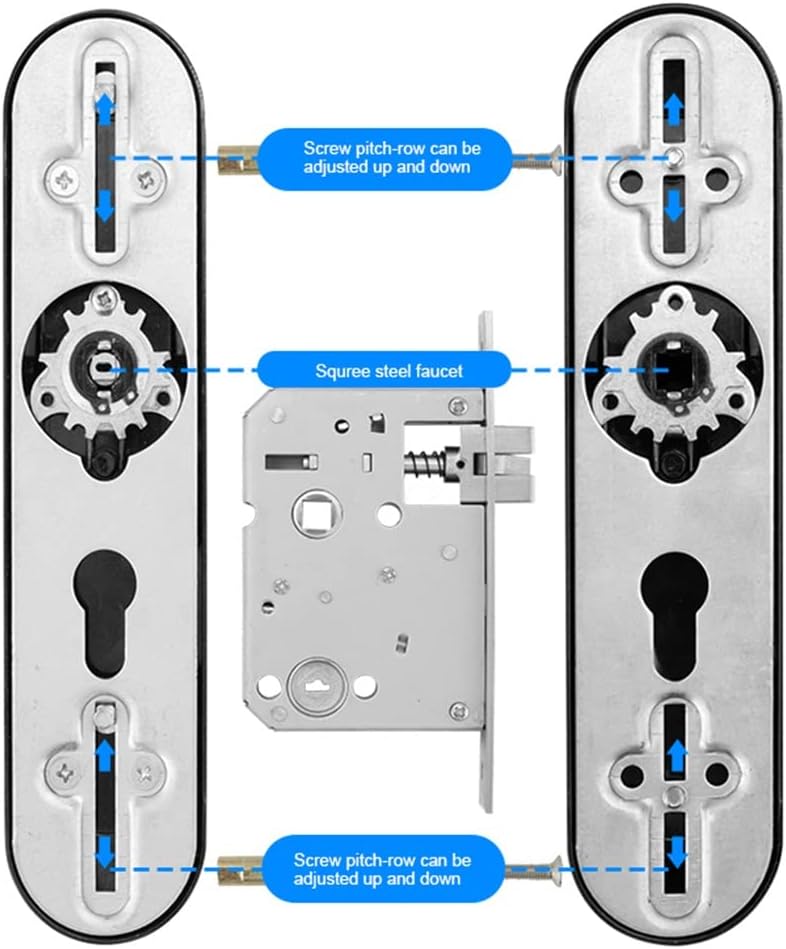
Figure 5: Close-up view of the adjustable screw pitch-row and square steel faucet.
5.5 Battery Installation
The lock requires 4 AAA 1.5V batteries (not included). Install them into the designated battery compartment, ensuring correct polarity. A low power reminder will be sent via the app when batteries need replacement.
6. Operating Instructions
6.1 Unlocking Methods
Your smart door lock offers several convenient ways to unlock:
- Fingerprint Unlock: Place your registered finger on the fingerprint sensor.
- Password Unlock: Enter your registered password on the keypad.
- Bluetooth APP Unlock: Use the TTlock APP on your smartphone to unlock the door via Bluetooth.
- Mechanical Key Unlock: In case of emergency or battery depletion, use the provided mechanical key.
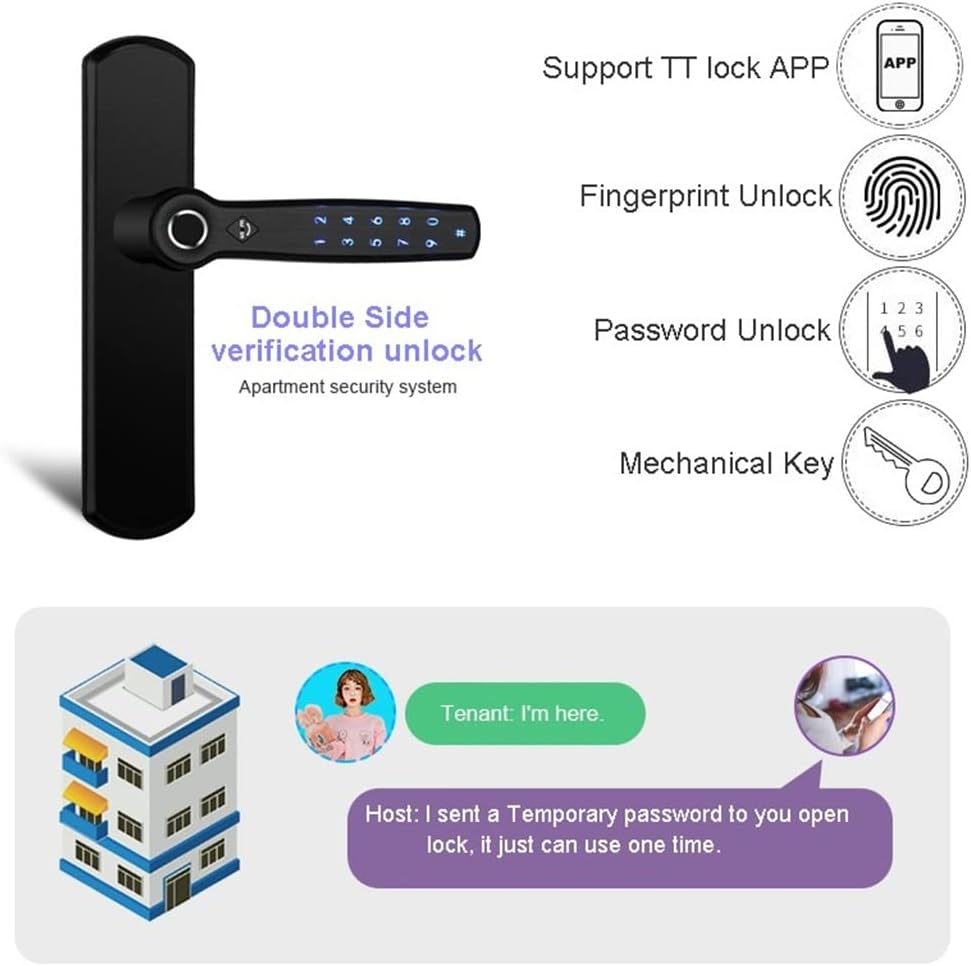
Figure 6: Visual representation of the four unlocking methods and the temporary password function.
6.2 TTlock APP Usage
The TTlock APP provides comprehensive management of your smart lock:
- User Management: Add, modify, or delete fingerprints and passwords.
- Temporary/Timed Passwords: Generate one-time or time-limited access codes for guests or service providers.
- Activity Log: View a record of who entered and when.
- Remote Control: Unlock the door remotely via Bluetooth (or WiFi with an optional gateway).
- Integration: The system can integrate with Google Assistant and Alexa via a gateway for voice control.
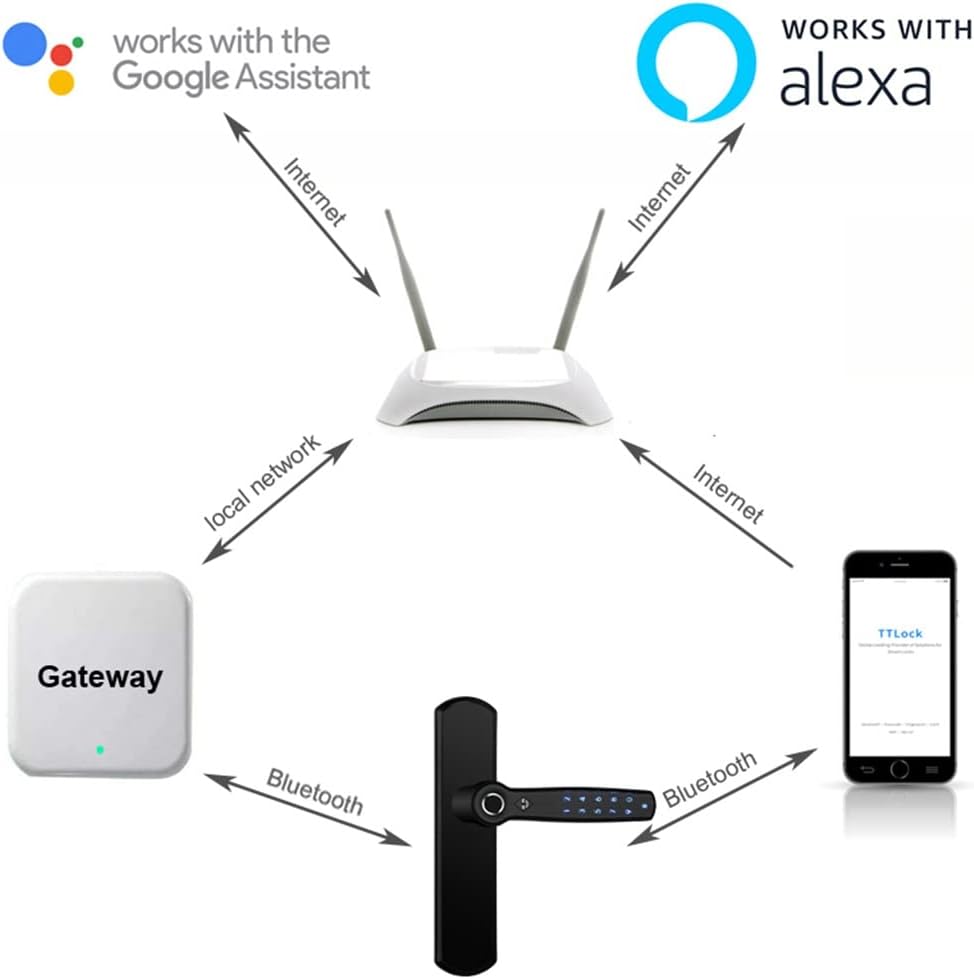
Figure 7: Connectivity diagram showing the smart lock's interaction with the TTlock APP, Gateway, and smart home assistants.
7. Maintenance
7.1 Battery Replacement
When the batteries are low, the TTlock APP will send a reminder. Replace all 4 AAA batteries promptly to ensure continuous operation. Use high-quality alkaline batteries for best performance.

Figure 8: Illustration of the low power app reminder and battery status.
7.2 Cleaning
Clean the lock's exterior with a soft, dry cloth. Avoid using abrasive cleaners or solvents, as these can damage the finish and electronic components. Keep the fingerprint sensor clean for optimal performance.
8. Troubleshooting
If you encounter issues with your smart lock, consider the following common solutions:
- Lock not responding: Check battery levels and replace if necessary. Ensure the lock is properly installed and all connections are secure.
- Fingerprint not recognized: Ensure your finger is clean and dry. Re-register your fingerprint if the issue persists.
- Password not working: Verify the entered password. Ensure the lock is not in a locked-out state due to multiple incorrect attempts.
- APP connectivity issues: Ensure Bluetooth is enabled on your phone and you are within range. If using a gateway, check its power and internet connection.
- Mechanical key not working: Ensure the key is fully inserted and turned correctly. Do not force the key.
For further assistance, please refer to the TTlock APP's help section or contact customer support.
9. Warranty and Support
This product comes with a standard manufacturer's warranty. Please retain your proof of purchase for warranty claims. For technical support, troubleshooting, or warranty inquiries, please contact the retailer or manufacturer directly. Contact information can typically be found on the product packaging or the retailer's website.