
1. Introduction
Thank you for choosing the Audiocrazy Portable AM FM Shortwave Radio with Bluetooth, Model AC-1705R. This radio is designed to provide versatile audio entertainment with its multi-band radio reception (AM, FM, Shortwave), Bluetooth connectivity, and media playback options via SD card and USB. It features a classic retro design, clear sound, and multiple power options for convenience at home or on the go.
2. Safety Information
- Power Source: Use only the specified power adapter or batteries. Ensure the voltage matches the device requirements.
- Battery Safety: When using D cell batteries, ensure correct polarity. Remove batteries if the radio will not be used for an extended period to prevent leakage. Do not mix old and new batteries or different types of batteries.
- Water Resistance: This product is not water resistant. Avoid exposure to water, rain, or high humidity to prevent damage.
- Ventilation: Do not block ventilation openings. Ensure adequate airflow around the unit.
- Cleaning: Disconnect from power before cleaning. Use a soft, dry cloth. Do not use liquid cleaners or aerosol sprays.
- Temperature: Avoid extreme temperatures. Do not place near heat sources or in direct sunlight for prolonged periods.
- Servicing: Do not attempt to service this product yourself. Refer all servicing to qualified service personnel.
3. Product Overview
Familiarize yourself with the main components and controls of your Audiocrazy radio.
Front Panel Controls

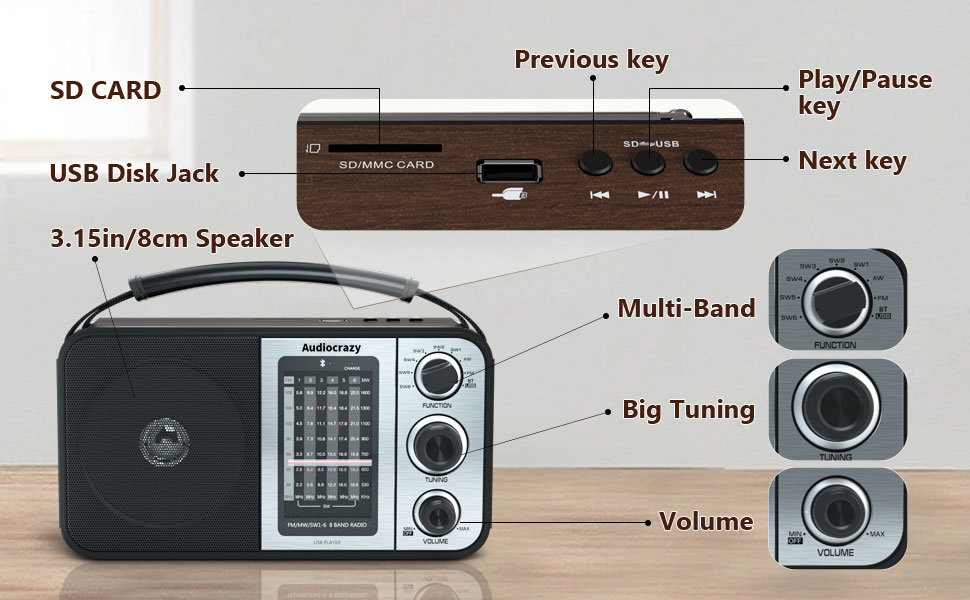
- Function Switch: Selects between AM, FM, SW1-6, Bluetooth (BT), and other modes.
- Tuning Knob: Used to precisely tune into radio stations across all bands.
- Volume Knob: Controls the audio output level and also serves as the power ON/OFF switch.
- Speaker: Front-facing speaker for audio output.
Top Panel Controls and Ports
- SD Card Slot: Insert an SD card for playing stored audio files.
- USB Disk Jack: Insert a USB flash drive for playing stored audio files.
- Previous Key: Skips to the previous track during media playback.
- Play/Pause Key: Starts or pauses playback of media files.
- Next Key: Skips to the next track during media playback.
Side and Rear Panel

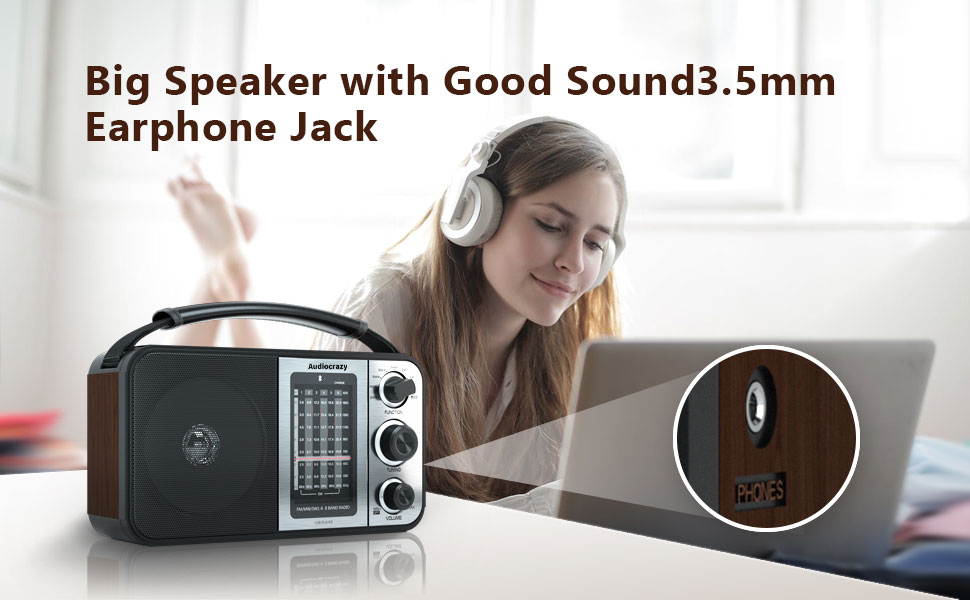
- 3.5mm Headphone Jack: For private listening with headphones.
- AC Power Input: Connect the supplied power adapter for wall power.
- Battery Compartment: Located on the rear, for D cell batteries.
- Telescopic Antenna: Extend for improved radio reception.
4. Setup
4.1 Powering the Radio
Your Audiocrazy radio offers three power options:
- AC Power (Wall Outlet): Insert the supplied power adapter cable into the AC power input on the radio and plug the other end into a standard wall outlet.
- DC Power (D Cell Batteries): Open the battery compartment cover on the rear of the radio. Insert two (2) D cell batteries, ensuring correct polarity (+/-) as indicated inside the compartment. Close the cover securely.
- Internal Rechargeable Battery: The radio has a built-in rechargeable lithium battery. It charges automatically when the radio is connected to AC power.
4.2 Antenna Adjustment
For optimal radio reception, extend the telescopic antenna fully. For AM and Shortwave bands, you may need to adjust the radio's position or direction for clearer reception.

5. Operating Instructions
5.1 Turning On/Off and Volume Control
Rotate the Volume Knob clockwise to turn the radio ON and increase the volume. Rotate it counter-clockwise to decrease the volume and turn the radio OFF.
5.2 Selecting Radio Bands
Use the Function Switch to select your desired radio band:
- AM: Amplitude Modulation band (520-1710 KHz).
- FM: Frequency Modulation band (87.5-108 MHz).
- SW1-6: Shortwave bands (3.5-23 MHz).
5.3 Tuning to a Station
Once a band is selected, slowly rotate the Tuning Knob to scan for stations. The frequency display will show the current frequency. Stop rotating when you find a clear signal.
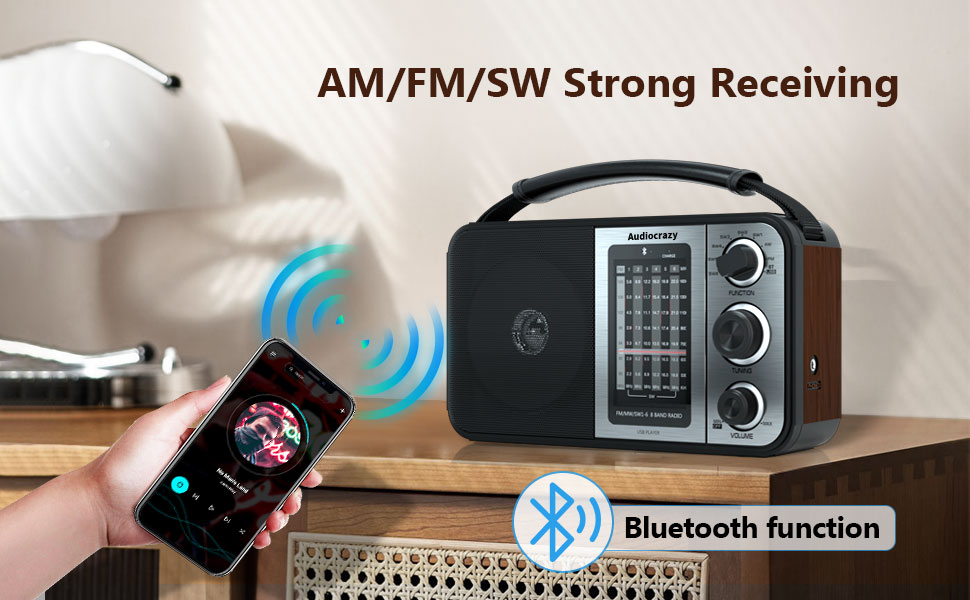
5.4 Bluetooth Mode
To connect a Bluetooth device:
- Switch the Function Switch to the 'BT' position. The radio will enter Bluetooth pairing mode.
- On your smartphone or other Bluetooth device, enable Bluetooth and search for available devices.
- Select 'Audiocrazy' (or similar name) from the list of devices to pair.
- Once paired, you can play audio from your device through the radio's speaker.
5.5 SD Card / USB Playback
To play audio from an SD card or USB drive:
- Insert a formatted SD card into the SD Card Slot or a USB flash drive into the USB Disk Jack.
- Switch the Function Switch to the appropriate media playback mode (usually indicated by 'USB' or 'SD' or automatically detected).
- Use the Previous Key, Play/Pause Key, and Next Key to control playback.
5.6 Headphone Use
For private listening, plug any standard 3.5mm headphones into the 3.5mm Headphone Jack on the side of the radio. The main speaker will automatically mute.

6. Maintenance
- Cleaning: Wipe the radio's exterior with a soft, dry, lint-free cloth. Do not use abrasive cleaners, waxes, or solvents.
- Storage: If storing the radio for an extended period, especially if using D cell batteries, remove the batteries to prevent potential leakage and damage. Store in a cool, dry place.
- Antenna Care: Handle the telescopic antenna gently to avoid bending or breaking.
7. Troubleshooting
| Problem | Possible Cause | Solution |
|---|---|---|
| Radio does not turn on. | No power, batteries drained or incorrectly inserted, AC adapter not connected. | Check AC power connection. If using batteries, ensure they are fresh and inserted with correct polarity. Recharge internal battery if using AC power. |
| Poor radio reception. | Antenna not extended, weak signal, interference. | Extend the telescopic antenna fully. Try repositioning the radio. For AM/SW, rotate the radio for better signal. |
| No sound from speaker. | Volume too low, headphones connected, incorrect mode. | Increase volume. Disconnect headphones. Ensure correct function mode (AM/FM/SW/BT/USB/SD) is selected. |
| Bluetooth device not pairing. | Radio not in BT mode, device too far, Bluetooth off on device. | Ensure radio is in 'BT' mode. Keep devices within range. Enable Bluetooth on your device and re-scan. |
| SD/USB media not playing. | Incorrect mode, unsupported file format, corrupted media. | Ensure radio is in the correct media playback mode. Check if audio files are in a supported format. Try a different SD card or USB drive. |
8. Specifications
| Feature | Specification |
|---|---|
| Brand | Audiocrazy |
| Model Number | AC-1705R |
| Product Dimensions (L x W x H) | 9.7" x 4.7" x 5.7" |
| Tuner Technology | AM, FM |
| Radio Bands Supported | AM (520-1710 KHz), FM (87.5-108 MHz), SW (3.5-23 MHz) |
| Connectivity Technology | Bluetooth, USB |
| Special Features | Portable, Rechargeable, SD/USB Playback, Headphone Jack |
| Power Source | Battery Powered (Internal Rechargeable, 2x D Cell), AC Plug-in |
| Included Components | Power Adapter |
| Display Type | LCD or LED |
| Hardware Interface | 3.5mm Audio, USB |
| Voltage | 3 Volts (DC) |
| Material | Wood (Enclosure) |
| Water Resistance Level | Not Water Resistant |
9. Warranty and Support
9.1 Warranty Information
Specific warranty details for your Audiocrazy product may vary. Please refer to the documentation included with your purchase or contact Audiocrazy customer support for detailed warranty terms and conditions.
9.2 Customer Support
For technical assistance, troubleshooting not covered in this manual, or general inquiries, please contact Audiocrazy customer support. Contact information can typically be found on the product packaging, the official Audiocrazy website, or through your retailer.