
AIOMEST AI-5000G
AIOMEST AI-5000G Digital Anemometer User Manual
Model: AI-5000G
1. Introduction
The AIOMEST AI-5000G Digital Anemometer is a professional handheld instrument designed for accurate measurement of wind speed, wind temperature, and air flow. Featuring a three-cup design for precision, a large display, and multiple unit options, it is suitable for various applications including shooting, sailing, surfing, drone operation, HVAC, and environmental monitoring.
2. Package Contents
Upon opening the package, please verify that all items listed below are present and in good condition:
- AIOMEST AI-5000G Anemometer (1)
- Rechargeable Battery (1)
- USB Type-C Charging Cable (1)
- Screwdriver (1)
- Compass (1)
- User Manual (1)

Image: The AIOMEST AI-5000G Anemometer shown with its included accessories: USB Type-C charging cable, screwdriver, and the instruction manual.
3. Product Features
- Professional Three-Cup Design: Ensures accurate wind measurement without constant alignment.
- Enhanced Accuracy & Extended Range: Wind speed from 0.3-30 m/s (±5%), temperature from -10℃ to 45℃ (±2℃).
- Large LCD Screen: Clear display with backlight function for visibility in low light.
- Multiple Units: Switch between m/s, Km/h, ft/min, knots, MPH for wind speed; ℃/℉ for temperature; CFM, CMS, CMM for air volume.
- Max/Min/Current Measurement: One-button calculation for maximum, minimum, and current values.
- Data Storage: Convenient function for storing measurement data.
- Type-C Charging Port: For quick and easy recharging.
- Auto Sleep Mode: Screen turns off after 5 minutes of inactivity to conserve battery.
- Integrated Compass: For directional reference during measurements.
- Tripod Mounting Hole: Equipped with 1/4" screw hole for stable, long-term monitoring (tripod not included).
- Durable Design: Compact, waterproof, and dustproof.
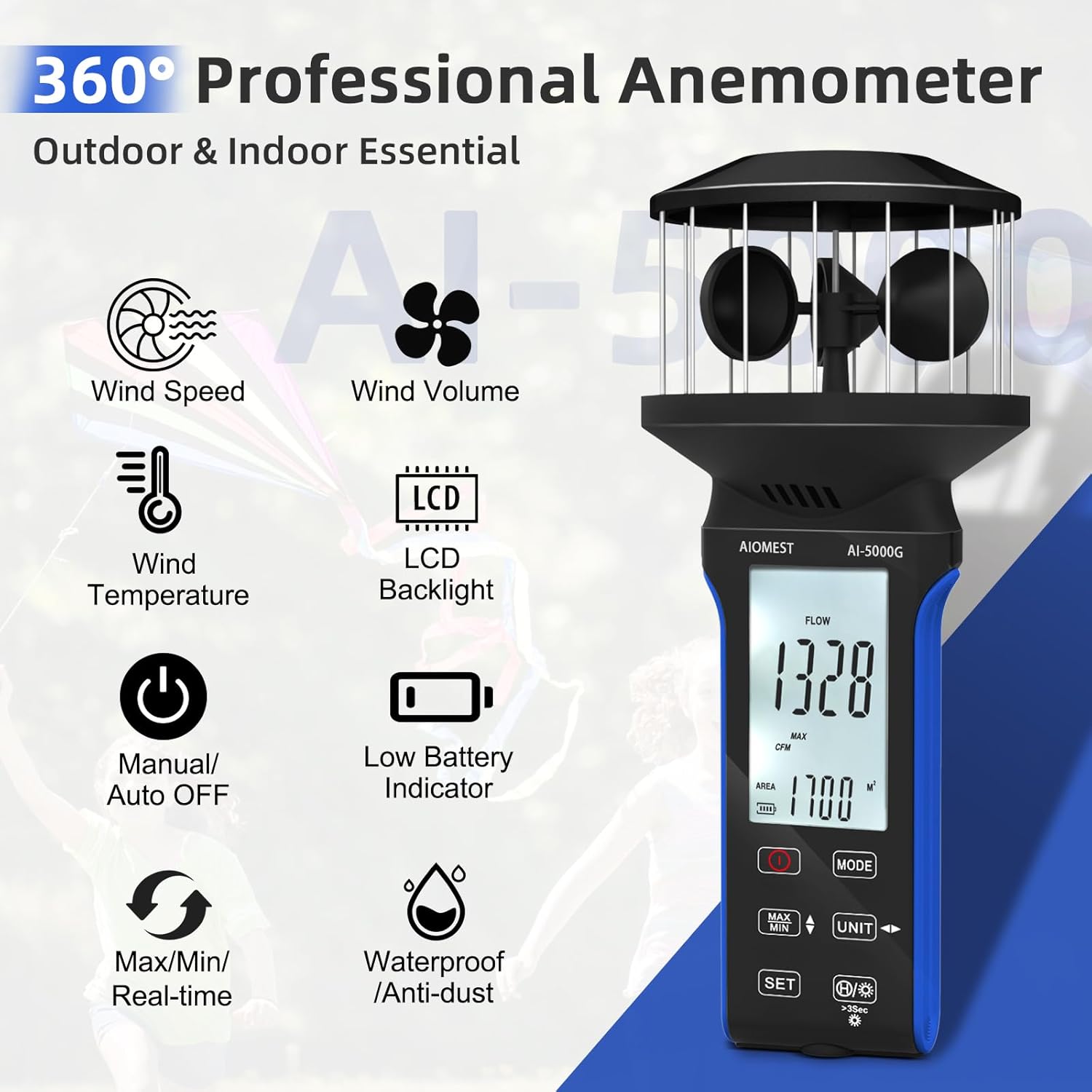
Image: The AIOMEST AI-5000G Anemometer highlighting its key features such as wind speed, wind volume, wind temperature, LCD backlight, manual/auto off, low battery indicator, Max/Min/Real-time, and waterproof/anti-dust capabilities.
4. Getting Started (Setup)
4.1 Charging the Device
The AI-5000G is equipped with a rechargeable battery. Before first use, or when the low battery indicator appears on the screen, connect the device to a power source using the provided USB Type-C charging cable.
- Locate the Type-C charging port, typically on the side or bottom of the device.
- Insert the Type-C end of the cable into the anemometer and the USB-A end into a compatible USB power adapter or computer port.
- The charging indicator (if present) will show the charging status.

Image: A close-up view of the AIOMEST AI-5000G Anemometer, specifically showing the Type-C rechargeable port located on the side of the device.
4.2 Powering On/Off
- To power on the device, press and hold the POWER button (usually marked with a circle and a vertical line).
- To power off, press and hold the POWER button again until the display turns off.
- The device features an auto-sleep mode, turning off the screen after 5 minutes of inactivity to save power.

Image: The AIOMEST AI-5000G Anemometer displaying its front panel with the screen and touch buttons, including the power button, mode button, MAX/MIN button, unit button, and set button.
5. Operation
5.1 Understanding the Display
The large LCD screen provides real-time readings and indicators:
- Main Display Area: Shows the current wind speed, temperature, or air flow value.
- Unit Indicators: Displays the active measurement unit (e.g., m/s, ℃, CFM).
- Mode Indicators: Shows if MAX, MIN, or current mode is active.
- Battery Indicator: Shows remaining battery life.
- Backlight Indicator: Indicates if the backlight is on.
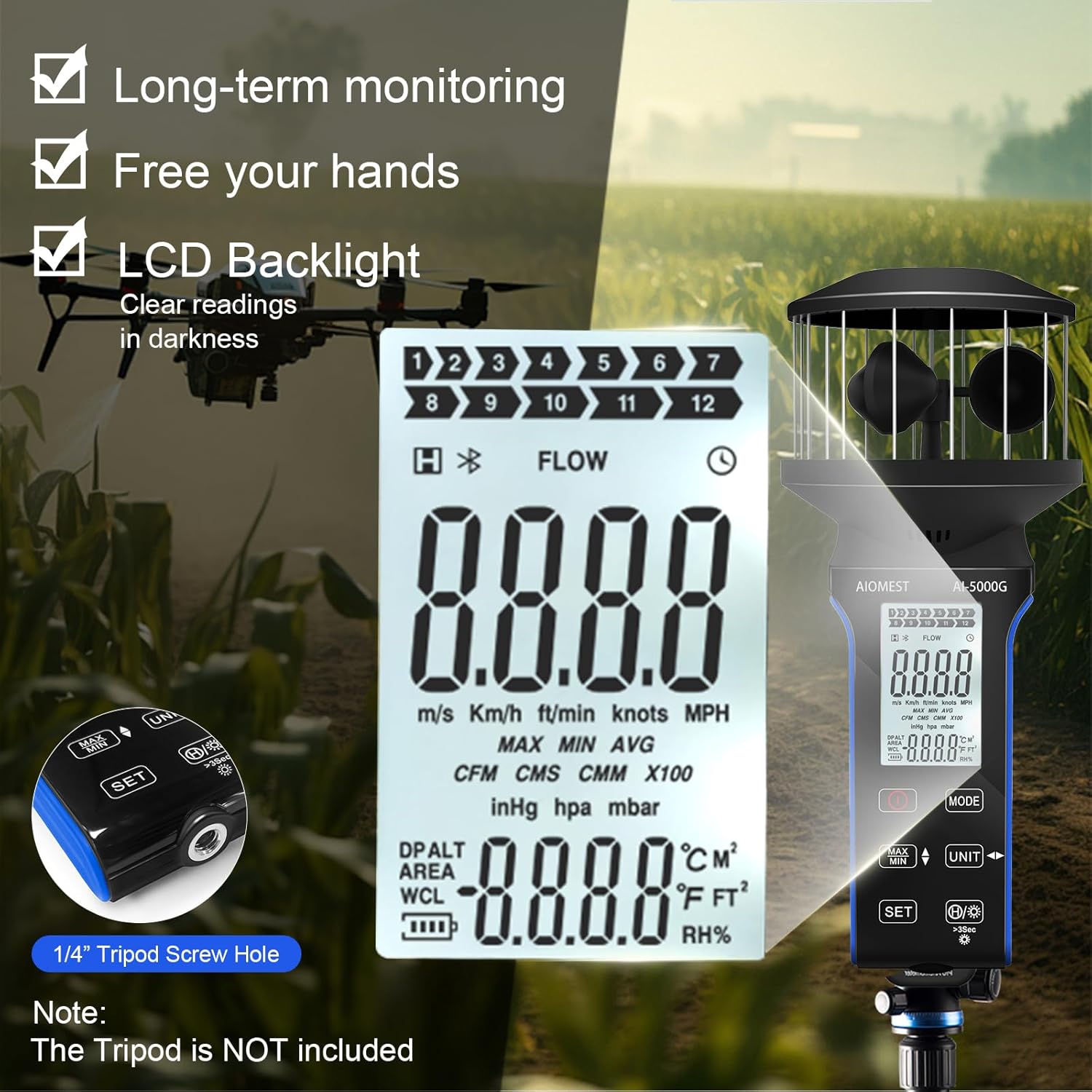
Image: A detailed view of the AIOMEST AI-5000G Anemometer's LCD screen, showing various measurement units (m/s, Km/h, ft/min, knots, MPH, CFM, CMS, CMM), MAX/MIN/AVG indicators, temperature units (℃/℉), and a 1/4" tripod screw hole on the side.
5.2 Changing Measurement Units
Press the UNIT button to cycle through available measurement units for wind speed, temperature, and air volume.
5.3 MAX/MIN/Current Measurement
Press the MAX/MIN button to switch between displaying the maximum, minimum, or current real-time measurement value. This is useful for capturing peak or lowest readings over a period.
5.4 Air Flow Area Setting
For accurate air volume (CFM, CMS, CMM) measurements, you may need to set the area. Refer to the specific instructions in the included paper manual for detailed steps on using the SET button to configure the area value.
5.5 Backlight and Auto-Off
- To activate or deactivate the LCD backlight, press the Backlight button (often integrated with another button, look for a light bulb icon).
- The device automatically enters sleep mode after 5 minutes of inactivity to conserve battery. Press any button to wake it up.
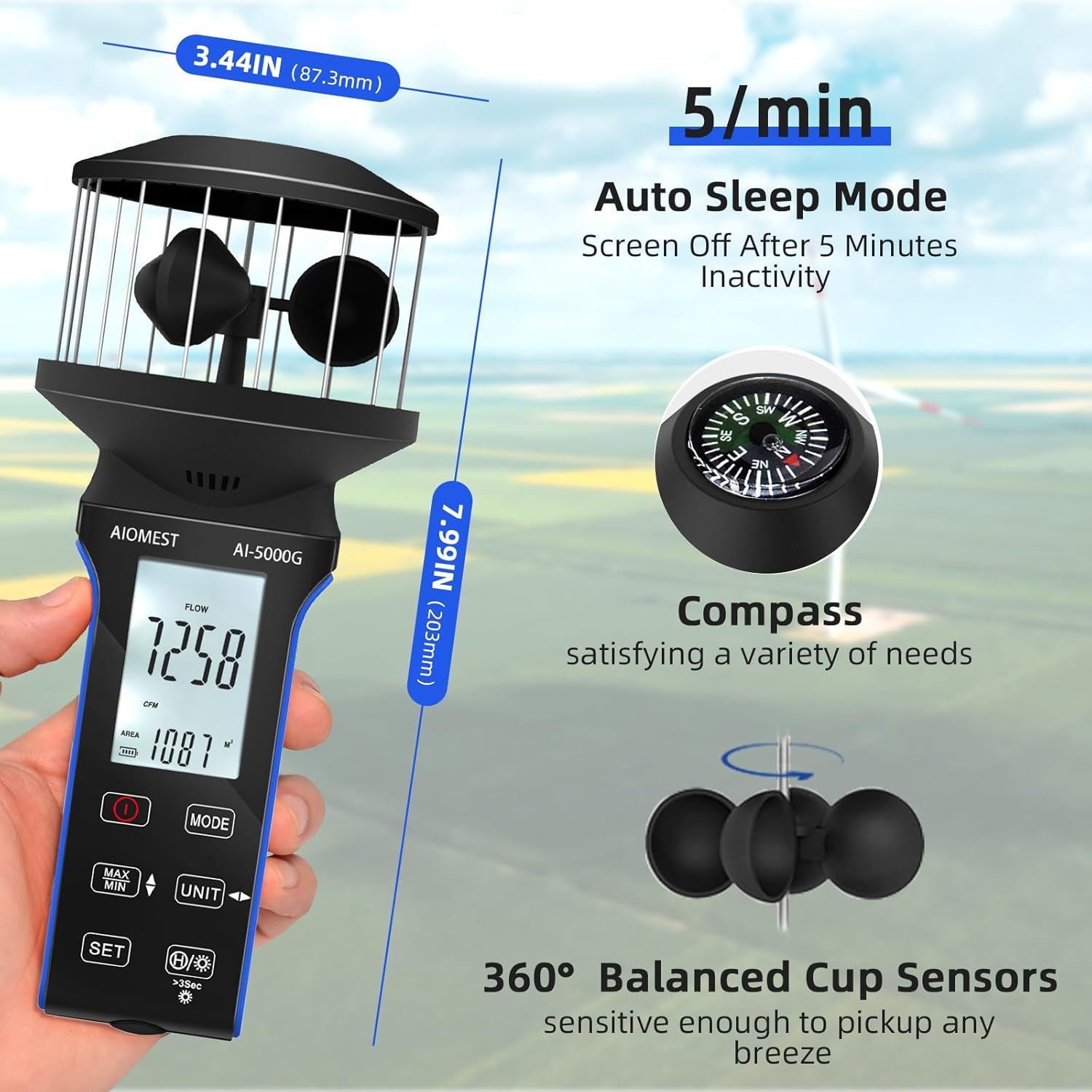
Image: The AIOMEST AI-5000G Anemometer displaying its dimensions (7.99 inches height, 3.44 inches width), illustrating the 5-minute auto sleep mode, the integrated compass, and the 360° balanced cup sensors.
5.6 Versatile Applications
The AI-5000G is designed for a wide range of uses:
- Outdoor Activities: Shooting, sailing, surfing, drone piloting.
- Industrial Use: HVAC system testing, vehicle optimization.
- Environmental Monitoring: Assessing wind conditions for various purposes.

Image: A collage showing various applications of the AIOMEST AI-5000G Anemometer, including drone operation, air vent measurement, vehicle optimization, boat usage, HVAC systems, and storm monitoring.
6. Specifications
| Parameter | Value |
|---|---|
| Wind Speed Range | 0.3 ~ 30 m/s |
| Wind Speed Resolution | 0.1 |
| Wind Speed Accuracy | ±5% |
| Temperature Range | -10 ℃ ~ 45 ℃ (14 ℉ ~ 113 ℉) |
| Temperature Accuracy | ±2 ℃ (±3.6 ℉) |
| Air Flow Range | 0-999900 (CMM /CMS/CFM) |
| Air Flow Resolution | 0.001-100 |
| Air Flow Area | 0.001-9999 |
| Power Consumption | About 3 mA |
| Dimensions | 203 * 87.3 * 87.3 mm (7.99 * 3.44 * 3.44 inches) |
| Weight | Approx. 180 g (including battery) |
| Material | Plastic |
| Country of Origin | China |
7. Maintenance and Care
- Cleaning: Use a soft, dry cloth to clean the device. Do not use abrasive cleaners or solvents.
- Storage: Store the anemometer in a cool, dry place away from direct sunlight and extreme temperatures.
- Battery: If storing for extended periods, ensure the battery is partially charged (around 50%) and recharge it every few months to maintain battery health.
- Sensor Protection: Avoid physical impact to the wind cups and ensure they are free from obstructions for accurate readings.
8. Troubleshooting
If you encounter issues with your AIOMEST AI-5000G Anemometer, please refer to the following common problems and solutions:
- Device not powering on: Ensure the battery is charged. Connect to a power source using the Type-C cable and try again.
- Inaccurate readings: Check that the wind cups are spinning freely and are not obstructed. Ensure the device is held in an open area, free from turbulence. Verify that the correct measurement unit is selected.
- Display not visible: Activate the backlight function. If the battery is low, recharge the device.
- Buttons unresponsive: Ensure the device is not in a locked mode (if applicable, refer to the paper manual). Try restarting the device by powering it off and on.
For issues not covered here, please contact customer support.
9. Customer Support
For technical assistance, warranty information, or any inquiries regarding your AIOMEST AI-5000G Digital Anemometer, please contact AIOMEST customer support. Refer to the contact information provided in your product packaging or visit the official AIOMEST website.
AIOMEST-US
Seller ID: AHD248QUYEJFS
For the most up-to-date support information, please visit the AIOMEST Store on Amazon.
Ask a question about this manual
Ask about setup, troubleshooting, compatibility, parts, safety, or missing instructions. Manuals+ will review the question and use this page’s manual context to help answer it.