
Hagibis MC13
Hagibis M.2 2230 NVMe SSD Enclosure User Manual
Model: MC13 | Brand: Hagibis
1. Introduction
The Hagibis M.2 2230 NVMe SSD Enclosure is designed to convert an M.2 2230 NVMe solid-state drive into a portable external storage device. It features a USB 3.2 Gen 2 Type-C interface, providing high-speed data transfer rates of up to 10Gbps. This enclosure is particularly suitable for users requiring direct external storage for 4K ProRes videos from devices like the iPhone 15/16 Pro/Pro Max, and offers broad compatibility with various Type-C enabled devices including laptops, iPads, and Android phones. Its aluminum alloy construction with three-dimensional ribs ensures efficient heat dissipation, enhancing drive performance and longevity. The compact and portable design, including a lanyard data cable, makes it an ideal solution for mobile data management.

Figure 1: Hagibis M.2 2230 NVMe SSD Enclosure. This image shows the compact, rugged design of the enclosure in green, featuring a textured surface and an integrated black lanyard for portability.
2. Package Contents and Setup
Before proceeding with the setup, please verify that all components are present in the package.

Figure 2: Package Contents. This image displays the items included in the box: the Hagibis M.2 2230 NVMe SSD Enclosure, two screwdrivers, five screws, and the user manual/warranty card.
2.1. Installing the M.2 2230 NVMe SSD
Follow these steps to properly install your M.2 2230 NVMe SSD into the enclosure:
- Using the provided screwdriver, carefully remove the screws securing the enclosure's cover.
- Gently slide open the enclosure to reveal the internal M.2 slot.
- Align your M.2 2230 NVMe SSD with the M-Key/B+M Key slot inside the enclosure. Insert the SSD firmly but gently into the slot at an angle.
- Once inserted, press down the SSD and secure it with the provided screw at the end of the slot. Ensure the SSD is flat and securely fastened.
- Apply the thermal pad(s) to the SSD chip(s) as instructed to ensure proper heat dissipation. Ensure good contact between the thermal pad and the aluminum housing when reassembling.
- Carefully slide the cover back onto the enclosure and secure it with the screws removed in step 1. Do not overtighten the screws.

Figure 3: M.2 Interface Standard. This diagram illustrates the correct orientation and insertion of an M.2 2230 NVMe SSD into the enclosure's internal slot.
3. Operating Instructions
Once your M.2 2230 NVMe SSD is securely installed, the enclosure is ready for use.
3.1. Connecting to Devices
Connect the Hagibis M.2 2230 NVMe SSD Enclosure to your device using the integrated USB 3.2 Gen 2 Type-C lanyard data cable. The enclosure is plug-and-play, requiring no additional drivers for most operating systems.

Figure 4: Type-C Interface Connection. This image highlights the USB Type-C connector, emphasizing its full-featured design for high-speed data transmission.
3.2. Data Transfer and Usage
The enclosure supports a 10Gbps transmission speed, allowing for rapid data transfer. Read and write speeds can reach 1000-1200MB/s, making it efficient for large files and backups.
- General Data Storage: Use the enclosure as a high-speed external drive for storing documents, photos, videos, and other files from your laptop, tablet, or Android device.
- ProRes Video Direct Storage (iPhone 15/16 Pro/Pro Max): Connect the enclosure to your iPhone 15 Pro or Pro Max to directly record 4K ProRes videos to the external SSD. This bypasses the phone's internal storage, ideal for professional videography.
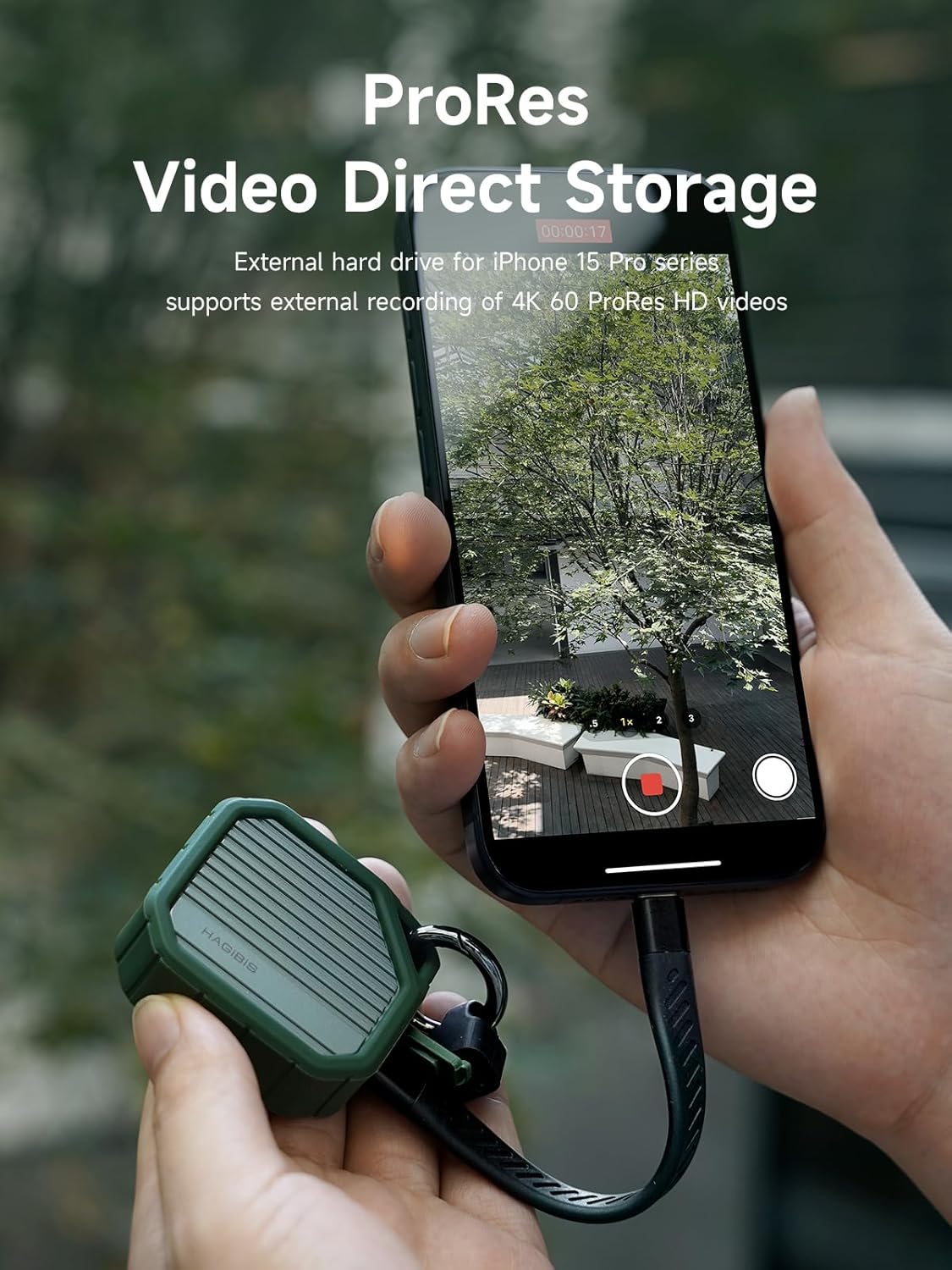
Figure 5: ProRes Video Direct Storage. An iPhone 15 Pro Max is shown connected to the Hagibis enclosure, demonstrating its capability for direct external recording of 4K ProRes videos.

Figure 6: 10Gbps High-Speed Transmission. The enclosure is connected to a laptop, illustrating its fast data transfer capabilities via USB 3.2 Gen 2 Type-C.
The enclosure supports up to 2TB capacity expansion, allowing for significant storage capabilities.

Figure 7: 2TB Large Capacity Expansion. This image visually represents the enclosure's ability to support up to 2TB of storage, suitable for various data types including videos, photos, and documents.
4. Maintenance
To ensure the longevity and optimal performance of your Hagibis M.2 2230 NVMe SSD Enclosure, follow these maintenance guidelines:
- Cleaning: Use a soft, dry cloth to wipe the exterior of the enclosure. Avoid using liquid cleaners or abrasive materials, which can damage the finish or internal components.
- Heat Dissipation: The aluminum alloy material with three-dimensional ribs is designed for efficient heat dissipation. Ensure the ribs are not obstructed during operation to allow for proper airflow and cooling.
- Storage: When not in use, store the enclosure in a cool, dry place away from direct sunlight and extreme temperatures.
- Handling: While the enclosure features a durable design and a protective silicone bumper, avoid dropping it or subjecting it to strong impacts to prevent damage to the internal SSD or enclosure components.
5. Troubleshooting
If you encounter issues with your Hagibis M.2 2230 NVMe SSD Enclosure, please refer to the following common troubleshooting steps:
| Problem | Possible Cause | Solution |
|---|---|---|
| Enclosure not recognized by device |
|
|
| Slow data transfer speeds |
|
|
| Enclosure feels hot during use |
|
|
| Screws are loose or stripped |
|
|
6. Specifications
| Feature | Detail |
|---|---|
| Product Dimensions | 2 x 1.9 x 0.7 inches (51mm x 48mm x 10mm) |
| Item Weight | 2.1 ounces |
| Model Number | MC13 |
| Compatible SSDs | M.2 2230 NVMe SSD (B+M Key / M Key) |
| Max Capacity Support | Up to 2TB |
| Interface | USB 3.2 Gen 2 Type-C (10Gbps) |
| Theoretical Transfer Speed | 10Gbps (approx. 1000-1200MB/s read/write) |
| Material | Aluminum Alloy with Silicone Case |
| Color | Green |
| Special Features | Lanyard, Multiple Heat Dissipation (Ribbed design) |
| Compatible Devices | iPhone 15 Pro Max, iPhone 16 Pro Max, iPad Pro, USB-C Laptops, Android devices |
| Manufacturer | Shanghai Xinxie Industrial Co., Ltd. |

Figure 8: Product Dimensions. This diagram provides precise measurements of the Hagibis M.2 2230 NVMe SSD Enclosure (51mm x 48mm x 10mm) and its accompanying 132mm USB-C cable.
7. Warranty and Support
Hagibis products are designed for reliability and performance. For warranty information and technical support, please refer to the warranty card included in your package or visit the official Hagibis website.
For customer service inquiries related to your purchase, you may also contact the seller, HAGIBIS, through the platform where the product was purchased.
Optional data recovery plans may be available for purchase separately to protect your data. Please check with your retailer for details.
Related Documents - MC13
 |
HAGIBIS M.2 NVMe SSD Enclosure User Manual and Specifications Comprehensive user manual for the HAGIBIS M.2 NVMe SSD Enclosure (Model YPHN02), detailing specifications, installation, warranty, and after-sales service for USB 3.2 Gen 2 (10Gbps) connectivity. |
 |
M.2 NVMe 2230 SSD Enclosure User Manual - Model B-DEM045 User manual for the M.2 NVMe 2230 SSD Enclosure (Model B-DEM045). Includes operating instructions, usage limitations, safety information, and EU/UK/US compliance details. |
 |
Hagibis YPHN03 M.2 NVMe SSD Enclosure User Manual & Specifications Comprehensive user manual and specifications for the Hagibis YPHN03 M.2 NVMe SSD enclosure, detailing installation, warranty, and product features for 2230 and 2280 SSDs. |
 |
ORICO M.2 NVMe SSD Enclosure M2PV-C3 M2PF-C3 User Manual and Specifications User manual and technical specifications for the ORICO M.2 NVMe SSD Enclosure, models M2PV-C3 and M2PF-C3, detailing features like USB 3.2 Gen 2 (10Gbps), tool-free installation, and broad SSD compatibility. |
 |
SHARGE Disk Enclosure SD001: User Manual, Specifications, and Safety Guide Get detailed information on the SHARGE Disk Enclosure (Model SD001), including installation steps, product specifications, safety guidelines, and warranty policies. Supports M.2 NVMe SSDs via USB-C with 10Gbps speeds. |
 |
User's Manual for kebidu M.2 NVME/NGFF SATA SSD Enclosure with Digital Display Comprehensive user manual for the kebidu M.2 NVME/NGFF SATA SSD enclosure. Learn about installation, features, screen display indicators, safety precautions, and troubleshooting for your external SSD case. |
Ask a question about this manual
Ask about setup, troubleshooting, compatibility, parts, safety, or missing instructions. Manuals+ will review the question and use this page’s manual context to help answer it.