1. Introduction
This manual provides essential information for the installation, operation, and maintenance of your new Generic Packard Bell N15550 Laptop Keyboard. Please read these instructions carefully before proceeding with installation or use to ensure proper functionality and to prevent damage.
2. Product Overview
The Generic Packard Bell N15550 Laptop Keyboard is a replacement component designed for specific Packard Bell N15550 laptop models. It features an English US layout with black keys and is supplied without a frame, meaning it is intended to be integrated into your laptop's existing chassis.
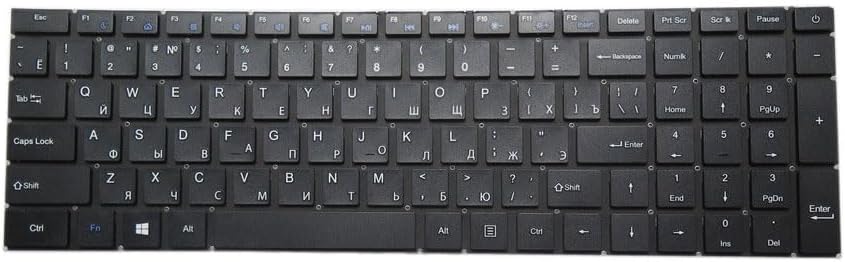
Image 1: Generic Packard Bell N15550 Laptop Keyboard. This image displays a black keyboard with an English US layout, including a numeric keypad. Some keys also show Cyrillic characters, which may indicate a multi-language variant or a general representation, but the product is specified as English US.
3. Setup and Installation
Installing a laptop keyboard requires careful handling and often involves disassembling parts of your laptop. It is highly recommended that installation be performed by a qualified technician. If you choose to proceed yourself, follow these general guidelines:
- Power Off and Disconnect: Ensure your laptop is completely powered off and disconnected from all power sources, including removing the battery if possible.
- Disassembly: Carefully follow your laptop's specific service manual to disassemble the necessary components (e.g., top case, bezel) to access the existing keyboard.
- Remove Old Keyboard: Gently disconnect the ribbon cable(s) of the old keyboard from the motherboard and remove any screws or clips securing it.
- Install New Keyboard: Position the new Generic Packard Bell N15550 keyboard into place. Ensure it aligns correctly with the mounting points.
- Connect Ribbon Cable(s): Carefully connect the new keyboard's ribbon cable(s) to the corresponding connectors on the motherboard. Ensure they are seated firmly and correctly.
- Reassembly: Reassemble your laptop by reversing the disassembly steps. Take care not to pinch any cables.
- Test Functionality: Power on your laptop and test all keys to ensure they are functioning correctly before fully securing all components.
Caution: Improper installation can lead to damage to the keyboard or other laptop components. Exercise extreme care.
4. Operating Instructions
Once installed, your Generic Packard Bell N15550 keyboard operates like any standard laptop keyboard. Key functions include:
- Alphanumeric Keys: For typing letters, numbers, and symbols.
- Function Keys (F1-F12): Often used in combination with the Fn key for system controls like volume, brightness, and wireless toggles.
- Modifier Keys: Ctrl, Alt, Shift for various shortcuts and commands.
- Navigation Keys: Arrow keys, Home, End, PgUp, PgDn for moving through documents and web pages.
- Numeric Keypad: Located on the right side, provides dedicated number and arithmetic keys for efficient data entry. Activate/deactivate with the Num Lock key.
5. Maintenance
To ensure the longevity and optimal performance of your keyboard, follow these maintenance tips:
- Regular Cleaning: Use a soft, lint-free cloth slightly dampened with water or a mild cleaning solution to wipe the keycaps. Avoid excessive moisture.
- Dust Removal: Use compressed air to remove dust and debris from between the keys. Hold the can upright to prevent propellant discharge.
- Avoid Spills: Keep liquids away from the keyboard to prevent damage to the internal circuitry.
- Gentle Use: Avoid excessive force when typing to prevent premature wear of the key mechanisms.
6. Troubleshooting
If you encounter issues with your keyboard, consider the following troubleshooting steps:
- Keys Not Responding:
- Ensure the ribbon cable is securely connected to the motherboard.
- Restart your laptop.
- Check for any physical obstructions under the non-responsive keys.
- Incorrect Character Input:
- Verify your operating system's keyboard language settings are set to "English (United States)".
- Ensure Caps Lock or Num Lock are not inadvertently activated.
- Intermittent Functionality:
- Re-check the ribbon cable connection for looseness.
- Ensure no liquid damage has occurred.
If problems persist after these steps, professional assistance may be required.
7. Specifications
| Feature | Detail |
|---|---|
| Model Number | N15550 |
| Language Layout | English US |
| Color | Black |
| Frame | Without Frame |
| Product Dimensions | 11.81 x 7.87 x 3.94 inches |
| Item Weight | 2.2 pounds |
| Manufacturer | Generic |
8. Warranty and Support
This product comes with a 90-day warranty from the date of purchase. This warranty covers manufacturing defects under normal use. It does not cover damage resulting from improper installation, misuse, accidents, or unauthorized modifications.
For warranty claims or technical support, please contact the seller directly through your purchase platform. Provide your order details and a clear description of the issue for prompt assistance.


