
1. Product Overview
The BUDI Multifunctional 7-in-1 SD Card Reader (Ultra Version) is designed to provide versatile memory card storage and high-speed data transfer capabilities. It integrates multiple card reader functions with a protective carrying case, catering to various digital media needs for photographers, smartphone users, drone operators, and action camera enthusiasts.
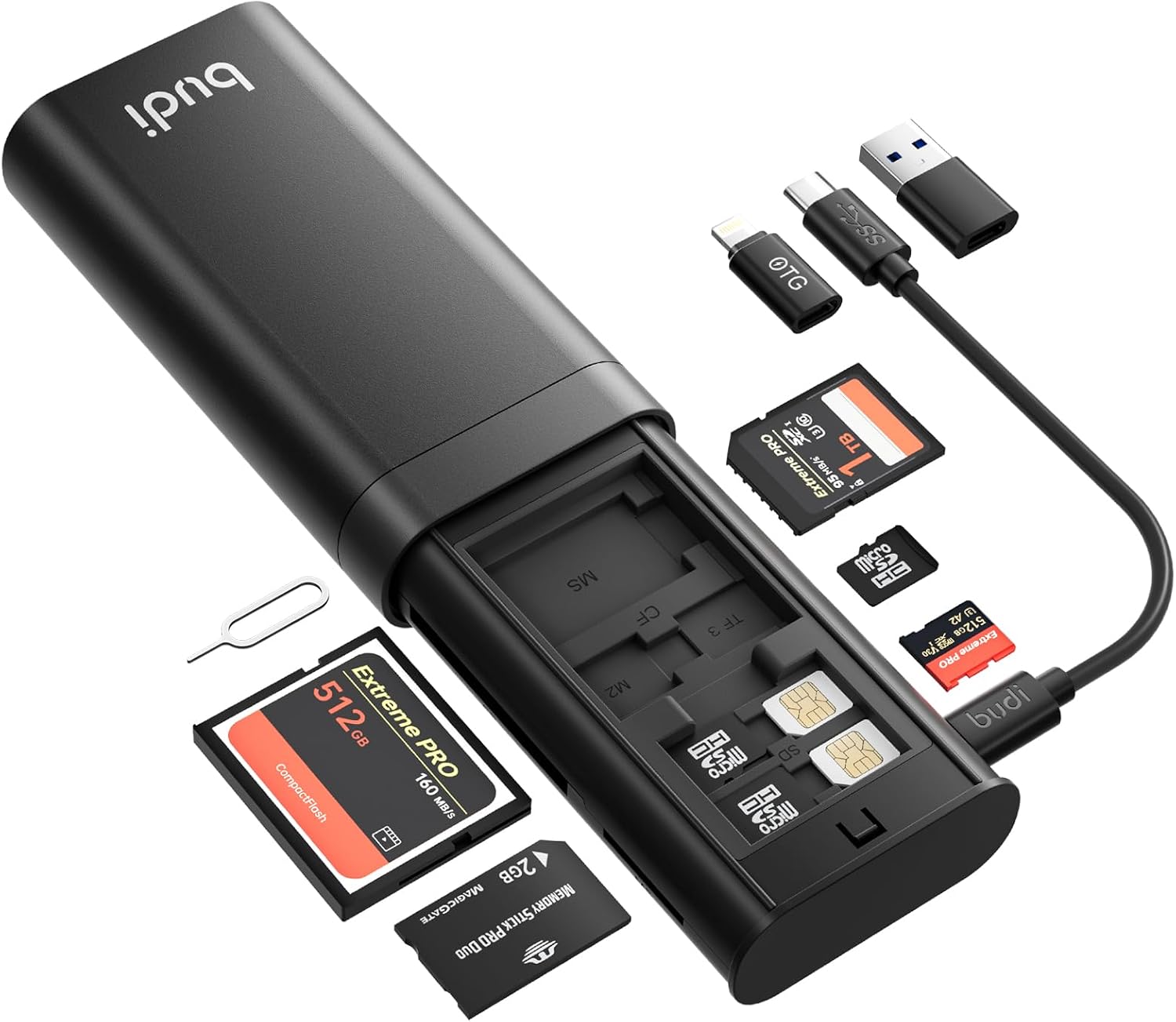
Figure 1: BUDI Multifunctional 7-in-1 SD Card Reader and its components.
Key Features:
- Multifunctional Flash Memory Card Case: This device serves as both a memory card reader and a storage case. It can accommodate TF ×3, Nano ×2, SD ×1, M2 ×1, MS ×1, and CF ×1 cards. Note that simultaneous data transmission from all stored cards is not supported.
- Super High-Speed Transmission: Equipped with USB 3.0 and a Type-C interface, it supports data transfer speeds of up to 5Gbps. It is compatible with Type-C smartphones and tablets.
- Wide Card Compatibility: Supports TF, SD, CF, MS, and M2 memory cards. It allows simultaneous reading of multiple card types.
- Plug and Play: No drivers are required for operation, supporting hot-swapping for convenience across various operating systems.
- Integrated Charging Cable: Includes a 65W fast charging cable for compatible devices.
- System Compatibility: Compatible with Windows, Mac OS, Linux, iOS, and OTG Android smartphones.
2. Setup Instructions
2.1 Connecting to Your Device
The BUDI Multifunctional Card Reader offers flexible connectivity options:
- For Type-C Devices (Smartphones, Tablets, Laptops): Use the integrated Type-C cable to connect directly to your device.
- For USB-A Devices (Desktop Computers, Older Laptops): Attach the provided Type-C to USB-A adapter to the integrated cable, then connect to your device's USB-A port.

Figure 2: Integrated multi-cable with various adapters for broad compatibility.
2.2 Inserting Memory Cards
The device features dedicated slots for various memory card types:
- Identify the correct slot for your memory card (TF/Micro SD, SD, CF, MS, M2).
- Gently insert the memory card into its corresponding slot. Ensure the card is oriented correctly to avoid damage to the chip or the reader.
- For TF/Micro SD cards, the device includes multiple storage slots within the case. To access these, slide open the top cover.

Figure 3: Internal layout of memory card storage slots.
2.3 Plug and Play Functionality
The BUDI card reader is designed for immediate use. Once connected to a compatible device, it should be recognized automatically without the need for additional driver installation.
3. Operating Instructions
3.1 Data Transfer
After connecting the card reader and inserting your memory cards, your device's file explorer or photo application should display the connected storage. You can then drag and drop files between your device and the memory cards.

Figure 4: High-speed data transfer from memory cards to a laptop.
3.2 Simultaneous Reading
The card reader supports simultaneous reading of multiple memory devices. This allows for efficient workflow when managing data from various sources.
3.3 Charging Functionality
The integrated 65W fast charging cable can be used to charge compatible smartphones and tablets while the card reader is connected to a power source or another device that provides power delivery.
3.4 Using the Storage Case
The device's internal compartment provides secure storage for various memory cards. To access the storage slots, slide open the top cover. This helps keep your cards organized and protected during transport.

Figure 5: Application scenarios for the card reader and storage.
3.5 Official Product Video
Video 1: A review demonstrating the BUDI Multifunctional 9-in-1 SD Card Reader's features and usage, including card storage and connectivity.
4. Maintenance
To ensure the longevity and optimal performance of your BUDI Multifunctional SD Card Reader, follow these maintenance guidelines:
- Keep the device clean and free from dust and debris. Use a soft, dry cloth for cleaning.
- Avoid exposing the device to extreme temperatures, humidity, or direct sunlight.
- Do not submerge the device in water.
- Handle memory cards and adapters with care to prevent damage to the connectors.
- Store the device in a cool, dry place when not in use.
5. Troubleshooting
If you encounter issues with your BUDI Multifunctional SD Card Reader, consider the following:
- Device not recognized: Ensure the cable is securely connected to both the card reader and your computer/smartphone. Try a different USB port or device.
- Memory card not detected: Ensure the memory card is fully and correctly inserted into its designated slot. Try a different memory card to rule out card issues.
- Slow transfer speeds: Verify that your device's USB port supports USB 3.0 for optimal speeds. Ensure no other high-bandwidth operations are running simultaneously.
- Charging issues: Confirm that the connected device and power source are compatible with 65W fast charging.
6. Specifications
| Feature | Detail |
|---|---|
| Brand | BUDI |
| Model Number | Ultra version (DC536B) |
| Connectivity Technology | USB Type-C |
| Media Type Supported | SD Card, TF/Micro SD, CF, MS, M2 |
| Data Transfer Speed | Up to 5Gbps (USB 3.0) |
| Charging Output | 65W Fast Charging (via integrated cable) |
| Operating System Compatibility | Windows, Mac OS, Linux, iOS, OTG Android Smart Phone |
| Item Weight | 6.7 ounces |
| Product Dimensions (LxWxH) | 6.89 x 3.15 x 1.1 inches |
| Color | BLACK |
| Special Features | Built-In USB Cord, Compact, Easy Setup, Plug & Play |
7. Warranty and Support
7.1 Warranty Information
The BUDI Multifunctional SD Card Reader comes with a 12-month hassle-free warranty.
7.2 Customer Service
For any questions or assistance, please contact our friendly customer service. You can leave us a message or ask through the product's Q&A section, and we will provide a satisfactory service solution.


