1. Introduction and Important Safety Information
Thank you for choosing the Pooboo D525DM Magnetic Resistance Indoor Cycling Bike. This manual provides essential instructions for assembly, operation, maintenance, and troubleshooting to ensure safe and effective use of your exercise equipment. Please read this manual thoroughly before assembly or use.
1.1 Important Safety Precautions
- Consult your physician before starting any exercise program.
- Always perform warm-up exercises before and cool-down exercises after each workout session.
- Ensure all bolts, nuts, and connections are securely tightened before each use.
- Keep children and pets away from the equipment during operation.
- The maximum user weight capacity for this bike is 100 kg (220 lbs). Do not exceed this limit.
- Place the exercise bike on a flat, stable surface. Use a protective mat if necessary.
- Wear appropriate exercise attire and footwear. Avoid loose clothing that could get caught in moving parts.
- If you experience dizziness, pain, or shortness of breath, stop exercising immediately and consult your physician.
- Do not attempt to modify the equipment.
2. Product Overview
The Pooboo D525DM is an indoor cycling bike designed for home use, featuring magnetic resistance and a belt drive system for a smooth and quiet workout. It includes adjustable components for user comfort and a digital monitor to track exercise data.
2.1 Key Features
- Magnetic Resistance: Provides smooth, quiet, and adjustable workout intensity.
- Belt Drive System: Ensures a low-maintenance, silent, and stable cycling experience.
- 35 lbs Flywheel: Heavy-duty flywheel for consistent and smooth pedaling.
- Adjustable Seat & Handlebar: 4-way adjustable seat and 2-way adjustable handlebar for ergonomic fit.
- LCD Monitor: Tracks time, speed, distance, calories, and pulse.
- Transportation Wheels: For easy relocation of the bike.
- Integrated Slant Board: For calf stretching before or after exercise.
2.2 Product Diagram
 Figure 2.1: Overview of the Pooboo D525DM Indoor Cycling Bike. This image displays the complete assembled bike, highlighting its main components such as the flywheel, seat, handlebars, and digital monitor.
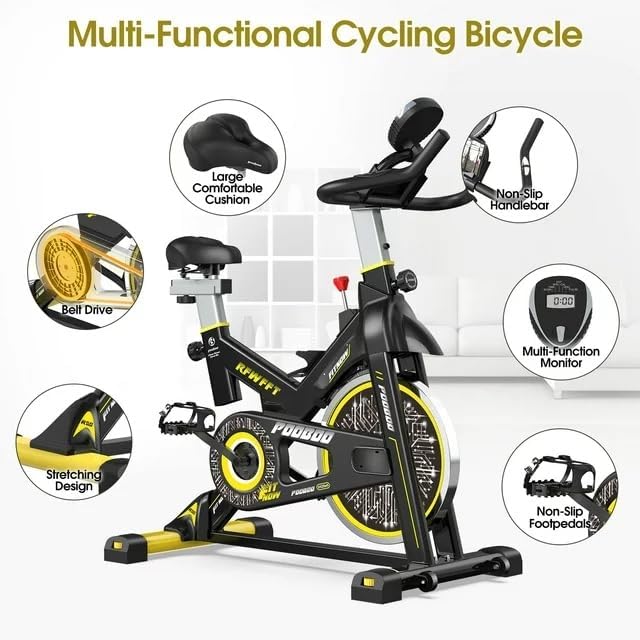 Figure 2.2: Multi-functional Cycling Bicycle Components. This diagram illustrates various features including the large comfortable cushion, non-slip handlebar, multi-function monitor, non-slip foot pedals, stretching design, and belt drive system.
3. Setup and Assembly
Follow these steps to assemble your Pooboo D525DM Indoor Cycling Bike. It is recommended to have two people for some assembly steps.
3.1 Unpacking and Parts Identification
Carefully remove all components from the packaging. Lay them out and compare them with the parts list provided in your package to ensure all parts are present and undamaged.
3.2 Assembly Steps
- Attach Stabilizers: Secure the front and rear stabilizer bars to the main frame using the provided bolts and washers. Ensure they are firmly tightened to provide a stable base.
- Install Pedals: Identify the left (L) and right (R) pedals. The left pedal screws in counter-clockwise, and the right pedal screws in clockwise. Ensure they are fully tightened to prevent loosening during use.
- Mount Seat Post and Seat: Insert the seat post into the main frame and adjust it to your desired height. Secure it with the adjustment knob. Attach the seat to the seat post.
- Install Handlebar Post and Handlebar: Insert the handlebar post into the main frame and adjust its height. Attach the handlebar to the handlebar post and secure it.
- Connect Monitor: Connect the sensor wires from the main frame to the back of the LCD monitor. Mount the monitor onto the handlebar assembly. Insert the required AAA batteries (included) into the monitor.
 Figure 3.1: High-Density Steel Tube and Precise Welding. This image highlights the robust construction of the bike's frame, indicating the quality of materials and manufacturing processes.
4. Operating Instructions
4.1 Adjusting Seat and Handlebar
Proper adjustment of the seat and handlebar is crucial for comfort and effective exercise.
- Seat Adjustment: Loosen the adjustment knob below the seat. Adjust the seat vertically (up/down) and horizontally (forward/backward) to a comfortable position. Your knee should have a slight bend at the bottom of the pedal stroke. Tighten the knob securely.
- Handlebar Adjustment: Loosen the adjustment knob on the handlebar post. Adjust the handlebar vertically (up/down) to a comfortable height. Your back should be straight, and your arms slightly bent. Tighten the knob securely.
 Figure 4.1: Adjustable Seat & Handle. This image illustrates the adjustable features of the seat and handlebars, along with recommended user height (4.9"-6.4"), flywheel weight (35 lbs), and load capacity (Max 220 lbs).
4.2 Using Magnetic Resistance
The Pooboo D525DM features a magnetic resistance system for varying workout intensity.
- Adjusting Resistance: Turn the red knob located on the main frame clockwise to increase resistance and counter-clockwise to decrease resistance.
- Emergency Stop: Press down firmly on the red resistance knob to activate the emergency brake, bringing the flywheel to an immediate stop.
 Figure 4.2: Quickly Adjustable Magnetic Resistance and Hyper-Quiet Magnetic Belt Drive. This image details the resistance knob for quick adjustments and emergency stops, and highlights the quiet, low-maintenance magnetic belt drive system.
4.3 Using the LCD Monitor
The multi-functional LCD monitor displays your workout data.
- Functions: The monitor typically displays SCAN (cycles through all functions), TIME, SPEED, DISTANCE, CALORIES, and PULSE (when holding the hand pulse sensors).
- Operation: The monitor automatically turns on when you start pedaling or press any button. It will automatically turn off after a few minutes of inactivity.
- Reset: Press and hold the button (usually 'MODE' or 'RESET') to clear all data.
 Figure 4.3: LCD Monitor Tracking Exercise Data. This image shows a user interacting with the bike's LCD monitor, which displays various exercise metrics. An integrated tablet holder is also visible.
4.4 Using the Slant Board
The integrated slant board at the rear of the bike can be used for calf stretches.
- Position your foot on the slant board with your heel down and toes up.
- Lean forward gently to feel a stretch in your calf muscle. Hold for 15-30 seconds.
- Perform stretches before or after your workout to help prevent muscle soreness and improve flexibility.
 Figure 4.4: Professional Slant Board for Stretch. This image demonstrates the use of the integrated slant board for calf stretching, emphasizing its benefits for muscle tension relief.
5. Maintenance
Regular maintenance ensures the longevity and safe operation of your exercise bike.
5.1 Cleaning
- Wipe down the bike with a damp cloth after each use to remove sweat and dust.
- Avoid using abrasive cleaners or solvents, as they may damage the finish or electronic components.
5.2 Regular Inspection
- Periodically check all bolts, nuts, and moving parts for tightness. Tighten any loose fasteners.
- Inspect the pedals, straps, and seat for any signs of wear or damage. Replace worn parts immediately.
- The belt drive system is designed for low maintenance. No lubrication is typically required.
6. Troubleshooting
If you encounter issues with your Pooboo D525DM, refer to the following common problems and solutions:
| Problem | Possible Cause | Solution |
|---|---|---|
| Bike is unstable or wobbles | Loose bolts; uneven floor | Check and tighten all assembly bolts. Ensure the bike is on a level surface. Adjust the level adjusters on the stabilizer bars if present. |
| Resistance is not changing | Resistance knob not properly engaged or damaged | Ensure the resistance knob is fully functional and turning correctly. If the issue persists, contact customer support. |
| LCD monitor not displaying data | Dead batteries; loose sensor connection | Replace batteries in the monitor. Check that all sensor wires are securely connected to the monitor and the bike frame. |
| Unusual noise during operation | Loose parts; friction from rubbing components | Inspect all parts for looseness and tighten as necessary. Ensure no components are rubbing against each other. The belt drive is designed to be quiet; if noise persists, contact support. |
7. Specifications
Below are the technical specifications for the Pooboo D525DM Indoor Cycling Bike:
| Feature | Specification |
|---|---|
| Model Number | D525DM |
| Drive System | Belt |
| Resistance Mechanism | Magnetic |
| Material | Alloy Steel |
| Flywheel Weight | 35 lbs |
| Maximum Weight Capacity | 100 Kilograms (220 lbs) |
| Product Dimensions (D x W x H) | 104 x 53 x 120 cm |
| Item Weight | 27 Kilograms |
| Power Source | Battery Powered (for monitor) |
| Batteries Required | 2 AAA batteries (included) |
| Special Features | Adjustable Footstrap, Adjustable Resistance Level, Adjustable Seat, Padded Seat, Water Bottle Holder, Integrated Slant Board |
8. Warranty and Support
8.1 Product Warranty
The Pooboo D525DM Indoor Cycling Bike comes with a one-year free replacement parts warranty from the date of purchase. This warranty covers manufacturing defects and component failures under normal use conditions.
8.2 Customer Support
For any questions, concerns, or warranty claims, please contact our customer support team. Our team aims to respond within 24 hours to provide a satisfactory solution. You can find the after-sales team's email address on the user manual included in your product packaging.