Introduction
This user manual provides essential information for the safe and efficient operation, maintenance, and troubleshooting of your Siemens TF301E09 fully automatic espresso machine. Please read this manual thoroughly before using the appliance for the first time and keep it for future reference.
Important Safety Information
Always follow basic safety precautions when using electrical appliances to reduce the risk of fire, electric shock, and injury to persons.
- Read all instructions before use.
- Do not immerse the appliance, cord, or plug in water or other liquids.
- Close supervision is necessary when any appliance is used by or near children.
- Unplug from outlet when not in use and before cleaning. Allow to cool before putting on or taking off parts, and before cleaning the appliance.
- Do not operate any appliance with a damaged cord or plug or after the appliance malfunctions, or has been damaged in any manner.
- The use of accessory attachments not recommended by the appliance manufacturer may result in fire, electric shock, or injury to persons.
- Do not use outdoors.
- Do not let cord hang over edge of table or counter, or touch hot surfaces.
- Do not place on or near a hot gas or electric burner, or in a heated oven.
- Always attach plug to appliance first, then plug cord into the wall outlet. To disconnect, turn any control to "off", then remove plug from wall outlet.
- Do not use appliance for other than intended use.
- Scalding may occur if the lid is removed during the brewing cycles.
Product Overview
Familiarize yourself with the components of your Siemens TF301E09 espresso machine.

Figure 1: Siemens TF301E09 Fully Automatic Espresso Machine with a prepared latte macchiato.
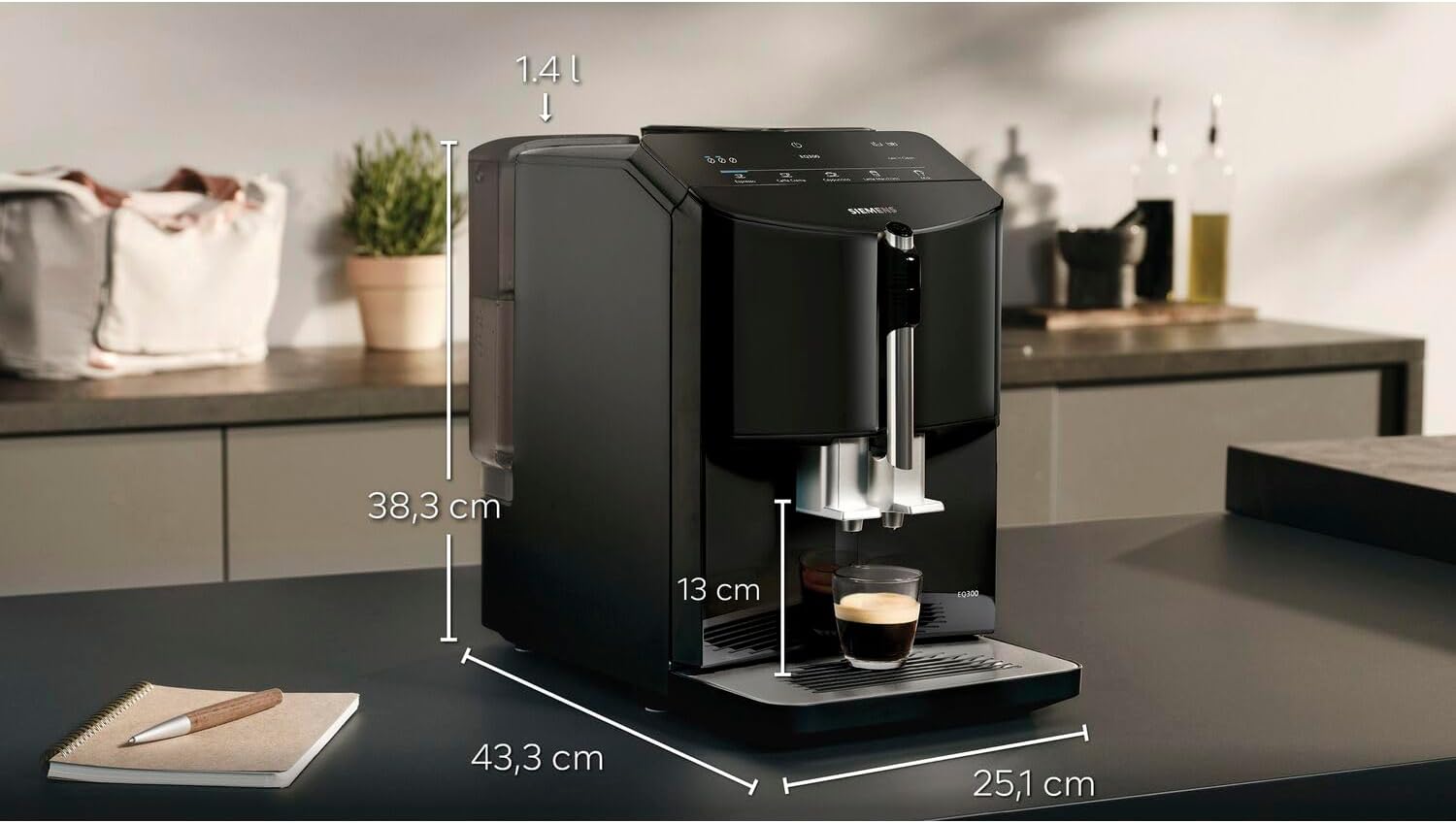
Figure 2: Product dimensions of the Siemens TF301E09. The machine measures approximately 43.3 cm in depth, 25.1 cm in width, and 38.3 cm in height. The water tank capacity is 1.4 liters, and the coffee spout height is 13 cm.
Main Components:
- Water Tank: Located on the side, for fresh water supply.
- Bean Container: Top-mounted, for whole coffee beans.
- Control Panel: Front-facing, with touch controls for various coffee specialties and maintenance functions.
- Coffee Spout: Adjustable height for different cup sizes.
- Milk Frother/Steam Nozzle: Integrated for milk-based beverages.
- Drip Tray: Collects excess water and coffee drips.
- Coffee Grounds Container: Collects used coffee grounds.
- Brewing Unit: Internal component responsible for brewing coffee.

Figure 3: Close-up of the control panel, showing touch buttons for Espresso, Caffè Crema, Cappuccino, Latte Macchiato, Milk, and Calc'n Clean functions, along with a power button.
Setup
Unpacking and Placement:
- Carefully remove all packaging materials.
- Place the machine on a stable, level, and heat-resistant surface. Ensure adequate ventilation around the appliance.
- Keep a safe distance from walls and other appliances.
First Use and Rinsing:
- Fill the water tank with fresh, cold water up to the MAX mark.
- Plug the appliance into a grounded power outlet.
- The machine will perform an initial rinse cycle. Follow the on-screen prompts or indicator lights.
- Empty and clean the drip tray after the rinsing process.
Operating Instructions
Making Coffee:
- Ensure the water tank is filled and the bean container has sufficient coffee beans.
- Place a cup under the coffee spout.
- Select your desired coffee specialty (e.g., Espresso, Caffè Crema) from the control panel.
- The machine will automatically grind the beans, brew the coffee, and dispense it into your cup.

Figure 4: A user placing a cup under the adjustable coffee spout to prepare a beverage.
Preparing Milk-Based Beverages:
- Fill a suitable container with fresh milk.
- Position the milk frother/steam nozzle into the milk.
- Select a milk-based beverage (e.g., Cappuccino, Latte Macchiato) or the "Milk" function.
- The machine will froth the milk and then combine it with coffee if a specialty beverage is selected.
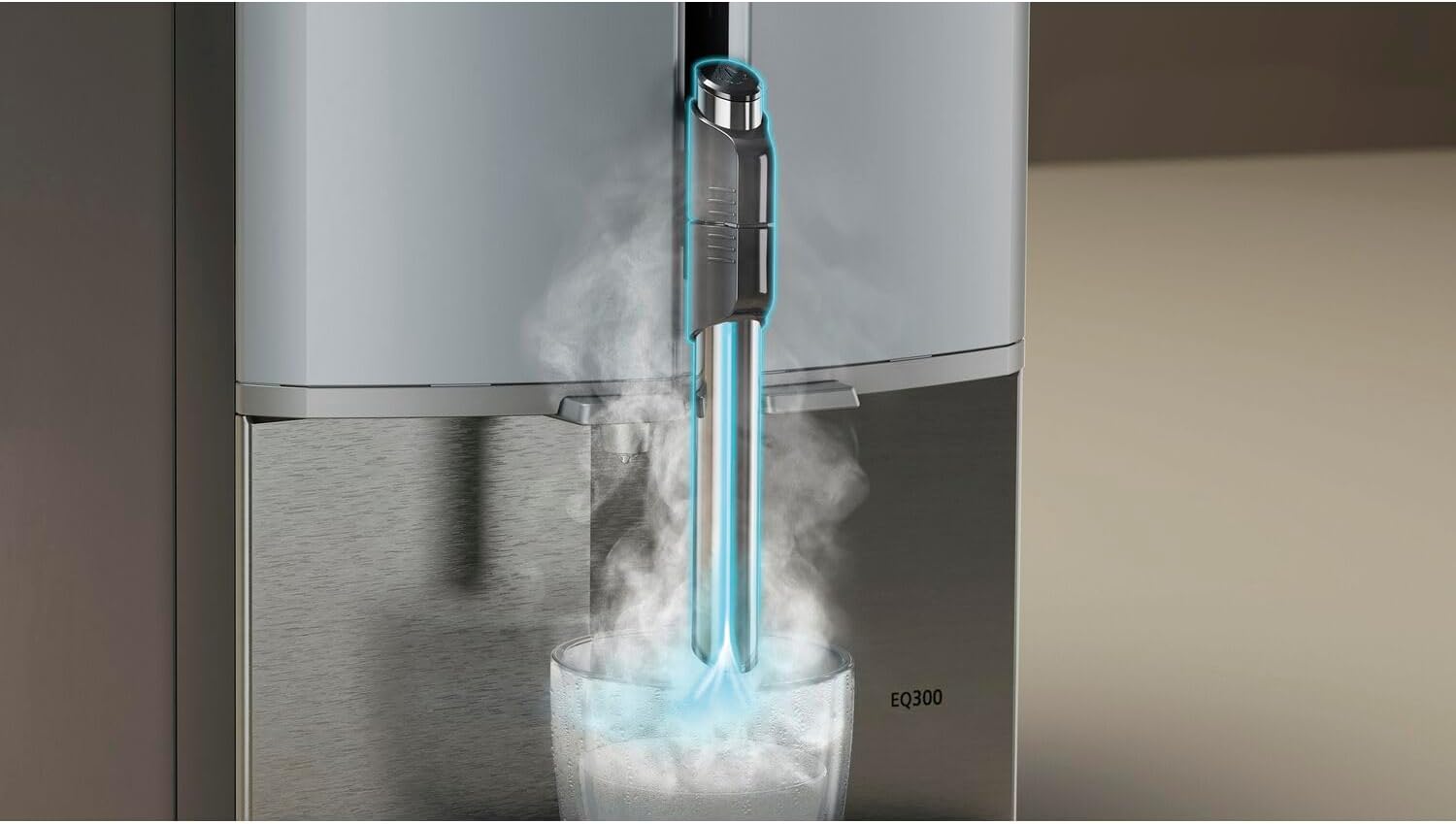
Figure 5: Close-up of the steam nozzle, indicating its function in frothing milk for various coffee drinks.
Maintenance and Cleaning
Regular cleaning and maintenance ensure the longevity and optimal performance of your espresso machine.
Daily Cleaning:
- Empty and rinse the drip tray and coffee grounds container.
- Wipe down the exterior of the machine with a damp cloth.
- Clean the milk frother/steam nozzle immediately after each use to prevent milk residue buildup.
Cleaning the Brewing Unit:
The brewing unit should be removed and rinsed regularly.
- Turn off the machine and unplug it.
- Open the service door and remove the brewing unit by pressing the release button and pulling it out.
- Rinse the brewing unit thoroughly under running water. Do not use detergent.
- Allow it to air dry completely before reinserting.

Figure 6: Step-by-step guide for cleaning the brewing unit. 1. Open the side panel. 2. Remove the brewing unit. 3. Rinse the brewing unit under running water.
Descaling and Cleaning Program:
The machine has an integrated Calc'n Clean program. Follow the instructions on the display or in the full manual for this process. Use only descaling agents recommended by Siemens.
Troubleshooting
This section addresses common issues you might encounter with your Siemens TF301E09.
| Problem | Possible Cause | Solution |
|---|---|---|
| No coffee is dispensed. | Water tank empty; brewing unit blocked; coffee beans empty. | Fill water tank; clean brewing unit; refill coffee beans. |
| Coffee is too weak. | Incorrect grind setting; insufficient coffee quantity. | Adjust grind setting to finer; increase coffee strength setting. |
| Milk does not froth properly. | Milk frother clogged; milk too warm/cold; incorrect milk type. | Clean milk frother thoroughly; use cold, fresh milk (e.g., semi-skimmed). |
| "Calc'n Clean" indicator lights up. | Machine requires descaling and cleaning. | Perform the Calc'n Clean program as per the manual. |
For more detailed troubleshooting, refer to the comprehensive manual or contact customer support.
Specifications
| Brand | SIEMENS |
| Model Number | TF301E09 |
| Color | Black |
| Product Dimensions (L x W x H) | 43.3 cm (D) x 25.1 cm (W) x 38.3 cm (H) |
| Item Weight | 8.2 Kilograms |
| Power | 1300 Watts |
| Material | Stainless Steel |
| Control Type | Touch |
| Heating Elements | 1 |
| Power Source | Corded Electric |
Warranty and Support
For warranty information, please refer to the documentation included with your purchase or visit the official Siemens website. For technical support, spare parts, or service, please contact Siemens customer service.
Siemens Customer Service: Please refer to your regional Siemens website for contact details.