
Solofish SL-1071
SOLOFISH SL-1071 450 Lumens Light and Green Beam Combo Instruction Manual
Model: SL-1071 | Brand: Solofish
1. Product Overview
The SOLOFISH 450 Lumens Light and Green Beam Combo is a compact and durable accessory designed for enhanced visibility and targeting. It features a powerful 450-lumen white light and a Class IIIa green laser with less than 5mW output. This combo unit is rechargeable via USB-C and offers multiple tactical modes for various operational needs. It is constructed from aluminum and fiber-reinforced polymer, ensuring high strength and light weight.
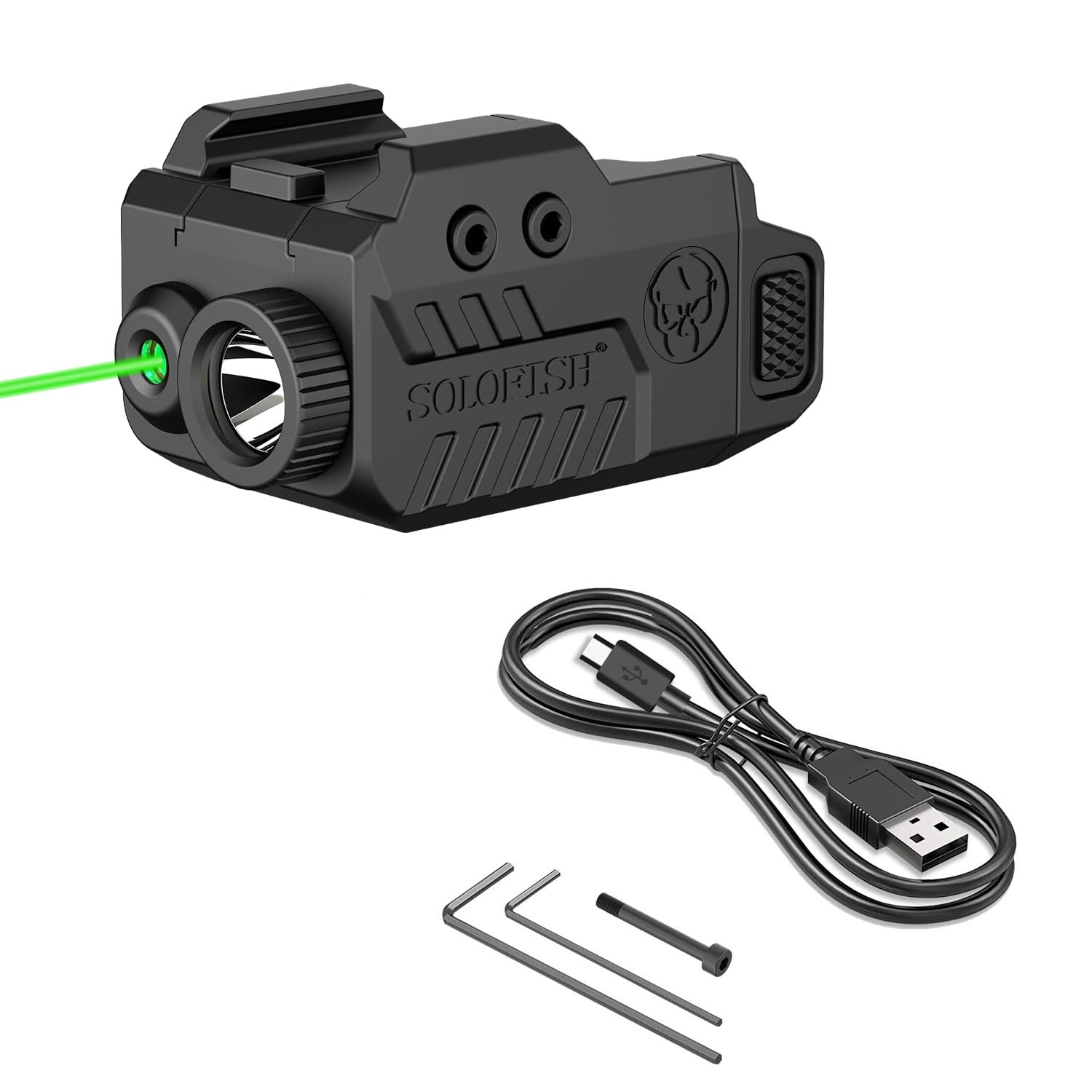
Image 1: The SOLOFISH 450 Lumens Light and Green Beam Combo unit, showcasing its compact design and green laser beam.
2. Important Safety Warnings
FAILURE TO FOLLOW ANY OF THE FOLLOWING WARNINGS MAY RESULT IN SEVERE INJURY OR DEATH TO YOU OR OTHERS.
- Prior to installing SOLOFISH products, ensure that the firearm is unloaded, the magazine is removed, safety is on, and finger(s) are off the trigger.
- DO NOT install or use SOLOFISH products if the installation of the product in any way affects the safe function of the firearm.
ALWAYS FOLLOW THE 4 RULES OF FIREARM SAFETY:
- Handle all firearms as if they are loaded.
- Never let the muzzle cover anything that you are not willing to destroy.
- Keep your finger off the trigger until your sights are on the target and you are ready to fire.
- Be sure of your target and what is beyond.
Remember, the user is ALWAYS responsible for the safe use of a firearm. Solofish recommends that every gun owner take a gun safety course from a certified NRA instructor before handling or firing your firearm.
3. What's in the Box
Your SOLOFISH 450 Lumens Light and Green Beam Combo package includes the following items:
- SOLOFISH Light and Green Beam Combo Unit
- USB-C Cable (for models SL-1091/ 1071/ 1085/ 1108/ 1039/ 1121 Series)
- Extra Screw
- Laser Adjustment Hex Wrench
- Screw Hex Wrench
- User Manual
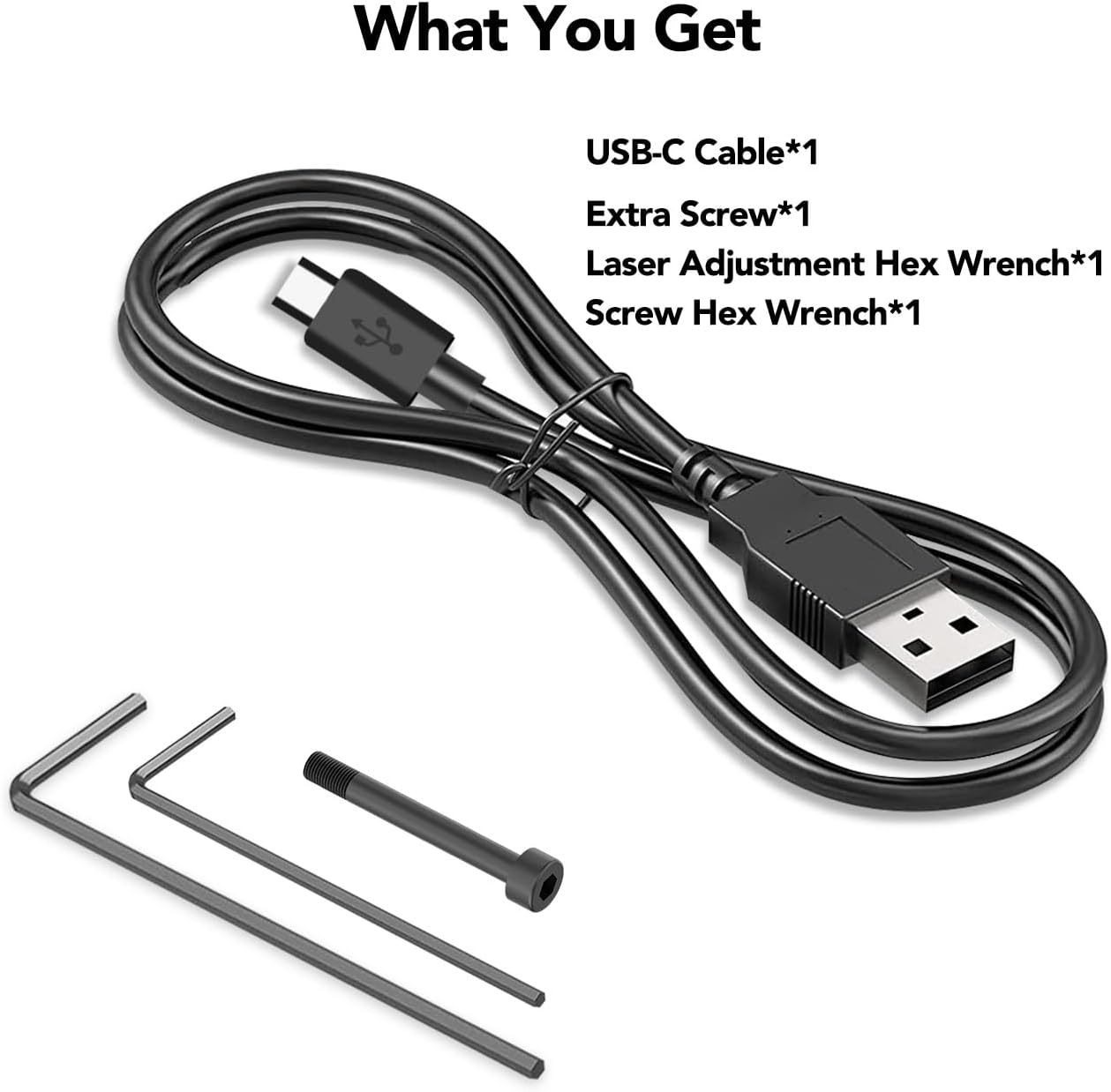
Image 2: Included accessories: USB-C cable, extra screw, laser adjustment hex wrench, and screw hex wrench.
4. Product Specifications
| Feature | Specification |
|---|---|
| Model No. | SL-1071 (and other compatible models in series) |
| Max Light Output | 450 Lumens |
| Max Laser Output | < 5mW (Class IIIa) |
| Laser Wavelength | 520nm (Green Beam) |
| Laser Visible Distance | Approx. 200 meters (day), 2000 meters (night) |
| Battery Source | Polymer Battery (Built-in) |
| Charging Time | 50 minutes (approx.) |
| Run Time (Light Only) | 70 minutes |
| Run Time (Laser Only) | 3 hours |
| Run Time (Light + Laser) | 60 minutes |
| Waterproof Rating | IP65 |
| Weight | 81g / 2.86oz |
| Size | 68x33x30mm / 2.7x1.3x1.2inch |

Image 3: Detailed dimensions and key specifications of the device.
5. Setup and Installation
5.1. Compatibility
The SOLOFISH Light and Green Beam Combo is designed to be compatible with various full-size and compact pistols featuring a Picatinny rail (21±0.5MM) and a cross slot. Two different rail keys are provided to ensure a secure fit for your specific pistol model (e.g., Glock or 1913 Picatinny rail).

Image 4: Visual representation of the light's compatibility with different pistol types and the USB-C charging port.
5.2. Mounting the Unit
- Select the Correct Rail Key: The unit comes with two rail keys. One is pre-installed for Glock-style rails, and the other is a 1913 Picatinny key. Choose the key that matches your pistol's rail.
- Attach to Pistol Rail: Loosen the rail clamp bolt on the bottom of the unit. Slide the unit onto your pistol's accessory rail until it is in the desired position.
- Secure the Unit: Tighten the rail clamp bolt using the provided screw hex wrench until the unit is firmly secured to the rail. Ensure it does not wobble.
For a visual guide on fitment, please refer to the video below:
Video 1: Demonstrates how to check if the SOLOFISH light and laser combo fits your pistol, highlighting the rail requirements.
5.3. Laser Adjustment (Zeroing)
To ensure accuracy, the green laser beam needs to be adjusted (zeroed) to align with your pistol's sights. Use the provided laser adjustment hex wrench for this process.
- Windage Adjustment: The windage adjustment screw is located on the side of the unit. Turn this screw to move the laser beam horizontally (left/right).
- Elevation Adjustment: The elevation adjustment screw is located on the top/bottom of the unit. Turn this screw to move the laser beam vertically (up/down).
Perform adjustments in a safe environment, following all firearm safety rules. It is recommended to perform fine adjustments at a shooting range.

Image 5: Diagram showing the location of elevation and windage adjustment screws, charging port, and switches.
6. Operating Instructions
The SOLOFISH combo unit features ambidextrous switches for easy operation by both left and right-handed users. There are separate buttons for the flashlight and the laser, each offering multiple modes.
6.1. Powering On/Off and Mode Selection
- Flashlight (Bottom Button):
- Single press: Activates constant-on flashlight mode.
- Double press: Activates strobe flashlight mode.
- Press and hold: Activates momentary-on flashlight mode (light stays on as long as button is held).
- Laser (Top Button):
- Single press: Activates constant-on green laser mode.
- Double press: Activates strobe green laser mode.
- Press and hold: Activates momentary-on green laser mode (laser stays on as long as button is held).
- Light + Laser Combo: Activate both the flashlight and laser independently to use them simultaneously.

Image 6: Illustrates the different tactical modes: Steady Flashlight, Strobe Flashlight, Green Laser Only, and Green Laser & Flashlight.
For a demonstration of the operating modes, please watch the video below:
Video 2: Shows the various 3-in-1 tactical modes including constant on, momentary on, and strobe for both light and laser functions.
7. Maintenance
7.1. Charging the Battery
The SOLOFISH combo unit features a built-in polymer battery that is rechargeable via the included USB-C cable. The charging port is magnetic for easy connection.
- Connect the USB-A end of the charging cable to an external USB power source (e.g., wall adapter, power bank, computer).
- Attach the magnetic end of the charging cable to the magnetic charging port on the light unit.
- The charging indicator light will show red while charging and turn green when fully charged.
- A full charge typically takes approximately 50 minutes.
Note: Some power banks are equipped with overcharge protection. In such cases, the charging indicator might turn off instead of turning green when fully charged by the power bank.
7.2. Cleaning
To maintain optimal performance, regularly clean the lens of the flashlight and laser emitter with a soft, lint-free cloth. Avoid using abrasive materials or harsh chemicals that could damage the optics or the unit's finish.
8. Troubleshooting
- Unit not turning on: Ensure the battery is fully charged. Connect the USB-C cable and check the charging indicator.
- Laser not visible or dim: Check battery level. Ensure the laser emitter is clean. Adjust laser zeroing if the beam is off-target.
- Light not bright enough: Check battery level. Ensure the flashlight lens is clean.
- Unit loose on rail: Re-tighten the rail clamp bolt using the provided hex wrench. Ensure the correct rail key is installed for your pistol.
9. Warranty and Support
For warranty information, technical support, or service inquiries, please contact SOLOFISH customer service through the retailer where the product was purchased or visit the official Solofish website. Keep your proof of purchase for any warranty claims.
For additional information and product updates, you may visit the Solofish Store on Amazon.
Ask a question about this manual
Ask about setup, troubleshooting, compatibility, parts, safety, or missing instructions. Manuals+ will review the question and use this page’s manual context to help answer it.