
1. Introduction
Thank you for choosing the Clouree Wireless Door/Window Sensor. This device is designed to enhance your home security by detecting the opening and closing of doors and windows. It integrates seamlessly with compatible 4G/3G/GSM alarm systems, providing reliable alerts and peace of mind. This manual provides essential information for proper installation, operation, and maintenance of your sensor.
2. Product Features
- Reliable Detection: Unique magnetic sensor design for detecting door and window openings.
- Wireless Transmission: Operates wirelessly with a transmission distance of up to 80 meters (open space) to the alarm host.
- Extended Host Range: Supports host transmission distances of approximately 120 meters (open space/no obstacles).
- Easy Installation: Simple peel-and-stick installation with included double-sided adhesive tape.
- Instant Alerts: Triggers an alarm when the magnetic components are separated by more than 10mm.
- System Integration: Designed to work with Clouree 4G/3G/GSM home alarm systems.
3. Package Contents
Your package typically includes:
- 3 x Clouree Wireless Door/Window Sensors (each consisting of a main sensor unit and a magnetic stripe)
- 3 x Lithium-ion Batteries (pre-installed or included for each sensor)
- 3 x Double-sided Adhesive Tapes

Figure 1: Main sensor unit and magnetic stripe.
4. Specifications
| Model Number | CL-PB67R-EU-2 |
| Brand | Clouree |
| Sensor Technology | Contact Sensor (Magnetic) |
| Mounting Type | Door or Window Mount |
| Power Source | Battery Powered |
| Battery Type | Lithium-ion |
| Wireless Transmission Distance | Up to 80m (open space) |
| Host Transmission Distance | Approx. 120m (open space/no obstacles) |
| Trigger Action Distance | 10mm separation |
| Control Method | Application (via compatible alarm host) |
| Package Dimensions | 7.1 x 5.3 x 4 cm |
| Package Weight | 80 grams |
5. Setup and Installation
The Clouree Wireless Door/Window Sensor is designed for simple and quick installation.
- Prepare the Surface: Ensure the door/window frame and the moving part of the door/window are clean, dry, and smooth.
- Identify Components: The sensor consists of two parts: a larger main unit (transmitter) and a smaller magnetic stripe.
- Attach Main Unit: Peel off the protective film from one side of the double-sided adhesive tape and attach it to the back of the main sensor unit. Then, peel off the other side and firmly press the main unit onto the door or window frame.
- Attach Magnetic Stripe: Peel off the protective film from the second piece of double-sided adhesive tape and attach it to the back of the magnetic stripe. Then, peel off the other side and firmly press the magnetic stripe onto the moving part of the door or window, aligning it with the main sensor unit.
- Ensure Proper Alignment: The main sensor unit and the magnetic stripe must be aligned closely, with a gap of no more than 10mm when the door or window is closed. This ensures the sensor is in a 'closure state' and will not trigger an alarm.
- Test Installation: Open and close the door/window to verify that the sensor and magnetic stripe separate and come together correctly.

Figure 2: Simple and easy installation process.

Figure 3: Sensor in use and installation example.
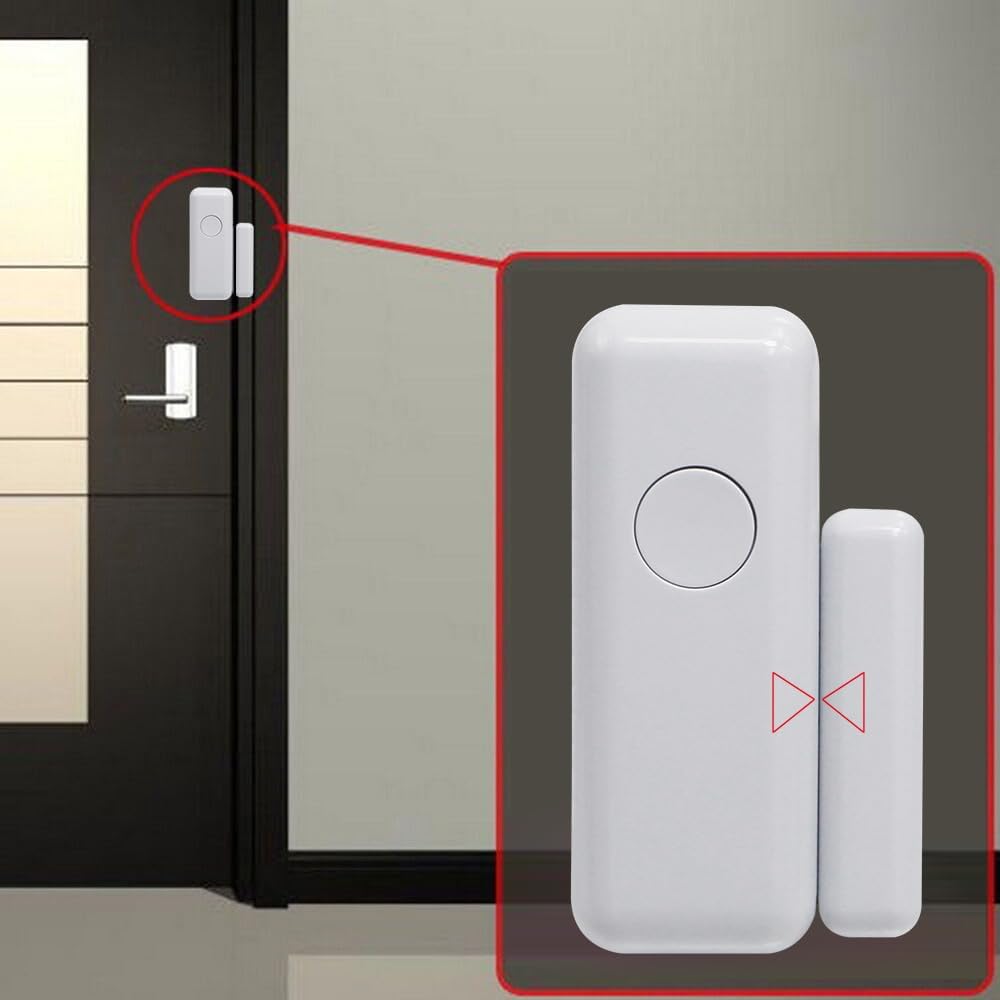
Figure 4: Close-up of installed sensor.
6. Operating Instructions
The Clouree Wireless Door/Window Sensor operates based on magnetic contact detection and communicates wirelessly with your compatible alarm host.
- Pairing with Alarm Host: Before operation, ensure the sensor is successfully paired with your Clouree 4G/3G/GSM alarm system. Refer to your alarm system's manual for specific pairing instructions. The sensor uses 433MHz wireless signal transmission.
- Closure State: When the door or window is closed, the main sensor unit and the magnetic stripe are in close proximity (less than 10mm separation). In this state, the sensor will not trigger an alarm.
- Separate State (Alarm Trigger): If the door or window is opened, the main sensor unit and the magnetic stripe separate. If this separation exceeds 10mm, the sensor immediately transmits an alarm signal to the paired alarm host.
- Alarm Host Response: Upon receiving an alarm signal, the alarm host will initiate its programmed response, which may include making a call, sending an SMS to your mobile phone, or pushing notifications via a mobile application. This allows you to monitor your security system at any time and from anywhere.

Figure 5: Working principle of the door sensor alarm.
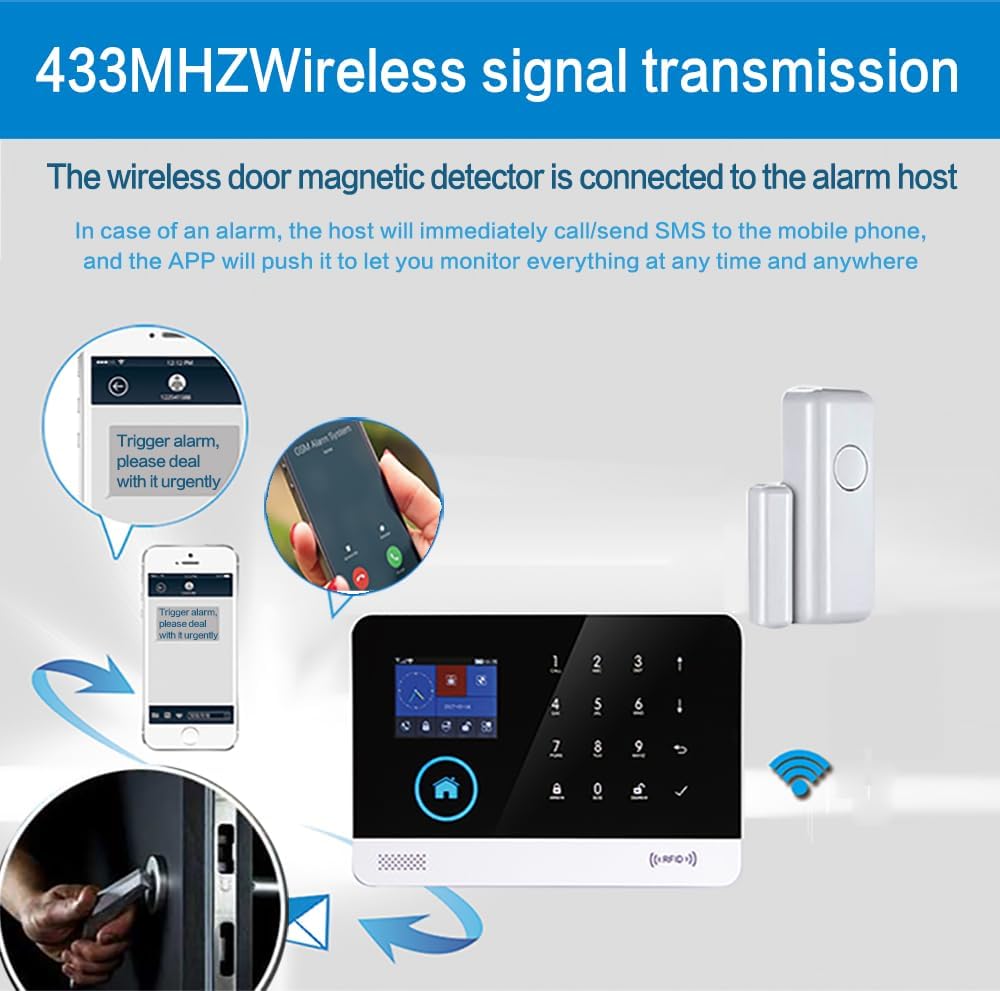
Figure 6: Wireless signal transmission and alarm notification process.
7. Compatibility
This Clouree Wireless Door/Window Sensor is designed to work exclusively with Clouree home alarm systems. It cannot be used as a standalone device.
Compatible Clouree Alarm System Models:
- PG103I-4G
- PG106I-4G
- PG107I-4G
- PG108I-4G
- PG109I-4G
- PG500I-4G
8. Maintenance
To ensure optimal performance and longevity of your Clouree Wireless Door/Window Sensor, follow these maintenance guidelines:
- Battery Replacement: The sensor is powered by a Lithium-ion battery. When the battery level is low, your alarm host may indicate a low battery warning. Replace the battery promptly with a new one of the same type to ensure continuous operation. Refer to the sensor's casing for specific battery access and replacement instructions.
- Cleaning: Periodically wipe the sensor units with a soft, dry cloth to remove dust and dirt. Do not use abrasive cleaners or solvents, as these can damage the device.
- Environmental Conditions: Ensure the sensor is not exposed to extreme temperatures, high humidity, or direct water contact, which can affect its performance and lifespan.
9. Troubleshooting
If you encounter issues with your Clouree Wireless Door/Window Sensor, consider the following troubleshooting steps:
- Sensor Not Triggering:
- Check the alignment of the main sensor unit and the magnetic stripe. Ensure the gap is less than 10mm when closed and separates sufficiently when opened.
- Verify the battery. Replace it if it's low or depleted.
- Ensure the sensor is correctly paired with your alarm host. Re-pair if necessary according to your alarm host's manual.
- False Alarms:
- Check for loose mounting. Re-secure the sensor and magnetic stripe firmly.
- Ensure the gap between the sensor and magnetic stripe is consistently less than 10mm when the door/window is fully closed.
- Check for any magnetic interference nearby.
- No Signal to Alarm Host:
- Check the battery level of the sensor.
- Ensure the sensor is within the wireless transmission range of the alarm host (up to 80m, less with obstacles).
- Verify that the alarm host is powered on and functioning correctly.
- Re-pair the sensor with the alarm host.
If these steps do not resolve the issue, please contact Clouree customer support or your alarm system provider for further assistance.
10. Warranty and Support
Specific warranty information for the Clouree Wireless Door/Window Sensor is not provided in the product details. For warranty claims, technical support, or inquiries regarding spare parts, please contact the seller or Clouree customer service directly. Keep your purchase receipt as proof of purchase.