Introduction
This manual provides detailed instructions for the installation, operation, and maintenance of your HOVVIDA 24V RGB LED Strip Light. Please read this manual thoroughly before use to ensure proper functionality and safety.
The HOVVIDA LED strip features 30 LEDs per meter, a 24V power supply for bright and durable illumination, and offers 16 million color options. It can be controlled via a mobile application and a remote control, includes music synchronization, and a timer mode.
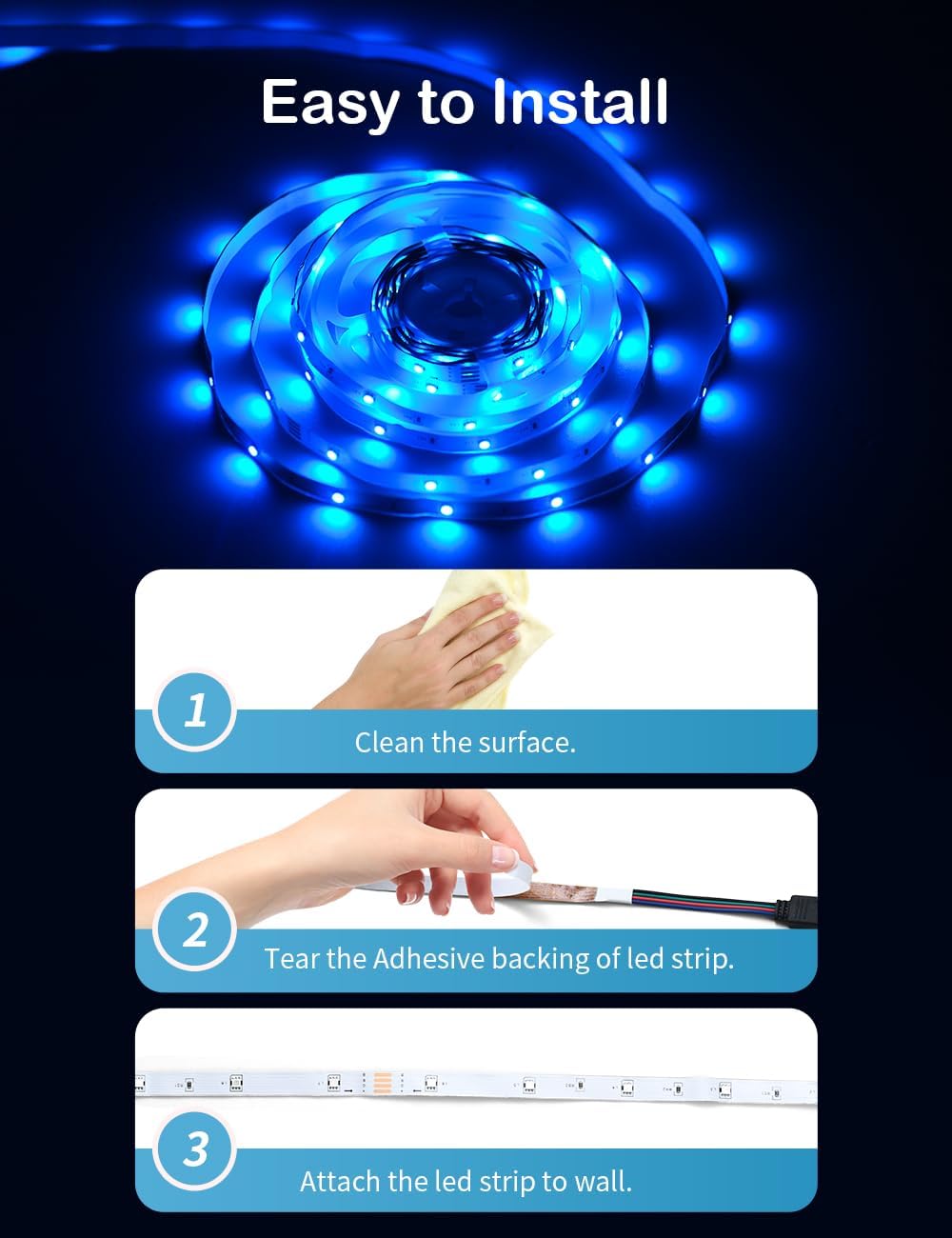
Image: HOVVIDA LED Strip Light demonstrating various application scenarios in different rooms.
1. Setup and Installation
Follow these steps for proper installation of your LED strip light:
- Prepare the Surface: Ensure the installation surface is clean, dry, and smooth. Dust, oil, or moisture can affect the adhesive's effectiveness.
- Measure and Cut (Optional): If necessary, measure the desired length and cut the LED strip only at the designated cutting marks (usually indicated by a copper pad). Do not cut elsewhere.
- Peel the Adhesive Backing: Carefully peel off the protective film from the adhesive backing of the LED strip.
- Attach the LED Strip: Firmly press the LED strip onto the desired surface. Apply even pressure along the entire length to ensure good adhesion.
- Connect Power: Connect the LED strip to the controller, and then connect the controller to the 24V power adapter. Plug the power adapter into a suitable power outlet.

Image: Visual guide for installing the LED strip light.
2. Operating Instructions
Your HOVVIDA LED Strip Light can be controlled using both the included IR remote control and a dedicated mobile application.
2.1 Mobile Application Control
Download the compatible mobile application (refer to the QR code on the controller or packaging for download links). Once installed, follow the in-app instructions to pair your LED strip light. The app allows for:
- Color Selection: Choose from 16 million colors.
- Brightness Adjustment: Adjust the light intensity.
- Dynamic Music Mode: Synchronize the lights with music rhythm.
- Timer Mode: Set schedules for turning the lights on/off.
- Scene Modes: Select from various pre-set lighting scenes.

Image: Control options via mobile application and IR remote.
2.2 IR Remote Control
The IR remote control provides quick access to essential functions:
- Power On/Off: Turn the lights on or off.
- Color Buttons: Select static colors.
- Brightness Up/Down: Adjust brightness levels.
- Mode Buttons: Cycle through dynamic lighting effects.
- Music Sync: Activate music synchronization.

Image: Demonstration of the dynamic music mode feature.
3. Maintenance
To ensure the longevity and optimal performance of your LED strip light, follow these maintenance guidelines:
- Cleaning: Gently wipe the LED strip with a soft, dry cloth to remove dust. Avoid using harsh chemicals or abrasive cleaners. Ensure the strip is powered off before cleaning.
- Adhesion Check: Periodically check the adhesion of the strip. If any part starts to peel, re-secure it with appropriate adhesive if necessary.
- Avoid Water Exposure: This product has an IP20 rating, meaning it is not waterproof. Avoid exposure to water or high humidity.
- Power Supply: Use only the provided 24V power adapter. Using an incorrect power supply can damage the device.
4. Troubleshooting
If you encounter issues with your HOVVIDA LED Strip Light, refer to the following common problems and solutions:
| Problem | Possible Cause | Solution |
|---|---|---|
| LED strip does not light up. | No power, loose connection, faulty power adapter. | Check if the power adapter is securely plugged in. Ensure all connections between the strip, controller, and power adapter are firm. Try a different power outlet. |
| Remote control is not working. | Battery depleted, remote not pointed at receiver, obstruction. | Replace the battery in the remote control. Ensure the remote is pointed directly at the IR receiver on the controller. Remove any obstructions between the remote and receiver. |
| App control not connecting. | Bluetooth/Wi-Fi off, app not updated, incorrect pairing. | Ensure Bluetooth (or Wi-Fi, depending on model) is enabled on your smartphone. Restart the app and try pairing again. Check for app updates. |
| Colors are incorrect or inconsistent. | Loose connection, damaged LED segment. | Check all connections. If a segment is damaged, it may require replacement of the strip. |
5. Specifications
| Feature | Detail |
|---|---|
| Brand | HOVVIDA |
| Model Number | N5MWT |
| LEDs per Meter | 30 |
| Total LEDs | 150 (for 5M strip) |
| Voltage | 24 Volts |
| Power | 60 Watts |
| Color Output | RGB (16 Million Colors) |
| Control Methods | Mobile Application, IR Remote Control |
| Special Features | Music Synchronization, Timer Mode, Cuttable |
| Material | Aluminum |
| IP Rating | IP20 (Indoor Use Only) |
| Dimensions (Package) | 19.3 x 18.7 x 2.4 cm |
| Item Weight | 200 g |
6. Warranty Information
Specific warranty details for the HOVVIDA 24V RGB LED Strip Light are not provided in this manual. Please refer to the product packaging or contact HOVVIDA customer support for information regarding warranty coverage and terms.
7. Customer Support
For further assistance, technical support, or inquiries regarding your HOVVIDA LED Strip Light, please contact the manufacturer directly. Contact information can typically be found on the product packaging or the official HOVVIDA website.