
RYA502A007C
User Manual: Replacement Remote Control
Model: RYA502A007C (Compatible with RYA502A007A, RYA502A007B, KFR-36GW/M)
Brand: Generic
Introduction
This manual provides instructions for the Generic replacement remote control designed for various Mitsubishi Air Conditioner models, including RYA502A007C, RYA502A007A, RYA502A007B, and KFR-36GW/M. Please note that as a replacement unit, some functions may differ or not be fully compatible with your original remote's capabilities. This remote is intended to provide essential control over your air conditioning unit.
Package Contents
- 1 x Replacement Remote Control (Color: Black or White, sent randomly)
No batteries are included in the package. Please prepare two AAA batteries for operation.
Setup
Battery Installation
- Locate the battery compartment on the back of the remote control.
- Slide open the battery compartment cover.
- Insert two new AAA batteries, ensuring the correct polarity (+ and -) as indicated inside the compartment.
- Close the battery compartment cover securely.
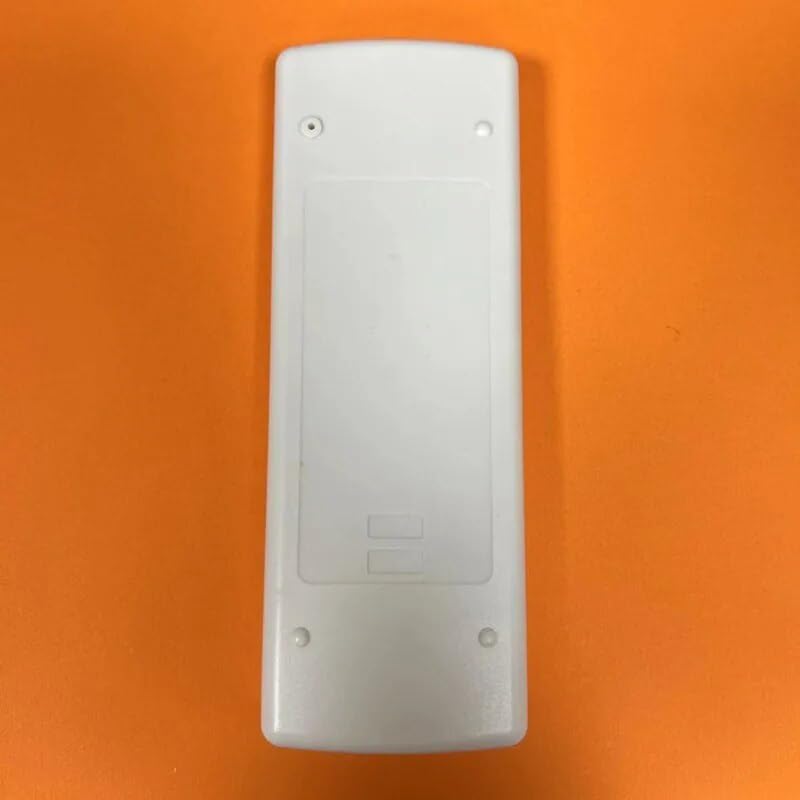
Figure 1: Back view of the remote control, illustrating the battery compartment location.
Initial Use
This remote control is designed as a direct replacement for the specified Mitsubishi Air Conditioner models. In most cases, no complex pairing or programming is required. Simply insert the batteries and point the remote towards your air conditioner unit to begin operation.
If you encounter issues, ensure your air conditioner model is listed as compatible. For optimal performance, it is recommended to verify compatibility with your specific unit model or original remote part number.
Operating Instructions
The remote control features an ergonomic design with clearly labeled buttons for easy operation. Refer to the image below for button layout and functions.

Figure 2: Front view of the remote control with button layout.
Key Functions:
- ON/OFF: Powers the air conditioner unit on or off.
- MODE: Cycles through operating modes such as Cool, Heat, Fan, Dry, Auto.
- TEMP ▲/▼: Adjusts the desired temperature setting.
- FAN SPEED: Adjusts the fan speed (e.g., Low, Medium, High, Auto).
- ECONO: Activates or deactivates economy mode for energy saving.
- HI POWER: Activates or deactivates high power mode for rapid cooling/heating.
- TIMER: Sets the on/off timer for the unit.
- SLEEP: Activates or deactivates sleep mode for comfortable night operation.
Important Note: As a replacement remote, certain advanced or specific functions present on your original remote may not be available or may operate differently. The core functions for temperature, mode, and fan control are typically supported.
Maintenance
Battery Replacement
Replace batteries when the remote's range decreases or buttons become unresponsive. Always replace both batteries simultaneously with new AAA batteries. Do not mix old and new batteries, or different types of batteries.
Cleaning
Wipe the remote control with a soft, dry cloth. Do not use liquid cleaners, abrasive cleaners, or chemical solvents, as these may damage the remote's surface or internal components.
Storage
If the remote control will not be used for an extended period, remove the batteries to prevent leakage and potential damage to the remote.
Troubleshooting
| Problem | Possible Cause | Solution |
|---|---|---|
| Remote not responding. |
|
|
| Certain functions do not work. |
|
|
Specifications
| Brand | Generic |
| Model Compatibility | RYA502A007C, RYA502A007A, RYA502A007B, KFR-36GW/M (Mitsubishi Air Conditioners) |
| Power Source | 2 x AAA Batteries (not included) |
| Special Feature | Ergonomic Design |
| Color | Black or White (randomly sent) |
Support
For any questions regarding the compatibility or operation of this replacement remote control, please contact the seller or retailer from whom you purchased the product. Providing your original remote's part number or your air conditioner unit's model number can assist in resolving compatibility inquiries.
Ask a question about this manual
Ask about setup, troubleshooting, compatibility, parts, safety, or missing instructions. Manuals+ will review the question and use this page’s manual context to help answer it.