
1. Introduction
Thank you for choosing the Dannilong 40-inch Modern Ceiling Fan with Light. This manual provides detailed instructions for the safe installation, operation, and maintenance of your new ceiling fan. Please read this manual thoroughly before installation and keep it for future reference.
2. Important Safety Information
Always follow basic safety precautions when installing and operating electrical appliances. Failure to do so may result in fire, electric shock, or personal injury.
- Ensure power is disconnected at the circuit breaker before installation or servicing.
- All wiring must be in accordance with national and local electrical codes.
- Installation should be performed by a qualified electrician.
- Mount the fan to a ceiling outlet box marked "Acceptable for Fan Support of 35 lbs (15.9 kg) or less."
- Do not operate the fan if any part is damaged.
- Keep hands, clothing, and other objects clear of fan blades during operation.
3. Package Contents
Verify that all components are present before beginning installation:
- Fan Body Assembly
- Fan Blades (5 reversible blades)
- LED Light Source
- Lampshade
- Mounting Bracket/Canopy
- Remote Control
- Screws and Hardware Kit
- User Manual

4. Setup and Installation
This section guides you through the assembly and installation process. For visual assistance, please refer to the embedded installation videos.
4.1. Pre-Installation Steps
- Turn off Power: Ensure the power supply to the ceiling fan location is turned off at the circuit breaker.
- Unpack Components: Carefully remove all components from the packaging and lay them out on a clean, flat surface.
- Prepare Mounting Bracket: Unscrew the two mounting bracket screws from the fan body assembly and remove the bracket.

4.2. Fan Blade Assembly
- Attach Blades: Insert each of the 5 fan blades into the motor, aligning them with the screw holes.
- Secure Blades: Secure each blade in place using the provided screws. Ensure all screws are tightened securely.
- Reversible Blades: Note that the fan blades are reversible, with one side being white and the other a natural wood color, allowing you to choose your preferred aesthetic.

4.3. Electrical Wiring and Mounting
- Mount Bracket: Attach the mounting bracket to the ceiling electrical box using the provided screws.
- Hang Fan: Use the S-shaped hook (if provided) to temporarily hang the fan body from the mounting bracket while making electrical connections.
- Connect Wiring: Connect the ground wire (green/yellow), live wire (black), and neutral wire (white) from the ceiling to the corresponding wires on the fan. Ensure all connections are secure with wire nuts.
- Secure Fan Body: Once wiring is complete, carefully lift the fan body and align it with the mounting bracket. Secure it in place with the remaining screws.
4.4. Light Kit Installation
- Attach LED Light Source: Connect the LED light source wires to the corresponding terminals on the fan motor.
- Secure LED Panel: Align the LED ceiling panel with the triangular slots beneath the motor, rotate it into place, and use 3 screws to securely attach it.
- Install Lampshade: Gently bend the acrylic lampshade slightly and insert it into the LED ceiling plate to complete the installation.
5. Operating Instructions
Your Dannilong ceiling fan can be controlled via the included remote control or a dedicated mobile application.
5.1. Remote Control Functions
The remote control allows you to manage all fan and light settings:
- Power On/Off: Turn the fan and light on or off.
- Fan Speed: Select from 6 adjustable fan speeds (1-2 for low/sleep, 3-4 for medium/natural, 5-6 for high/cooling).
- Light On/Off: Control the light independently from the fan.
- Color Temperature: Adjust the light color between 3000K (warm white), 4000K (natural white), and 5000K (cool white).
- Brightness: Dim the light from 5% to 100% brightness.
- Timer: Set the fan to turn off automatically after 1, 2, or 4 hours.
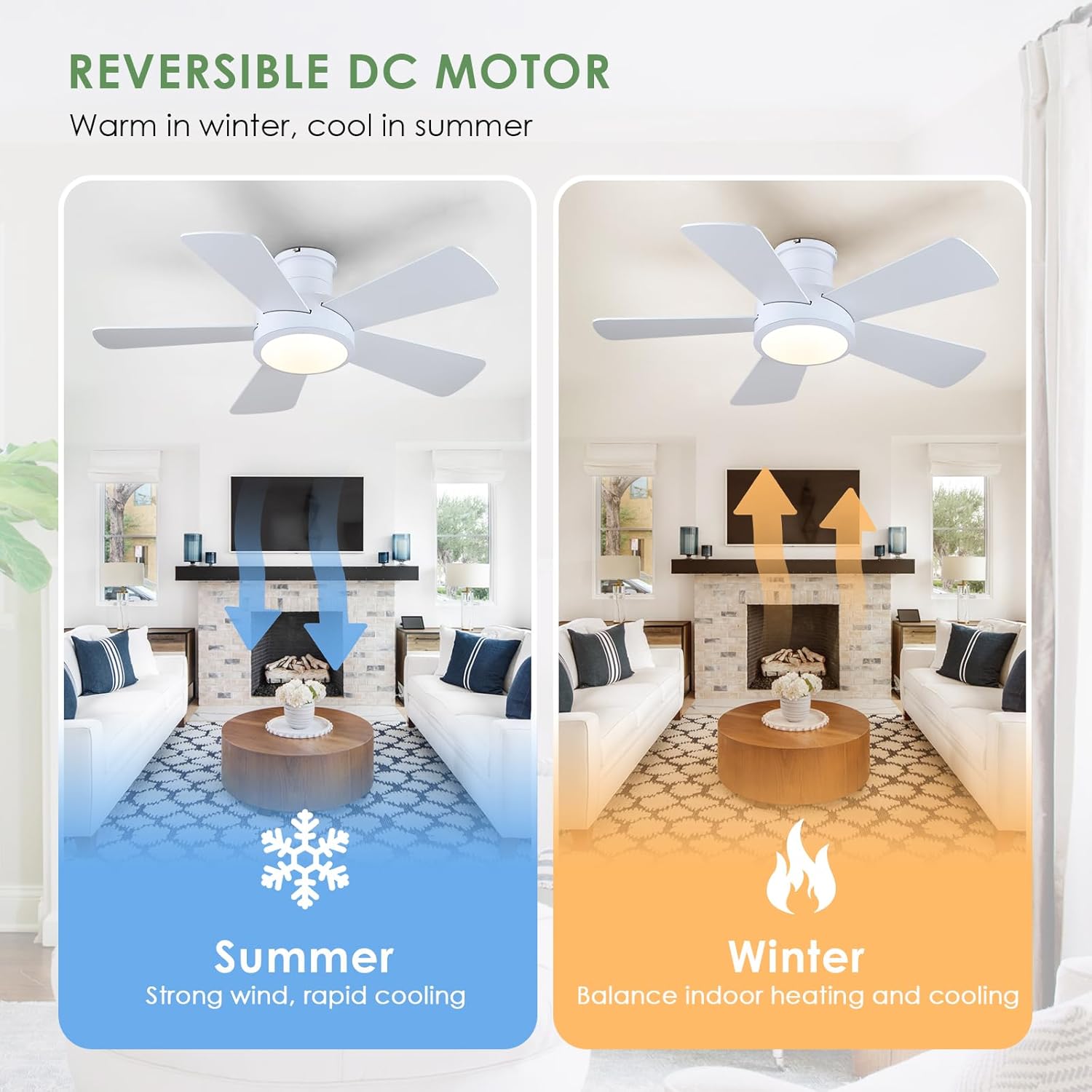
- Reversible Function (Summer/Winter Mode):
- Summer Mode (Downward Airflow): Blades rotate counter-clockwise to create a cooling breeze.
- Winter Mode (Upward Airflow): Blades rotate clockwise to circulate warm air trapped near the ceiling.

5.2. APP Control
For APP functionality, please refer to page 11 of the printed installation manual. Scan the provided QR code to download the APP and complete the pairing process to control your fan from your smartphone.
6. Maintenance
Regular maintenance ensures optimal performance and longevity of your ceiling fan.
- Cleaning: Use a soft, damp cloth to clean the fan blades and motor housing. Do not use abrasive cleaners or solvents.
- Blade Cleaning: Clean the blades regularly to prevent dust buildup, which can affect airflow and balance.
- Tighten Screws: Periodically check all screws for tightness, especially those securing the fan blades and mounting bracket.
- No Lubrication Needed: The fan's motor is permanently lubricated and does not require oiling.
7. Troubleshooting
If you experience issues with your fan, refer to the following common problems and solutions:
| Problem | Possible Cause | Solution |
|---|---|---|
| Fan does not start | No power to fan; Loose wire connections; Remote control battery low. | Check circuit breaker; Verify all wire connections are secure; Replace remote control battery. |
| Fan is noisy | Loose fan blades; Loose mounting screws; Fan not properly balanced. | Tighten blade screws; Tighten mounting screws; Use a balancing kit (not included) to balance blades. |
| Light does not work | Loose wire connection to light kit; Faulty LED light source. | Check light kit wiring; Contact customer support for replacement LED light source. |
| Remote control not working | Low battery; Remote not paired with fan. | Replace battery; Refer to remote pairing instructions in the full manual. |
8. Specifications
- Model Number: 8502
- Size: 40 inch
- Color: White
- Material: Plastic
- Power Source: DC
- Voltage: 110 Volts
- Wattage: 20 watts
- Air Flow Capacity: 3000 Cubic Feet Per Minute
- Type of Bulb: LED
- Brightness: 2200 Lumen
- Speed Settings: 6 RPM (speeds)
- Mounting Type: Flush Mount
- Special Features: Remote Controlled, Timer, Reversible, APP Control
- Item Weight: 6.81 kg
- Product Dimensions: 27.94 x 15 x 43.18 cm
9. Warranty and Support
For warranty information or technical support, please refer to the contact details provided in your product packaging or visit the Dannilong official website. Our customer support team is available to address any inquiries and provide suitable solutions.


