
1. Introduction
The Klein Theo Klein 8734 Bosch Workbench is a robust and interactive play set designed for children aged 3 years and older. This wooden workbench, featuring the popular Bosch design, transforms any child's room into a creative workshop. It includes a variety of tools and accessories, promoting the development of manual skills, spatial thinking, and creativity.
This manual provides essential information for the safe assembly, operation, and maintenance of your Bosch Workbench. Please read all instructions carefully before use.
2. Safety Warnings
WARNING:
- Not suitable for children under 3 years of age.
- Contains small parts and/or small detachable parts that may be swallowed. Choking hazard.
- To be used only under adult supervision.
- Retain this address and information for future reference.
3. Package Contents
Before assembly, ensure all components are present. The package includes over 100 pieces, designed to provide a comprehensive workshop experience. Key items include:
- Wooden workbench structure (height-adjustable)
- Battery-powered Bosch cordless screwdriver with light and sound functions
- Mechanical circular saw with sound
- Safety equipment: helmet, protective glasses, ear protectors, gloves
- Assorted hand tools: hammer, pliers, saw, wrench, screwdriver, tape measure, square, vise
- Various screws, nuts, and connecting elements
- 5-in-1 assembly vehicle kit
- Toolbox and storage shelves/drawer
- Writable chalkboard (chalk not included)

Figure 1: Overview of the more than 100 pieces included in the Bosch Workbench set.
4. Setup Instructions
The Bosch Workbench requires assembly. While specific step-by-step instructions are provided in the product packaging, here are general guidelines:
- Unpack Components: Carefully remove all parts from the packaging and verify against the package contents list.
- Assemble Main Frame: Begin by connecting the main wooden frame pieces according to the diagrams. Ensure all connections are secure.
- Install Shelves and Drawers: Attach the storage shelves, drawer, and back panel to the main frame.
- Attach Workbench Top: Secure the main workbench surface.
- Mount Tool Hooks and Accessories: Place the tool hooks on the back panel and arrange the various tools and accessories as desired.
- Insert Batteries: For the electronic screwdriver, open the battery compartment and insert 3 x AAA batteries (not included), ensuring correct polarity.
- Adjust Height: The workbench is height-adjustable. Follow the instructions to set it to one of the three available heights (approximately 101.3 cm, 105 cm, or 107 cm) to suit the child's stature.
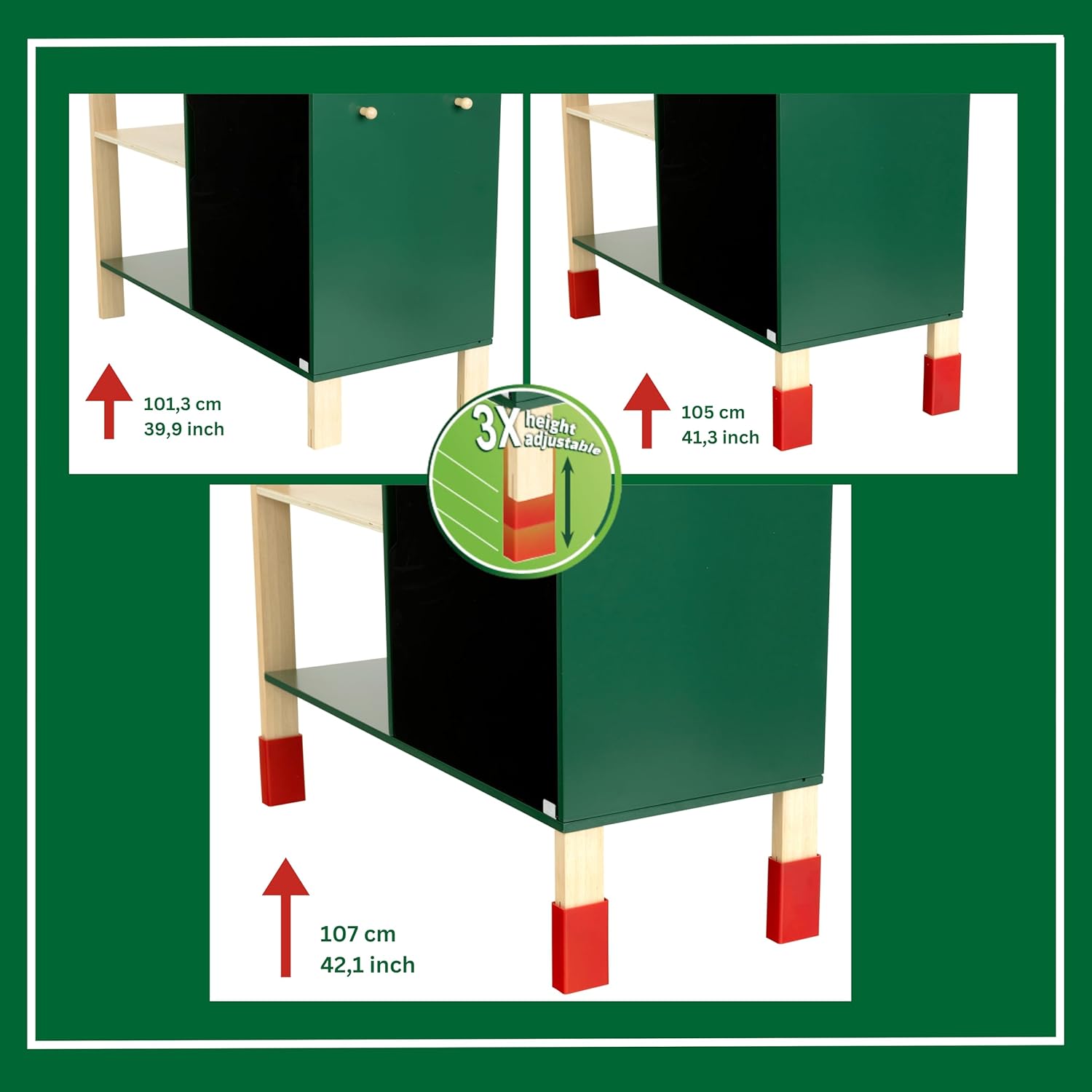
Figure 2: The workbench offers three height adjustments for ergonomic play.

Figure 3: Workbench dimensions for planning placement.
5. Operating Instructions
The Bosch Workbench provides a realistic and engaging play experience with various functional tools:
5.1 Electronic Screwdriver
The battery-powered Bosch cordless screwdriver features realistic light and sound effects. To operate:
- Ensure 3 x AAA batteries are correctly installed.
- Select the desired screwdriver bit and insert it into the chuck.
- Press the trigger to activate the rotation, light, and sound.
- Use the forward/reverse switch to change the rotation direction for 'screwing in' or 'unscrewing'.
5.2 Mechanical Circular Saw
The mechanical circular saw includes a sound feature for realistic play. To use:
- Place the 'material' (e.g., wooden slats provided) on the saw bench.
- Operate the saw mechanism to simulate cutting, accompanied by sound effects.
5.3 5-in-1 Assembly Vehicle
This kit allows children to assemble at least five different vehicle configurations using the provided parts and tools. Encourage children to follow the included diagrams or create their own designs.
5.4 Chalkboard
The integrated chalkboard allows children to draw plans, write notes, or list tasks for their projects. Use standard chalk (not included).

Figure 4: Key interactive features of the Bosch Workbench.
6. Maintenance
To ensure the longevity and safe use of the Bosch Workbench:
- Cleaning: Wipe down all surfaces with a damp cloth. Avoid harsh chemicals or abrasive cleaners.
- Storage: Store the workbench in a dry environment, away from direct sunlight or extreme temperatures, to prevent damage to the wood.
- Battery Replacement: Replace batteries in the electronic screwdriver when sound and light effects diminish. Always use new AAA batteries and dispose of old batteries responsibly.
- Check for Wear: Periodically inspect all parts for signs of wear, damage, or loose connections. Tighten screws if necessary. Replace any broken or severely worn parts to maintain safety.
7. Troubleshooting
| Problem | Possible Cause | Solution |
|---|---|---|
| Electronic screwdriver not working (no light/sound/rotation) | Batteries are dead or incorrectly inserted. | Replace with new AAA batteries, ensuring correct polarity. |
| Workbench feels unstable | Assembly screws are loose or not fully tightened. | Check all assembly points and tighten screws securely. Ensure the workbench is on a flat, stable surface. |
| Tools do not fit properly on hooks | Incorrect placement or tool orientation. | Refer to the product images or packaging for suggested tool placement. |
8. Specifications
| Feature | Detail |
|---|---|
| Model Number | 8734 |
| Product Dimensions (L x W x H) | 79 x 35 x 107 cm (adjustable height) |
| Item Weight | 11.5 Kilograms |
| Recommended Age | 3 years and up (36 months minimum) |
| Main Material | Wood |
| Battery Requirement | 3 x AAA batteries (not included) for electronic screwdriver |
| Educational Value | Develops manual skills, hand-eye coordination, tool understanding |
| Color | Multicolored |
9. Warranty and Support
Specific warranty information for the Klein Theo Klein 8734 Bosch Workbench is not provided in the product details. For any questions regarding product defects, missing parts, or operational issues, please contact the retailer where the product was purchased or refer to the manufacturer's official website for customer support contact information.
Please retain your proof of purchase for any warranty claims or support inquiries.


