1. Introduction
Thank you for choosing the Dibea H8 Cordless Wet Dry Smart Washer & Vacuum Cleaner. This appliance is designed for efficient cleaning of various hard floor surfaces, combining vacuuming and mopping functions. Please read this manual thoroughly before use to ensure proper operation and maintenance.
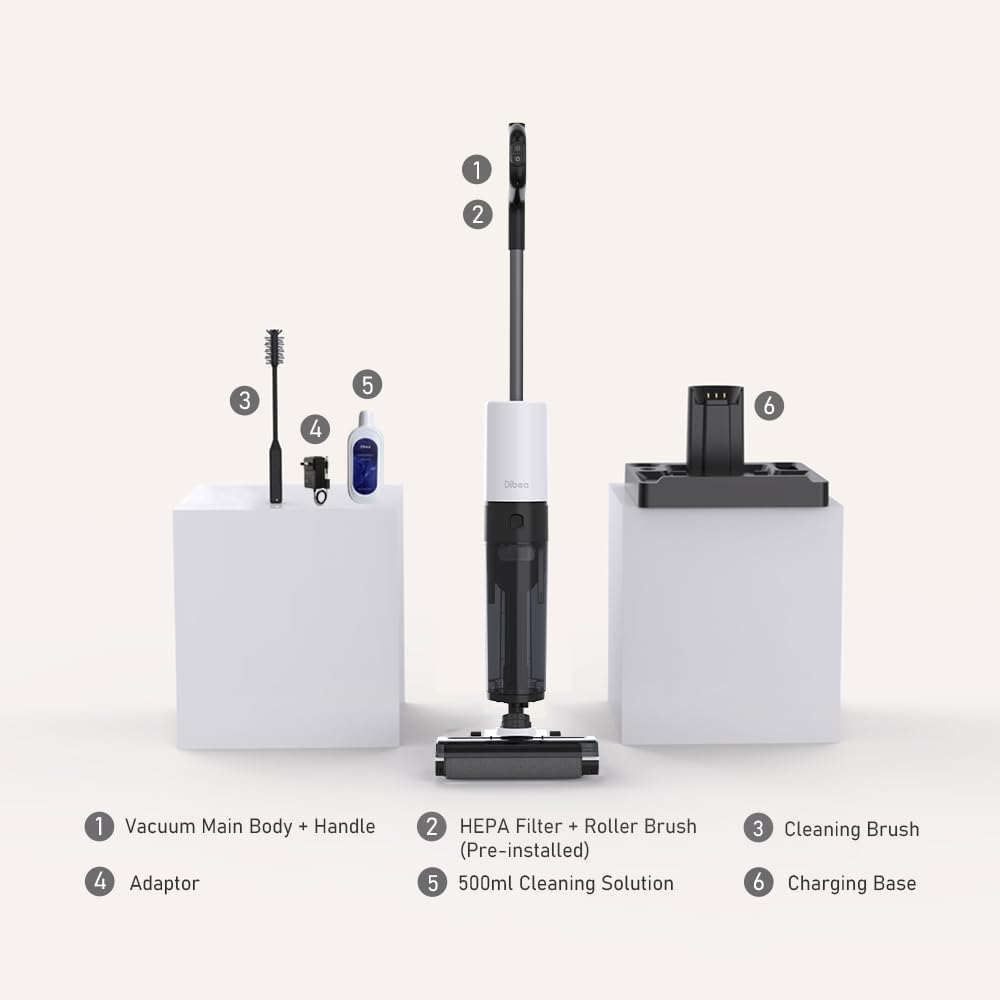
2. Package Contents
Carefully unpack your Dibea H8 and ensure all items listed below are present and in good condition. If any items are missing or damaged, please contact customer support.
- 1 x Dibea H8 Main Body
- 1 x Handheld Handle
- 1 x Dirty Water Tank (DWT)
- 1 x Clean Water Tank (CWT)
- 1 x Roller Brush & HEPA Filter (Pre-installed)
- 1 x Charging Base
- 1 x Adaptor
- 1 x Cleaning Brush
- 1 x Cleaning Solution (500ml)

3. Setup
3.1 Assembly
- Insert the handheld handle into the main body until it clicks securely into place.
- Ensure the Clean Water Tank (CWT) and Dirty Water Tank (DWT) are correctly installed.
- Verify that the roller brush and HEPA filter are pre-installed in their respective compartments.
3.2 Charging
- Place the Dibea H8 onto the charging base.
- Connect the adaptor to the charging base and plug it into a power outlet.
- The LED display will indicate charging status. A full charge typically takes 4-5.5 hours.
3.3 Filling the Clean Water Tank
- Remove the Clean Water Tank (CWT) from the main body.
- Open the tank cap and fill with clean tap water. For enhanced cleaning, add a small amount of the provided cleaning solution. Do not exceed the MAX fill line.
- Close the cap securely and re-install the CWT into the main body.
4. Operating the Appliance
The Dibea H8 offers versatile cleaning for various hard surfaces including hardwood, tile, ceramic, and marble. It features a smart LED digital display and voice prompts for real-time information.

4.1 Powering On/Off
Press the power button on the handle to turn the appliance on or off. The LED display will illuminate upon activation.
4.2 Cleaning Modes
The Dibea H8 features four cleaning modes to suit different cleaning needs:
- Auto Mode: Automatically adjusts suction power and water flow based on detected dirt levels. Ideal for general cleaning.
- High Power Mode: Provides maximum suction (up to 13,000Pa) for stubborn dirt and heavy spills.
- Suction Mode: Focuses solely on liquid suction, useful for drying wet areas or picking up large liquid spills without scrubbing.
- Self-Cleaning Mode: Initiates an automatic cleaning cycle for the roller brush and internal tubes while the unit is on its charging base.

4.3 Smart LED Digital Display and Voice Prompts
The user-friendly LED display provides real-time information, including the current working mode, battery life, and water tank status. Voice guidance assists with operational instructions and alerts.

4.4 Self-Propelled Design
The Dibea H8 is equipped with a self-propulsion system that reduces the effort required to push the vacuum, making cleaning easier and less strenuous.
4.5 Battery Life and Water Tanks
Powered by a 2,200mAh lithium battery, the appliance offers up to 38 minutes of continuous cleaning in Auto Mode. It features 500ml clean and dirty water tanks, minimizing the need for frequent refills and emptying during cleaning sessions.

5. Maintenance
Regular maintenance ensures optimal performance and extends the lifespan of your Dibea H8.
5.1 Self-Cleaning Function
After each use, it is recommended to activate the self-cleaning mode:
- Place the appliance on its charging base.
- Ensure there is sufficient clean water in the CWT.
- Press the self-cleaning button (often integrated with the High Power mode button) to start the cycle. The appliance will automatically clean the roller brush and internal tubes.
- Once complete, empty the Dirty Water Tank.
5.2 Emptying the Dirty Water Tank (DWT)
- Remove the DWT from the main body.
- Open the tank and carefully pour out the dirty water.
- Rinse the DWT thoroughly with clean water and allow it to air dry before re-installing.
5.3 Cleaning the Roller Brush and HEPA Filter
- Periodically remove the roller brush and HEPA filter for manual cleaning.
- Use the provided cleaning brush to remove hair and debris from the roller brush. Rinse under running water.
- Tap the HEPA filter gently to dislodge dust. If heavily soiled, rinse under water, ensuring it is completely dry before re-installation to prevent mold growth and maintain suction power.
6. Troubleshooting
If you encounter issues with your Dibea H8, refer to the following common problems and solutions:
| Problem | Possible Cause | Solution |
|---|---|---|
| No power/Does not turn on | Low battery; Not charged | Charge the appliance fully. Ensure the adaptor is properly connected. |
| Poor suction | Dirty HEPA filter; Blocked roller brush; Full DWT | Clean or replace the HEPA filter. Remove any blockages from the roller brush. Empty and clean the Dirty Water Tank. |
| Water not dispensing | Empty CWT; Clogged water nozzle | Refill the Clean Water Tank. Check and clear any blockages in the water dispensing nozzle. |
| Self-cleaning not working | Insufficient water in CWT; Appliance not on charging base | Ensure the Clean Water Tank is filled. Place the appliance correctly on the charging base. |
| Unusual noise | Foreign object in brush roll; Damaged components | Turn off and inspect the brush roll for foreign objects. If noise persists, contact customer support. |
7. Specifications
Detailed technical specifications for the Dibea H8 Cordless Wet Dry Smart Washer & Vacuum Cleaner:
| Feature | Specification |
|---|---|
| Net Weight | 3.7 kg |
| Dimensions | 1106 x 217 x 270 mm |
| Battery Capacity | 2,200 mAh |
| Motor | Brushless Motor |
| Rating Power | 170W |
| Suction Power (Pa) | 13kPa |
| Running Time (Min) | 38 Mins (Auto Mode) |
| Charging Time | 4-5.5 Hours |
| Noise Level | ≤80db |
| Charging Voltage | 22.2 Volts |
| Filter Type | HEPA |
| Self-Cleaning | Yes |
| Dirty Water Tank Capacity | 600 ml |
| Clean Water Tank Capacity | 500 ml |
| Display Screen | LED On-Screen Display |
| Voice Prompts | Yes |
| Self-Propulsion | Yes |
| Water Sterilization | No |
| Cleaning Mode | Auto / High Power / Self-Cleaning / Suction |
| Surface Recommendation | All hard floors |
| Power Source | Battery Powered |

8. Warranty and Support
8.1 Warranty Information
The Dibea H8 comes with a 2-year manufacturer's guarantee. Please note that specific components, such as the battery, may have a shorter warranty period (e.g., 6 months). Retain your proof of purchase for warranty claims.
8.2 Customer Support
For technical assistance, warranty claims, or spare parts, please contact Dibea customer support through their official website or the retailer where the product was purchased. Provide your model number (H8) and purchase date for efficient service.