
Product Overview
The Schecter PT Classic Electric Guitar, Model 7320, is a solidbody electric guitar designed for versatile performance. It features a mahogany body with a quilted maple top, providing a balanced tone with sustain. The instrument is equipped with Alnico V humbucking pickups and a hardtail bridge for stable tuning and intonation. The neck is constructed from flame maple, paired with a 22-fret ebony fingerboard, offering a smooth playing surface.
Key Features:
- Solidbody Electric Guitar with Mahogany Body
- Quilted Maple Top
- 2 Humbucking Pickups (Alnico V)
- Ebony Fingerboard with 22 Frets
- Flame Maple Neck
- Hardtail Bridge

Figure 1: Front view of the Schecter PT Classic Electric Guitar. This image displays the Inferno finish, humbucking pickups, volume/tone knobs, and the hardtail bridge.
Setup
1. Initial Inspection
Upon unboxing, carefully inspect the guitar for any visible damage. Ensure all components, such as tuning machines, bridge, and pickups, are securely in place.
2. Tuning
Tune the guitar using a reliable electronic tuner. The standard tuning for a 6-string guitar is E-A-D-G-B-e (from thickest to thinnest string). Gently stretch new strings after initial tuning to help them settle and improve tuning stability.
3. Connecting to an Amplifier
- Ensure your amplifier is turned off and its volume is set to minimum.
- Connect one end of a standard 1/4-inch instrument cable to the output jack on the side of the guitar body.
- Connect the other end of the cable to the input jack on your amplifier.
- Turn on your amplifier and slowly increase the volume to a desired level.

Figure 2: Rear view of the Schecter PT Classic Electric Guitar. This image highlights the mahogany body, maple neck, and the string-through-body ferrules.
Operating the Guitar
Controls Overview
The Schecter PT Classic features a straightforward control layout for ease of use.
- Volume Knob: Controls the overall output level of the guitar. Turn clockwise to increase volume, counter-clockwise to decrease.
- Tone Knob: Adjusts the treble frequencies. Turning clockwise brightens the sound, while turning counter-clockwise rolls off high frequencies for a warmer tone.
- Pickup Selector Switch: This 3-way switch allows you to select different pickup configurations:
- Position 1 (Bridge): Activates the bridge humbucker for a brighter, more aggressive sound.
- Position 2 (Middle): Activates both bridge and neck humbuckers for a fuller, balanced tone.
- Position 3 (Neck): Activates the neck humbucker for a warmer, smoother tone.

Figure 3: Close-up of the guitar's rear body. This view shows the access panel for the electronics and the string-through-body design.
Maintenance
1. Cleaning
- After each use, wipe down the strings and body with a clean, soft cloth to remove sweat and oils.
- For the body finish, use a guitar-specific polish or cleaner sparingly. Avoid abrasive cleaners.
- Clean the ebony fretboard periodically with a fretboard conditioner to prevent drying and cracking.
2. String Replacement
Strings should be replaced regularly, depending on playing frequency and string type. Old strings can lose their tone and intonation. Replace one string at a time to maintain neck tension.
3. Storage
Store the guitar in a stable environment, away from extreme temperature changes and humidity fluctuations. A guitar case or gig bag provides protection from dust and physical damage.
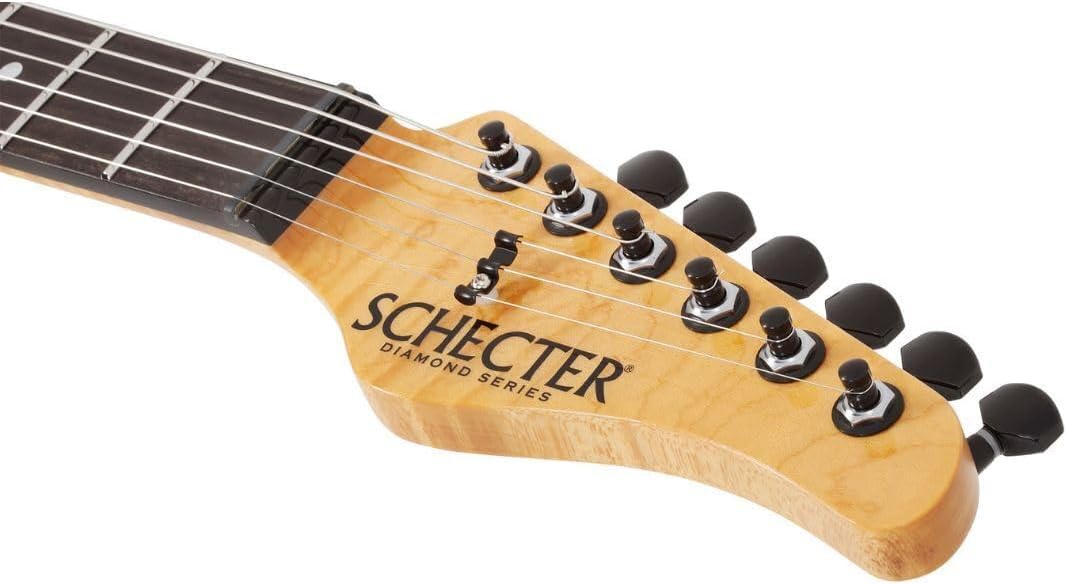
Figure 4: Front view of the guitar headstock. This image shows the Schecter logo, Diamond Series branding, and the black tuning machines.
Troubleshooting
No Sound Output
- Check that the instrument cable is securely connected to both the guitar and the amplifier.
- Ensure the amplifier is powered on and its volume is not at zero.
- Verify the guitar's volume knob is turned up.
- Test with a different cable or amplifier to isolate the issue.
Buzzing or Fret Noise
- Ensure proper finger placement directly behind the fret.
- Check for worn strings; replace if necessary.
- Extreme changes in temperature or humidity can affect neck relief, potentially causing fret buzz. Professional setup may be required.
Tuning Instability
- Ensure strings are properly stretched after installation.
- Check for worn or improperly wound strings on the tuning posts.
- Verify that the tuning machines are functioning correctly and are not loose.

Figure 5: Rear view of the guitar headstock. This image displays the back of the tuning machines and the flame maple neck.
Specifications
| Brand | Schecter |
| Model Number | 7320 |
| Color | Inferno |
| Body Material | Mahogany |
| Top Material | Quilted Maple |
| Neck Material | Maple |
| Fretboard Material | Ebony |
| Number of Frets | 22 |
| Pickup Configuration | HH (2 Humbuckers) |
| Bridge System | Hard Tail |
| Number of Strings | 6 |
| Item Weight | 24.7 Pounds (approx. 11.2 kg) |
| Item Dimensions (L x W x H) | 45.6 x 18.6 x 5.9 inches (approx. 115.8 x 47.2 x 15 cm) |
| UPC | 810051473643 |
Warranty Information
This Schecter PT Classic Electric Guitar is covered by a 2-year manufacturer's warranty. This warranty covers defects in materials and workmanship under normal use. Please retain your proof of purchase for warranty claims.
For specific terms and conditions, or to register your product, please refer to the official Schecter website or contact their customer service department.
Support
For further assistance, technical support, or inquiries regarding your Schecter PT Classic Electric Guitar, please visit the official Schecter website or contact their customer support directly.
Official Website: www.schecterguitars.com
Contact information may vary by region. Please check the website for the most up-to-date contact details.