
1. Introduction
Thank you for choosing LemonNova 40FT LED Storefront Lights. This product is designed to provide vibrant and versatile lighting for various applications, including storefronts, windows, and decorative lighting. Please read this manual carefully before installation and operation to ensure proper use and longevity of your lights.
1.1. Package Contents
- 40FT LED Storefront Light Strip (Model 9923-40)
- Power Adapter
- Remote Control (with 1 Lithium Metal battery included)
- Mounting Clips and Screws
- User Manual (this document)

Image: Overview of the LemonNova 40FT LED Storefront Lights, including the packaging, light modules, remote control, and a smartphone displaying the control app.
2. Safety Information
- Ensure the power supply is disconnected before installation or maintenance.
- Use only the provided power adapter. Using an incompatible adapter may damage the product or pose a safety risk.
- Do not expose the power plug or controller to water. While the LED strips are IP67 waterproof, the power adapter and controller are not.
- Avoid bending the LED strips sharply, as this may damage the internal wiring.
- Keep out of reach of children.
- Do not attempt to repair or modify the product. Contact customer support for assistance.
3. Setup and Installation
3.1. Installation Steps
- Prepare the Surface: Ensure the installation surface is clean, dry, and smooth.
- Connect Components: Connect the LED light strip to the controller, and then connect the controller to the power adapter.
- Mount the Lights: The LED modules feature strong adhesive backing for direct application. For added security, use the provided mounting clips and screws, especially for outdoor or vertical installations.
- Power On: Plug the power adapter into a suitable electrical outlet.

Image: A visual guide showing the four steps for setting up the LED lights: connecting components, downloading the app, enabling 2.4GHz Wi-Fi, and starting use.
3.2. App Connection
- Download the App: Scan the QR code provided in the packaging or visit https://smartapp.tuya.com/tuyasmart to download the TUYA Smart app.
- Enable Wi-Fi: Ensure your smartphone is connected to a 2.4 GHz Wi-Fi network. The lights do not support 5 GHz networks.
- Add Device: Open the TUYA Smart app, register or log in, and follow the in-app instructions to add your LED lights.
- Start Control: Once connected, you can control the lights via the app.
4. Operating Instructions
Your LemonNova LED Storefront Lights can be controlled using the included remote control or the TUYA Smart app.
4.1. Remote Control Operation
The remote control allows for quick adjustments to your lights. Point the remote directly at the light controller for optimal response.
- Power On/Off: Use the Power button.
- Color Selection: Press the colored buttons to change the light color.
- Brightness Adjustment: Use the Brightness Up/Down buttons.
- Mode Selection: Cycle through 44 dynamic modes (flash, fade, static) using the Mode+/- buttons.
- Speed Adjustment: Adjust the speed of dynamic modes using the Speed+/- buttons.
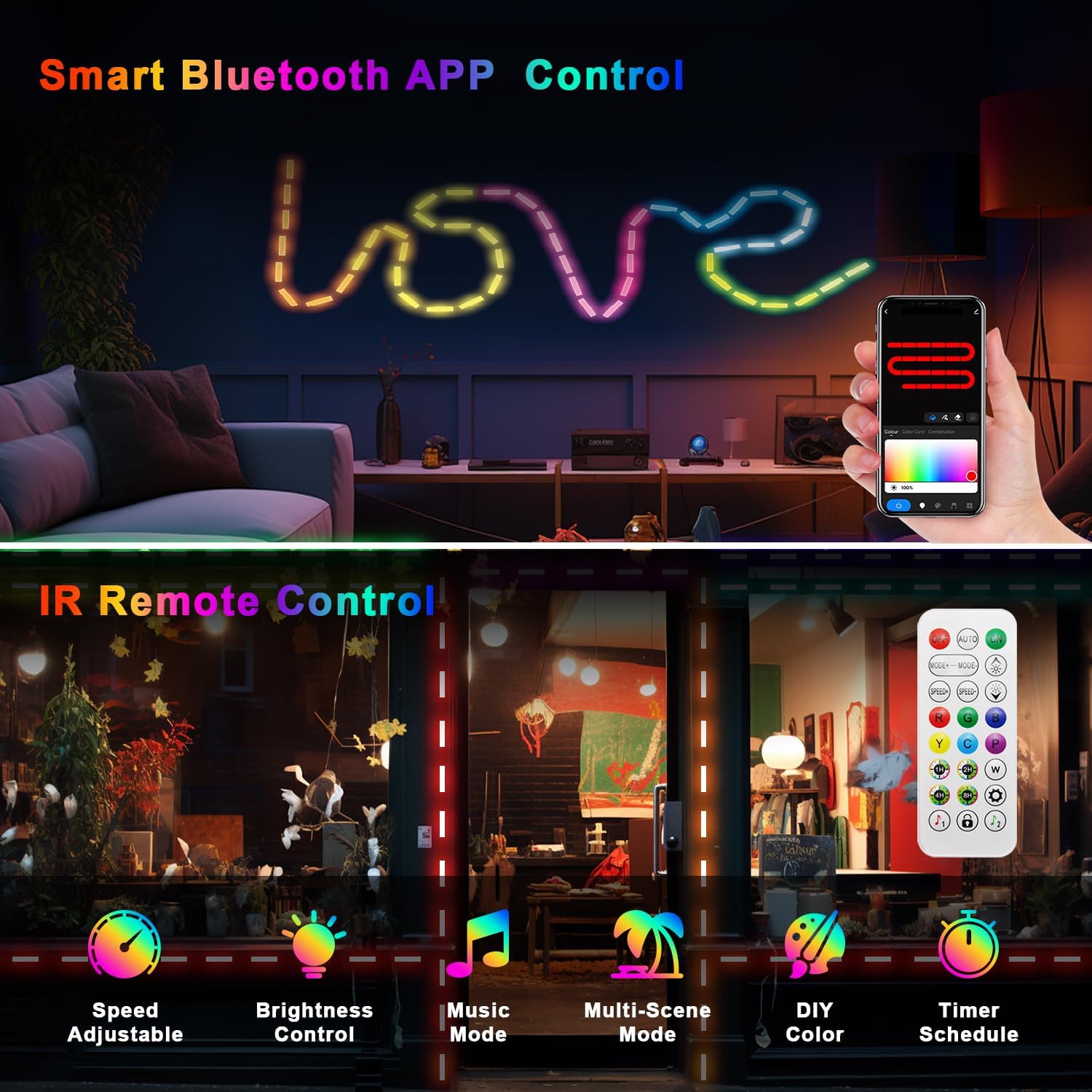
Image: A split image showing the remote control with various buttons for color, mode, speed, and brightness adjustments, alongside a smartphone displaying the app interface for light control.
4.2. Smart App Control
The TUYA Smart app offers advanced control and customization options:
- 16 Million RGB Colors: Select any color from the color wheel for static or dynamic lighting effects.
- Dynamic Modes: Access all 44 pre-programmed modes, including flash, fade, and static options.
- Custom DIY Colors: Create and save your own custom color combinations and effects.
- Timer Function: Set schedules for the lights to turn on/off automatically, or to change modes at specific times.
- Music Mode: Synchronize the lights with music for an immersive experience.
- Brightness Adjustment: Fine-tune the brightness level.

Image: A smartphone screen displaying the app's interface for selecting DIY colors, with various color swatches and a color picker. The background shows LED lights illuminating a storefront in red.

Image: A smartphone screen showing the app's timing settings, with options to set schedules for nightlight (10:00 PM) and wake-up (08:00 AM) functions. The background shows a person sleeping and illuminated stairs.
5. Maintenance
- Cleaning: Gently wipe the LED modules with a soft, damp cloth. Do not use harsh chemicals or abrasive cleaners.
- Waterproof Rating: The LED light strips are IP67 waterproof, meaning they are protected against immersion in water up to 1 meter for 30 minutes. This makes them suitable for outdoor use in rain or snow. However, ensure the power adapter and controller are protected from moisture.
- Adhesive Check: Periodically check the adhesive backing for secure attachment. Reapply or use mounting clips if necessary.

Image: An outdoor scene at night with LED lights illuminating the perimeter of a house and a swimming pool, demonstrating their IP67 waterproof capability in rainy conditions.
6. Troubleshooting
| Problem | Possible Cause | Solution |
|---|---|---|
| Lights do not turn on. | No power, loose connection, faulty adapter. | Check power outlet, ensure all connections are secure, try a different outlet. |
| Remote control not working. | Battery depleted, remote not pointed at receiver, interference. | Replace remote battery, ensure direct line of sight to the controller, reduce interference. |
| App cannot connect to lights. | Incorrect Wi-Fi band, poor signal, app pairing issue. | Ensure Wi-Fi is 2.4 GHz, move closer to router, restart app and lights, re-attempt pairing. |
| Colors on remote do not match actual light colors. | Remote color mapping discrepancy. | This is a known characteristic for some units. Use the app for precise color selection or experiment with remote buttons to find desired colors. |
7. Specifications
- Brand: LemonNova
- Model: 9923-40
- Length: 40FT
- Color: Multicolor (16 Million RGB)
- Material: Plastic
- Light Source Type: LED
- Power Source: Corded Electric
- Waterproof Rating: IP67 (LED strips only)
- Control Methods: Remote Control, TUYA Smart App
- Number of Light Sources: 40 modules
- Battery (Remote): 1 Lithium Metal battery (included)
- Wi-Fi Compatibility: 2.4 GHz only
8. Warranty and Support
For warranty information or technical support, please refer to the product packaging or contact LemonNova customer service directly. Keep your purchase receipt as proof of purchase.
9. Product Videos
Watch these official product videos for visual guidance on installation and features.
9.1. LemonNova Waterproof LED Storefront Lights for Business
Video Description: This video demonstrates the unboxing of the LemonNova LED Storefront Lights, showcasing the components included in the package. It also highlights the IP67 waterproof feature by submerging the lights in water while they are illuminated, and illustrates various app-controlled lighting effects for storefronts.
9.2. Multi-color LED Storefront Lights for Business Window Decor
Video Description: This video showcases the multi-color capabilities of the LemonNova LED Storefront Lights, demonstrating how they can be used to decorate business windows and storefronts with various dynamic lighting effects.