
Introduction
This manual provides essential information for the safe and effective operation, maintenance, and care of your MYMULIKE 3.6V Cordless Electric Screwdriver, Model XZDDLSD-MY-LAN. Please read these instructions thoroughly before first use and retain for future reference.
This cordless electric screwdriver is designed for light-duty household tasks such as assembling furniture, disassembling and reassembling cabinets and beds, and other general home DIY projects. It is not intended for heavy-duty applications like construction site work or concrete drilling.
Safety Information
Always observe basic safety precautions when using electric tools to reduce the risk of fire, electric shock, and personal injury.
- Keep the work area clean and well-lit. Cluttered or dark areas invite accidents.
- Do not operate power tools in explosive atmospheres, such as in the presence of flammable liquids, gases, or dust. Power tools create sparks which may ignite the dust or fumes.
- Keep children and bystanders away while operating a power tool. Distractions can cause you to lose control.
- Dress properly. Do not wear loose clothing or jewelry. Keep your hair and clothing away from moving parts.
- Use personal protective equipment. Always wear eye protection. Protective equipment such as dust mask, non-skid safety shoes, hard hat, or hearing protection used for appropriate conditions will reduce personal injuries.
- Avoid accidental starting. Ensure the switch is in the off-position before connecting to battery pack, picking up or carrying the tool.
- Do not overreach. Keep proper footing and balance at all times. This enables better control of the power tool in unexpected situations.
- Maintain power tools. Check for misalignment or binding of moving parts, breakage of parts and any other condition that may affect the power tool’s operation. If damaged, have the power tool repaired before use.
- Use the power tool, accessories and tool bits etc. in accordance with these instructions, taking into account the working conditions and the work to be performed. Use of the power tool for operations different from those intended could result in a hazardous situation.
Package Contents
Upon unpacking, please verify that all items listed below are present and undamaged:
- 1 x MYMULIKE 3.6V Electric Screwdriver
- 1 x Magnetic Soft Shaft
- 29 x 25mm Screwdriver Bits
- 4 x 50mm Screwdriver Bits
- 8 x Socket Wrenches
- 2 x Drill Bits
- 1 x Screwdriver Bit Extension Rod
- 1 x BMC Case (Storage Case)
- 1 x User Manual (This document)
- 1 x USB Charging Cable

Product Overview
Familiarize yourself with the components of your cordless electric screwdriver:
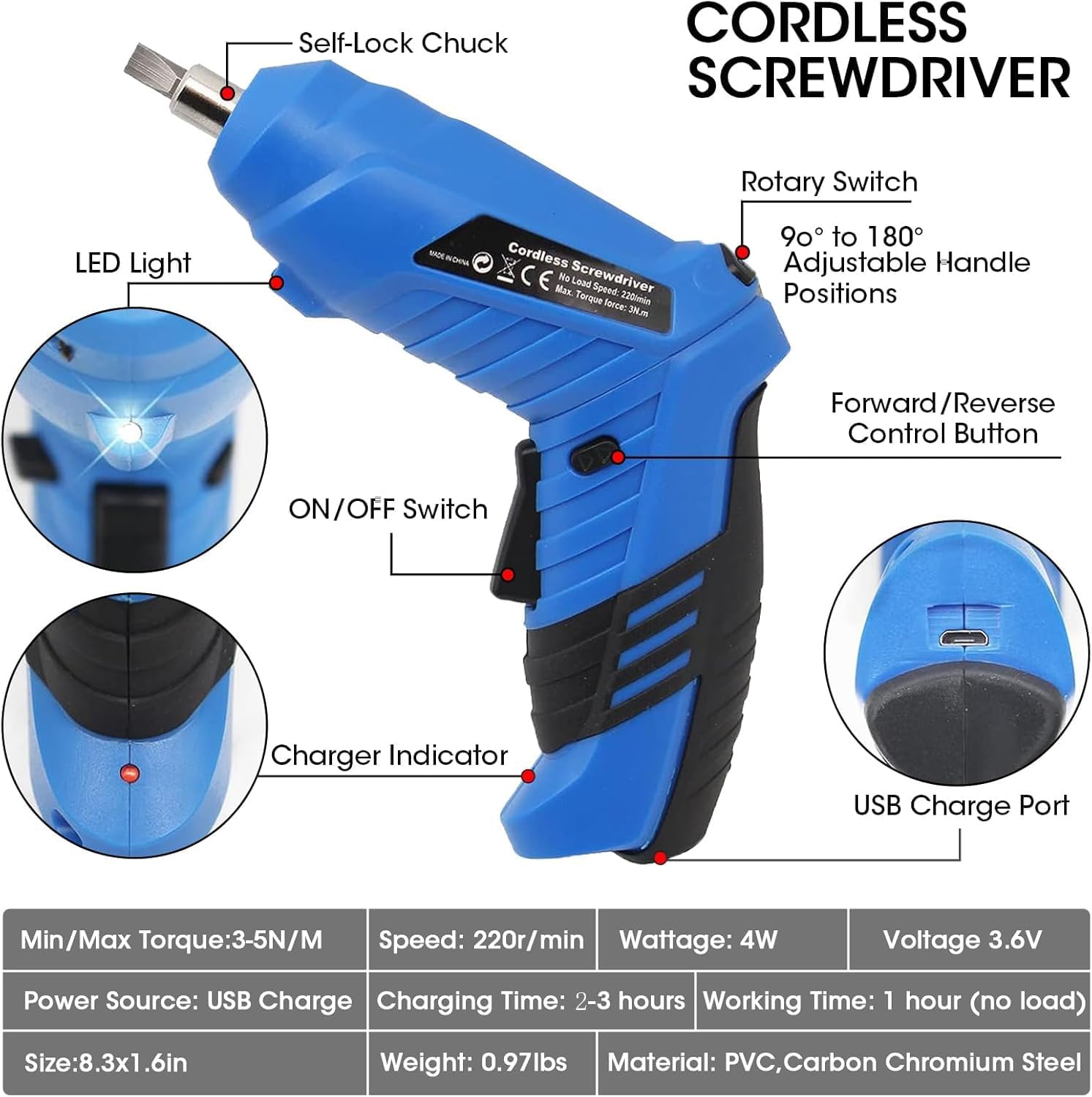
- Self-Lock Chuck: Securely holds screwdriver bits and drill bits.
- LED Light: Illuminates the work area for improved visibility.
- ON/OFF Switch: Activates and deactivates the tool.
- Charger Indicator: Displays charging status.
- USB Charge Port: For connecting the USB charging cable.
- Forward/Reverse Control Button: Controls the direction of rotation.
- Rotary Switch: Allows adjustment of the handle position from 90° to 180° for versatile use.
Setup
Charging the Battery
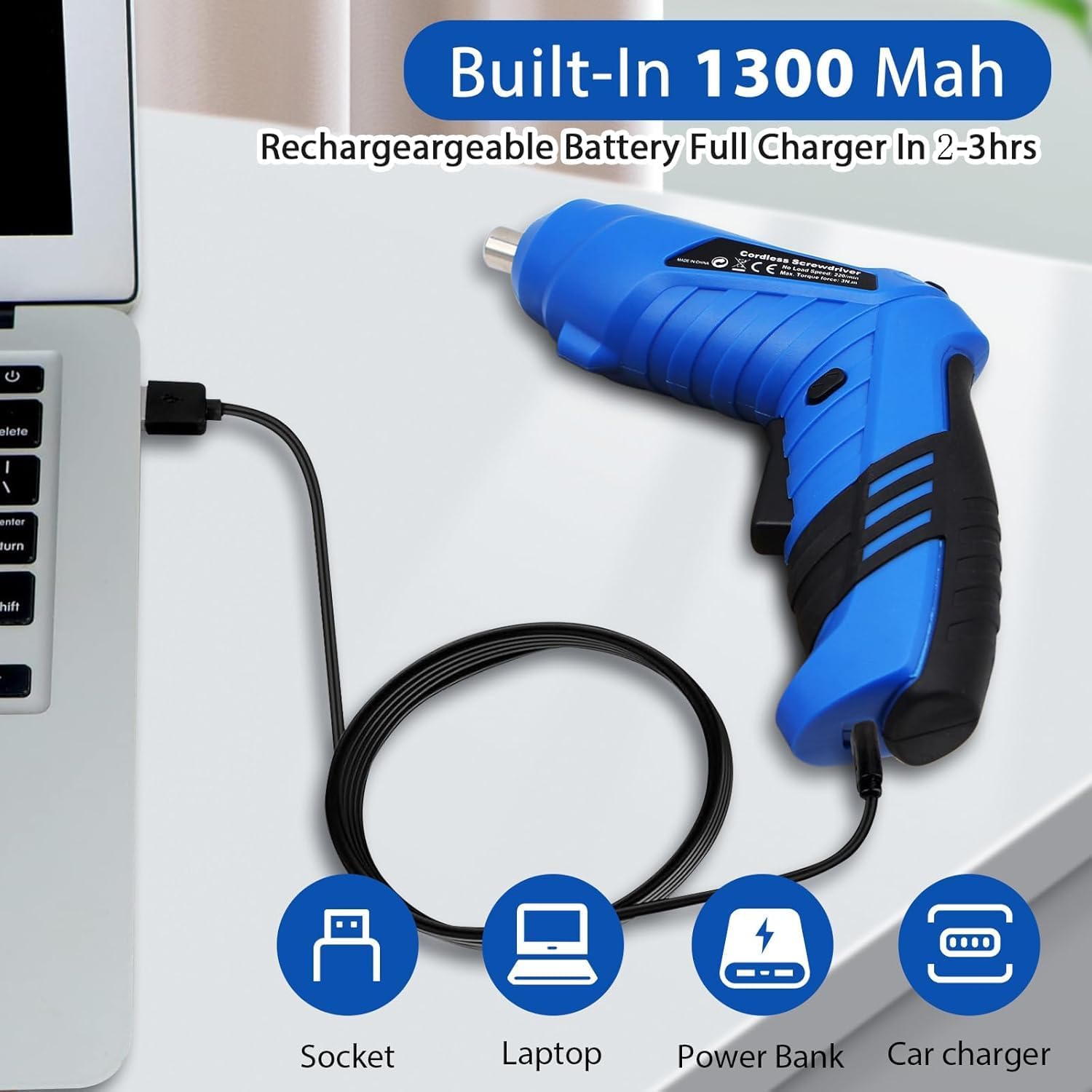
The screwdriver is equipped with a 1300mAh rechargeable lithium-ion battery. For optimal performance, fully charge the battery before its first use.
- Locate the USB charge port on the screwdriver (refer to Figure 2).
- Connect the provided USB charging cable to the screwdriver's USB charge port.
- Plug the other end of the USB charging cable into a suitable USB power source (e.g., AC adapter, laptop, power bank, car charger).
- Allow 2-3 hours for the battery to become fully charged. The charger indicator light will provide feedback on the charging status.
- Once fully charged, disconnect the charging cable from both the screwdriver and the power source.
Note: For long-term storage, it is recommended to charge and maintain the battery regularly to preserve its lifespan.
Installing/Changing Bits
- Ensure the screwdriver is turned off and the forward/reverse switch is in the locked (middle) position to prevent accidental activation.
- Insert the desired screwdriver bit or drill bit into the self-lock chuck until it snaps securely into place.
- To remove a bit, pull the chuck collar forward and pull the bit out.
Operating Instructions
Basic Operation
- Select Direction: Use the Forward/Reverse control button to select the desired rotation direction. Press the top of the switch for forward rotation (tightening screws), and the bottom for reverse rotation (loosening screws). The middle position locks the tool.
- Positioning: Grasp the tool firmly with both hands. Align the bit with the screw head or drilling point.
- Start Tool: Squeeze the ON/OFF switch to start the tool. Apply firm, steady pressure to the screw or workpiece.
- LED Light: The bright front LED light will automatically illuminate when the screwdriver is operating, providing visibility in dark or confined spaces.

Adjusting the Handle Position
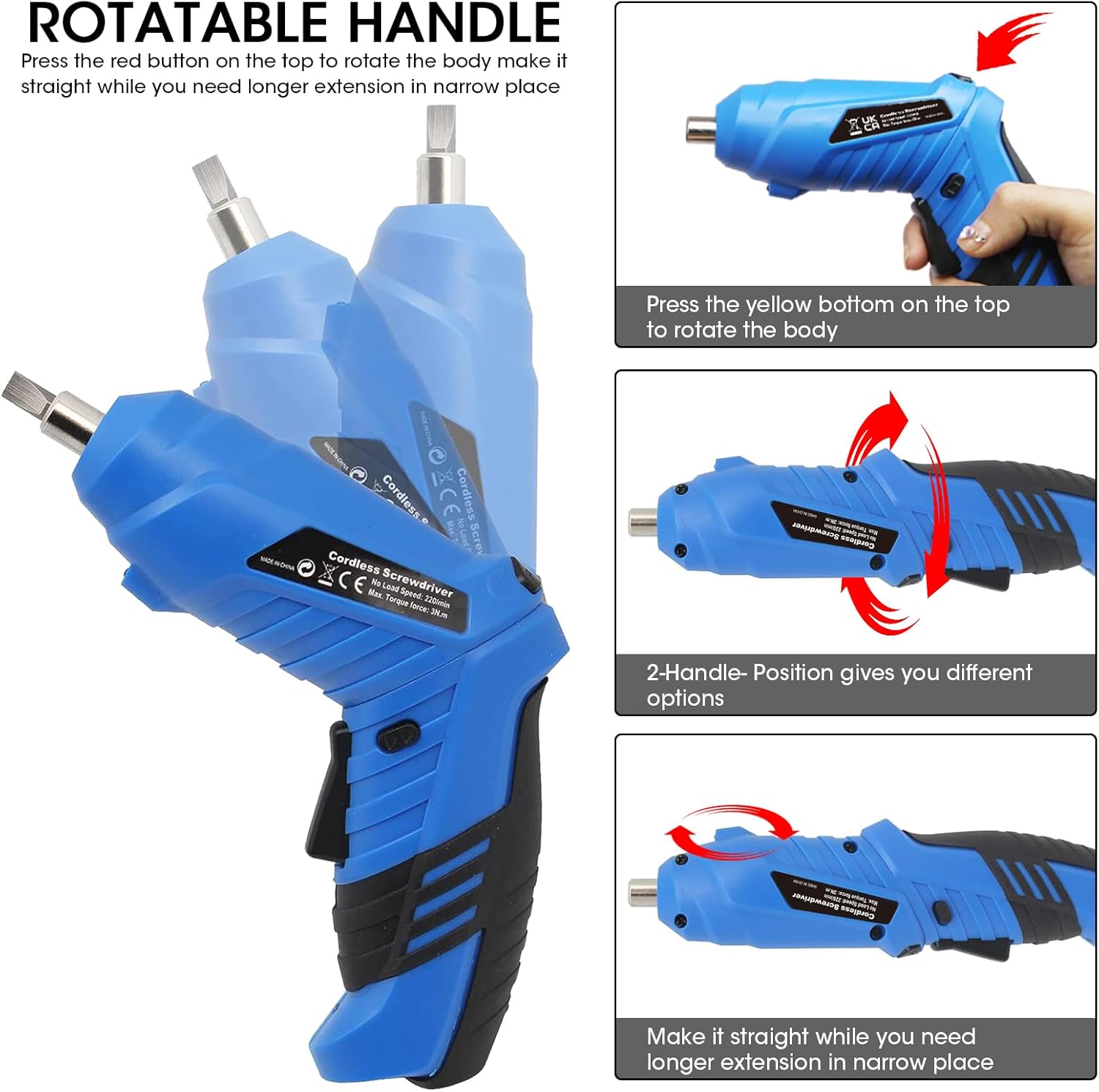
The screwdriver features a rotatable handle for increased versatility and access in tight spaces.
- To adjust the handle, locate the rotary switch (often a yellow button) on the top of the tool.
- Press and hold the rotary switch.
- Rotate the body of the screwdriver to your desired position (90° pistol grip or 180° straight).
- Release the switch to lock the handle in place.
Using the Magnetic Soft Shaft
The included magnetic soft shaft allows you to reach screws in awkward or unseen locations. Simply insert the soft shaft into the chuck, then insert a screwdriver bit into the end of the soft shaft. This provides flexibility for intricate work.
Maintenance
- Cleaning: Keep the tool's ventilation openings clean to prevent overheating. Use a soft, damp cloth to clean the exterior. Do not use harsh chemicals or abrasive cleaners.
- Storage: Store the screwdriver and its accessories in the provided BMC case in a dry, secure location, out of reach of children.
- Battery Care: As mentioned in the charging section, for long-term storage, charge the battery periodically (e.g., every 3-6 months) to maintain its health.
- Bit Inspection: Regularly inspect screwdriver bits and drill bits for wear or damage. Replace worn bits to ensure efficient and safe operation.
Troubleshooting
| Problem | Possible Cause | Solution |
|---|---|---|
| Screwdriver does not turn on. | Battery is depleted. Forward/Reverse switch is in the locked position. | Charge the battery for 2-3 hours. Move the switch to the forward or reverse position. |
| Reduced power or slow operation. | Low battery charge. Overloading the tool. | Recharge the battery. Ensure the tool is used for light-duty tasks only. Avoid excessive force. |
| Bit falls out of chuck. | Bit not fully inserted. Chuck is worn or damaged. | Ensure bit snaps securely into place. Contact customer support if chuck is damaged. |
| LED light not working. | Tool not operating. LED malfunction. | The LED only illuminates when the tool is running. If still not working, contact support. |
Specifications
| Feature | Detail |
|---|---|
| Brand | MYMULIKE |
| Model Number | XZDDLSD-MY-LAN |
| Voltage | 3.6 Volts |
| Battery Type | Lithium Ion |
| Battery Capacity | 1300mAh |
| Charging Time | 2-3 hours |
| No-Load Speed | 220 RPM |
| Max Torque | 3 N/m |
| Power Source | Battery Powered (USB Charge) |
| Material | Plastic |
| Product Dimensions | 6.7"L x 2.4"W x 9"H |
| Item Weight | 2.05 pounds |
| Special Features | LED Light, Rotatable Handle, Forward/Reverse Control |
Warranty and Support
MYMULIKE is committed to providing quality products. While specific warranty details are not provided in this manual, please retain your proof of purchase for any warranty claims. For technical support, troubleshooting assistance, or to inquire about warranty service, please contact MYMULIKE customer service through the retailer where the product was purchased or visit the official MYMULIKE website.
For more information, you may visit the MYMULIKE Store on Amazon.