
Mlijzard AV-MP326BT
Mlijzard AV-MP326BT Home Audio Power Amplifier User Manual
Model: AV-MP326BT | Brand: Mlijzard
Introduction
This manual provides detailed instructions for the setup, operation, and maintenance of your Mlijzard AV-MP326BT Home Audio Power Amplifier. Please read this manual thoroughly before using the product to ensure proper function and to maximize your audio experience. This amplifier is designed for versatile use in home audio systems, karaoke setups, and various other applications requiring high-quality sound amplification.
Safety Information
- Ensure the amplifier is connected to a power source matching the specified voltage (110V AC or 12V DC).
- Do not expose the unit to rain, moisture, or excessive humidity to prevent electric shock or fire hazards.
- Avoid placing the amplifier in direct sunlight or near heat sources.
- Ensure adequate ventilation around the unit to prevent overheating. Do not block ventilation openings.
- Do not open the amplifier casing. Refer all servicing to qualified personnel.
- Keep out of reach of children.
- Unplug the power cord from the outlet if the unit will not be used for an extended period.
Product Overview
The Mlijzard AV-MP326BT amplifier features a comprehensive set of controls and inputs for a rich audio experience. Familiarize yourself with the components below.

Figure 1: Front view of the Mlijzard AV-MP326BT Home Audio Power Amplifier, showing the main unit and included remote control.
Front Panel Controls and Inputs
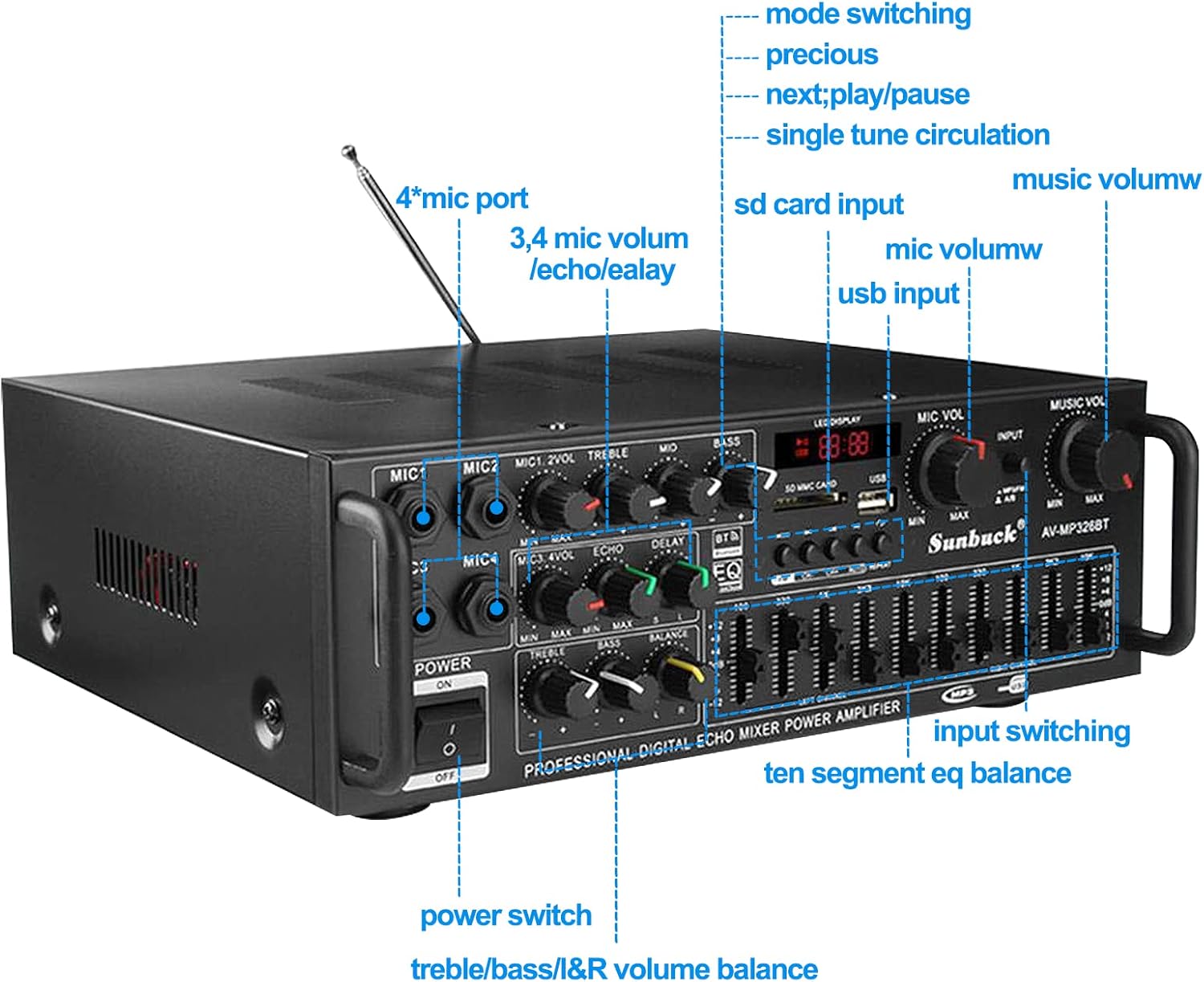
Figure 2: Detailed view of the amplifier's front panel, highlighting key controls and input ports.
- Power Switch: Turns the unit on or off.
- MIC1-MIC4 Ports: Four microphone input jacks.
- MIC VOL: Adjusts the volume for microphones.
- ECHO/DELAY: Controls the echo effect and delay for microphone inputs.
- TREBLE/BASS: Adjusts high and low frequencies for microphone audio.
- LED Display: Shows current mode, track information, and volume level.
- SD Card Input: Slot for playing audio files from an SD card.
- USB Input: Port for playing audio files from a USB flash drive.
- Mode Switching: Button to cycle through input modes (USB, SD, Bluetooth, AUX).
- Previous/Next/Play/Pause: Media playback controls.
- Single Tune Circulation: Repeats the current track.
- Music Volume: Main volume control for music playback.
- Input Switching: Selects the audio input source.
- Ten Segment EQ Balance: Graphic equalizer for fine-tuning audio frequencies.
- Treble/Bass/L&R Volume Balance: Adjusts overall treble, bass, and left/right channel balance for music.
Remote Control

Figure 3: The full-function infrared remote control for convenient operation of the amplifier.
The included remote control provides convenient access to various functions, including power, mode switching, volume adjustment, track navigation, and equalizer presets.
Setup Instructions
- Unpacking: Carefully remove the amplifier and all accessories from the packaging. Retain packaging for future transport or storage.
- Placement: Place the amplifier on a stable, flat surface with adequate ventilation around it. Ensure it is away from direct sunlight, heat sources, and moisture.
- Speaker Connection: Connect your speakers to the appropriate speaker output terminals on the rear of the amplifier. Ensure correct polarity (+ to + and - to -) for optimal sound.
- Power Connection: Connect the power cord to the amplifier's power input and then to a suitable 110V AC power outlet. Alternatively, for 12V DC operation, connect to a compatible 12V DC power source.
- Initial Power On: Before turning on, ensure all volume controls are set to minimum. Flip the power switch to the "ON" position. The LED display should illuminate.
Operating Instructions
Connecting Audio Sources

Figure 4: The amplifier's versatile compatibility, connecting to laptops, tablets, smartphones, and external audio output devices via Bluetooth.
- Bluetooth Connectivity:
- Press the "Mode" button on the amplifier or remote until "BT" appears on the LED display.
- Enable Bluetooth on your device (smartphone, tablet, computer).
- Search for "AV-MP326BT" or similar in your device's Bluetooth settings and pair.
- Once paired, audio from your device will play through the amplifier.
- USB/SD Card Playback:
- Insert a USB flash drive or SD card containing MP3 audio files into the respective port.
- The amplifier will automatically switch to USB/SD mode and begin playback. If not, press the "Mode" button.
- Use the Previous/Next/Play/Pause buttons to control playback.
- Auxiliary Input: Connect external audio devices (CD player, TV, etc.) to the amplifier's auxiliary input ports using appropriate audio cables. Select the AUX mode using the "Mode" button.
Microphone Usage (Karaoke Ready)
The amplifier supports up to four microphones, making it ideal for karaoke and vocal performances.
- Connect microphones to the MIC1-MIC4 input ports.
- Adjust the "MIC VOL" knob to control the overall microphone volume.
- Use the "ECHO" and "DELAY" knobs to add vocal effects.
- Fine-tune microphone tone with the "TREBLE" and "BASS" controls for each microphone channel.
Audio Adjustment
- Music Volume: Use the large "MUSIC VOL" knob to adjust the main music playback volume.
- Equalizer (EQ): The ten-segment graphic equalizer allows you to adjust specific frequency bands to tailor the sound to your preference or room acoustics. Move the sliders up to boost a frequency or down to cut it.
- Treble/Bass/Balance: Use the dedicated knobs to adjust the overall treble and bass of the music, and the L&R balance knob to adjust the left and right channel output.
Specifications

Figure 5: Key product specifications and dimensions of the Mlijzard AV-MP326BT amplifier.
| Feature | Detail |
|---|---|
| Product Name | High Power Bluetooth Amplifier |
| Model | AV-MP326BT |
| Dimensions (L x W x H) | 29 x 24 x 10 cm (11.4 x 9.45 x 3.94 inches) |
| Input Voltage | AC 110V or DC 12V |
| Material | Aluminum Alloy |
| Frequency Response | 20KHz-20KHz (±3dB) |
| Input Sensitivity | 200mV (±2mV) |
| Distortion | ≤0.02% |
| Suitable For | Home, Karaoke, Concert Hall, Meetings, Gaming, TV Home Theater, Radio |
Troubleshooting
| Problem | Possible Cause | Solution |
|---|---|---|
| No power | Power cord not connected; Power switch off; Power outlet faulty. | Ensure power cord is securely plugged in. Turn power switch to ON. Test outlet with another device. |
| No sound output | Volume too low; Incorrect input selected; Speakers not connected or faulty; Audio source issue. | Increase "MUSIC VOL". Press "Mode" to select correct input. Check speaker connections. Verify audio source is playing. |
| Microphone not working | Microphone not plugged in; MIC VOL too low; Microphone faulty. | Ensure microphone is fully inserted. Increase "MIC VOL". Test with another microphone. |
| Bluetooth pairing failed | Amplifier not in Bluetooth mode; Device Bluetooth off; Device too far. | Ensure amplifier is in "BT" mode. Turn on Bluetooth on your device. Move device closer to amplifier. |
| Distorted sound | Volume too high; EQ settings incorrect; Poor audio source quality. | Reduce volume. Adjust EQ settings. Use a higher quality audio source. |
Maintenance
- Cleaning: Use a soft, dry cloth to clean the exterior of the amplifier. Do not use liquid cleaners or aerosols.
- Ventilation: Regularly check that the ventilation openings are clear of dust and debris.
- Storage: If storing the unit for an extended period, unplug it from power and store it in a cool, dry place, preferably in its original packaging.
Warranty and Support
For warranty information or technical support, please refer to the documentation included with your purchase or contact Mlijzard customer service through the retailer where the product was purchased. Please have your model number (AV-MP326BT) and purchase date available when contacting support.
For more information, visit the official Mlijzard store: Mlijzard Store
Ask a question about this manual
Ask about setup, troubleshooting, compatibility, parts, safety, or missing instructions. Manuals+ will review the question and use this page’s manual context to help answer it.