
Doorii Q10
Doorii Q10 Car Jump Starter & Air Compressor User Manual
Model: Q10 | Brand: Doorii
Introduction
Thank you for choosing the Doorii Q10 Car Jump Starter with Air Compressor. This versatile device is designed to provide reliable emergency power for jump-starting vehicles, inflating tires, and charging electronic devices. Please read this manual thoroughly before operation to ensure safe and efficient use.

Image: The Doorii Q10 Car Jump Starter and Air Compressor, showcasing its compact design and integrated jump cables and air hose.
Important Safety Information
- Always wear eye protection when operating the device.
- Do not expose the device to rain or extreme temperatures.
- Ensure proper polarity when connecting jump cables to the vehicle battery (Red to Positive, Black to Negative).
- Keep out of reach of children.
- Do not attempt to disassemble or modify the device.
- Avoid continuous operation of the air compressor for more than 10 minutes to prevent overheating. Allow it to cool down before resuming use.

Image: An internal view of the Doorii Q10, highlighting its smart microcomputer technology for high safety, preventing sparks and damage.
Package Contents
Verify that all items are present in your package:
- 1x Doorii Q10 Jump Starter
- 1x Jumper Cable with Clamps
- 1x Air Tube
- 1x User Manual
- 1x Storage Case
- 1x USB-C Cable
- 3x Nozzles (for various inflatables)

Image: A visual representation of the Doorii Q10 package contents, including the jump starter, jumper cables, air tube, user manual, storage case, USB-C cable, and three nozzles.
Product Overview
The Doorii Q10 features a clear LED screen and intuitive controls for ease of use.
- LED Display: Shows battery percentage, pressure units (PSI, BAR, KPA, Kg/cm²), and selected inflation mode.
- Control Buttons: Power, Mode selection, Increase/Decrease pressure, Light/SOS.
- Jump Start Port: For connecting the jumper cables.
- Air Hose Port: For connecting the air tube.
- USB Output Ports: For charging external devices (e.g., smartphones).
- USB-C Input Port: For charging the Q10 device.
- LED Light: Provides illumination, warning, and SOS signals.

Image: A close-up of the Doorii Q10's large LED screen, displaying battery status, pressure readings, and mode indicators.
Charging the Device
Before first use, fully charge the Doorii Q10. It is recommended to recharge the device every 3-6 months to maintain battery health, even if not in use.
- Connect the provided USB-C cable to the Input port on the Doorii Q10.
- Connect the other end of the USB-C cable to a compatible USB wall adapter (not included) or a car charger.
- The LED display will indicate the charging status. The device is fully charged when the battery indicator shows 100%.

Image: The Doorii Q10 functioning as a portable power bank, showing input and output ports for charging the device itself and external devices like smartphones.
Jump-Starting a Vehicle
The Doorii Q10 is capable of jump-starting vehicles with up to 10.0L Gas or 8.0L Diesel engines.
- Ensure the Doorii Q10 is sufficiently charged.
- Connect the blue end of the jumper cable to the jump start port on the Doorii Q10.
- Attach the red clamp to the positive (+) terminal of the vehicle's battery.
- Attach the black clamp to the negative (-) terminal of the vehicle's battery.
- Once connected, turn on the Doorii Q10. The device will indicate readiness.
- Start the vehicle's engine. If it doesn't start immediately, wait 30 seconds and try again. Do not crank for more than 3 seconds per attempt.
- Once the vehicle starts, immediately disconnect the black clamp, then the red clamp, and finally remove the jumper cable from the Doorii Q10.
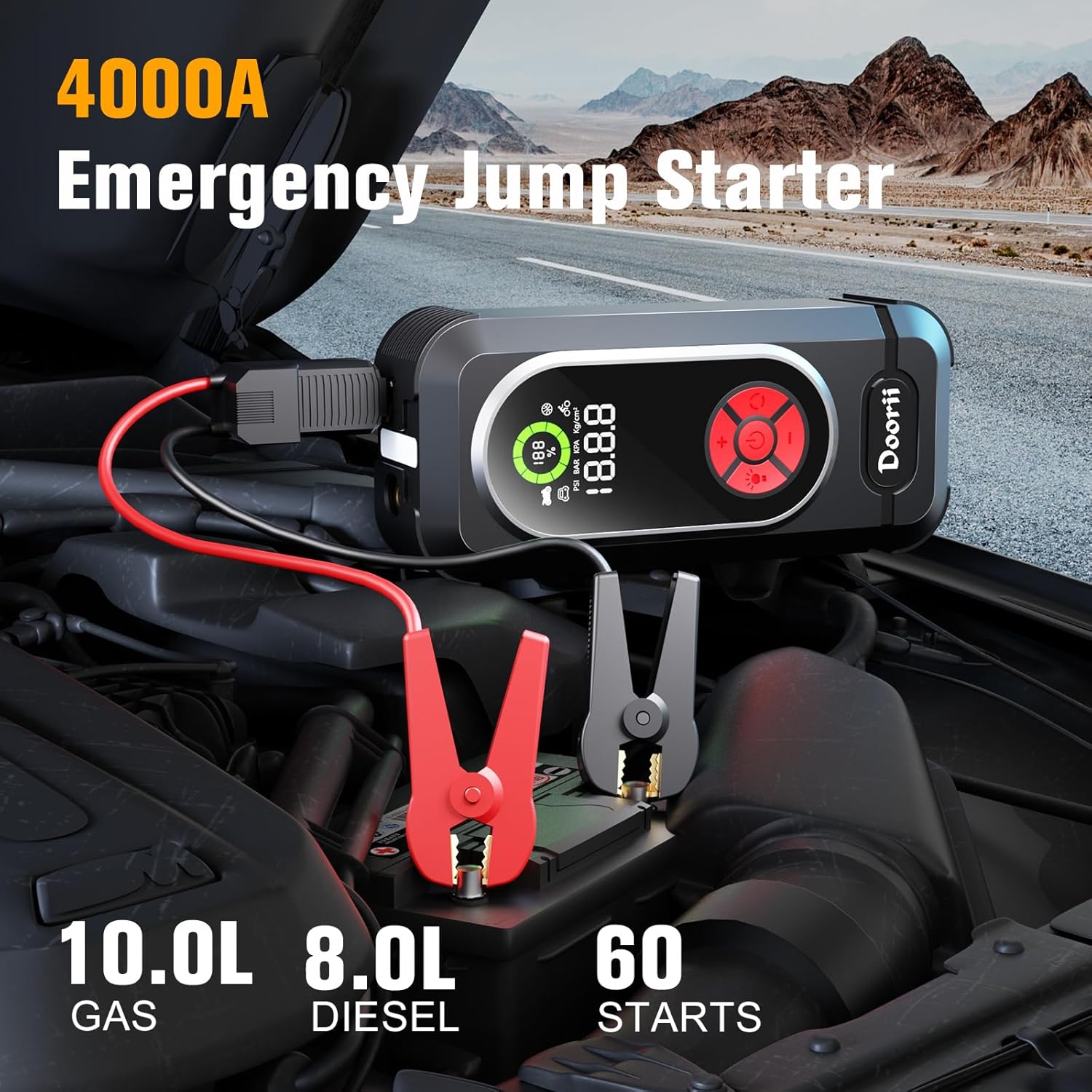
Image: The Doorii Q10 connected to a car battery in an engine bay, demonstrating its 4000A emergency jump start capability for large engines.

Image: A visual step-by-step guide illustrating how to use the Doorii Q10 for both jump-starting a vehicle and inflating a tire.
Using the Air Compressor
The integrated air compressor can inflate tires up to 150 PSI and is suitable for various inflatables using the included nozzles.
- Long press the power button to turn on the device.
- Connect the air tube to the air hose port on the Doorii Q10 and to the valve stem of the item to be inflated.
- Press the Mode button to select the appropriate inflation mode (car, motorcycle, bicycle, ball).
- Use the '+' and '-' buttons to set the desired pressure.
- Press the power button again to start inflation. The compressor will automatically stop when the preset pressure is reached.
- Disconnect the air tube from the item and the device.

Image: The Doorii Q10 connected to a car tire, demonstrating its 150PSI super fast inflation capability, able to inflate from 0 to 20 PSI in 2 minutes.
Using as a Portable Power Bank
The Doorii Q10 can charge your electronic devices via its USB output ports.
- Connect your device's USB charging cable to one of the USB output ports on the Doorii Q10.
- The Doorii Q10 will automatically begin charging your device.
- Disconnect your device once charging is complete.
Using the LED Light
The built-in 400 Lumen LED light offers multiple modes for various situations.
- Short press the light button to cycle through modes: Constant On > Strobe > SOS > Off.
- Use the constant on mode for general illumination.
- The strobe mode can be used as a warning light.
- The SOS mode emits a Morse code signal for emergency situations.
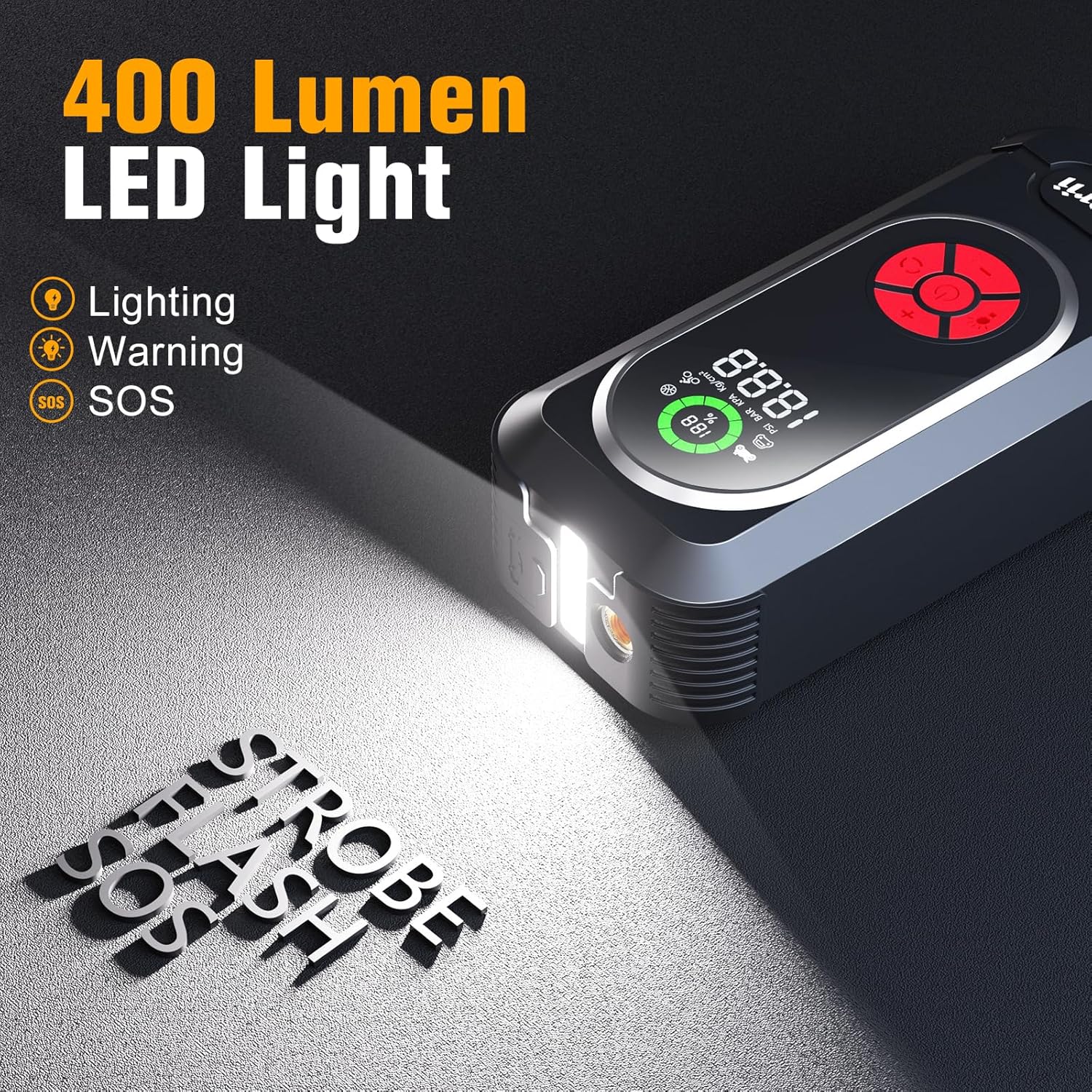
Image: The Doorii Q10 with its 400 Lumen LED light activated, showing its capabilities for lighting, warning, and SOS functions.
Specifications
| Feature | Detail |
|---|---|
| Model | Q10 |
| Brand | Doorii |
| Peak Current | 4000A |
| Air Compressor Pressure | Up to 150 PSI |
| Engine Compatibility (Gas) | Up to 10.0L |
| Engine Compatibility (Diesel) | Up to 8.0L |
| Item Weight | 3.02 pounds |
| Product Dimensions | 2.36 x 3.26 x 7.7 inches |
| LED Light Output | 400 Lumens |
| Input | 5V/2A (USB-C) |
| Output | 5V/2A (USB-A) |
Troubleshooting
- Device not turning on: Ensure the device is fully charged. If the battery is critically low, it may take a few minutes of charging before it can power on.
- Vehicle not starting: Check that the jumper cables are securely connected to the correct battery terminals (red to positive, black to negative). Ensure the Doorii Q10 has sufficient charge. The vehicle battery might be severely discharged or damaged, requiring professional assistance.
- Air compressor not inflating: Verify the air tube is securely connected to both the device and the item's valve stem. Check that the desired pressure is set and the inflation mode is correctly selected. Ensure the device has enough battery charge.
- Overheating: If the device feels excessively hot during use, especially the air compressor, stop operation immediately and allow it to cool down for at least 15-20 minutes before resuming.
Maintenance
- Clean the device with a soft, dry cloth. Do not use harsh chemicals or abrasive materials.
- Store the Doorii Q10 in its provided storage case in a cool, dry place, away from direct sunlight and moisture.
- Recharge the device every 3-6 months to prolong battery life, even if it has not been used.
Warranty and Support
For warranty information or technical support, please refer to the contact details provided on the product packaging or the official Doorii website. Keep your purchase receipt as proof of purchase for warranty claims.
Ask a question about this manual
Ask about setup, troubleshooting, compatibility, parts, safety, or missing instructions. Manuals+ will review the question and use this page’s manual context to help answer it.