Introduction
Thank you for choosing the Generic Cordless Portable Air Pump & Blower CZK-3686. This device is designed for convenient inflation of various items such as vehicle tires, bicycle tires, sports equipment, and air mattresses. It also features a blower function, a power bank capability, and an integrated LED light for enhanced utility. Please read this manual thoroughly before use to ensure safe and efficient operation.
Safety Information
- Keep the device away from children.
- Do not operate the device in wet conditions or immerse it in water.
- Avoid prolonged continuous operation to prevent overheating. Allow the device to cool down between uses if necessary.
- Ensure the correct pressure is set for the item being inflated to prevent over-inflation and potential damage or injury.
- Do not point the inflation nozzle at people or animals.
- Use only the provided or approved accessories and charging cables.
Package Contents
Please verify that all items are present in your package:
- Cordless Portable Air Pump & Blower CZK-3686
- Inflation Hose
- USB Charging Cable (Type-C)
- Storage Pouch
- Various Nozzle Adapters (e.g., Presta valve adapter, needle nozzle for balls, wide nozzle for inflatables)

Image: The main unit of the air pump shown with its complete set of accessories, including the inflation hose, USB-C charging cable, a black storage pouch, and multiple nozzle adapters for different inflation needs.
Product Overview
Familiarize yourself with the components of your air pump:
- Digital Display: Shows current pressure, target pressure, and battery level.
- Control Buttons:
- Power Button: Turns the device on/off, starts/stops inflation.
- Mode Button (C): Cycles through inflation modes (e.g., car, bicycle, ball, custom).
- Unit Button (Psi Bar Kpa): Changes pressure unit.
- +/- Buttons: Adjusts target pressure.
- Light Button: Activates/deactivates the LED light.
- Inflation Port: Where the inflation hose connects.
- USB-C Charging Port: For charging the device.
- USB-A Output Port: For power bank function.
- LED Light: Provides illumination.
Image: A close-up view of the air pump's front panel, highlighting the digital display which shows pressure readings and battery status, along with the intuitive control buttons for operation.
Setup
1. Initial Charging
Before first use, fully charge the air pump. Connect the provided USB-C charging cable to the device's charging port and plug the other end into a suitable USB power adapter (not included). The digital display will indicate charging status. A full charge typically takes 3-4 hours.
2. Attaching the Inflation Hose
Screw the inflation hose securely onto the inflation port of the air pump. Ensure it is tightened to prevent air leakage.
3. Selecting the Correct Nozzle
Choose the appropriate nozzle adapter for the item you intend to inflate. Screw or push the adapter onto the end of the inflation hose.
Operating Instructions
1. Powering On/Off
Press and hold the Power button for a few seconds to turn the device on. The digital display will illuminate. To turn off, press and hold the Power button again.
2. Selecting Pressure Unit
With the device on, press the "Unit" button (labeled Psi Bar Kpa) to cycle through available pressure units: PSI, BAR, KPA.
3. Setting Target Pressure
Press the "Mode" button (C) to select a preset inflation mode (e.g., car, motorcycle, bicycle, ball). Each mode has a default target pressure. Alternatively, use the "+" and "-" buttons to manually adjust the desired target pressure.
4. Connecting to Item for Inflation
Connect the chosen nozzle adapter to the valve of the item you wish to inflate. The digital display will show the current pressure of the item.
5. Starting Inflation
Once the target pressure is set and the hose is connected, press the Power button to start inflation. The pump will automatically stop when the target pressure is reached.

Image: The portable air pump positioned next to a car tire, with its integrated LED light shining brightly onto the tire valve area, indicating its use during inflation, especially in low-light conditions.
6. Using the Blower Function
The device can also function as a blower. To activate, ensure no hose is connected to the inflation port. Press the designated blower button (if available, or refer to specific mode for blower). This function is suitable for light dusting or clearing debris.
7. Power Bank Function
To use the device as a power bank, connect your electronic device (e.g., smartphone) to the USB-A output port using your device's charging cable. The air pump will begin charging your device.

Image: The portable air pump connected via a USB cable to a smartphone, demonstrating its power bank capability to charge other electronic devices. The phone's screen shows a charging indicator.
8. Using the LED Light
Press the Light button to turn on the integrated LED light. Press again to cycle through different light modes (if available) or to turn it off. This is useful for nighttime operations or as an emergency light.
Maintenance
1. Cleaning
Wipe the exterior of the device with a soft, damp cloth. Do not use harsh chemicals or abrasive cleaners. Ensure the device is turned off and disconnected from any power source before cleaning.
2. Storage
Store the air pump and its accessories in the provided storage pouch in a cool, dry place, away from direct sunlight and extreme temperatures. Ensure the device is fully charged before long-term storage to maintain battery health.

Image: The portable air pump neatly placed in a car's central console cup holder, illustrating its compact design and ease of storage within a vehicle.
Troubleshooting
- Device does not turn on:
Ensure the battery is charged. Connect to a power source and try again after a few minutes.
- Pump does not inflate:
Check if the inflation hose is securely connected to both the pump and the item's valve. Verify that the target pressure is set above the current pressure.
- Inaccurate pressure reading:
Ensure the nozzle is properly sealed to the valve. Recalibrate if possible (refer to specific device features, if any). Compare with a known accurate pressure gauge.
- Device overheats:
Stop operation immediately and allow the device to cool down for at least 15-20 minutes before resuming use. Avoid continuous operation for extended periods.
Specifications
| Model | CZK-3686 |
| Power | 70W |
| Operation Mode | Manual (with automatic shut-off) |
| Power Source | Battery Powered |
| Material | Silver (housing) |
| Color | Black, Silver |
| Item Weight | 0.72 Kilograms |
| Package Dimensions | 20.2 x 10.8 x 6.7 cm |
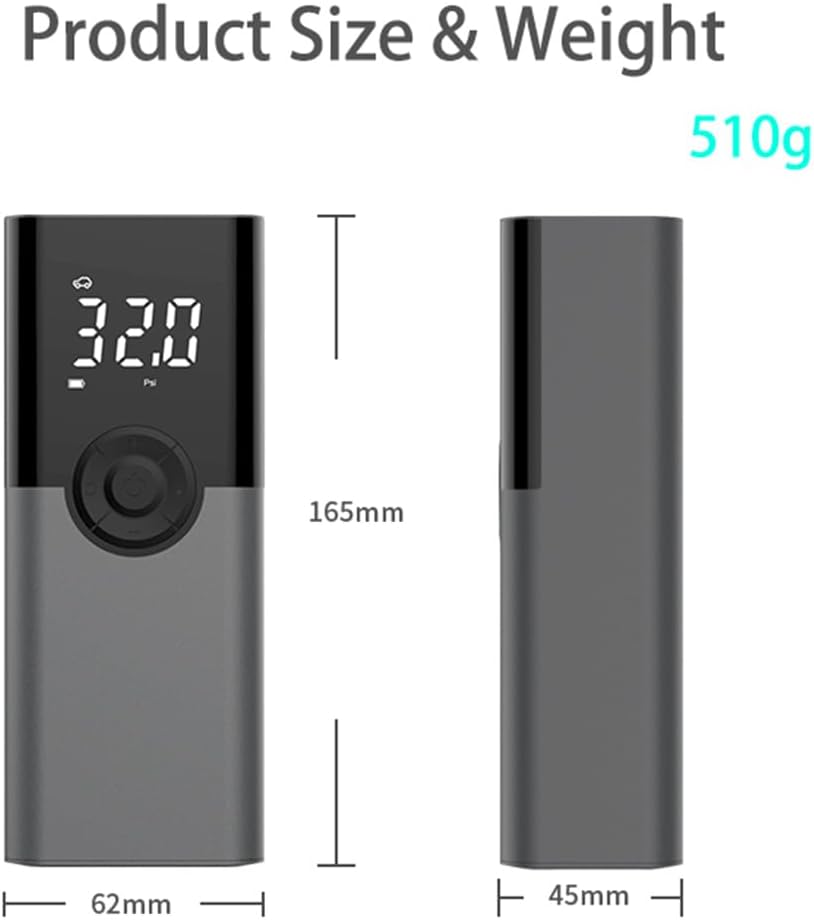
Image: A visual representation of the product's dimensions (165mm height, 62mm width, 45mm depth) and its weight (510g), providing a clear understanding of its compact and lightweight design. Note: Official specifications list item weight as 0.72 Kilograms.
Warranty and Support
This product comes with a standard manufacturer's warranty. For specific warranty details, claims, or technical support, please refer to the retailer or manufacturer's official website. Keep your purchase receipt as proof of purchase.


