
Introduction
This manual provides instructions for the installation, maintenance, and replacement of ORCOW brand spare parts compatible with Xiaomi Roborock S5, S502-00, S502-02, S5 Max, S6, S6 MaxV, S6 Pure, E4, and E5 series robot vacuum cleaners. Regular replacement of these components ensures optimal performance and extends the lifespan of your robot vacuum.
Package Contents
The ORCOW replacement parts set (Model 9887, Set 1) typically includes the following components:
- 2 x Main Brushes
- 4 x HEPA Filters
- 6 x Side Brushes (5-armed silicone design)
- 2 x Mop Cloths
- 1 x Comb (for cleaning brushes)
- 1 x Cleaning Tool
- 6 x Filter Elements (likely referring to additional filter components or pre-filters)
- 1 x Cleaning Brush
- 1 x Screwdriver
Setup and Installation
Before installing any new parts, ensure your robot vacuum is powered off and disconnected from its charging dock. Refer to your robot vacuum's original manual for specific instructions on accessing component compartments.
1. Main Brush Installation

Image: ORCOW replacement main brush. This brush features a floating structure for deep cleaning.
- Turn the robot vacuum upside down.
- Locate the main brush cover, usually secured by latches or screws.
- Open or remove the cover.
- Remove the old main brush. Clean any hair or debris from the brush compartment.
- Insert the new ORCOW main brush, ensuring the ends align with the slots.
- Close the main brush cover securely.
2. Side Brush Installation

Image: Comparison showing the ORCOW 5-armed silicone side brush (left) versus a standard 3-armed brush (right). The 5-armed design offers enhanced corner cleaning.

Image: Close-up of a side brush attachment point on a robot vacuum.
- Turn the robot vacuum upside down.
- Locate the side brush. It is usually held by a single screw.
- Use the provided screwdriver to remove the screw and detach the old side brush.
- Align the new ORCOW 5-armed side brush with the post and secure it with the screw. Ensure it is firmly attached but can still rotate freely.
3. HEPA Filter Installation

Image: ORCOW replacement HEPA filter. This filter is designed for effective dust collection and is easy to clean.
- Open the top cover of your robot vacuum to access the dustbin.
- Remove the dustbin from the vacuum.
- Open the dustbin cover and remove the old HEPA filter.
- Insert the new ORCOW HEPA filter into the designated slot in the dustbin. Ensure it fits snugly.
- Close the dustbin cover and reinsert the dustbin into the vacuum.
4. Mop Cloth Installation
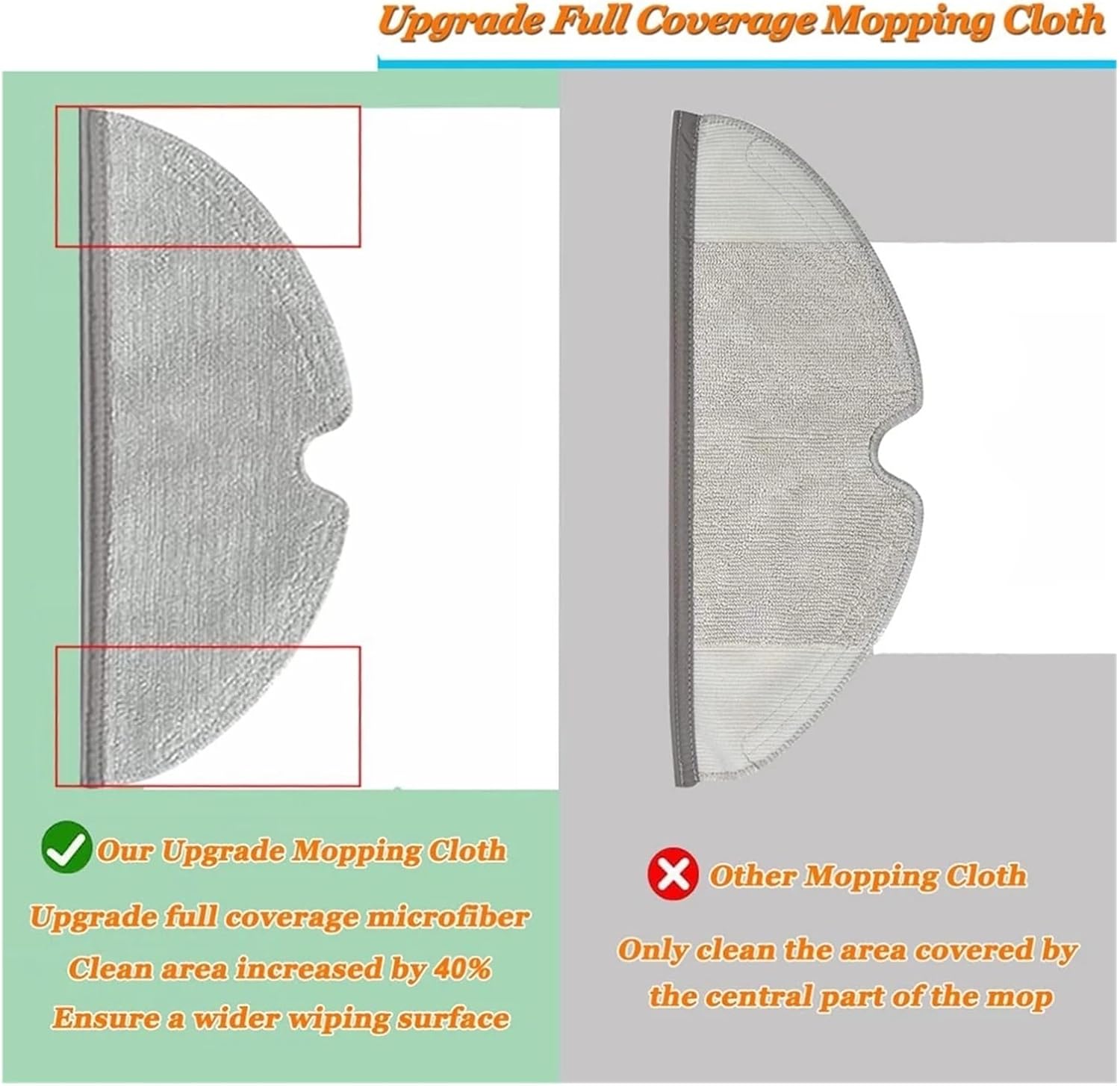
Image: ORCOW upgraded full coverage mopping cloth (left) compared to a standard mopping cloth (right). The ORCOW cloth provides a 40% increased cleaning area for a wider wiping surface.
- Locate the water tank or mop attachment on your robot vacuum.
- Remove the old mop cloth, typically attached via Velcro or a sliding mechanism.
- Attach the new ORCOW mop cloth to the water tank or mop attachment, ensuring it is evenly spread and securely fastened.
- Reattach the water tank/mop assembly to the robot vacuum.
Maintenance and Replacement Frequency
Regular maintenance and timely replacement of parts are crucial for maintaining your robot vacuum's cleaning efficiency and longevity.
- General Recommendation: It is recommended to replace spare parts every 2 to 3 months to ensure the machine runs at its best performance.
- Main Brush: Replace every 6 to 12 months, depending on usage and floor type. Regularly clean hair and debris from the brush using the provided cleaning tool.
- Side Brush: Replace every 3 to 6 months. Inspect for wear and tear, especially if bristles are bent or missing. The 5-armed silicone design is durable and effective for collecting hair.
- HEPA Filter: Replace every 1 to 3 months. Tap out dust after each use and clean with the provided cleaning brush. Do not wash HEPA filters with water unless explicitly stated by the vacuum manufacturer.
- Mop Cloth: Wash after each use. Replace every 1 to 3 months, or when signs of wear or reduced cleaning effectiveness are observed.
Note: Actual replacement frequency may vary based on usage, pet hair presence, and environmental factors.
Troubleshooting Common Issues
If your robot vacuum's performance declines after replacing parts, consider the following:
- Reduced Suction Power:
- Check if the HEPA filter is clogged. Clean or replace it.
- Ensure the dustbin is empty and properly seated.
- Ineffective Sweeping/Cleaning:
- Verify the main brush is free of tangled hair and debris and spinning correctly.
- Check if the side brush is securely attached and rotating. Replace if bristles are worn.
- Mop Not Cleaning Effectively:
- Ensure the mop cloth is clean and properly attached to the water tank.
- Check if the water tank has sufficient water (if applicable to your vacuum model).
- Unusual Noises:
- Inspect all brushes for foreign objects or excessive hair entanglement.
- Ensure all parts are installed correctly and securely.
For persistent issues, consult your robot vacuum's original user manual or contact the vacuum manufacturer's support.
Specifications
| Feature | Detail |
|---|---|
| Brand | ORCOW |
| Model Number (Set) | 9887 |
| Compatible Robot Vacuums | Xiaomi Roborock S5, S502-00, S502-02, S5 Max, S6, S6 MaxV, S6 Pure, E4, E5 Series |
| Material | Plastic, Silicone, Microfiber (for mop cloths) |
| Item Weight (Set) | 1.76 ounces |
| Package Dimensions | 1.18 x 0.79 x 0.39 inches (Note: These dimensions appear to be for a single small component, not the entire multi-item set.) |
Warranty Information
This product is sold without an explicit manufacturer's warranty. Please refer to the retailer's return policy for details on returns or exchanges.
Support
For questions regarding the ORCOW replacement parts, please contact your point of purchase. For issues related to the operation of your Xiaomi Roborock vacuum cleaner, please refer to the original vacuum's user manual or contact Xiaomi/Roborock customer support.