
SD-508
SDRD SD-508 Wireless Bluetooth Karaoke Speaker User Manual
Model: SD-508
Introduction
Thank you for purchasing the SDRD SD-508 Wireless Bluetooth Karaoke Speaker. This portable karaoke machine is designed to provide high-quality audio and an enjoyable karaoke experience with its integrated speaker and two wireless microphones. Featuring Bluetooth 5.0 connectivity, a long-lasting rechargeable battery, and versatile input options, the SD-508 is perfect for music playback and vocal performances anywhere.
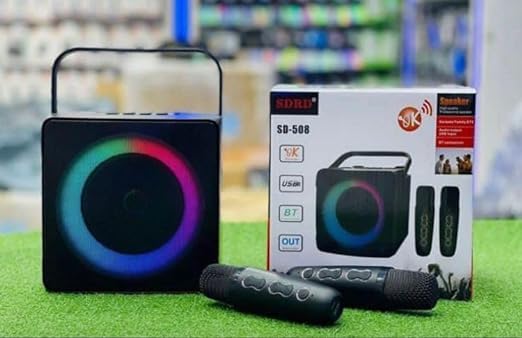
Image: The SDRD SD-508 speaker, its retail box, and two wireless microphones. The speaker features a colorful LED ring around its front grille.
Safety Information
- Do not expose the device to water or excessive moisture.
- Avoid extreme temperatures.
- Do not disassemble or attempt to repair the device yourself. Refer to qualified service personnel.
- Use only the specified charging voltage (5V) to prevent damage.
- Keep out of reach of children.
Package Contents
Please check the package for the following items:
- SDRD SD-508 Wireless Bluetooth Karaoke Speaker (1 unit)
- Wireless Microphones (2 units)
- Charging Cable (1 unit)
- Audio Cable (1 unit)
- User Manual (this document)
Product Overview
The SDRD SD-508 features a compact design with intuitive controls and multiple connectivity options, making it highly portable.
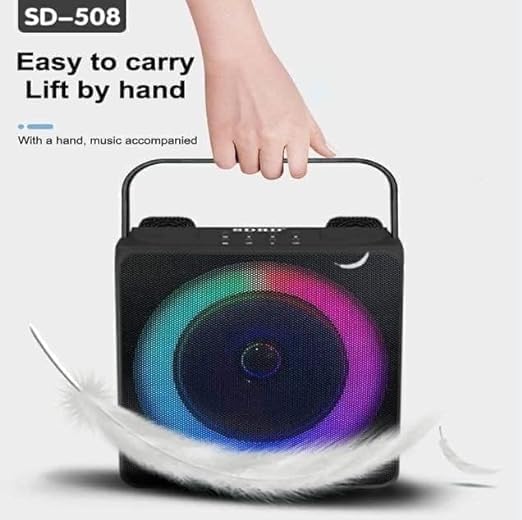
Image: A hand lifting the SDRD SD-508 speaker by its integrated handle, emphasizing its lightweight and portable design for easy transport.
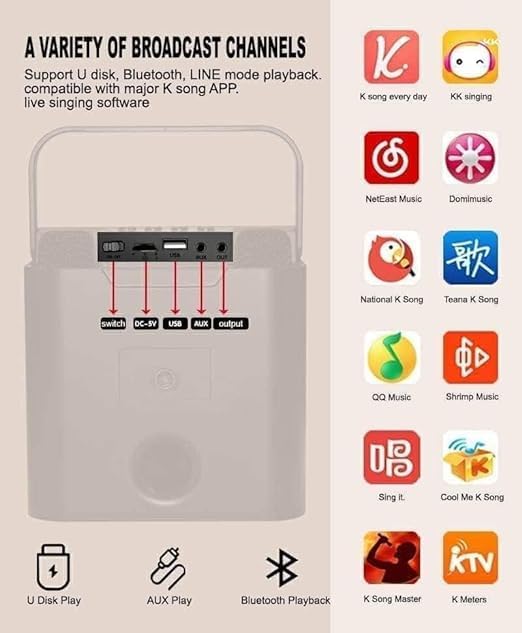
Image: A detailed view of the speaker's rear panel, highlighting the power switch, DC-5V charging port, USB port, AUX input, and AUX output. Red arrows point to each port for clarity.
Controls and Ports:
- Power Switch: Turns the speaker ON/OFF.
- DC-5V Charging Port: For charging the speaker's internal battery.
- USB Port: For U-disk playback.
- AUX Input: Connect external audio devices via 3.5mm audio cable.
- AUX Output: Connect to other audio systems.
- Microphone Volume Controls: Adjust microphone volume (on microphones).
- Speaker Volume Controls: Adjust main speaker volume (on speaker).
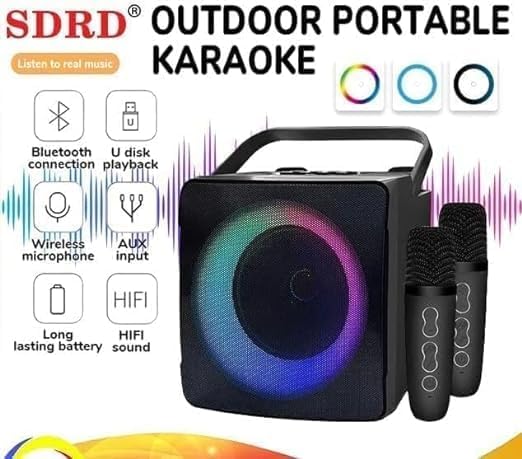
Image: The SDRD SD-508 speaker with two microphones, accompanied by icons illustrating its key features: Bluetooth connectivity, U-disk playback, wireless microphone support, AUX input, long-lasting battery, and HIFI sound quality.
Setup
1. Charging the Speaker:
- Connect the provided charging cable to the DC-5V port on the speaker.
- Connect the other end of the cable to a 5V USB power adapter (not included).
- The charging indicator will illuminate. Allow 2-3 hours for a full charge.
- A full charge provides approximately 3-5 hours of continuous use.
2. Charging the Microphones:
The wireless microphones are typically powered by internal rechargeable batteries or standard AA/AAA batteries. Refer to the microphone's specific instructions for charging or battery replacement.
3. Initial Power On:
Flip the power switch on the speaker to the "ON" position. The speaker will power on and indicate its current mode.
Operating Instructions
1. Bluetooth Connection:

Image: The SDRD SD-508 speaker with two microphones, illustrating its Bluetooth 5.0 compatibility across Android, Windows, and iOS devices. The image emphasizes a 10-meter wireless connection range.
- Ensure the speaker is powered on and in Bluetooth mode (it usually defaults to this or announces "Bluetooth Mode").
- On your smartphone, tablet, or computer, enable Bluetooth and search for available devices.
- Select "SD-508" from the list of devices.
- Once connected, the speaker will confirm the connection, and you can play audio from your device.
- The Bluetooth connection range is approximately 10 meters.
2. U-Disk Playback:
- Insert a USB flash drive (U-disk) containing MP3 audio files into the USB port on the speaker.
- The speaker will automatically switch to U-disk mode and begin playing music.
- Use the speaker's controls to navigate tracks (if available).
3. AUX Input:
- Connect one end of the provided audio cable to the AUX input port on the speaker.
- Connect the other end to the headphone jack or audio output of your external device (e.g., MP3 player, computer).
- The speaker will switch to AUX mode, and audio from your device will play through the speaker.
4. Using the Wireless Microphones:
- Ensure the microphones are charged and powered on. They should automatically pair with the speaker.
- Adjust the microphone volume using the controls on the microphone itself.
- For karaoke, play music via Bluetooth, U-disk, or AUX, and sing along through the microphones.
- The speaker has dedicated slots to store the microphones when not in use, preventing loss or damage.
5. Karaoke Functionality:
The SD-508 supports various karaoke applications and platforms. You can use popular K-song apps on your connected device (phone, tablet) and output the audio to the speaker while using the wireless microphones for vocals.
Image: The SDRD SD-508 speaker's rear panel with input/output ports, alongside a grid of popular karaoke application icons, indicating compatibility with various K-song apps for live singing software.
Maintenance
- Cleaning: Use a soft, dry cloth to clean the speaker and microphones. Do not use abrasive cleaners or solvents.
- Storage: Store the device in a cool, dry place away from direct sunlight and extreme temperatures.
- Battery Care: To prolong battery life, charge the speaker regularly, even if not in frequent use. Avoid fully discharging the battery for extended periods.
- Microphone Storage: Utilize the designated microphone placements on the speaker to securely store the microphones when not in use, preventing damage or loss.
Troubleshooting
| Problem | Possible Cause | Solution |
|---|---|---|
| No power | Battery is depleted. | Charge the speaker fully. |
| No sound from speaker | Volume too low; incorrect mode; device not connected. | Increase volume; ensure correct input mode (Bluetooth, AUX, USB); re-pair Bluetooth device. |
| Microphones not working | Microphones not powered on or charged; out of range. | Ensure microphones are charged and turned on. Keep them within range of the speaker. |
| Bluetooth connection unstable | Too far from speaker; interference. | Move device closer to the speaker; avoid obstacles or other wireless devices. |
Specifications

Image: A detailed specification table for the SDRD SD-508, including product name, Bluetooth version, speaker power, battery size, charging mode, material, microphone charging time, package size, and main functions. It also lists available colors (Black, White, Gold).
| Feature | Detail |
|---|---|
| Product Name | SD-508 |
| Bluetooth Version | Bluetooth 5.0 |
| Speaker Power | 10W |
| Battery Size | 3.7V / 2400 mAh (Speaker) |
| Charging Mode | Charger (5V-2A) |
| Material | ABS plastic |
| Microphone Charging Time | 1-2 hours |
| Running Time | 2-3 hours (Microphone), 3-5 hours (Speaker) |
| Bluetooth Distance | 10 meters |
| Microphone Distance | 10 meters |
| Product Dimensions | 10 x 12 x 10 cm |
| Weight | 1.3 kg |
| Included Components | Speaker, 2 Wireless Microphones, Data Cable, Audio Cable, Manual |
| Main Functions | Bluetooth, Line-in, U-disk, K Song mode |
Warranty and Support
This product comes with a standard manufacturer's warranty. Please retain your purchase receipt for warranty claims. For technical support, troubleshooting assistance, or warranty inquiries, please contact your retailer or the manufacturer's customer service.
For more information, you may visit the official product page or contact the seller through the platform where you purchased the item.
Related documentsSD-508


Ask a question about this manual
Ask about setup, troubleshooting, compatibility, parts, safety, or missing instructions. Manuals+ will review the question and use this page’s manual context to help answer it.